Rest Day Management of Employee
Author
-
Sanket Mal
-
...
Last Updated Date
[2025-05-14]
SRS References
Version History
| Version | Date | Changes | Author |
|---|---|---|---|
| 1.0 | 2025-05-14 | Initial draft | Sanket Mal |
| ... | ... | ... | ... |
Feature Overview
Objective:
To ensure a systematic and consistent approach to updating employee rest days in the system, eliminating the risks associated with real-time changes.
Scope:
- Only focuses on the management of rest day updates.
- Changes are initiated manually by authorized users but processed in bulk by a scheduler.
- Prevents multiple conflicting changes within the same week by allowing only one effective change per employee.
Dependencies:
Requirements
-
Allow higher authorities to raise or update rest day change requests for employees at any time during the week.
-
Prevent real-time application of rest day changes. All updates must be processed only via a scheduled job, not immediately.
-
A scheduler will run every Saturday, which will:
- Apply all pending rest day change requests submitted during the previous 7 days (from the last Saturday to the current Friday).
- Update the employee’s rest day based on the latest available request.
- After updating the rest day of the employees immediately generate the roster for the upcoming week, reflecting the newly assigned rest days.
-
If a new request is submitted for an employee who already has a request in
Pendingstatus:- The previous request will be marked as
Ignored. - The new request will be processed, and the employee’s rest day will be updated accordingly.
- The previous request will be marked as
-
Each rest day request will have a status to track its lifecycle:
Status Description PendingWhen a request is newly created or updated, waiting for scheduler processing. ProcessedAfter the scheduler successfully applies the request and updates the roster. IgnoredIf a new request is submitted for the same employee, the older request is skipped and marked as Ignored.
Design Specifications
(Provide detailed design specifications, including UI/UX designs, API interfaces, and any other relevant architectural details.)
-
UI/UX Design:
(Include wireframes, mockups, or links to design files.) -
Data Models:
 public enum RestDayChangeStatus
 {
    Pending = 0,
    Processed = 1,
    Ignored = 2
 }
 public record RestDayChangeRequest
 {
    public required string EmployeeCode { get; init; }
    public required List<Day> RestDays { get; set; }
    public string? Remarks { get; init; }
 }
 public record RestDayChangeRequestDetails : RestDayChangeRequest
 {
    public Guid RequestId { get; init; }
    public DateTime RequestedOn { get; set; }
    public RestDayChangeStatus Status { get; set; }
    public string RequestedBy { get; init; }
    public DateTime EffectiveFrom {get; set;}
 }
 public class RestDayChangeRequestFilter
 {
    public string? EmployeeCode { get; set; }  // Filter by employee code (optional)
    public RestDayChangeStatus? Status { get; set; }  // Filter by status (optional)
    public DateTime? RequestFrom { get; set; }  // Filter requests after this date (optional)
    public DateTime? RequestTo { get; set; }  // Filter requests before this date (optional)
    public int PageNumber { get; set; } = 1;  // Default page number
    public int PageSize { get; set; } = 10;  // Default page size
 }
CREATE TABLE RestDayChangeRequests (
  RequestId UUID PRIMARY KEY,
  EmployeeCode VARCHAR(50) NOT NULL,
  RestDays TEXT NOT NULL, -- Can also use JSONB if you want to query individual days
  Remarks VARCHAR(255),
  RequestedOn TIMESTAMP NOT NULL,
  Status INT NOT NULL CHECK (Status IN (0, 1, 2)), -- 0: Pending, 1: Processed, 2: Ignored
  RequestedBy VARCHAR(100) NOT NULL,
  EffectiveFrom DATE NOT NULL
); -
API Interfaces:
(Define the APIs required for this feature, including endpoints, methods, request/response formats.)Endpoint Method Parameters Response Response Status Codes /api/employees/restday/change-requestPOSTRestDayChangeRequestString200,400,403,500/api/employees/restday/change-requestsGETRestDayChangeRequestFilterServerPaginatedData<RestDayChangeRequestDetails>200,204,400,500 -
Third-Party Integrations:
(List any third-party services or tools that need to be integrated.) -
Workflow:
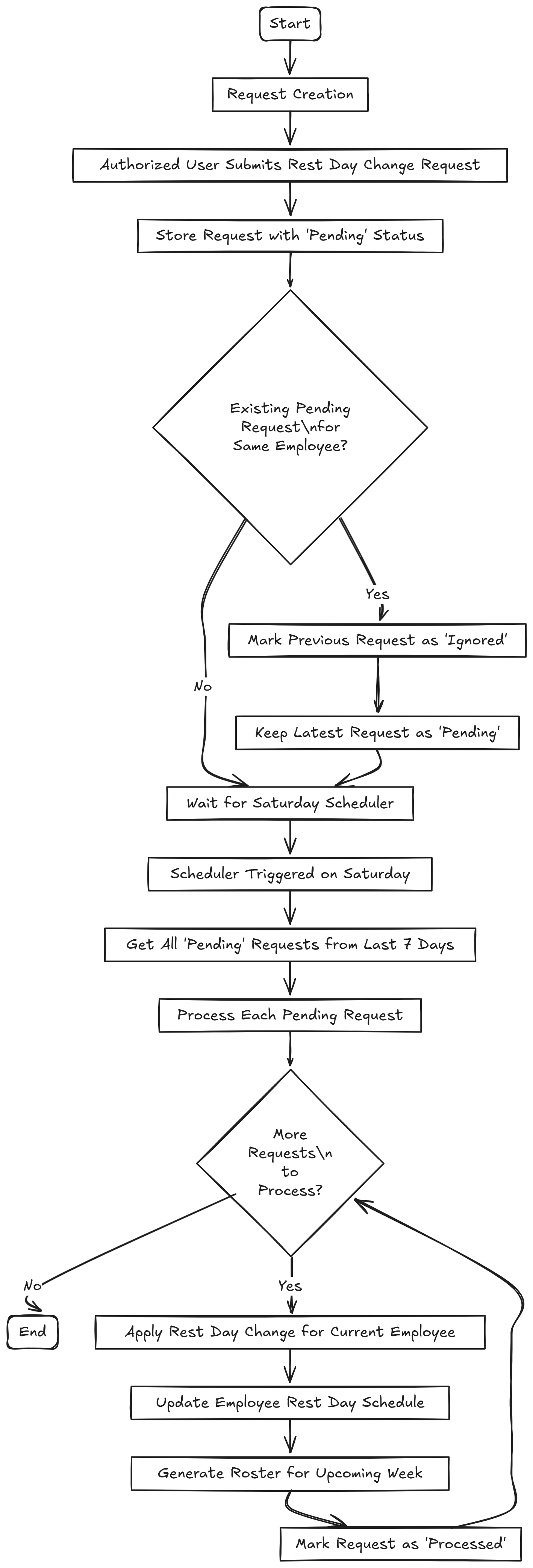
The Employee Rest Day Change process follows a controlled and scheduled workflow to ensure consistency and avoid real-time conflicts.Workflow: Employee Rest Day Change Process
1. Request Creation
- Authorized user (e.g., manager) submits a Rest Day Change Request via the UI.
- Request is stored in the system with status:
Pending.
2. Handling Duplicate Requests
- If a new request is submitted for the same employee while an earlier one is still
Pending:- The previous Pending request is marked as
Ignored. - The latest request remains
Pendingand will be considered for processing.
- The previous Pending request is marked as
3. Scheduler Execution (Every Saturday)
- A scheduled job runs every Saturday just before creating the roster of the next week.
- It picks up all
Pendingrequests submitted in the last 7 days (from last Saturday to current Friday). - For each employee:
- Applies the latest available request.
- Updates the employee’s rest day schedule.
- Automatically generates the roster for the upcoming week using the updated rest days.
- After successful processing, request status is updated to:
Processed.
-
Flowchart
Development Tasks & Estimates
| No | Task Name | Estimate (Hours) | Dependencies | Notes |
|---|---|---|---|---|
| 1 | Feature planning | 2 | None | Initial requirement discussion |
| 2 | Feature documentation | 3 | Task 1 | Prepare SRS and design doc |
| 3 | Rest Day Change Request API | 4 | Task 2 | POST endpoint implementation |
| 4 | Testing the above API | 1 | Task 3 | Unit and basic integration |
| 5 | Get Rest Day Change Request API | 4 | Task 2 | GET endpoint with filters |
| 6 | Testing Get Rest Day Change Request API | 1.5 | Task 5 | Covers pagination, filtering |
| 7 | Implement Scheduler to update rest day accordingly | 6 | Task 3, Task 5 | Apply on Saturday starting |
| 8 | Integration Testing | 2.5 | Task 3, Task 5, Task 7 | Full flow simulation |
| Total | 24 |
Testing & Quality Assurance
(Outline the testing strategy and quality assurance measures for the feature.)
-
Unit Tests:
(List the unit tests that will be written for this feature.) -
Integration Tests:
(Describe how integration testing will be conducted.) -
Acceptance Criteria:
(Define the criteria that must be met for the feature to be considered complete.) -
Testing Tools:
(List any tools that will be used for testing.)
Deployment Considerations
(Describe any deployment considerations, including environment configurations, feature toggles, or migration steps.)
-
Configuration Changes:
(Detail any configuration changes required for this feature.) -
Rollout Plan:
(Outline the plan for rolling out the feature, including any phased releases.)
Warnings
- The weekly roster is created every Saturday.
Ensure that all rest day updates are processed before the roster generation step,
so that the newly updated rest days are correctly reflected in the upcoming week’s roster.
Risks & Mitigations
(Identify potential risks and the strategies to mitigate them.)
| Risk | Impact | Likelihood | Mitigation Strategy |
|---|---|---|---|
| ... | ... | ... | ... |
Review & Approval
(Include a section for review and approval by stakeholders.)
-
Reviewer:
(Name and role of the person reviewing the document.) -
Approval Date:
(Date when the feature is approved for development.)
Notes
(Add any additional notes or considerations related to the feature development here.)