[Feature Name]
Author(s)
- Dipak Mourya
- Arpita Dey
Last Updated Date
[2025-05-15]
SRS References
- 2.1.2
- 2.1.3
Version History
| Version | Date | Changes | Author |
|---|---|---|---|
| 1.0 | YYYY-MM-DD | Initial draft | Developer Name |
| ... | ... | ... | ... |
Feature Overview
Objective:
The purpose of this feature is to allow employees to request manual attendance in cases where they forget to punch in via the MNRS app. This ensures accurate attendance records while enforcing restrictions to prevent misuse.
-
Shift Validation
- Find the employee’s shift ID.
- If no shift is found, return:
Error: “Shift not assigned. Please contact HR.”
-
Attendance Duplication Check
- Check if an attendance entry exists for the current date.
- If it does, return:
Error: “Attendance already recorded for today.”
-
Valid Date Range
- Only dates within the current month and equal to today are valid for manual attendance requests.
-
Unclosed Attendance Correction
- From the 1st of the current month to yesterday:
- If a check-in exists without a checkout, perform a forced checkout.
- Log this action in the Work Log with necessary details (time, note, etc.).
- From the 1st of the current month to yesterday:
-
Manual Request Limit
- Check the number of manual attendance entries submitted by the employee in the current month.
- If the count is 2 or more, return:
Error: “Manual attendance limit reached for this month.”
Scope:
- Current date attendance entries.
- Employees with valid shift assignments.
- Maximum of two manual attendance requests per employee per calendar month.
Manual attendance requests are subject to validation based on shift assignment, existing attendance records, and previous manual entries.
Dependencies:
- Employee Shift Management module
- Attendance Management system
- Work Log and Reporting module
- Time & Location validation services
Requirements
-
The system must retrieve the shift ID associated with the employee.
-
The system must validate whether attendance already exists for the current day.
-
The system must check for unclosed attendance entries (i.e., missing checkouts) and automatically close them with a forced checkout.
-
The system must count existing manual attendance requests within the current month.
-
The system must prevent manual attendance if the limit (2 per month) is exceeded.
-
Manual attendance can only be submitted for the current date.
-
All manual requests should be logged with timestamp, location (if provided), and reason/note.
Design Specifications
(Provide detailed design specifications, including UI/UX designs, API interfaces, and any other relevant architectural details.)
-
UI/UX Design:
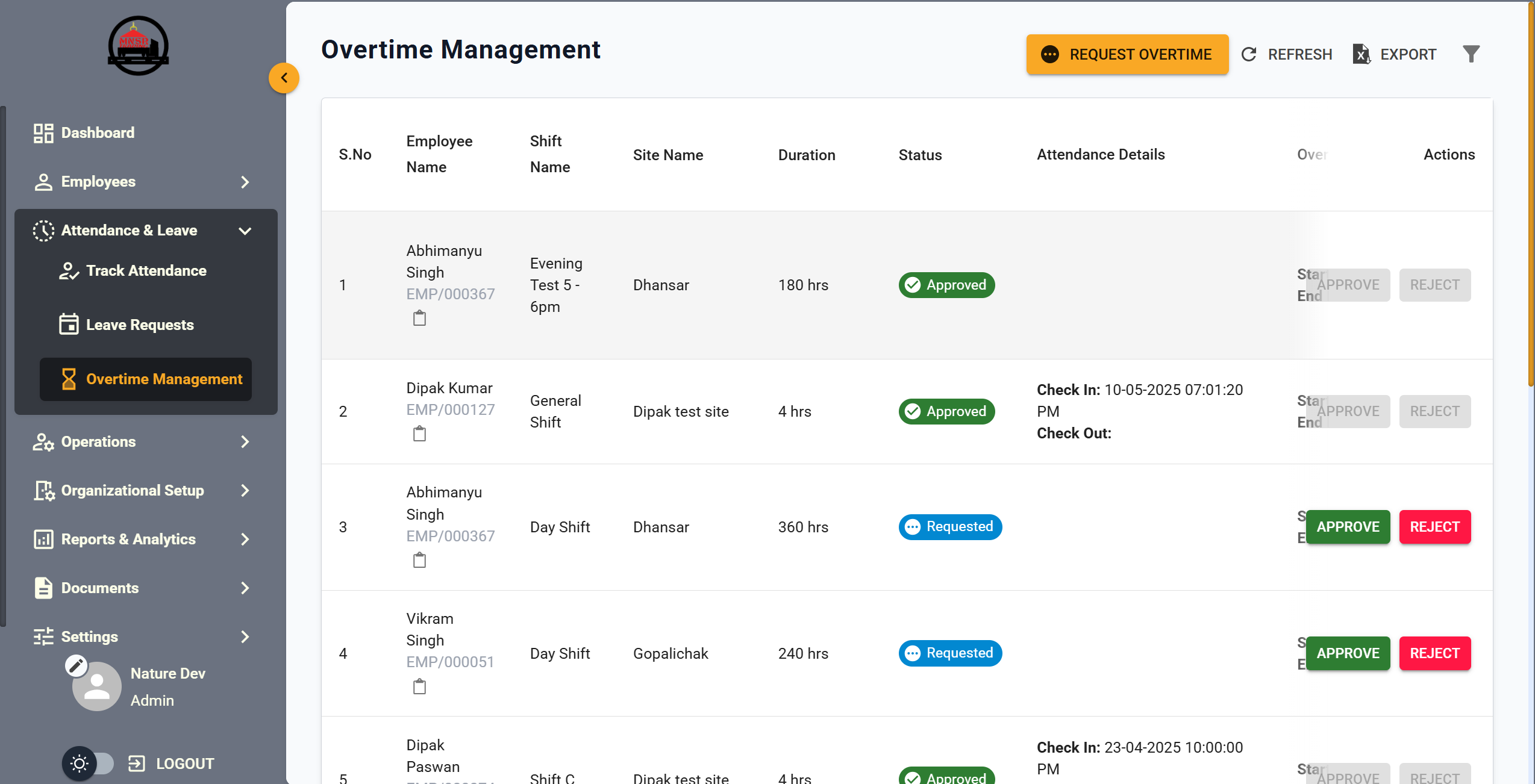
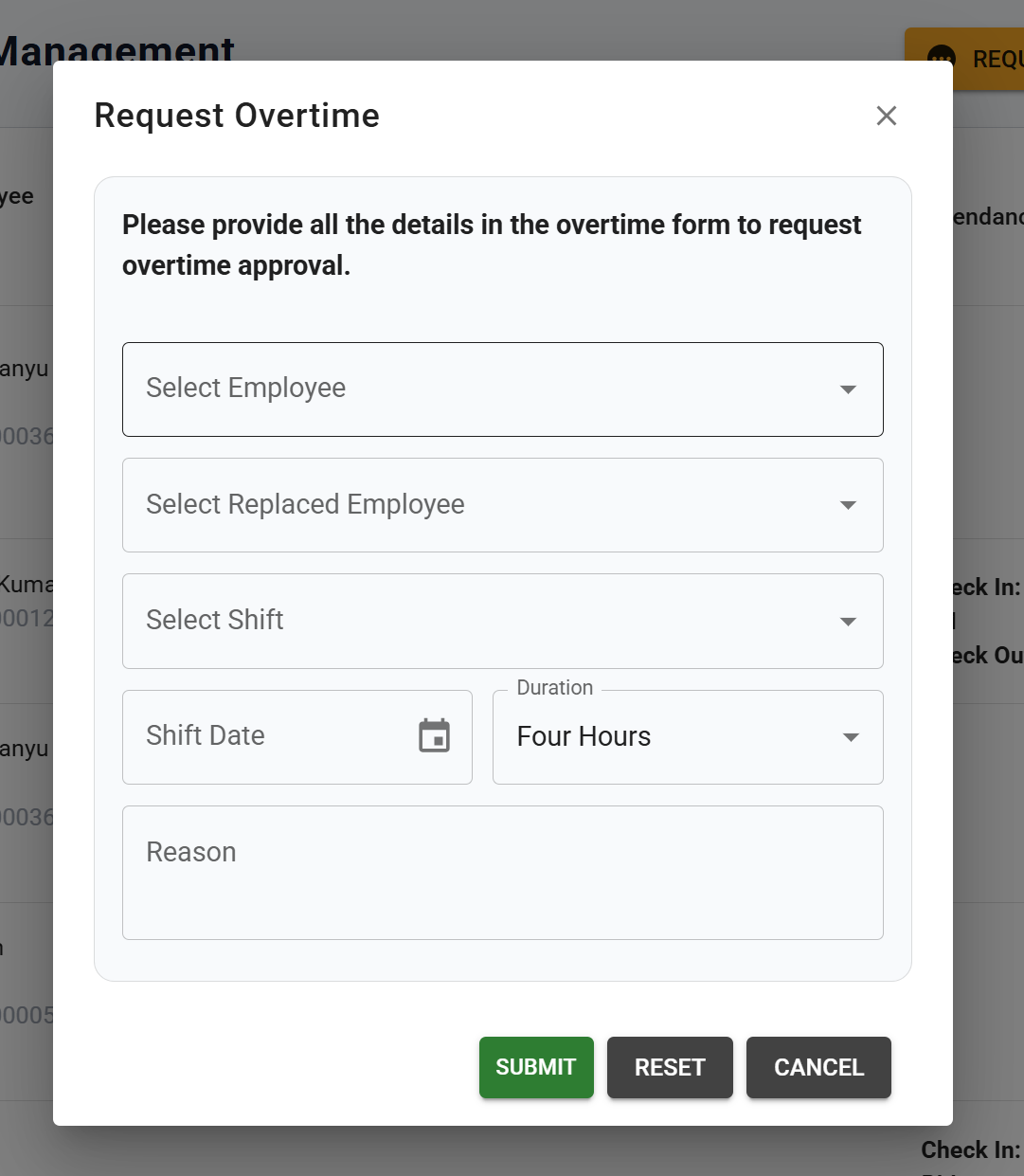
- A screen will be designed similar to the shared snapshot, where users can approve or reject manual attendance requests by clicking on them.
Additionally, users will be able to add a new manual attendance request by selecting the employee and their shift.
- A screen will be designed similar to the shared snapshot, where users can approve or reject manual attendance requests by clicking on them.
-
Data Models:
(Detail the data structures, including database schemas or objects.)public record User
{
public int Id { get; init; }
public string FirstName { get; init; }
public string LastName { get; init; }
public string Email { get; init; }
public DateTime DateOfBirth { get; init; }
} -
API Interfaces:
(Define the APIs required for this feature, including endpoints, methods, request/response formats.)Endpoint Method Parameters Response Response Status Codes /api/v1/usersGETpage(optional, integer): Page numberList of User200,204,500/api/v1/users/{id}GETid(required, integer): User IDUser200,204,500/api/v1/usersPOSTusers(required, list of User)String(Message)201,204,500/api/v1/users/{id}PUTid(required, integer): User IDname(optional, string): User's nameemail(optional, string): User's emailString(Message)200,204,500/api/v1/users/{id}DELETEid(required, integer): User IDString(Message)200,204,500 -
Third-Party Integrations:
(List any third-party services or tools that need to be integrated.) -
Workflow:
(Describe the end-to-end workflow of the feature, detailing how different components interact, including the sequence of events, data flow, and the user journey.)
Development Tasks & Estimates
(Break down the development process into smaller tasks and provide time estimates for each.)
| No | Task Name | Estimate (Hours) | Dependencies | Notes |
|---|---|---|---|---|
| 1 | Set up a page and routing for Manual attendance feature | 1 hours | ||
| 2 | Integrate get call for attendance history and table design | 2 hours | Backend API | |
| 3 | Create a request dialog and add proper validation as per the discussion and mentioned in document | 2.5 hours | ||
| 4 | Integrate request manual attendance api | 1.5 hours | Backend API | |
| 5 | create a UI design or modal for both request and approve feature for manual attendance | 1.5 hours | ||
| 6 | Integrate API for both request and approve feature for manual attendance | 2 hours | Backend API | |
| 7 | Total | 10.5 hours |
Testing & Quality Assurance
(Outline the testing strategy and quality assurance measures for the feature.)
-
Unit Tests:
(List the unit tests that will be written for this feature.) -
Integration Tests:
(Describe how integration testing will be conducted.) -
Acceptance Criteria:
(Define the criteria that must be met for the feature to be considered complete.) -
Testing Tools:
(List any tools that will be used for testing.)
Deployment Considerations
Risks & Mitigations
Review & Approval
(Include a section for review and approval by stakeholders.)
-
Reviewer:
Ramit Ray -
Approval Date:
(Date when the feature is approved for development.)
Notes
(Add any additional notes or considerations related to the feature development here.)