Employee Roster Management
Authors
- Arpita Dey
- Sanket Mal
Last Updated Date
2025-02-20
SRS References
Version History
| Version | Date | Changes | Author |
|---|---|---|---|
| 1.0 | 2025-02-20 | Initial draft | Arpita Dey, Sanket Mal |
Feature Overview
Objective:
The goal of this feature is to implement a comprehensive system for managing employee rest days and shift schedules. The system will allow to :
- Set and manage employee rest days.
- View and track employee schedules.
- Make rosters.
- Export shift rosters in Excel format.
Scope:
The scope of this feature includes:
Rest Day Management:Adding, updating, and storing employee rest day details.Employee Schedule Management or Roster:Viewing and managing employee schedules with rest day considerations.Shift Roster Management:Viewing shift roster details for employees.Excel Export Functionality:Generating and exporting shift rosters in Excel format. This feature is focused solely on employee scheduling and does not include payroll processing or leave management.
Dependencies:
Requirements
- Rest Day Management :
-
Save Rest Days:Allow administrators to assign rest days for individual employees or groups of employees.
-
Update and Modify Rest Days:Enable updating or modifying rest days as needed.
-
View Rest day:Here will be a page for viewing working days and rest days of all the employees in paginated view.
-
- Employee Schedule Management (Roster):
-
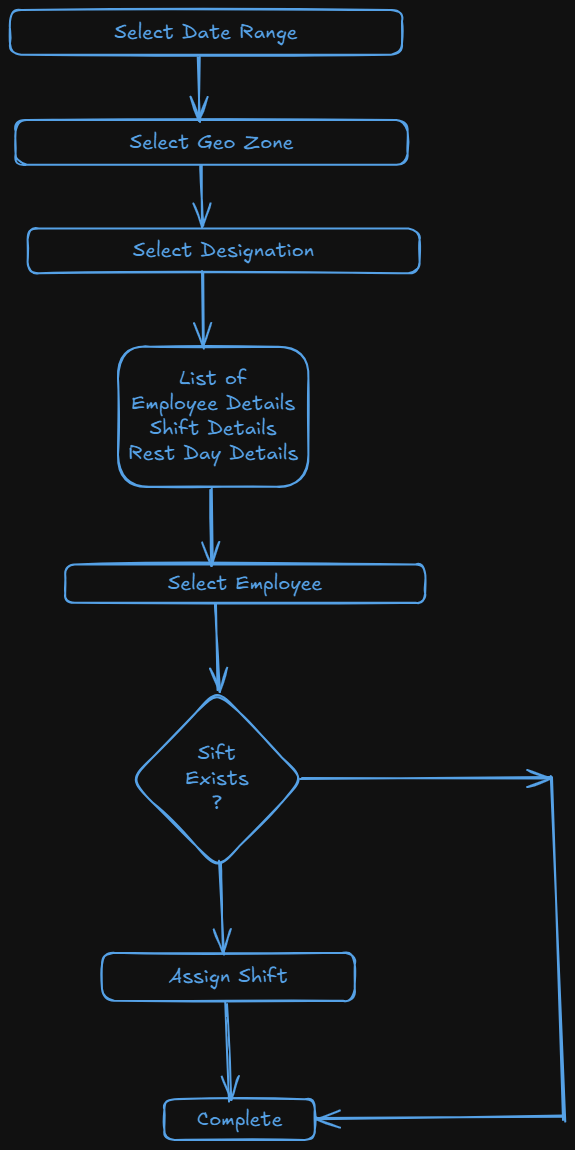
Manage Employee Schedules:- Allow administrators to create and adjust employee schedules, taking rest days into account for the upcoming week.
- Rosters should always be created for a 1-week period, ensuring consistency and ease of management.
- Prevent the creation of rosters for past dates; schedules can only be set for future weeks.
- Roster also can be edit.
-
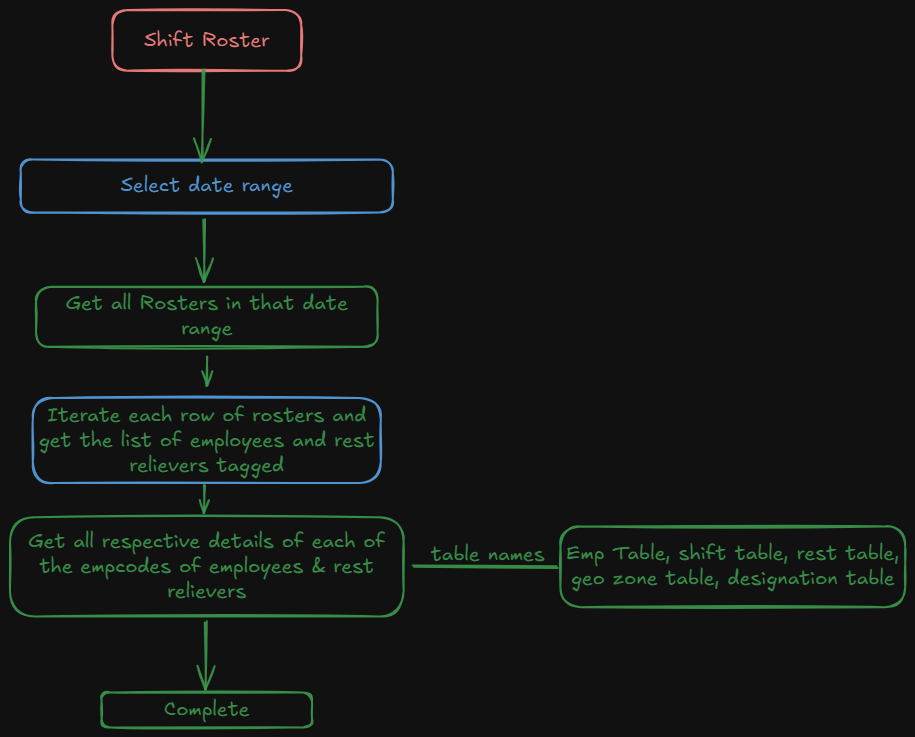
View Employee Schedules:- User can view all rosters for selecting a week interval.
- Also have export feature to export roster for a week.
-
Design Specifications
(Provide detailed design specifications, including UI/UX designs, API interfaces, and any other relevant architectural details.)
-
UI/UX Design:
(Include wireframes, mockups, or links to design files.) -
Data Models:
(Detail the data structures, including database schemas or objects.)CREATE TABLE tblRestDay
(
EmployeeCode TEXT Primary Key NOT NULL,
Monday Boolean,
Tuesday Boolean,
Wednesday Boolean,
Thursday Boolean,
Friday Boolean,
Saturday Boolean,
Sunday Boolean,
LogUser TEXT,
LogDTS TIMESTAMP WITH TIME ZONE DEFAULT CURRENT_TIMESTAMP
);
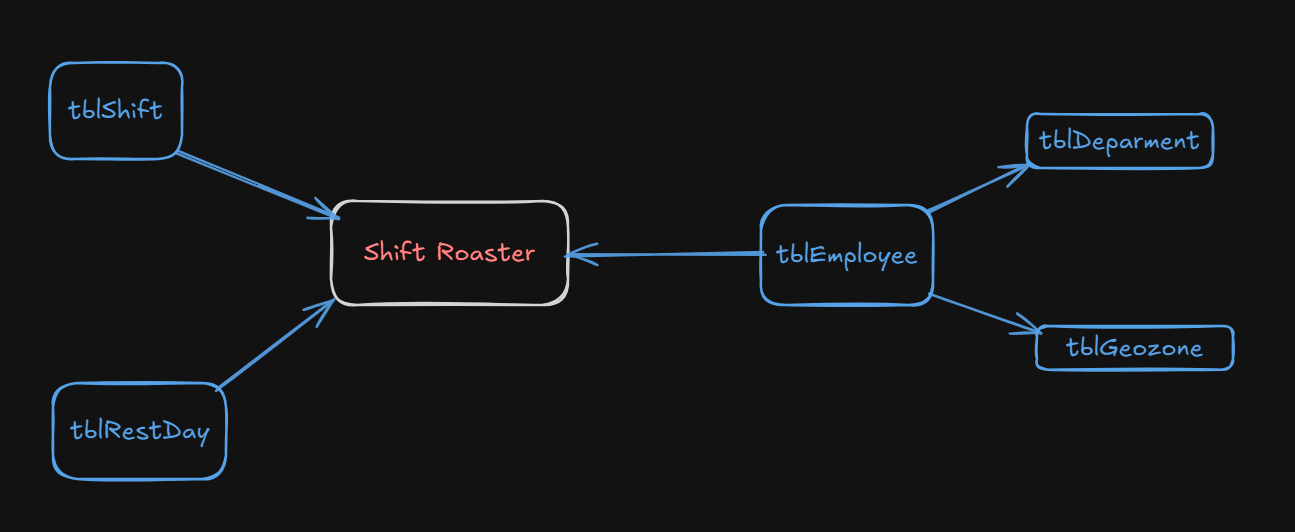
CREATE TABLE tblRoster
(
RosterId UUID PRIMARY KEY,
RosterName TEXT,
GeoZoneId UUID,
DesignationId UUID,
ListOfEmployees TEXT[] NOT NULL,
RosterStartDate TIMESTAMP WITH TIME ZONE NOT NULL,
RosterEndDate TIMESTAMP WITH TIME ZONE NOT NULL,
EmployeesRestDayDetails JSONB,
LogUser TEXT,
LogDTS TIMESTAMP WITH TIME ZONE DEFAULT CURRENT_TIMESTAMP
);
ALTER TABLE tblEmployeeShift
ADD COLUMN Remarks Text;
ALTER TABLE public.tblemployeeshift
ADD COLUMN rosterId uuid NOT NULL DEFAULT '00000000-0000-0000-0000-000000000000';
public record EmployeeRestDay
{
public required string EmployeeCode { get; init; }
public required List<Day> RestDays { get; init; }
public string? Remarks { get; init; }
}
public record EmployeeRestDayDetail : EmployeeRestDay
{
public string? EmployeeName { get; init; }
public string? ContactNumber {get; init;}
public string? Department { get; init; }
public string? Designation { get; init; }
public string? GeoZoneName {get; init;}
}
public record RestDayFilter
{
public string? EmployeeCode { get; init; }
public string? EmployeeName { get; init; }
public List<Day>? RestDay {get; init;}
public List<Day>? WorkingDay {get; init;}
public string? Department { get; init; }
public string? Designation {get; init;}
public string? GeoZoneName {get; init;}
public int RowsPerPage { get; set; }
public int PageNumber { get; set; }
}
public record ShiftRoster : EmployeeRestDay
{
public required Guid ShiftId { get; init; }
public required string ShiftName { get; init; }
}
public record ShiftRosterDetails : ShiftRoster
{
public string? EmployeeName { get; init; }
public string? ContactNumber { get; init; }
}
public record Roster
{
public Guid? RosterId { get; init; }
public string? RosterName { get; init; }
public required Guid DesignationId { get; init; }
public required Guid GeoZoneId { get; init; }
public List<ShiftRoster>? ShiftRosters { get; init; }
public required DateTime RosterStartDate { get; set; }
public DateTime? RosterEndDate { get; set; }
}
public record RosterDetails
{
public Guid? RosterId { get; init; }
public string? RosterName {get; init;}
public Guid? DesignationId { get; init; }
public Guid? GeoZoneId { get; init; }
public string? DesignationName {get; init;}
public string? GeoZoneName { get; init; }
public List<ShiftRosterDetails>? ShiftRosters { get; init; }
}
public record RosterFilter
{
public required DateTime RosterStartDate { get; set; }
public DateTime? RosterEndDate { get; set; }
public string? GeoZoneName { get; init; }
public string? Designation { get; init; }
public bool? IsExcel { get; init; } = false;
}
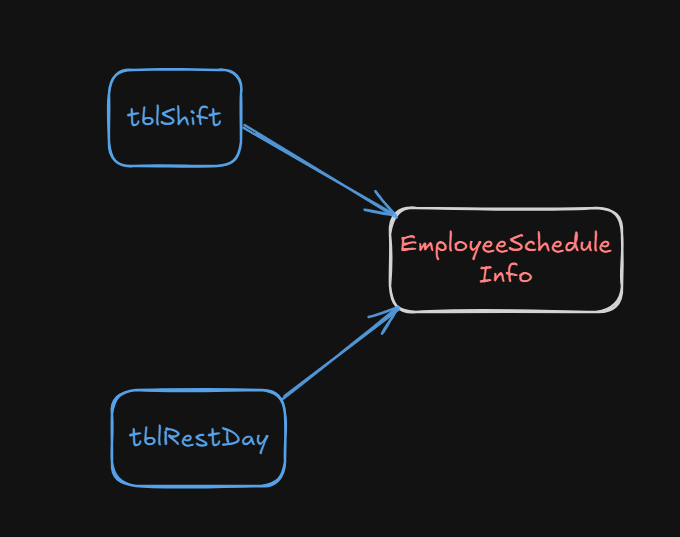
public record EmployeeScheduleInfo
{
public string? EmployeeCode { get; init; }
public string? EmployeeName { get; init; }
public string? Designation {get; init;}
public string? GeoZone {get; init;}
public Guid? ShiftId { get; init; }
public string? ShiftName { get; init; }
public List<Day>? RestDays { get; init; }
}
public record EmployeeScheduleFilter
{
public string? EmployeeCode { get; init; }
public string? EmployeeName { get; init; }
public string? Designation {get; init;}
public string? GeoZone {get; init;}
public required DateTime RosterStartDate {get; init;}
public DateTime? RosterEndDate {get; init;} = RosterStartDate.AddDays(6);
}
public enum Day
{
Monday = 0,
Tuesday = 1,
Wednesday = 2,
Thursday = 3,
Friday = 4,
Saturday = 5,
Sunday = 6
}
public class ServerPaginatedData<T>
{
public List<T>? Data { get; set; }
public long TotalNumber { get; set; }
} -
API Interfaces:
(Define the APIs required for this feature, including endpoints, methods, request/response formats.)Endpoint Method Parameters Response Response Status Codes Purpose /rest-day/viewGETRestDayFilterServerPaginatedData<EmployeeRestDayDetail>200,204,400,401,403,404,500Fetch a paginated list of employee rest days based on filters./rest-day/savePOSTList<EmployeeRestDay>Message200,400,401,403,404,500Save rest days for multiple employees at once./schedule-detailsGETEmployeeScheduleFilterList<EmployeeScheduleInfo>200,204,400,401,403,404,500Fetch all employees minimal info with their rest days in a list based on filter/rosterGETRosterFilterList<RosterDetails>200,204,400,401,403,404,500See all the roster in this time interval and also have export feature./rosterPOSTList<Roster>Message200,204,400,401,403,404,500Create or update rosters -
Third-Party Integrations:
(List any third-party services or tools that need to be integrated.) -
Workflow:
Development Tasks & Estimates
(Break down the development process into smaller tasks and provide time estimates for each.)
| No | Task Name | Estimate (Hours) | Dependencies | Notes |
|---|---|---|---|---|
| 1 | Define Workflow | 4 hours | ||
| 2 | Add new shift Rest Reliever in tblShift table : Start Time : 00:30:00 , End Time : 00:30:00 & Create new table tblRestDay | 1 hours | ||
| 3 | Add Rest Day column having one or multiple comma(,) separated rest days in employee excel format | 2 hours | ||
| 4 | While uploading employee excel, rest day details should be stored in tblRestDay table | 2.5 hours | ||
| 5 | Implement an API to view employee with their rest day in paginated view | 4 hours | ||
| 6 | Test the API to view employee with their rest day in paginated view | 1 hours | ||
| 7 | Implement an API to set rest day details of multiple employee | 3 hours | ||
| 8 | Test the API to set rest day details of multiple employee | 1 hours | ||
| 9 | Implement API to fetch employee schedule details based on filter | 4 hours | ||
| 10 | test the API to fetch employee schedule details based on filter | 1 hours | ||
| 11 | Implement API to fetch all roster in a time interval of one week with having excel export feature | 6 hours | ||
| 12 | Test API to fetch all roster in a time interval of one week with having excel export feature | 1.5 hours | ||
| 13 | Implement an API to save multiple roster one at a time details | 8 hours | ||
| 14 | Test the API to save multiple roster one at a time details | 1 hours | ||
| Total | 40 hours |
Testing & Quality Assurance
(Outline the testing strategy and quality assurance measures for the feature.)
-
Unit Tests:
(List the unit tests that will be written for this feature.) -
Integration Tests:
(Describe how integration testing will be conducted.) -
Acceptance Criteria:
(Define the criteria that must be met for the feature to be considered complete.) -
Testing Tools:
(List any tools that will be used for testing.)
Deployment Considerations
(Describe any deployment considerations, including environment configurations, feature toggles, or migration steps.)
-
Configuration Changes:
(Detail any configuration changes required for this feature.) -
Rollout Plan:
(Outline the plan for rolling out the feature, including any phased releases.)
Risks & Mitigations
(Identify potential risks and the strategies to mitigate them.)
| ... | ... | ... |
Review & Approval
(Include a section for review and approval by stakeholders.)
-
Reviewer:
(Name and role of the person reviewing the document.) -
Approval Date:
(Date when the feature is approved for development.)
Notes
(Add any additional notes or considerations related to the feature development here.)