[Request & Approve Overtime]
Author(s)
- Arpita Dey
- Dipak Mourya
Last Updated Date
[2025-03-11]
SRS References
- 2.1.2
Version History
| Version | Date | Changes | Author |
|---|---|---|---|
| 1.0 | YYYY-MM-DD | Initial draft | Arpita Dey , Dipak Mourya |
| ... | ... | ... | ... |
Feature Overview
Objective:
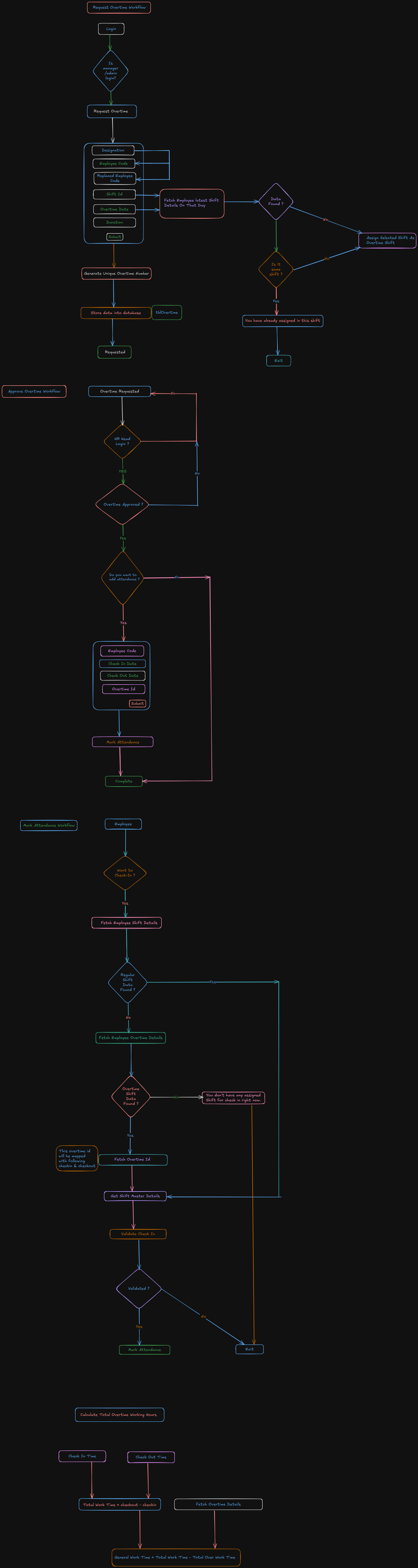
This workflow defines the process for managing overtime requests, approvals, and attendance tracking within MNSR. It begins with a manager or admin submitting an overtime request for an employee, followed by multiple validation and approval steps by the HR Head before the overtime is recorded and reported. During the approval process, HR also has the option to mark attendance with remarks.
Scope:
(Outline the scope of the feature, including any limitations or boundaries.)
Dependencies:
(List any external dependencies, libraries, or other features that this feature depends on.)
Requirements
(List all the functional and non-functional requirements that the feature must meet.)
- User Roles & Access Control : Manager/Admin: Can submit overtime requests for employees. HR Head: Reviews, approves, or rejects overtime requests. Employee: Can check their overtime status.
- Overtime Request Submission : Managers/Admins must be able to request overtime for employees. The request should include: Employee Code Request Date Expected Overtime Hours Reason for Overtime
- Employee Shift Validation : The system should verify if the employee is already assigned to the selected shift or not. If the employee is not in that shift, the overtime request should be accepted. If the employee is already in that shift, the overtime request should be rejected.
- Overtime Approval Process : Overtime requests should be sent to the HR Head for approval. HR Head can approve or reject the request. HR should be able to mark attendance with remarks during approval.
- Attendance & Shift Verification : The system should check if the employee has a scheduled shift. If there is not scheduled shift, it will look into overtime shift.
- Overtime Calculation : The system should capture In Time and Out Time. Break times should be deducted. Total overtime hours should be calculated accurately. Overtime hour should not exceed the max limit of approved overtime.
Design Specifications
(Provide detailed design specifications, including UI/UX designs, API interfaces, and any other relevant architectural details.)
-
UI/UX Design:
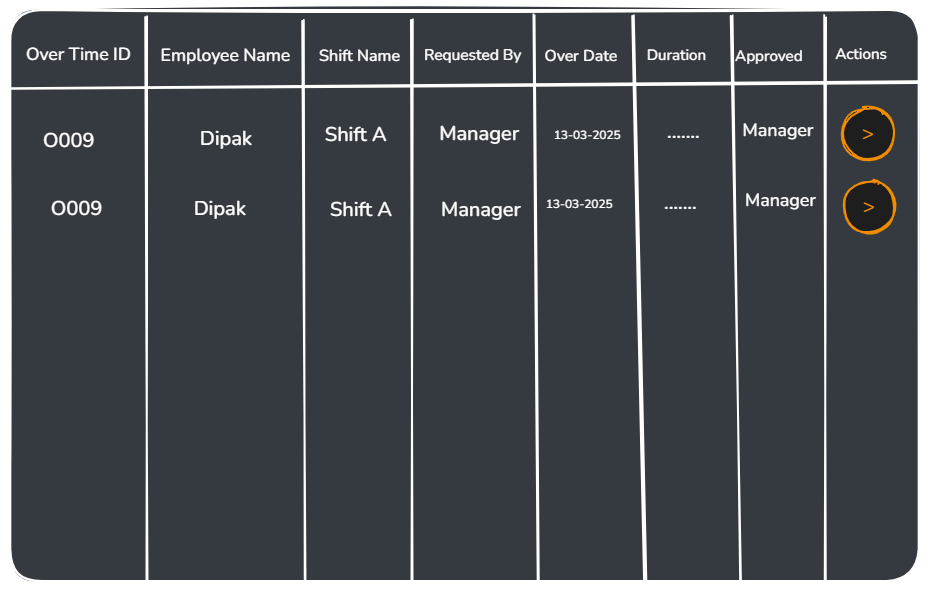
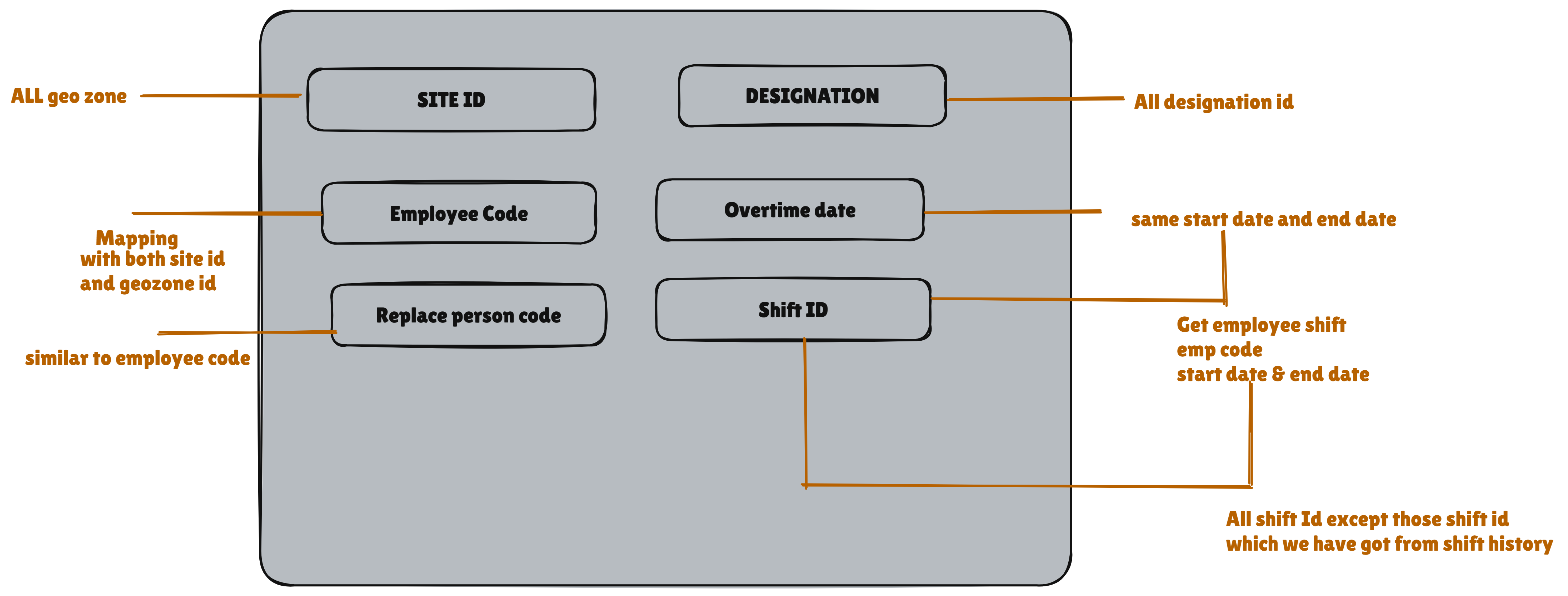
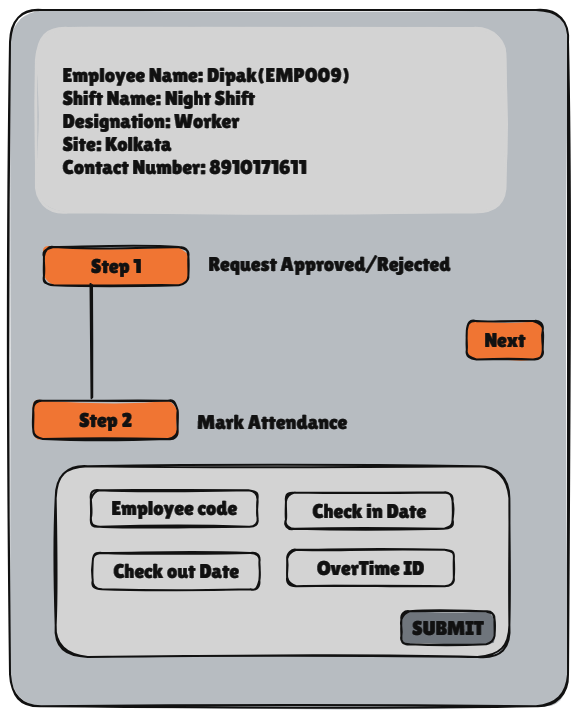
-
Data Models:
(Detail the data structures, including database schemas or objects.)CREATE TABLE IF NOT EXISTS public.tblovertime
(
id uuid NOT NULL DEFAULT gen_random_uuid(),
employeecode text COLLATE pg_catalog."default" NOT NULL,
replacedemployeecode text COLLATE pg_catalog."default",
shiftid uuid NOT NULL,
overtimestartdate timestamp with time zone NOT NULL,
overtimeenddate timestamp with time zone NOT NULL,
duration numeric NOT NULL,
reason text COLLATE pg_catalog."default",
requestedby text COLLATE pg_catalog."default",
requestedon timestamp with time zone DEFAULT CURRENT_TIMESTAMP,
remarks text COLLATE pg_catalog."default",
approvedby text COLLATE pg_catalog."default",
approvedon timestamp with time zone DEFAULT CURRENT_TIMESTAMP,
loguser text COLLATE pg_catalog."default",
logdts timestamp with time zone DEFAULT CURRENT_TIMESTAMP,
CONSTRAINT tblovertime_pkey PRIMARY KEY (id)
)
ALTER TABLE tblattendance ADD COLUMN OvertimeId UUID;
public record OverTime
{
public required string EmployeeCode { get; init; }
public string? ReplacedEmployeeCode { get; init; }
public required Guid ShiftId { get; init; }
public required DateTime OvertimeDate { get; init; }
public required Decimal Duration { get; init; }
public string? RequestedBy { get; set; }
public DateTime? RequestedOn { get; set; }
public string? LogUser { get; set; }
public DateTime? LogDTS { get; set; }
}
public record CheckInOutDetails
{
public DateTime? CheckIn { get; init; }
public DateTime? CheckOut { get; init; }
}
public record OverTimeDetails : OverTime
{
[JsonIgnore]
public int TotalNumber { get; init; }
public Guid? OvertimeId { get; init; }
public string? EmployeeName { get; init; }
public string? ShiftName { get; init; }
public string? ApprovedBy { get; set; }
public DateTime? ApprovedOn { get; set; }
public List<CheckInOutDetails>? AttendanceDetails { get; init; }
}
public record ApproveOvertime
{
public required Guid OvertimeId { get; init; }
public required string EmployeeCode { get; init; }
public required string Image { get; init; }
public List<CheckInOutDetails>? AttendanceDetails { get; init; }
}
public record OverTimeFilter
{
public string? EmployeeCode { get; init; }
public Guid? ShiftId { get; init; }
public DateTime? OverTimeDate { get; init; }
public Decimal? Duration { get; init; }
public bool? IsExcel { get; init; }
public int PageNumber { get; init; }
public int RowsPerPage { get; init; }
} -
API Interfaces:
(Define the APIs required for this feature, including endpoints, methods, request/response formats.)Endpoint Method Parameters Response Response Status Codes /overtimeGETOverTimeFilterList of OverTimeDetails200,204,500/overtime/requestPOSTOverTime200,204,500/overtime/approvePOSTApproveOvertime,IFormFile201,204,500 -
Third-Party Integrations:
(List any third-party services or tools that need to be integrated.) -
Workflow:
Development Tasks & Estimates
(Break down the development process into smaller tasks and provide time estimates for each.)
| No | Task Name | Estimate (Hours) | Dependencies | Notes |
|---|---|---|---|---|
| 1 | Planning & Define Workflow | 5 hours | ||
| 2 | Request Overtime | 3 hours | ||
| 3 | Approve Overtime | 5 hours | ||
| 4 | View Overtime | 3 hours | ||
| 5 | Calculate Overtime & Modify Minimal Employee Response | 2 hours | ||
| 5 | Integration Testing | 2 hours | ||
| 6 | Screen design for request overtime and api integration | 2.5 hours | ||
| 7 | Filter and excel create | 3 hours | ||
| 8 | Request over time dialog creation and api integration | 5 hours | ||
| 9 | Request approve and reject screen design | 2 hours | ||
| 10 | API integration for mark attendance and screen design | 3.5 hours | ||
| 11 | Full flow testing request overtime approved and reject steps | 2 hours | ||
| 12 | Total | 38 hours |
Testing & Quality Assurance
(Outline the testing strategy and quality assurance measures for the feature.)
-
Unit Tests:
(List the unit tests that will be written for this feature.) -
Integration Tests:
(Describe how integration testing will be conducted.) -
Acceptance Criteria:
(Define the criteria that must be met for the feature to be considered complete.) -
Testing Tools:
(List any tools that will be used for testing.)
Deployment Considerations
(Describe any deployment considerations, including environment configurations, feature toggles, or migration steps.)
-
Configuration Changes:
(Detail any configuration changes required for this feature.) -
Rollout Plan:
(Outline the plan for rolling out the feature, including any phased releases.)
Risks & Mitigations
(Identify potential risks and the strategies to mitigate them.)
| Risk | Impact | Likelihood | Mitigation Strategy |
|---|---|---|---|
| Risk 1 | High | Medium | Strategy for mitigating Risk 1 |
| Risk 2 | Medium | High | Strategy for mitigating Risk 2 |
| ... | ... | ... | ... |
Review & Approval
(Include a section for review and approval by stakeholders.)
-
Reviewer:
(Name and role of the person reviewing the document.) -
Approval Date:
(Date when the feature is approved for development.)
Notes
(Add any additional notes or considerations related to the feature development here.)