Excel Data Upload and Validation
Author(s)
- Arpita Dey
- Dipak Mourya
Last Updated Date
2025-02-13
SRS References
Version History
| Version | Date | Changes | Author |
|---|---|---|---|
| 1.0 | 2025-02-13 | Initial draft | Arpita Dey, Dipak Mourya |
Feature Overview
Objective:
This feature allows users to upload Excel files containing data for different categories such as Employee, Department, Designation, Geozone, and Shift. The objective is to validate the uploaded Excel file against the selected format type and perform cell-by-cell data validation before processing.
Scope:
- Validate Excel file structure against the selected format type.
- Perform data validation for mandatory fields and data integrity checks.
- Support for downloading the format template for each data type.
- Ensure seamless integration with the backend validation API.
- Provide user feedback for any validation errors.
Dependencies:
- Excel file parsing library (e.g., ClosedXML)
- Backend validation API
- Database for verifying Designation, Department, Geozone, and Shift existence
Requirements
- User must select an Excel data format type (Employee, Department, Designation, Geozone, Shift) before uploading.
- User can optionally download the format template for the selected type.
- If the format is known, the user can directly upload the Excel file.
- On clicking the submit button, the system should:
- Call the validation API to check if the Excel format matches the selected type.
- Validate data cell by cell if the format is correct.
- Display error messages for any format mismatches or data validation failures.
- Employee Data Validation:
- Employee code must not be empty.
- Contact number must not be empty and should be an unique 10-digit number.
- Employee name must not be empty.
- UANNumber must not be empty.
- DesignationName must exist in the system.
- DepartmentName must exist in the system.
- GeozoneName must exist in the system.
- Skill name must exist in the system.
- Category name must exist in the system.
- Highest Qualification name must exist in the system.
- Total experience should be in decimal format.
Design Specifications
-
UI/UX Design:
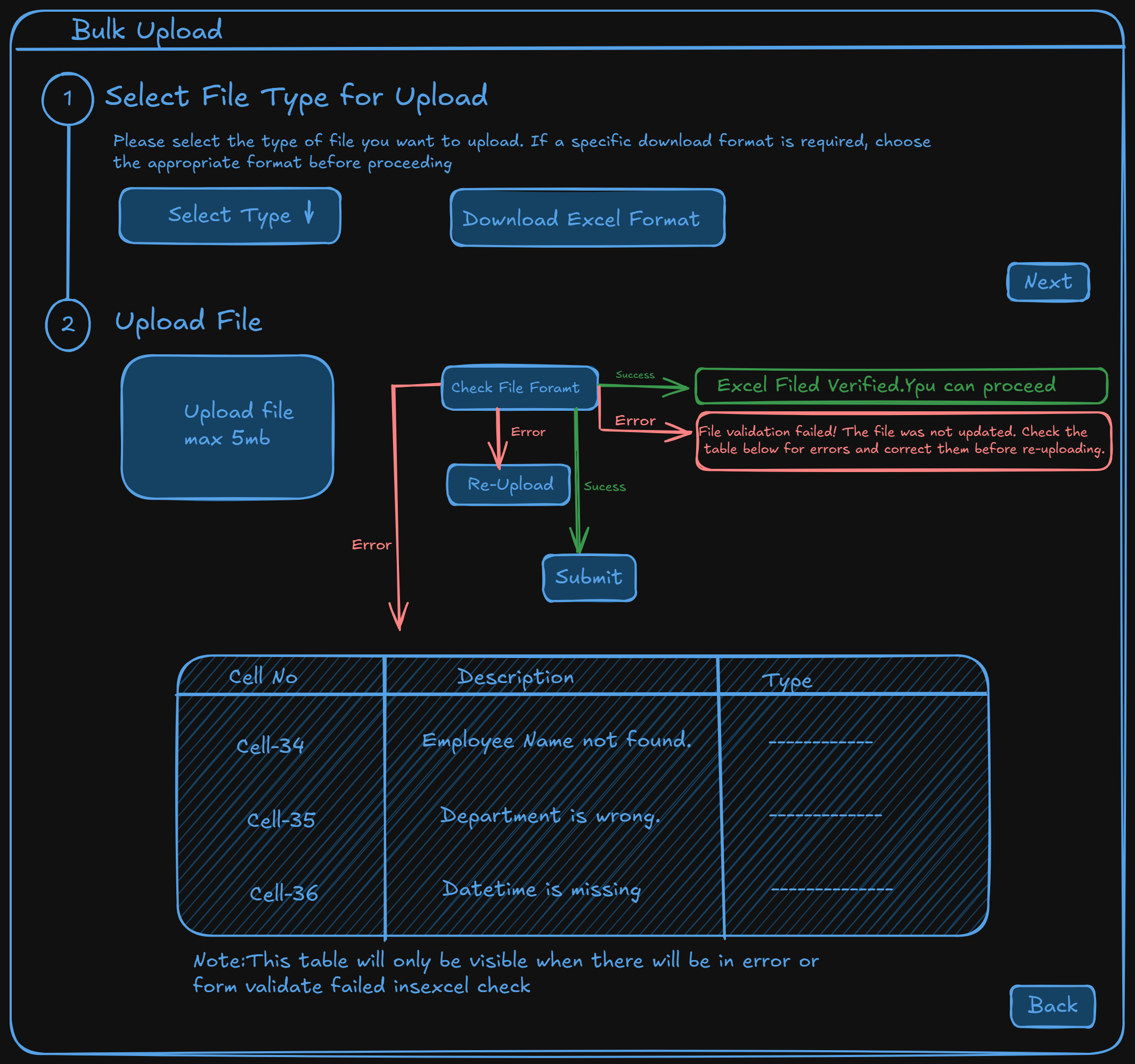
-
Data Models:
public record ImportEmployeeData
{
      public string? EmployeeCode { get; init; }
      public string? EmployeeName { get; init; }
      public string? DesignationName { get; init; }
      public string? DepartmentName { get; init; }
      public string? ShiftName { get; set; }
      public string? ContactNumber { get; init; }
      public string? DateOfJoining { get; init; }
      public string? Skill { get; init; }
      public string? Category { get; init; }
      public string? UANNumber { get; init; }
      public string? HighestQualification { get; init; }
      public string? GeoZoneName { get; init; }
      public string? EmailId { get; init; }
      public string? ReportingPersonCode { get; init; }
      public string? EmploymentCardNumber { get; init; }
      public string? DateOfBirth { get; init; }
      public string? NomineeName { get; init; }
      public string? NomineeRelation { get; init; }
      public string? TotalExperience { get; init; }
      public string? ParentName { get; init; }
      public string? EmergencyContactName { get; init; }
      public string? EmergencyContactNumber { get; init; }
      public string? Reference { get; init; }
      public string? Address { get; init; }
      public string? AppointedBy { get; init; }
}

public record ImportDepartmentData
{
      public string? DepartmentName { get; init; }
}

public record ImportDesignationData
{
      public string? DesignationName { get; init; }
      public string? DesignationDisplayName { get; init; }

}

public record ImportShiftData
{
      public string? ShiftName { get; init; }
      public string? ShiftStartTime { get; init; }
      public string? ShiftEndTime { get; init; }

}

public record ImportGeozoneData
{
      public string? GeoZoneName { get; init; }
      public string? Latitude { get; init; }
      public string? Longitude { get; init; }
      public string? Radius { get; init; }

}

public enum ExcelFormatType
{
      Employee,Department,Designation,Geozone,Shift
} -
API Interfaces:
Endpoint Method Parameters Response Response Status Codes /download/formatGETformatTypeExcel file 200,400,500/validate/excelPOSTstring formatType,FormFile excelFileList of string cellNumber,string message200,400,500/upload/excelPOSTFormFileStatus Code 200,400,500 -
Third-Party Integrations:
- ClosedXML for Excel file parsing.
-
Workflow:
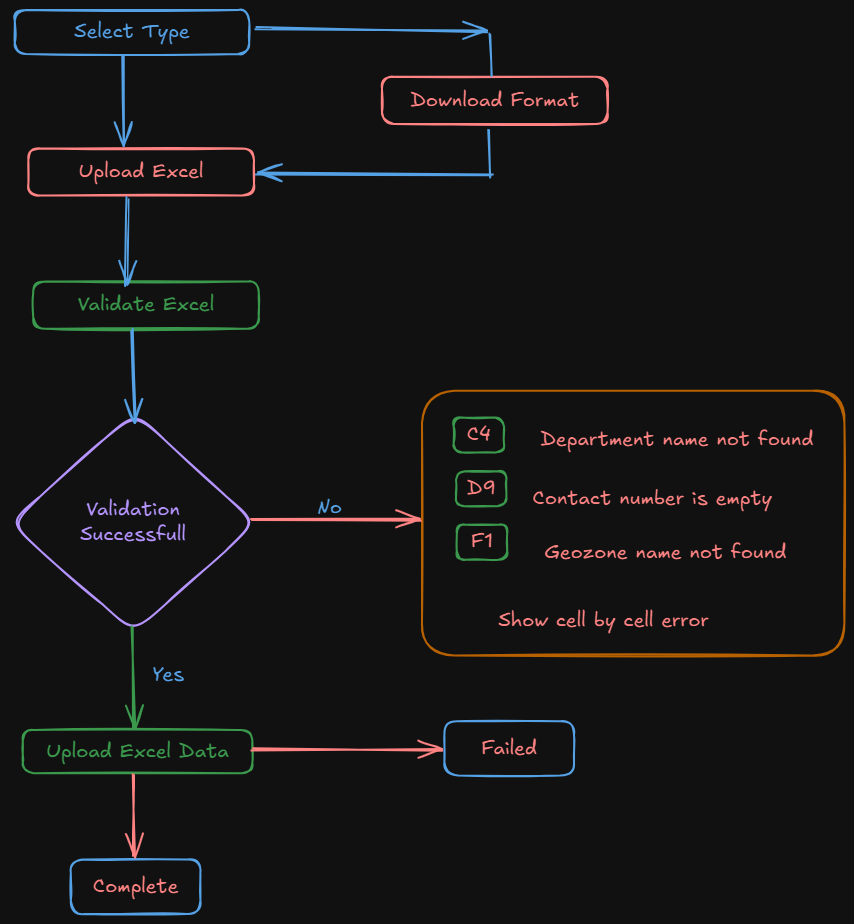
Development Tasks & Estimates
| No | Task Name | Estimate (Hours) | Dependencies | Notes |
|---|---|---|---|---|
| 1 | API to validate excel data Cell-by-cell | 5 | None | Backend API |
| 2 | API to import excel data | 4 | None | Backend API |
| 3 | Create a new page for Bulk-Upload | 1.5 | None | |
| 4 | Implement a Stepper Component in the modal and all the UI with excel mapping | 5 | None | |
| 5 | Integrate API for excel UploadFormat | 1 | On Backend API | |
| 6 | Create a Responsive Table for API Error Handling | 2 | On Backend API | |
| 7 | Implement API for Final Submission | 1 | On Backend API | |
| 8 | Final Testing | 1.5 | None | |
| 9 | Total | 21 |
Testing & Quality Assurance
-
Unit Tests:
- Test file format validation logic.
- Test individual cell validations (e.g., empty fields, incorrect data types).
-
Integration Tests:
- Test complete workflow from upload to validation.
-
Acceptance Criteria:
- Correct error messages are displayed for each validation failure.
- Only correctly formatted and valid data is accepted.
-
Testing Tools:
- xUnit for unit and integration testing.
Deployment Considerations
Risks & Mitigations
| Risk | Impact | Likelihood | Mitigation Strategy |
|---|
Review & Approval
-
Reviewer:
Ramit Ray, Ayon Das -
Approval Date:
2025-02-24