Chat window & Webconsole Tutorial.
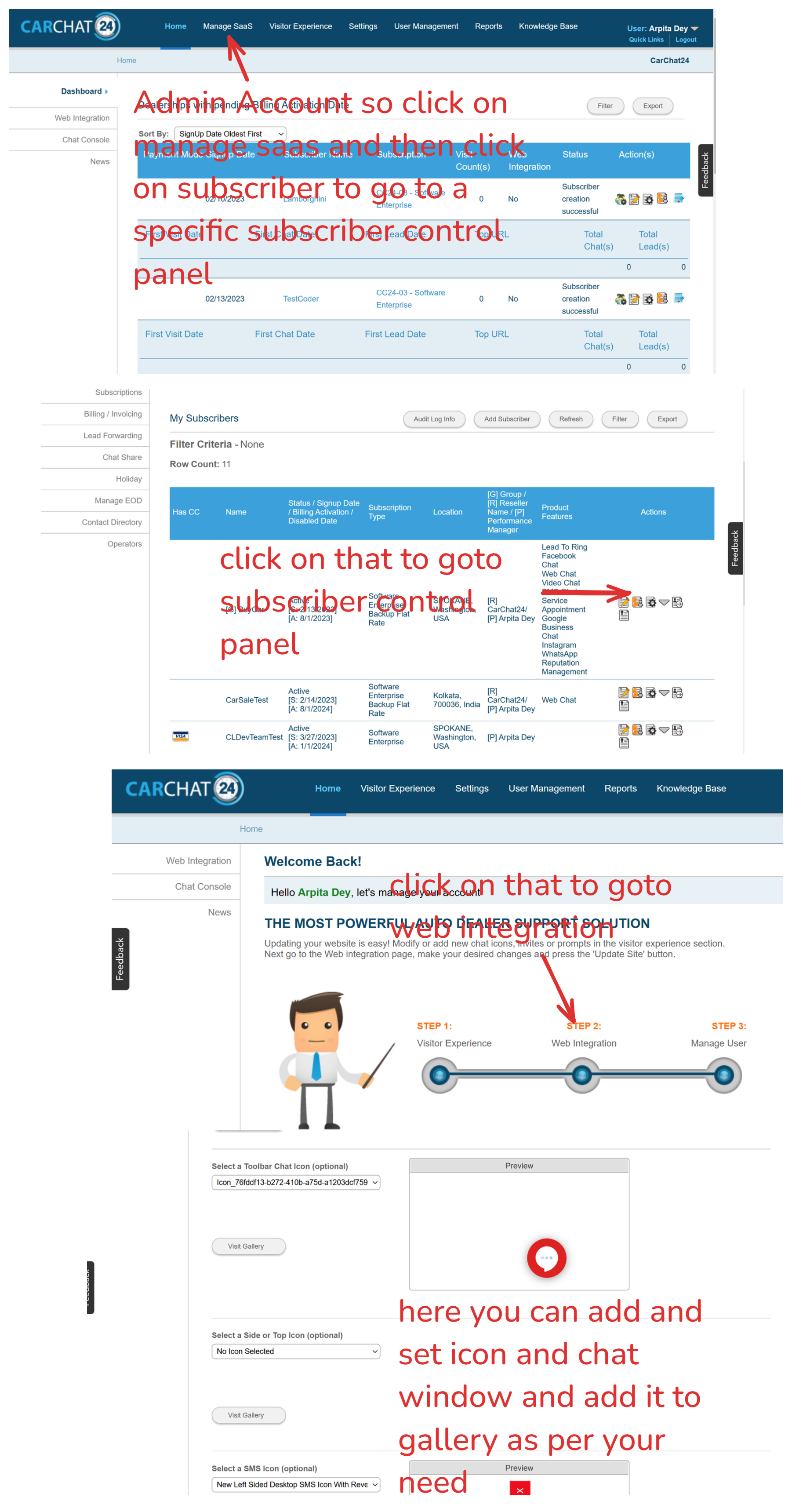
How to set chat icon ?
-
Goto old business-web in my case it's live carchat.
-
then click on web-integration(if you login from subscriber panel then its direct goto subscriber control panel where you can found web integration. other-wise need to goto subscriber control panel by clicking manage-saas to view web-integration.)
 .
. -
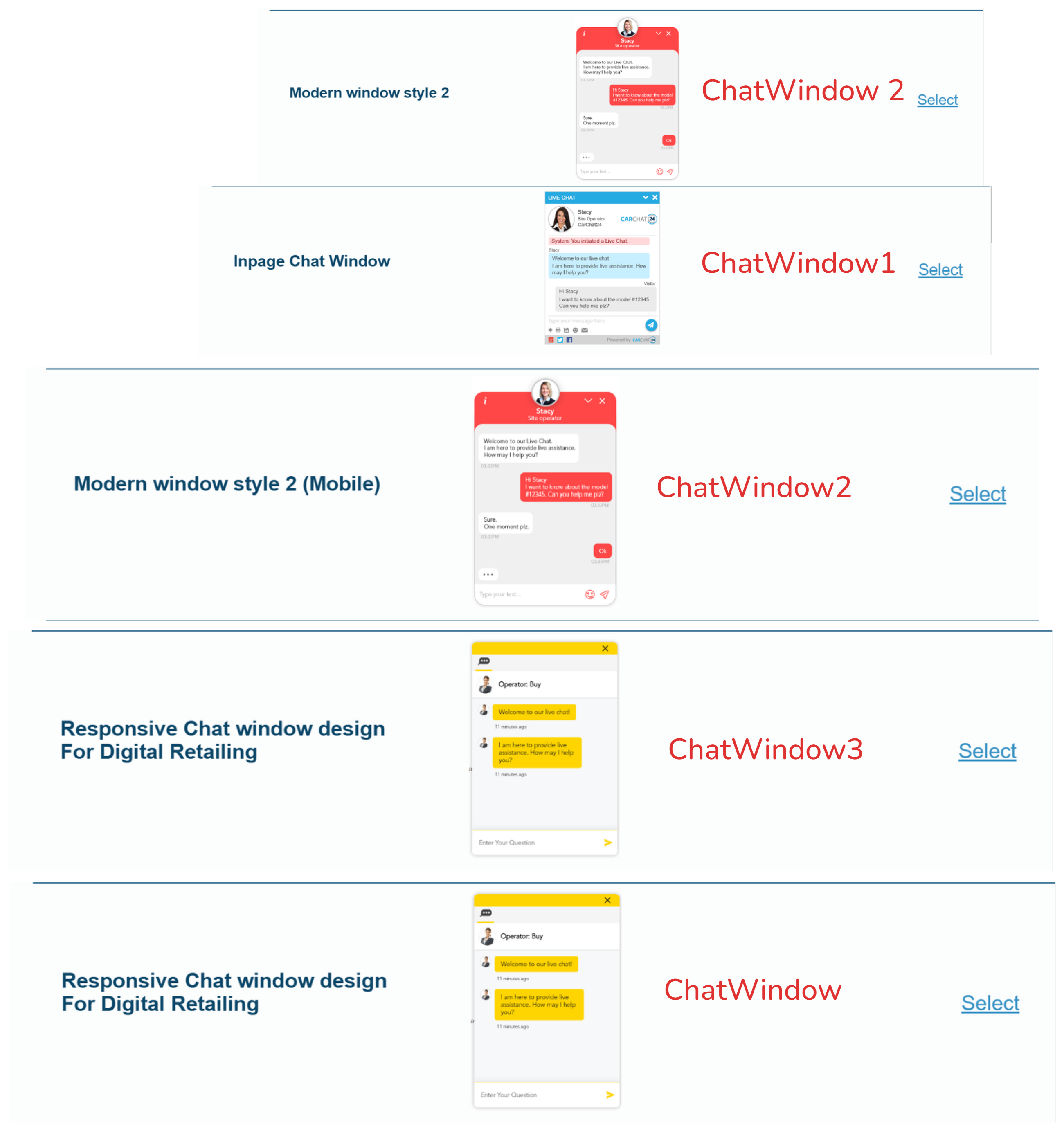
As per VisitorChatAngular Project folder name chatwindow design as follows.
 .
.
VisitorChat Features & Documents:
-
Forms In Chat & Digital Retailing.: Forms will automatic render on chat.
-
Automated Prechat Message Image:
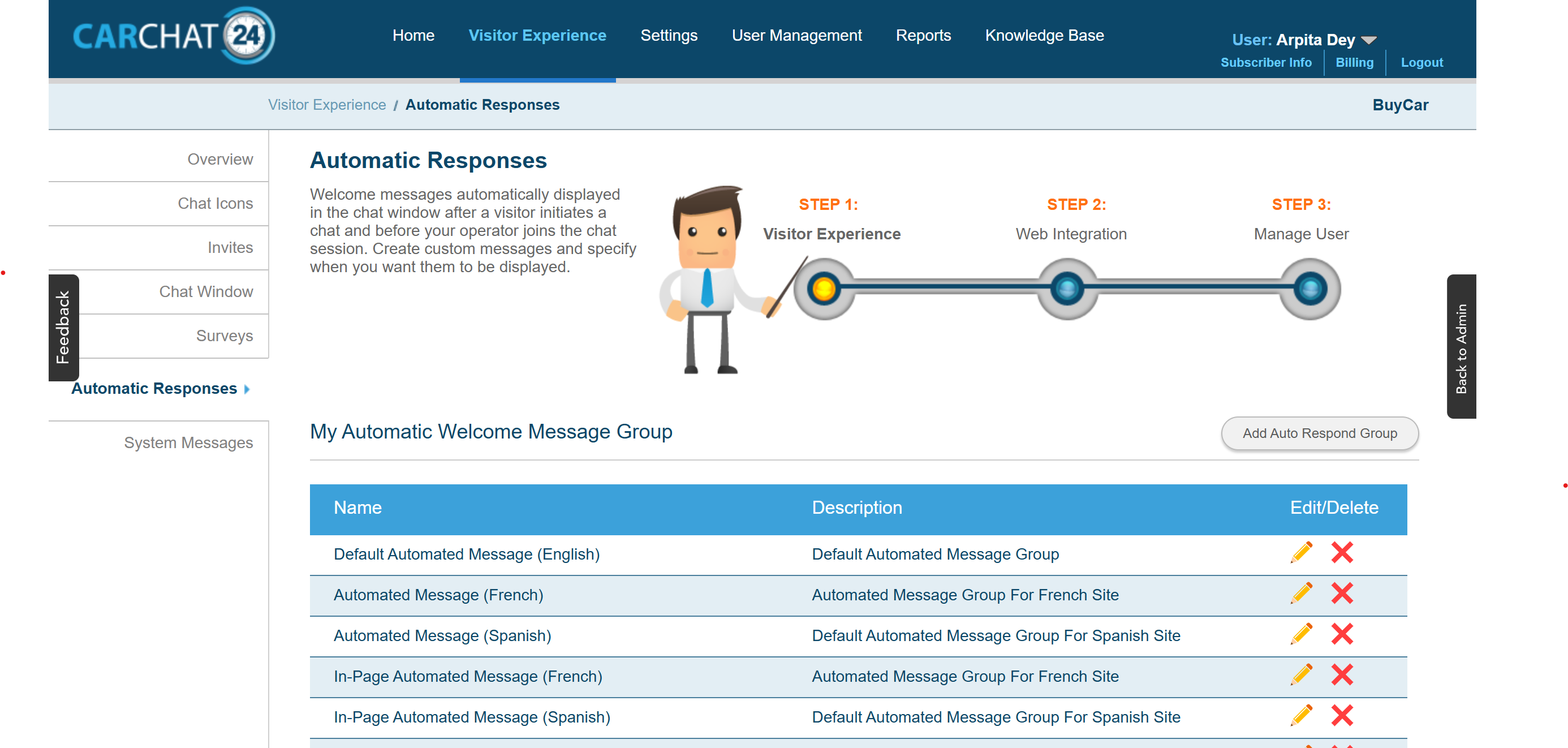 for image in automated prechat
<div><a href="//401dixieinfiniti.ca/en/used-inventory" target="_blank"><img src="//static11.carchat24.com/images/prechatimage/Chatbox_DGOC_1024_PreOwnedSalesEvent-01-EN.jpg" width="100%"></a></div>
- Sms chat Privacy Policy:
<span align="justify">I agree to receive text messages from dealership representatives and understand that no consent to texting is required for purchase of products or services. <br>By opting in, you agree to receive SMS messages. <br>Messages & data rates may apply. By receiving these messages, you acknowledge and accept our <a href="//www.carchat24.com/terms-of-use/" target="_blank"><u><strong>terms & conditions</strong></u></a>. <br>To opt out at any time, reply 'STOP.' We respect your privacy. <br>For details on how we handle your data, visit <a href="www.forddirectprivacy.com/" target="_blank"><u><strong>privacy policy</strong></u></a> link below. <br>Message frequency varies. For help, reply 'HELP.' To unsubscribe, reply 'STOP.'</span>
- Automatic Prechat Survey for web and sms: its automatically render prechat fields like name, phone department, you can add it from. Old Business web -> Visitor Experience -> Survey here you can find Pre chat survey(for webchat), prechat sms survey(for sms chat)
Code Base Exploer:
-
ComCC24DomReadt.js:
used for call vhs for icon related data and vhs send it from cache all the details like html, css, js, settings, browser info, ga info, invite, language, pageid, sessionid
-
immportant api end points are:
# call when session are same
vhs/page_entry_v3

# call when new session and new fresh visit then it's called.
vhs/new_visitor_v3

# call when session is expired but other data are same.
vhs/new_session_v3

# its call after 1sec to check if visitor stays on page or not.
vhs/page_stay
remmeber on every refresh PageId will be different but if data exists and same session are there then other id's are same.
start chat api call's when a div consist of startChat_5A7BE287-776F this id in an html tag of an chat icon.
- Immportant functions:
//this function called 1st
 bindReady()
 //this will create a onclick handler based on event and window design
 trySubscribeToolbarStartChatClicked()
 //after that goto this function and call with param based on which design.
 getStartChatHandlerBasedOnDesign()
 // this will call for new designs
 chatwareComLAHO.modernInpageChat.onStartChatClicked

 // in the bottom this function is used for mutation  observer when cookie banner exists it will move the chat icon up.
 document.onreadystatechange = () => {
 }
 // this code is used for chat icon trigger on enter using accessability.
 window.onload = function () {
    const chatElement = document.querySelectorAll(".startChat_5A7BE287-776F")[0];
    if (chatElement) {
        chatElement.addEventListener("keypress", function (event) {
            if (event.key === "Enter") {
                event.preventDefault();
                chatwareComLAHO.integrations.customOpenWebSMSChat("web");
            }
        });
    }
};
  // this is all deisgn types of chat window and design styles.

    InpageChatWindowDesignType: [
        "None",
        "Integrated",
        "Transparent",
        "Design_2",
        "Design_2_Mobile",
        "Design_3",
        "Design_4",
        "Design_1",

    ],

    // this will used for sms chat
    chatwareComLAHO.smsChat

    // this will listen iframe and send all events

    listenIframe()

    //this will post message to chat window iframe.
    notifyIFrameForChatWinowState()
VisitorChat Angular:
-
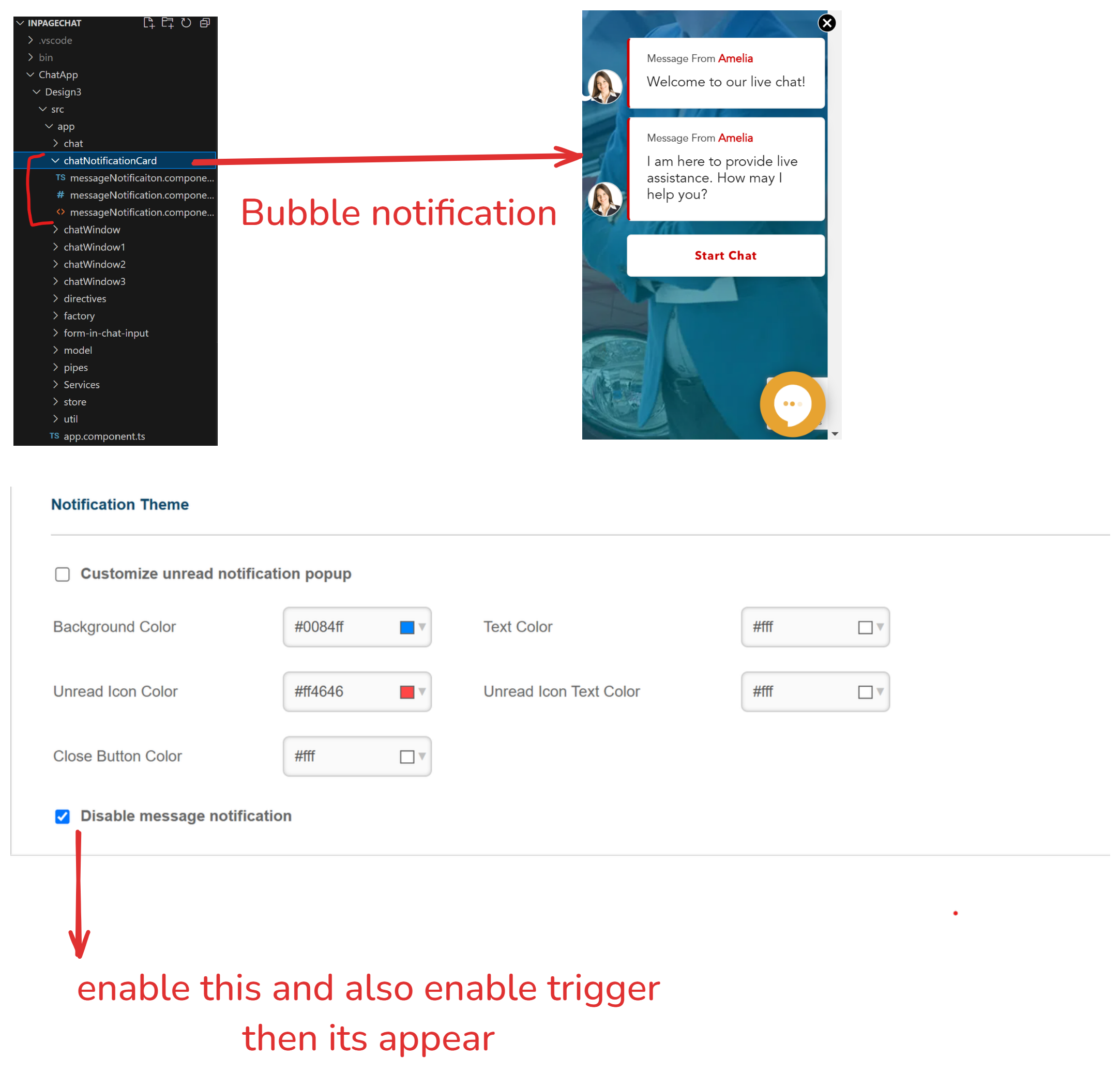
bubble notification code in chatNotificationCard folder. it will apear when chat window settings notification is enabled and window trigger is enabled.
-
customization folder consist of customization regarding that chatwindow and also one is common customization folder which is used for common folder.
-
4 modules with 4 chatwindow lazy loaded which one is needed.
-
immportant api end points are:
# fetch all the chatwindow related data like audioName, colourschema, prehchatSurveytemplate, prechatsmsSurveyTemplate and many more.
InpageChat/api/GetChatWindowData

# returns current chat state(prechat, postchat, inchat) with chatid .
InpageChat/api/GetCurrentChatState

# returns all the blocked and cursed words which are prohibitted to enter.
InpageChat/util/GetBlockedWords

# save ga data to db return boolean
InpageChat/api/saveGAData
Vista Dash:
  {
  "1": {
    "shouldNotifyAdmin": false,
    "adminGaid": null,
    "googleAnalyticsIDs": [
      {
        "GaId": "G-XXXXXX",
        "NotificationType": 3,
        "EventBitMasked": 505,
        "ASC": true,
        "SubscribedEvents": [
          {
            "EventCategory": "CPE-Chat-Initiated-##department##",
            "EventAction": null,
            "EventLable": "##department## Chat Initiated By Visitor",
            "ClEvent": 1,
            "PageName": "/CarChat24/pre-chat-survey-page/index.html"
          },
          {
            "EventCategory": null,
            "EventAction": null,
            "EventLable": null,
            "ClEvent": 16,
            "PageName": "/CarChat24/Post-chat-survey-page/index.html"
          },
          {
            "EventCategory": null,
            "EventAction": null,
            "EventLable": null,
            "ClEvent": 64,
            "PageName": "/CarChat24/Offline-survey-page/index.html"
          },
          {
            "EventCategory": null,
            "EventAction": null,
            "EventLable": null,
            "ClEvent": 32,
            "PageName": "/CarChat24/lead_submitted/index.html"
          },
          {
            "EventCategory": "CPE-Chat-Engage",
            "EventAction": null,
            "EventLable": " Visitor sent a chat response",
            "ClEvent": 256,
            "PageName": ""
          },
          {
            "EventCategory": "CPE-Chat-Complete-##department##-With-Appointment-Set",
            "EventAction": null,
            "EventLable": " Chat complete with ##department## appointment set",
            "ClEvent": 128,
            "PageName": ""
          },
          {
            "EventCategory": "CPE-Chat-Complete-##department##",
            "EventAction": null,
            "EventLable": "##department## Chat Completed",
            "ClEvent": 8,
            "PageName": ""
          }
        ]
      }
    ]
  }
}
Put this code in tblsitemaster after changing gaid and enable googleAnalytics column.