Payment posting related changes (Project Code/Trans Dim)
Author(s)
- Saptarshi Mukherjee
- Arpita Dey
Last Updated Date
2024-10-16
SRS References
- 2.1.1
Version History
| Version | Date | Changes | Author |
|---|---|---|---|
| 1.0 | 2024-10-16 | Initial draft | Saptarshi Mukherjee , Arpita Dey |
Feature Overview
Objective:
When an user adds a payment, it is initially recorded as an unposted payment and later posted to the core ERP. Once confirmed by the ERP, the payment is marked as posted, updating the customer ledger and reflecting in all reports. Additionally, the system now requires the IT park code to be sent as both a project code dimension and transdimension for all payments, including on-account payments, invoice settlements, credit settlements, SD payments, and TDS adjustments. Users can also switch the building for any posted on-account payment that is not linked to an invoice, and the building details must be sent to the core ERP for processing. After the ERP confirms the change, the revenue will be moved to the new building selected by the user.
Scope:
The limitation of this feature is that a single Building Code can only be associated with one payment (BRV), and each payment will have invoices attached from only one building. The RMC ERP will also introduce functionality allowing users to change the building associated with a payment before it is applied to any invoices, requiring new integration between RMC ERP and the core ERP system.
Building switch will not be supported in SD payment feature.
Dependencies:
Core ERP
Requirements
- A single Building Code will be associated with a single payment (BRV)
- Each payment will only have invoices attached from a single building.
- On account/advance payments without invoices attached should also be recorded against a building.
- The RMC ERP will include functionality allowing users to change the building associated with a payment before it is applied to any invoices. This will require new integration between RMC ERP and Core ERP.
- Building switch will not be supported in SD payment feature.
Design Specifications
(Provide detailed design specifications, including UI/UX designs, API interfaces, and any other relevant architectural details.)
-
UI/UX Design:
(Include wireframes, mockups, or links to design files.) -
Data Models:
(Detail the data structures, including database schemas or objects.)public class Item
{
public string? Code { get; set; }
public string? Name { get; set; }
}
public class SwitchBuildingFilter
{
public required string PostedReceiptNumber { get; set; }
public required string BuildingCode { get; set; }
} -
API Interfaces:
(Define the APIs required for this feature, including endpoints, methods, request/response formats.)Endpoint Method Parameters Response Response Status Codes /get/occupied/buildings/{custid}This is a new api. It provides occupied building of a customer.GETcustid(required, text)List of Item200,204,500/switch/buildingThis is a new api. One can switch building of any on account payment.POSTSwitchBuildingFilter(required, class)string200,204,500/analytics/receipts/listThis is an existing api. Add building code in the response.POSTReceiptFilterStruct(required)ReceiptStructLite201,204,500/wallet/balance/{customerId}/{buildingcode}This is an existing api. Provide response wrt buildingcode & customeridGETcustomerId(required, text),buildingcode(required, text)walletDetails200,204,500/get/invoice/list/{customerId}/{buildingcode}This is an existing api. Provide response wrt buildingcode & customeridGETcustomerId(required, text),buildingcode(required, text)invoiceList200,204,500 -
Third-Party Integrations:
Core ERP will provide an api to sitch buildings of any on account payment. -
Workflow:
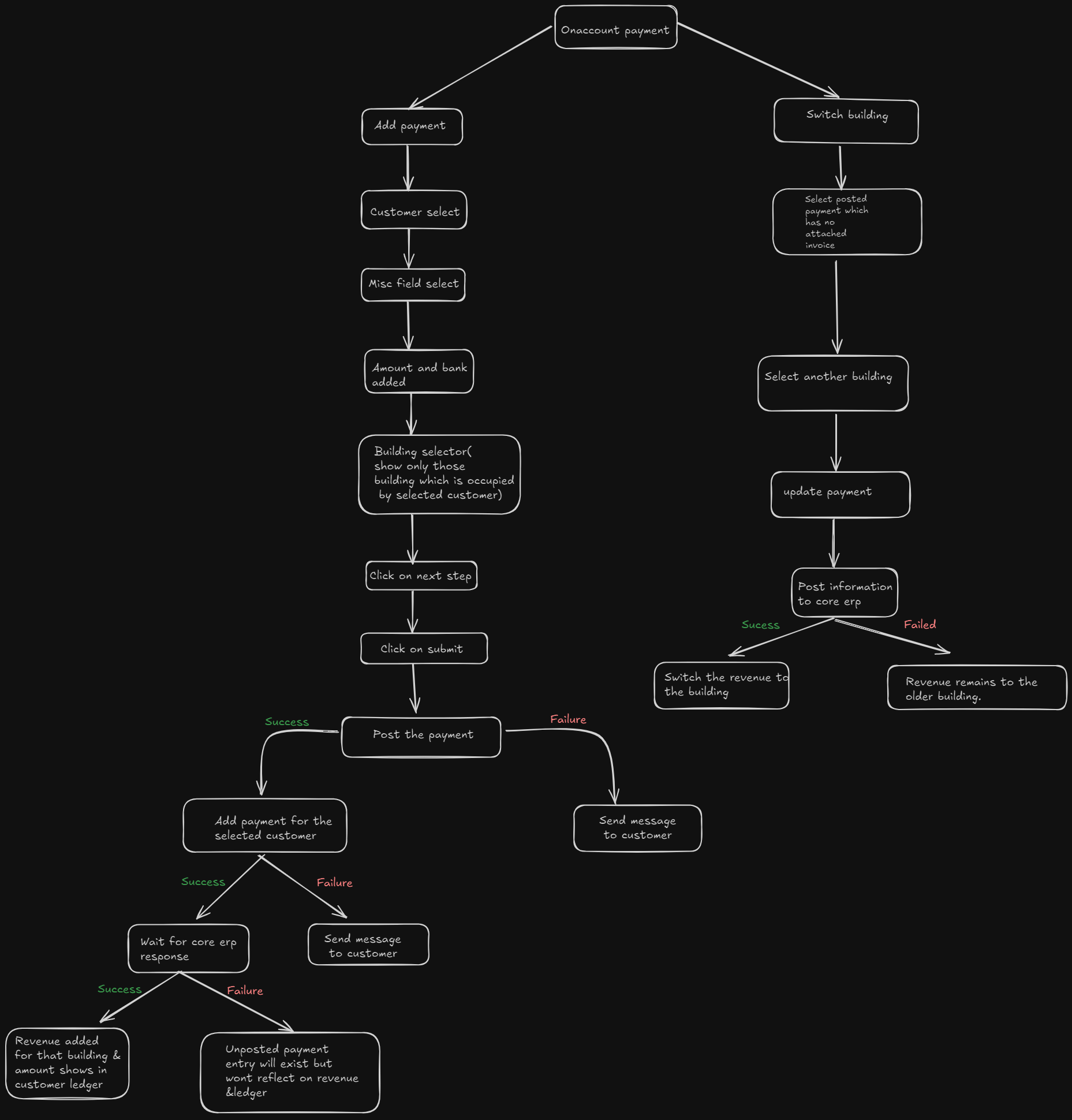
Following is the workflow of adding On-Account Payment & switch building of existing on-account payment.
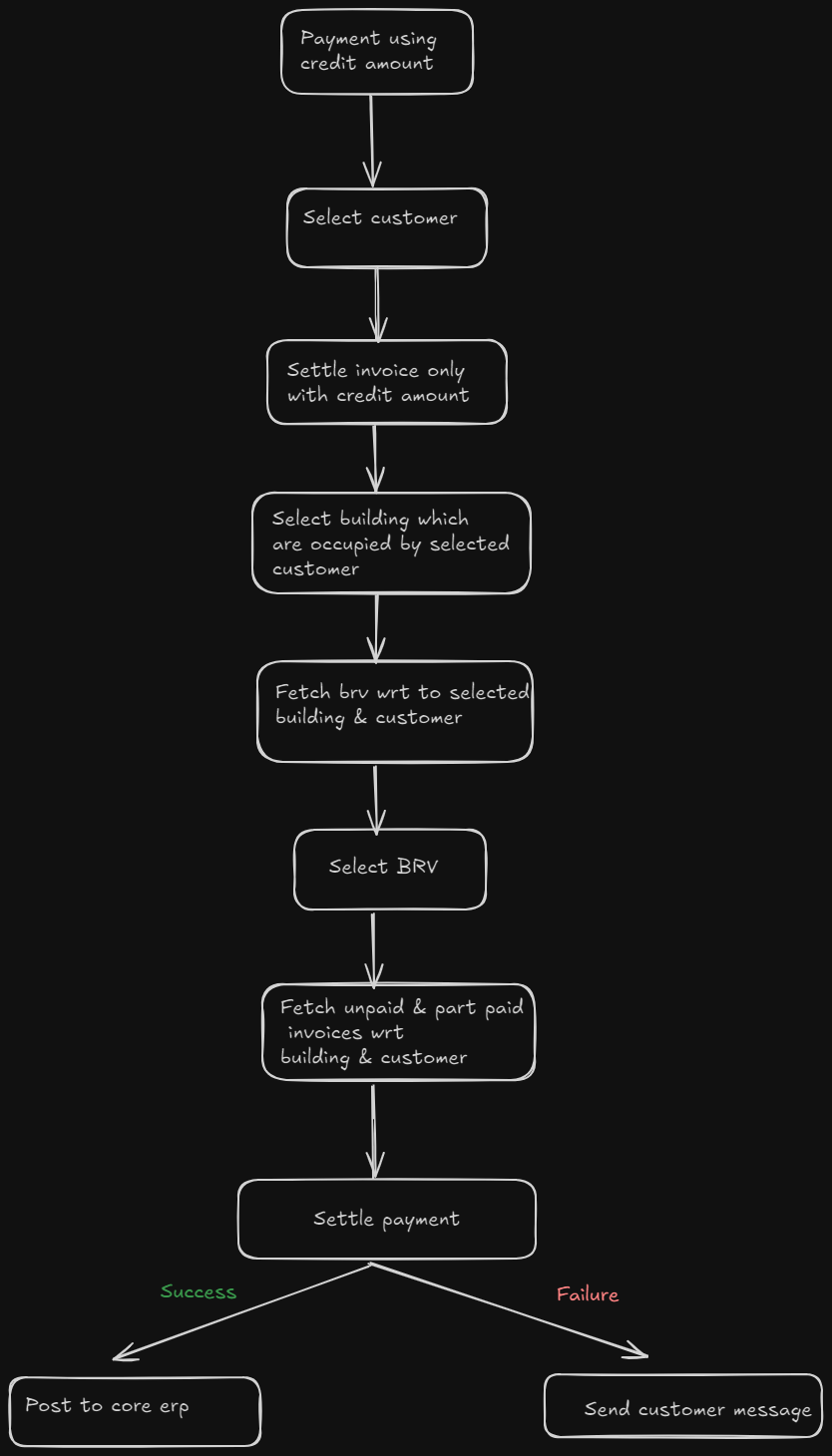
 Following is the workflow of settling on-account payment with invoices.
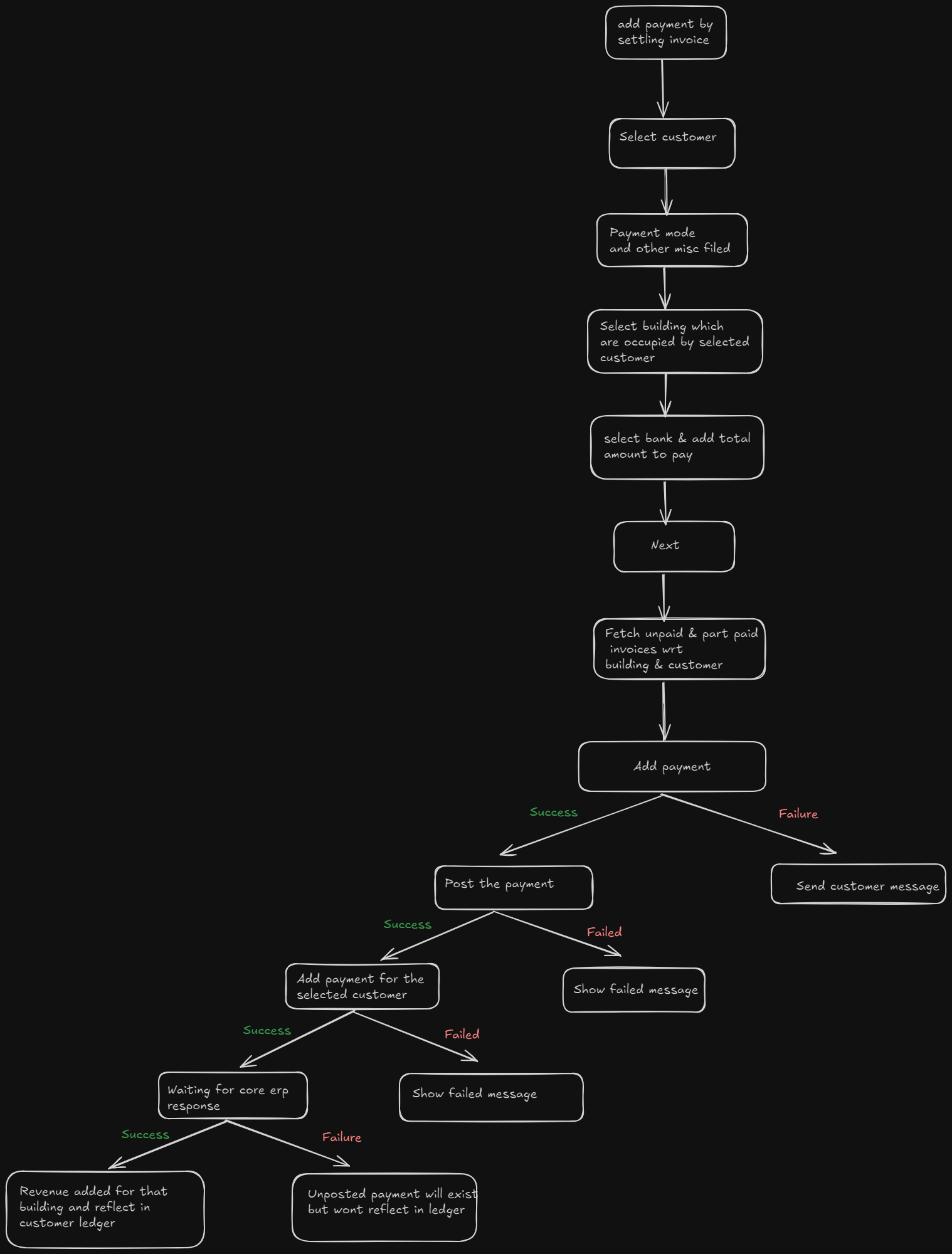
 Following is the workflow of adding new payment by settling invoices.
Development Tasks & Estimates
(Break down the development process into smaller tasks and provide time estimates for each.)
| No | Task Name | Estimate (Hours) | Dependencies | Notes |
|---|---|---|---|---|
| 1 | get occupied building of a customer | 1.5 | Dependency 1 | Any notes here |
| 2 | switch building | 2 hours | Dependency 2 | Any notes here |
| 3 | add building code in receipt list response | 1.5 hours | Dependency 3 | Any notes here |
| 4 | add two params building code and customer code for get brv | 1 hours | Dependency 3 | Any notes here |
| 5 | add two params building code and customer code for get unpaid and part paid invoices | 1 hours | Dependency 3 | Any notes here |
| 6 | Integrate new building fetch api (UI) | 0.5 hours | Dependency 3 | Any notes here |
| 7 | Change in three existing api (UI) | 2.5 hours | Dependency 3 | Any notes here |
| 8 | Functionality to achive payment posting scenarios (UI) | 2 hours | Dependency 3 | Any notes here |
| 9 | Switch building (ui) | 2.5 hours | Dependency | Any notes here |
| 10 | Switch building functionality (ui) | 3 hours | Dependency | Any notes here |
| 11 | Switch building api(ui) | 2 hours | Dependency | Any notes here |
| 12 | Core erp integration for switching building | 2 hours | Core ERP | Any notes here |
| 13 | Integration test | 1.5 hours | Dependency | Any notes here |
| 14 | Total | 23 hours | Dependency 3 | Any notes here |
Testing & Quality Assurance
-
Unit Tests:
Payment Addition Test: Ensure that when a user adds a payment, it is correctly recorded as an unposted payment and that all relevant fields (e.g., building code, project code dimension, transdimension) are stored properly.ERP Posting Test: Verify that once the payment is posted to the core ERP, it correctly updates the status in the RMC ERP, marking the payment as posted.
Switch Building Test: Validate that users can switch the building of a posted on-account payment that is not linked to any invoice, and that the building details are updated correctly in the core ERP.
On-Account Payment Test: Check that on-account payments without attached invoices are recorded correctly, with the associated building code and necessary dimensions.
Invoice Settlement Test: Ensure that payments used to settle invoices are applied correctly to invoices from a single building and that the corresponding building code is reflected in the core ERP.
-
Integration Tests:
/get/occupied/buildings/custid: Test that the API correctly returns the list of occupied buildings for a given customer./switch/building: Ensure that the API successfully switches the building of a posted on-account payment and updates the core ERP accordingly.
/analytics/receipts/list: Test that the building code is included in the response of the analytics API.
/wallet/balance/customerId/buildingcode: Validate that the wallet balance is correctly returned for the specified customer and building code.
/get/invoice/list/customerId/buildingcode: Ensure that the list of invoices is correctly returned based on the customer and building code.
Core ERP Posting Validation: Test the integration with the core ERP to ensure that all building changes, project code dimensions, and transdimensions are accurately reflected and confirmed by the ERP system.
-
Acceptance Criteria:
Payments should be added as unposted and correctly posted to the core ERP, with all necessary details, including project codes and building codes.Users must be able to switch buildings for on-account payments before they are applied to any invoices.
All APIs should return correct data, with proper filtering based on customer and building codes. Invoice settlement and on-account payments must always reflect the associated building.
-
Testing Tools:
(List any tools that will be used for testing.)
Deployment Considerations
None
Risks & Mitigations
None
Review & Approval
(Include a section for review and approval by stakeholders.)
-
Reviewer:
Ayon Das -
Approval Date:
2024-10-16
Notes
None