[EMD Payment Feature]
Author(s)
- Bishwanath Jana
- Dipak Mourya
Last Updated Date
[2024-12-17]
SRS References
- 2.1.2
- 2.1.3
Version History
| Version | Date | Changes | Author |
|---|---|---|---|
| 1.0 | 2024-12-17 | Initial draft | Bishwanath Jana |
| 1.0 | 2024-12-17 | Initial draft | Dipak Mourya |
| ... | ... | ... | ... |
Feature Overview
Objective:
The purpose of this feature is to introduce a new EMD amount option on the Receipt Page and BRS Page, allowing users to manually add EMD payments. Unlike the previous process where BRVs and corresponding receipts were generated automatically during customer onboarding, users will now need to manually add the EMD amount, ensuring greater control and flexibility over the BRV creation process.
Scope:
- Add an EMD amount input option on the Receipt Page and BRS Page.
- Allow users to manually add the EMD amount when processing payments.
- Disable the automatic creation of BRVs and EMD receipts during the customer onboarding process.
- Users will need to manually verify and create the BRV associated with the EMD amount.
- Update onboarding flow to reflect the manual steps for EMD payment processing.
Dependencies:
- Integration with existing BRS Page and Receipt Page components.
- Dependency on the customer onboarding flow for updating manual BRV creation steps.
Requirements
- The same API used for payment initiation (e.g., paymentInitiate and cheque) can be reused for this feature.
- New API Required: An API to fetch the EMD amount based on the application.
Design Specifications
(Provide detailed design specifications, including UI/UX designs, API interfaces, and any other relevant architectural details.)
-
UI/UX Design:
The UI for this feature will be almost similar to the SD amount section, as shown in the picture provided below.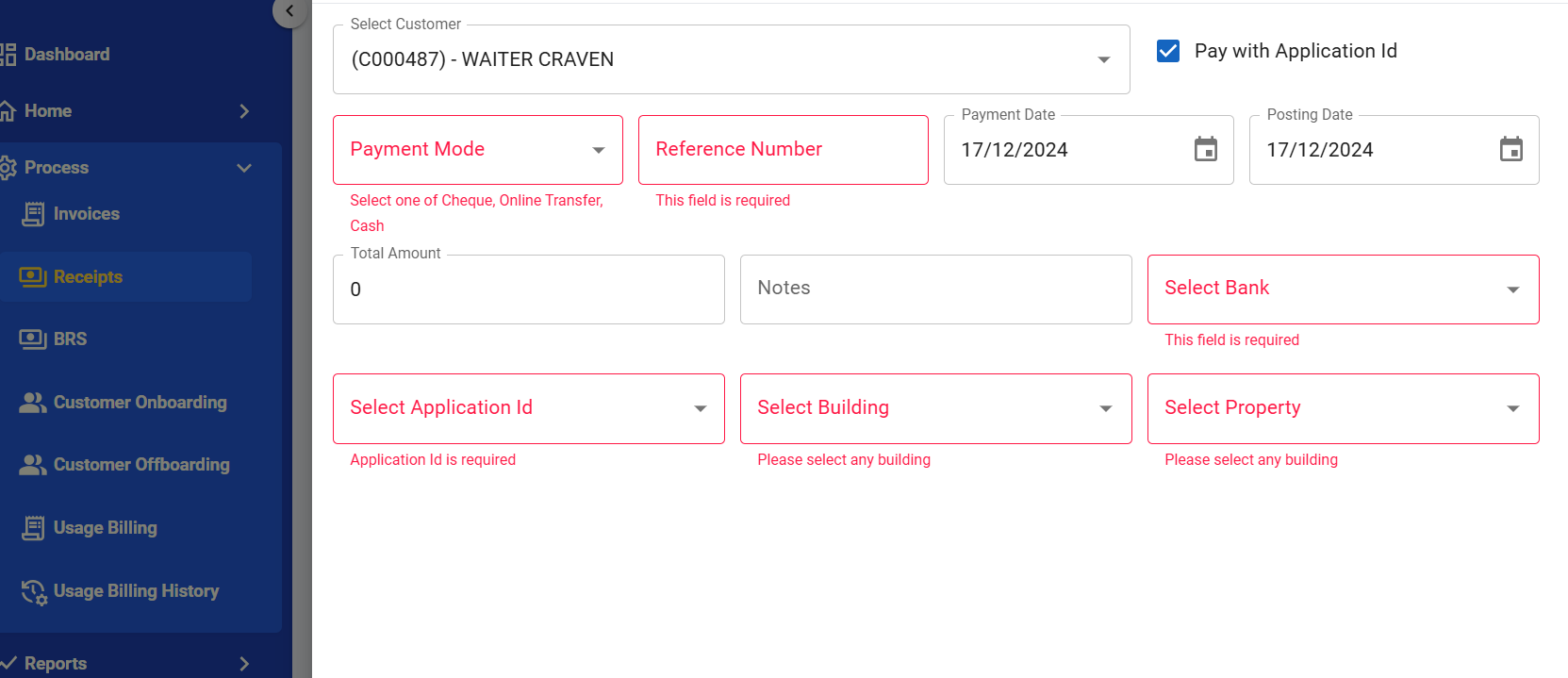
-
Data Models:
(Detail the data structures, including database schemas or objects.)public record EMDPayment
{
public required string ApplicationNumber { get; set; }
public required string CustomerId { get; set; }
public required PaymentType PaymentType { get; set; }
public DateTime? PostingDate { get; set; }
public DateTime? PaymentDate { get; set; }
public string? BankCode { get; set; }
public string? RefNumber { get; set; }
public DateTime? ChequeDate { get; set; }
}
API Interfaces
| Endpoint | Method | Parameters | Response | Response Status Codes |
|---|---|---|---|---|
emd/amount | GET | applicationId (required, string): Unique Application ID | EMDAmountResponse | 200, 404, 500 |
initiate/emdpayment | POST | EMDPayment (required, object): EMD payment details | TransactionResponse | 200, 400, 500 |
-
Third-Party Integrations:
(List any third-party services or tools that need to be integrated.)- None specified for this feature.
- Workflow:
(Describe the end-to-end workflow of the feature, detailing how different components interact, including the sequence of events, data flow, and the user journey.)
-
Endpoint:
emd/amount- The user provides an
applicationIdto retrieve the EMD amount. - The API fetches the EMD amount corresponding to the given
applicationIdfrom the database. - The API responds with
EMDAmountResponsecontaining the amount or an appropriate error if theapplicationIdis not found.
- The user provides an
-
Endpoint:
initiate/emdpayment- The user provides EMD payment details as part of the request body using the
EMDPaymentstructure. - The API validates the incoming request and maps the data to the required database fields.
- The API calls the existing DAL method
AddPaymentForBookingRequest, modified to accept the updated fields, to insert the EMD payment data into the Payments table. - On successful completion, the API returns a
TransactionResponsewith a success message andtransactionId. - If an error occurs (e.g., missing or invalid data), the API responds with an appropriate error message and status code.
- The user provides EMD payment details as part of the request body using the
Development Tasks & Estimates
| No | Task Name | Estimate (Hours) | Dependencies | Notes |
|---|---|---|---|---|
| 1 | Implement UI screen for EMD payment | 4 hours | UI Design | Any notes here |
| 2 | API Integration | 2 hours | Dependency 2 | Any notes here |
| 3 | Testing EMD payment from both the screen | 1.5 hours | Dependency 3 | Any notes here |
| 4 | Create GET API to fetch EMD amount by applicationId | 3 hours | DB changes for SP | Ensure SP fetches correct EMD data |
| 5 | Update initiate/cheque API to include EMD payment flag and manual handling | 3 hours | Existing APIs | Extend payload and handle EMD logic |
| 6 | Stored Procedure Changes | 3 hours | DB design | Add new SP for fetching EMD amount |
| 7 | Unit and Integration Testing | 3 hours | Updated APIs | Verify functionality |
| 8 | Testing EMD payment overall | 2 hours | All Dependencies | Ensure E2E flow works correctly |
| 9 | Total | 21.5 hours |
Testing & Quality Assurance
(Outline the testing strategy and quality assurance measures for the feature.)
-
Unit Tests:
- Validate the
emd/amountAPI fetches the correct EMD amount based onapplicationId. - Verify
initiate/chequeAPI processes EMD payments correctly whenisEMDPaymentis set totrue. - Test failure scenarios, including invalid
applicationIdand missing required parameters.
- Validate the
-
Integration Tests:
- End-to-end flow for fetching the EMD amount and processing an EMD payment.
- Verify database integration for the stored procedure changes fetching EMD data.
- Ensure proper handling of responses and HTTP status codes for both APIs.
-
Acceptance Criteria:
- The EMD amount is fetched correctly from the database using the
emd/amountAPI. - The
initiate/chequeAPI successfully processes EMD payments when the EMD flag is enabled. - Errors are handled gracefully for invalid or missing inputs.
- Manual EMD payment option reflects accurately on the UI (Receipt Page and BRS Page).
- The EMD amount is fetched correctly from the database using the
-
Testing Tools:
(List any tools that will be used for testing.)
Deployment Considerations
(Describe any deployment considerations, including environment configurations, feature toggles, or migration steps.)
-
Configuration Changes:
(Detail any configuration changes required for this feature.) -
Rollout Plan:
(Outline the plan for rolling out the feature, including any phased releases.)
Risks & Mitigations
(Identify potential risks and the strategies to mitigate them.)
| Risk | Impact | Likelihood | Mitigation Strategy |
|---|---|---|---|
| Risk 1 | High | Medium | Strategy for mitigating Risk 1 |
| Risk 2 | Medium | High | Strategy for mitigating Risk 2 |
| ... | ... | ... | ... |
Review & Approval
(Include a section for review and approval by stakeholders.)
-
Reviewer:
(Name and role of the person reviewing the document.) -
Approval Date:
(Date when the feature is approved for development.)
Notes
(Add any additional notes or considerations related to the feature development here.)