[Payment Gateway Integration]
Author(s)
- Arpita Dey
- Dipak Mourya
Last Updated Date
[2025-02-26]
SRS References
Version History
| Version | Date | Changes | Author |
|---|---|---|---|
| 1.0 | 025-02-26 | Initial draft | Arpita Dey,Dipak Mourya |
Feature Overview
Objective:
1. Payment Initialization
- The user provides payment details, including:
- Customer ID
- Total Amount
- Invoice List (with Posted Invoice Number)
- Whether the payment is for a Security Deposit or not.
- The system prompts: "Do you want to proceed?"
- If confirmed, a request is sent to
api/payment/process-initiate/pg. - A Random Order Number is generated.
2. Database Entry (tblPaymentOrderMaster)
- The system stores the payment details in
tblPaymentOrderMaster, including:- Transaction ID
- Transaction Date
- Payment Order Number
- Customer ID
- Paid Amount
- List of Invoice IDs
- Current Status
- Application Number
- Initiation Time
- Success Time
- Failure Time
- Current Status
- Remarks
- LogUser
- LogDTS
- The payment remains in a Initiated state initially.
3. Payment Encryption & Secure Redirection
- If the transaction is submitted, the following values are encrypted:
- Service ID
- Department ID
- Payment Order Number
- Amount
- Success URL
- Cancel URL
- The encrypted text is used to generate a secure payment request.
- The system returns
encrypted responseand redirects the user to the Payment Gateway.
4. Payment Processing
- The user is redirected to the Webel Payment Gateway.
- The payment is processed by the gateway.
- Upon completion, the system receives the payment response.
5. Payment Status Handling
- The system validates the response using:
- API Key
- Payment Order Number
- The payment result is categorized as:
- Success: Updates payment status to "Completed".
- Failure: Updates status accordingly.
- The user is redirected based on the payment result.
6. Order Management
- The system navigates back to the Payment Order Page.
- Retrieves all payment orders from
tblPaymentOrderMaster. - The user selects an order and chooses to:
- Settle Order – Completes the payment settlement process.
- Archive Order – Moves the order to an archived state for reference.
- User can mark settled to a successfull payment order.
- User can archieved or de-archieved any payment order.
- Double Verification : user can re-verify an initiated or failed payment order.
Scope:
The feature facilitates secure online payments by processing transactions, updating statuses, and managing payment orders
Dependencies:
Webel Payment Gateway
Requirements
(List all the functional and non-functional requirements that the feature must meet.)
- API to initiate online payment processing.
- Database storage for payment details (tblPaymentOrderMaster).
- Random order number generation.
- Encryption mechanism for secure payment processing.
- Integration with a webel payment gateway.
- Handling of success and failure cases.
- Updating payment status based on gateway response.
- Redirecting users to appropriate screens after payment.
- Retrieves all payment orders from tblPaymentOrderMaster.
- Users navigate to the Payment Order Page to manage payment orders.
- User can settle or archieve Payment Orders.
Design Specifications
(Provide detailed design specifications, including UI/UX designs, API interfaces, and any other relevant architectural details.)
-
UI/UX Design:
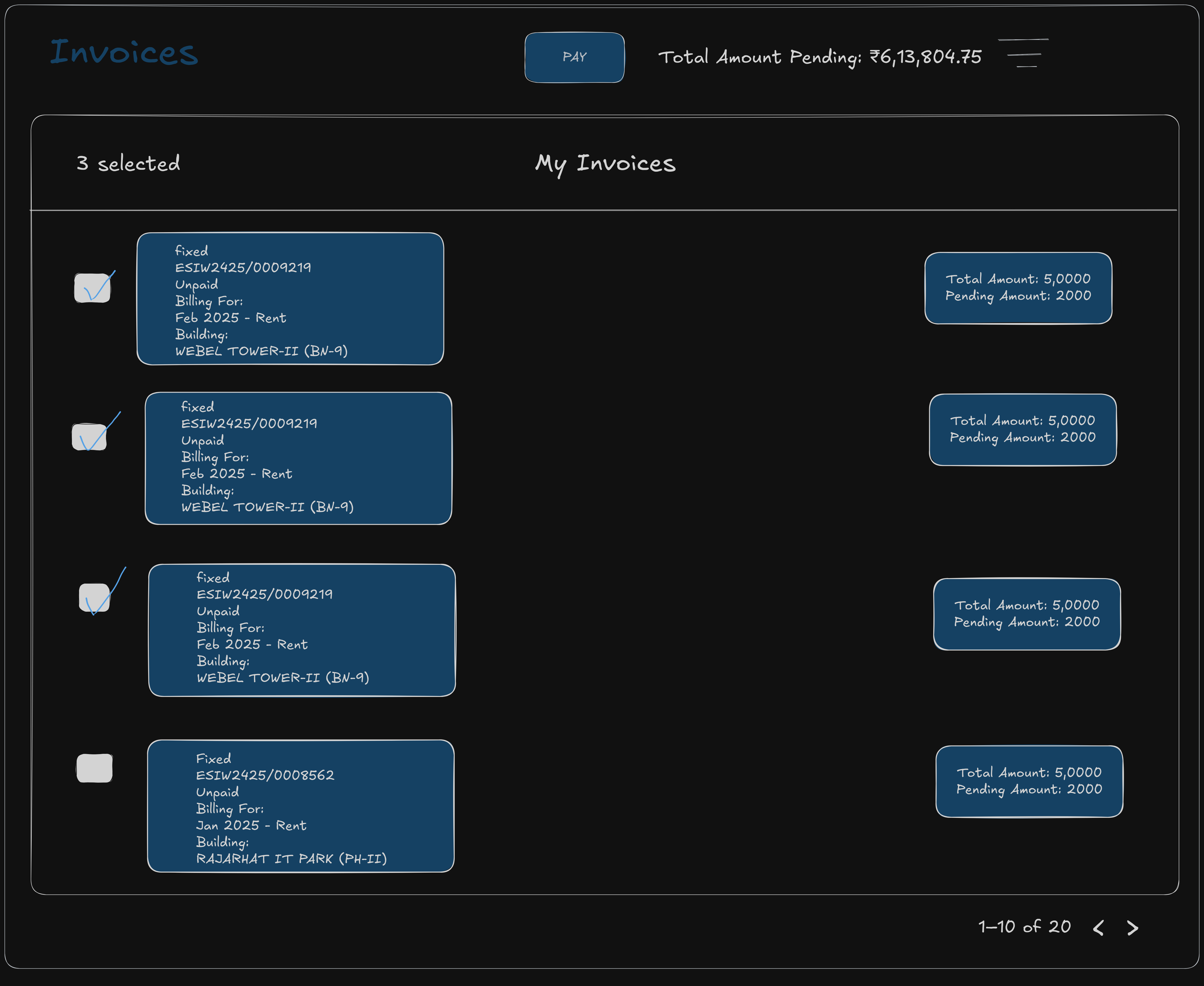
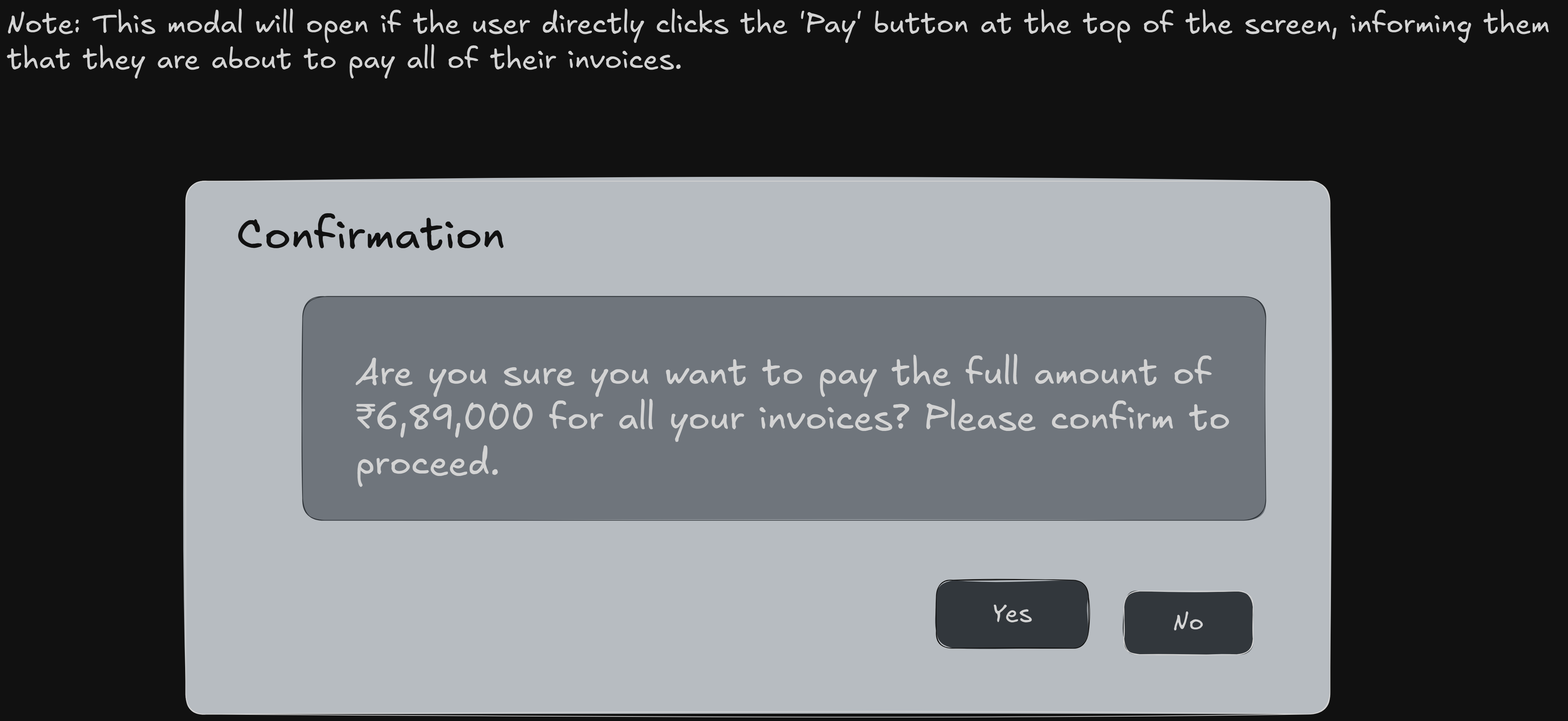
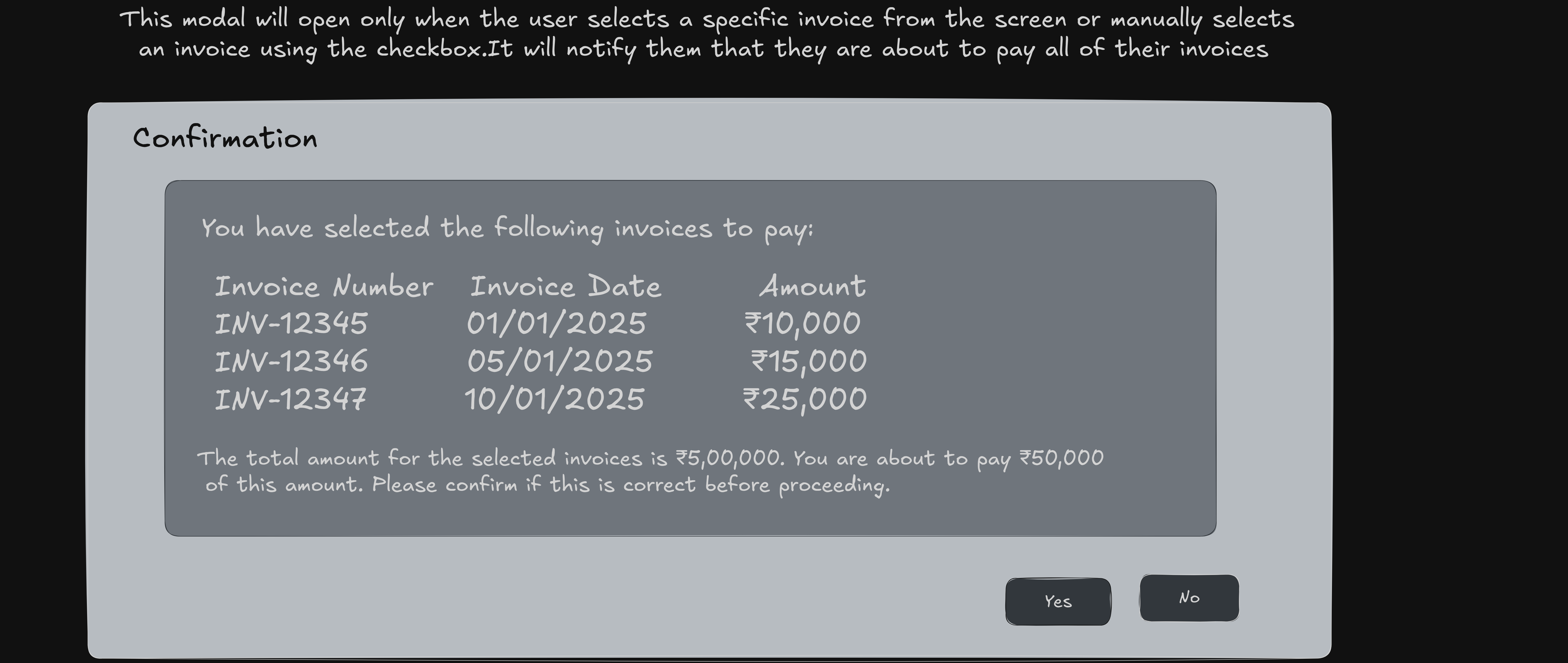
-
Data Models:
(Detail the data structures, including database schemas or objects.)public record OnlinePaymentDetails
{
public required string CustId { get; init; }
public required decimal TotalAmount { get; init; }
public bool? IsSDPayment { get; init; }
public string? ApplicationNumber { get; init; }
public List<OnlinePaymentInvoiceDetails>? ListOfInvoice { get; init; }
}
public record OnlinePaymentInvoiceDetails
{
public Guid? InvoiceId { get; init; }
public string? PostedInvoiceNumber { get; init; }
}
public record OnlinePaymentOrderDetails
{
public Guid? TransactionId { get; init; }
public DateTime? TransactionDate { get; init; }
public required string PaymentOrderNumber { get; init; }
public required string CustomerId { get; init; }
public required decimal TotalAmount { get; init; }
public List<OnlinePaymentInvoiceDetails>? ListOfInvoice { get; init; }
public bool? IsSDPayment { get; init; }
public string? ApplicationNumber { get; init; }
public OnlinePaymentStatus CurrentStatus { get; init; }
public DateTime? InitiatedTime { get; init; }
public DateTime? SuccessTime { get; init; }
public DateTime? FailureTime { get; init; }
public string? Remarks { get; init; }
public string? LogUser { get; init; }
public DateTime? LogDTS { get; init; }
}
public record PaymentGatewayDetails
{
public string? PaymentOrderNumber { get; set; }
public decimal? TotalAmount { get; set; }
public string? DepartmentId { get; set; }
public string? ServiceId { get; set; }
public string? AuthCode { get; set; }
public string? Key1 { get; set; }
public string? SuccessURL { get; set; }
public string? FailureURL { get; set; }
}
public record OnlinePaymentResponse
{
public string? EncryptedRequest { get; set; }
public string? AuthCode { get; set; }
}
public enum OnlinePaymentStatus { Initiated, Success, Failed }
public enum BRSType
{
Settled,
Unsettled,
Archived,
Any = -1
} -
API Interfaces:
(Define the APIs required for this feature, including endpoints, methods, request/response formats.)Endpoint Method Parameters Response Response Status Codes /process/initiate/pgPOSTOnlinePaymentDetailsOnlinePaymentResponse200,204,500/success/{apiKey}/{paymentOrderNumber}POSTapiKey,paymentOrderNumberRedirect200,204,500/cancel/{apiKey}/{paymentOrderNumber}POSTapiKey,paymentOrderNumberRedirect201,204,500/get/paymentorder{Custid}/{Type}/{StartDate}/{EndDate}/{PageNumber}/{RowsPerPage}GETCustid,Type,StartDate,EndDate,PageNumber,RowsPerPageOnlinePaymentOrderDetails200,204,500/paymentorder/settle/{paymentordernumber}PUTpaymentordernumber200,204,500/paymentorder/archieve/dearchieve/{paymentordernumber}PUTpaymentordernumber200,204,500/double-verify/paymentorder/{paymentordernumber}/{amount}Postpaymentordernumber,amount200,204,500 -
Third-Party Integrations:
(List any third-party services or tools that need to be integrated.) -
Workflow:
(Describe the end-to-end workflow of the feature, detailing how different components interact, including the sequence of events, data flow, and the user journey.)
Development Tasks & Estimates
(Break down the development process into smaller tasks and provide time estimates for each.)
| No | Task Name | Estimate (Hours) | Dependencies | Notes |
|---|---|---|---|---|
| 1 | Payment Gateway Integration | 5 hours | Any notes here | |
| 2 | Online Payment Order Page | 4 hours | Any notes here | |
| 3 | Double Verification | 5 hours | Any notes here | |
| 4 | Workflow Testing | 2 hours | Any notes here | |
| 5 | Invoice Payment screen for customer login UI design | 5 hours | Any notes here | |
| 6 | API integration for getting auth code and encrypted text | 1.5 hours | Any notes here | |
| 7 | Creating Invisible form to access pwc gateway for the payment | 2 hours | Any notes here | |
| 8 | Create a success and error page for payment successful or denied | 3 hours | Any notes here | |
| 9 | Create a sucessfull payment page for all the records of rthe user to check | 3 hours | Any notes here | |
| 10 | Create a filter and doubleverification feature in it and api integration. | 3 hours | Any notes here | |
| 11 | Payment gateway testing for all invoice payment and selected invoice payment | 2 hours | Any notes here | |
| 12 | Total | 35.5 hours | Any notes here |
Testing & Quality Assurance
(Outline the testing strategy and quality assurance measures for the feature.)
-
Unit Tests:
(List the unit tests that will be written for this feature.) -
Integration Tests:
(Describe how integration testing will be conducted.) -
Acceptance Criteria:
(Define the criteria that must be met for the feature to be considered complete.) -
Testing Tools:
(List any tools that will be used for testing.)
Deployment Considerations
(Describe any deployment considerations, including environment configurations, feature toggles, or migration steps.)
-
Configuration Changes:
(Detail any configuration changes required for this feature.) -
Rollout Plan:
(Outline the plan for rolling out the feature, including any phased releases.)
Risks & Mitigations
Review & Approval
-
Reviewer:
Ayon Das -
Approval Date:
2025-02-27
Notes
(Add any additional notes or considerations related to the feature development here.)