Firebase Cloud Messaging (FCM) Push Notifications
Author(s)
- Amarnath Garai
Last Updated Date
2026-05-08
SRS References
- Firebase Cloud Messaging: https://firebase.google.com/docs/cloud-messaging
Version History
| Version | Date | Changes | Author |
|---|---|---|---|
| 1.0 | 2026-03-02 | Initial documentation for FCM push notification system | Amarnath Garai |
| 1.1 | 2026-05-08 | Added Categorized Notification Enable Disable | Amarnath, Arabinda |
| 1.2 | 2026-05-22 | Added Email Unsubscribe Feature Documentation | Copilot |
Feature Overview
Objective:
Enable users to receive real-time push notifications on their mobile and web devices through Firebase Cloud Messaging (FCM).
Key Goals for Version 1.1:
- Granular Control: Empower users to manage notification preferences at a category level (e.g., Appointments, Marketing) to reduce noise.
- Multi-Channel Flexibility: Support multiple delivery channels (Push, Email, and SMS) for better reach and user preference.
- Improved Engagement: Target notifications more effectively through categorization.
Scope:
- Register and manage device FCM tokens
- Enable/disable notifications globally and per category (Push, Email, SMS)
- Send notifications to multiple devices and channels
- Support iOS, Android, and web platforms
- Automatic cleanup of invalid tokens
Dependencies:
- Firebase Cloud Messaging Service
- Firebase Admin SDK
- Database for token and settings storage
Requirements
Functional Requirements
- Users can register device tokens for push notifications
- Users can delete (unregister) devices
- Users can enable/disable push notifications globally
- A user can have multiple registered devices
- Notifications sent to all user's active devices
- Invalid tokens automatically removed from system
- Support multiple platforms (iOS, Android, Web)
Non-Functional Requirements
- Handle large volumes of notifications efficiently
- Graceful handling of partial delivery failures
- Comprehensive error logging and monitoring
- Secure credential management
Design Specifications
Database Schema
1. User Device Tokens Table
Table: userdevicetokens
| Column | Type | Constraints | Description |
|---|---|---|---|
id | UUID | PRIMARY KEY | Unique token record ID |
userid | UUID | NOT NULL | User who owns this device |
deviceid | VARCHAR(255) | NOT NULL | Unique device identifier |
fcmtoken | TEXT | NOT NULL | FCM token for notifications |
platform | VARCHAR(20) | NOT NULL | Device platform (ios/android/web) |
createdat | TIMESTAMPTZ | DEFAULT NOW() | Registration timestamp |
updatedat | TIMESTAMPTZ | DEFAULT NOW() | Last update timestamp |
Constraints:
- UNIQUE(userid, deviceid) - One token per device per user
- INDEX on userid - Fast user lookups
- INDEX on platform - Platform-based queries
2. Notification Settings Table
Table: notificationsettings
| Column | Type | Constraints | Description |
|---|---|---|---|
id | UUID | PRIMARY KEY | Settings record ID |
userid | UUID | NOT NULL UNIQUE | User settings |
push | BOOLEAN | DEFAULT FALSE | Push notifications enabled |
email | BOOLEAN | DEFAULT FALSE | Email Notifications enabled |
sms | BOOLEAN | DEFAULT FALSE | SMS Notifications enabled |
createdat | TIMESTAMP | DEFAULT NOW() | Created timestamp |
updatedat | TIMESTAMP | DEFAULT NOW() | Updated timestamp |
3. Notification Category Settings Table
Table: notificationcategorysettings
| Column | Type | Constraints | Description |
|---|---|---|---|
id | UUID | PRIMARY KEY | Category settings record ID |
userid | UUID | NOT NULL | User settings |
category | TEXT | NOT NULL | Notification category |
push | BOOLEAN | DEFAULT FALSE | Push notifications enabled |
email | BOOLEAN | DEFAULT FALSE | Email notifications enabled |
sms | BOOLEAN | DEFAULT FALSE | SMS notifications enabled |
createdat | TIMESTAMP | DEFAULT NOW() | Created timestamp |
updatedat | TIMESTAMP | DEFAULT NOW() | Updated timestamp |
Constraints:
- UNIQUE(userid, category) - One setting per category per user
- INDEX on userid - Fast user lookups
Notification Categorizations
- System Events
- TemporaryPasswordAdmin
- TemporaryPasswordTechnician
- NewAdminCreated
- NewTechnicianCreated
- Appointment Category
- NotifyTechnicianAboutAssignment
- NotifyCustomerAboutAssignment
- JourneyStarted
- ServiceStarted
- ServiceCompleted
- NotifyTechnicianAboutReschedule
- NotifyCustomerAboutReschedule
- NotifyTechnicianAboutUnassignment
- NotifyCustomerAboutUnassignment
- CustomerCanceledServiceRequest
- TechnicianCanceledServiceRequest
- AdminCanceledServiceRequest
- NewServiceRequest
- NewAssignment
- Marketing Category & SpecialOffers Category
- TargetedNotification
Data Models
// Platform enumeration for supported devices
public enum Platform
{
    Android = 1,
    IOS,
    Web
}

// Register/Update Device Token
public record RegisterDeviceRequest(
    string DeviceId,           // Unique device identifier
    string FcmToken,           // FCM token from Firebase SDK
    Platform Platform          // Android, IOS, Web
);

// Device deletion
public record DeleteDeviceRequest(
    string DeviceId
);

// Device token stored in database
public record DeviceTokenModel
{
    public Guid Id { get; set; }
    public Guid UserId { get; set; }
    public string DeviceId { get; set; }
    public string FcmToken { get; set; }
    public Platform Platform { get; set; }
    public DateTime CreatedAt { get; set; }
    public DateTime UpdatedAt { get; set; }
}
public enum NotificationCategory
{
    System = 1, // System notification toggle will not be there as User can not turn on/off system Notifications (Forgot Password,Reset Emails etc.)
    Appointments,
    SpecialOffers,
    Marketing,
}

// Global update notification settings request
public record UpdateNotificationRequest
{
    public required bool Push { get; init; }
    public required bool Email { get; init; }
    public required bool Sms { get; init; }
}

// Category update notification settings request
public record UpdateCategoryNotificationRequest
{
    public NotificationCategory Category { get; init; }
    public required bool Push { get; init; }
    public required bool Email { get; init; }
    public required bool Sms { get; init; }
}

// User's notification settings response
public record NotificationSettingsResponse
{
    public required DeliveryPreferences Global { get; init; }
    public List<CategoryNotificationSettings> Categories { get; init; } = new();
}

public record CategoryNotificationSettings : DeliveryPreferences
{
    public NotificationCategory Category { get; init; }
}

public record DeliveryPreferences
{
    public bool Push { get; init; }
    public bool Email { get; init; }
    public bool Sms { get; init; }
}

public record GetNotificationSettingsResponse
{
    public NotificationSettingsResponse? Settings { get; init; }
    public int Status { get; init; }
    public string? Message { get; init; }
}

public record GlobalNotificationSettings
{
    public bool Push { get; init; }
    public bool Email { get; init; }
    public bool Sms { get; init; }
}

// Common API response wrapper
public record CommonResponse
{
    public int Status { get; init; }      // HTTP status code
    public string? Message { get; init; } // Success or error message
}
API Endpoints
Summary of all endpoints:
| Method | Endpoint | Purpose | Auth | Response |
|---|---|---|---|---|
POST | /device-token | Register device token | Bearer Token | CommonResponse (201) |
DELETE | /device-token/{deviceId} | Delete device token | Bearer Token | CommonResponse (200) |
GET | /notification/settings/global | Get global notification preferences | Bearer Token | DeliveryPreferences |
PUT | /notification/settings/global | Update global notification preferences | Bearer Token | CommonResponse (200) |
GET | /notification/settings/category | Get category wise notification preferences | Bearer Token | CategoryNotificationSettings |
PUT | /notification/settings/category | Update category notification preferences | Bearer Token | CommonResponse (200) |
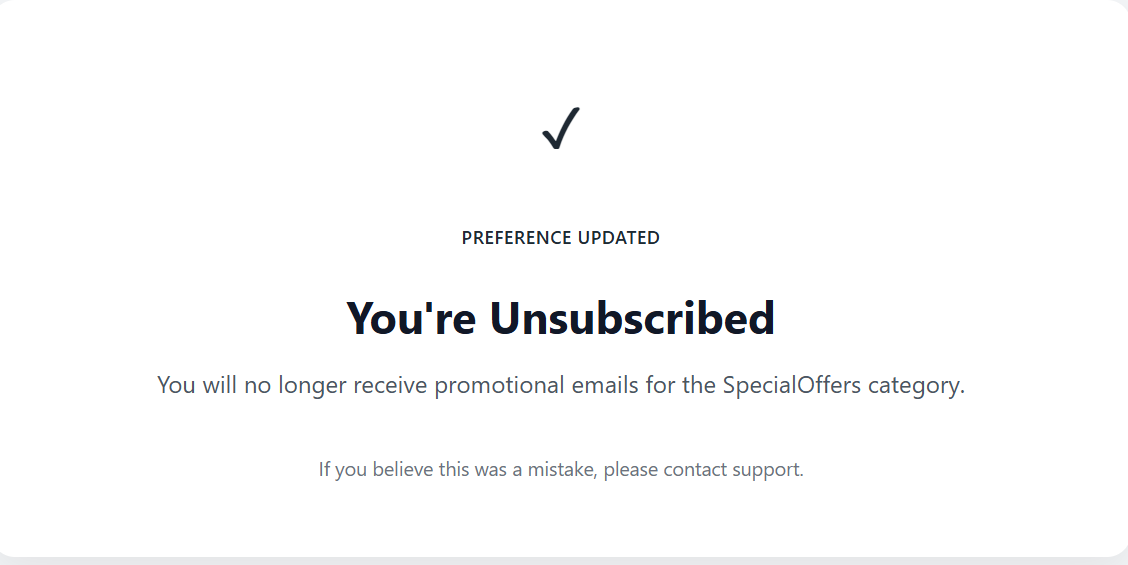
GET | /unsubscribe?token={token} | Unsubscribe an notification of an user for an category | NA | An Html Success Page |
1. Register Device Token
Endpoint: POST /device-token
Auth: Required (Bearer Token)
Request:
{
  "deviceId": "uuid-device-identifier",
  "fcmToken": "APA91bE1234567890...",
  "platform": 3
}
Success Response:
{
  "status": 0,
  "message": "Device registered successfully"
}
Error Responses:
-20009: Invalid input parameters-20012: Unauthorized-20002: Device already registered
2. Delete Device Token
Endpoint: DELETE /device-token/{deviceId}
Auth: Required (Bearer Token)
Success Response:
{
  "status": 0,
  "message": "Device deleted successfully"
}
Error Responses:
-20001: Device not found-20012: Unauthorized
3. Get Global Notification Settings
Endpoint: GET /notification/settings/global
Auth: Required (Bearer Token)
Success Response (DeliveryPreferences):
{
    "push": true,
    "email": true,
    "sms": false
}
4. Update Global Notification Settings
Endpoint: PUT /notification/settings/global
Auth: Required (Bearer Token)
Request:
{
  "push": false,
  "email": true,
  "sms": false
}
Success Response:
{
  "status": 0,
  "message": "Global settings updated successfully"
}
Error Response Example:
{
  "status": -20001,
  "message": "Notification settings not found"
}
5. Get Category Notification Settings
Endpoint: GET /notification/settings/category
Auth: Required (Bearer Token)
Success Response (CategoryNotificationSettings):
{
    "category": 2,
    "push": true,
    "email": true,
    "sms": false
}
6. Update Category Notification Settings
Endpoint: PUT /notification/settings/category
Auth: Required (Bearer Token)
Request:
{
  "category": 2,
  "push": true,
  "email": true,
  "sms": false
}
Success Response:
{
  "status": 0,
  "message": "Category settings updated successfully"
}
Error Response Example:
{
  "status": -20001,
  "message": "Notification settings not found"
}
7. Unsubscribe from Category Notifications (Email)
Endpoint: GET /unsubscribe?token={token}
Auth: Not Required (Public)
Purpose: Allow users to unsubscribe from promotional emails (Marketing, SpecialOffers) via email link
How It Works:
- Email template includes unsubscribe link at the bottom
- User clicks the link in email
- Browser opens the endpoint with encoded token
- API decodes token to extract
userIdandcategory - API disables the specific category notification for that user
- Returns HTML success page confirming unsubscribe
Request:
GET /unsubscribe?token=eyJhbGciOiJIUzI1NiIsInR5cCI6IkpXVCJ9...
Token Structure (JWT):
{
  "userId": "550e8400-e29b-41d4-a716-446655440000",
  "category": 3,
  "iat": 1652054400,
  "exp": 1684590400
}
Token Parameters:
userId: The user's UUID who will be unsubscribedcategory: Notification category (3=SpecialOffers, 4=Marketing)iat: Token issued timestamp (Unix)exp: Token expiration timestamp (Unix) - typically 30 days
Success Response (HTML Page):
Workflow Diagram
STEP 1: Device Registration
┌──────────────────┐
│   Mobile App     │
│  (iOS/Android)   │
└────────┬─────────┘
         │
         │ 1. Get FCM Token
         │    (Firebase SDK)
         │
         ▼
    ┌─────────────────────────────────┐
    │ POST /device-token              │
    │ {                               │
    │   "deviceId": "device-uuid",   │
    │   "fcmToken": "FCM_TOKEN",      │
    │   "platform": "ios"             │
    │ }                               │
    └────────┬────────────────────────┘
             │
             │ 2. Validate & Save
             │
             ▼
    ┌─────────────────────────────────┐
    │     Backend API                 │
    │  Store in Database              │
    │  userdevicetokens table         │
    └────────┬────────────────────────┘
             │
             │ 3. Send Confirmation
             │
             ▼
    ┌─────────────────────────────────┐
    │ 201 Created                      │
    │ Device registered successfully   │
    └─────────────────────────────────┘
STEP 2: Manage Notification Preferences
┌──────────────────┐
│   User Settings  │
│   (Mobile App)   │
└────────┬─────────┘
         │
         │ 1. Toggle Push Notifications
         │
         ▼
    ┌─────────────────────────────────┐
    │ PUT /notification/settings/global│
    │ {                               │
    │   "push": true                  │
    │ }                               │
    └────────┬────────────────────────┘
             │
             │ 2. Update in Database
             │    (notificationsettings)
             │
             ▼
    ┌─────────────────────────────────┐
    │ 200 OK                          │
    │ Settings updated                │
    └─────────────────────────────────┘
STEP 3: Sending Notifications
┌──────────────────────┐
│  Backend Service     │
│  (Event Triggered)   │
│  e.g., Order placed  │
└──────────┬───────────┘
           │
           │ 1. Check User Settings
           │
           ▼
    ┌──────────────────────────┐
    │ notificationsettings     │
    │ push = true?             │
    └──────────┬───────────────┘
               │
        YES ───┤
               │
               ▼
    ┌──────────────────────────┐
    │ Fetch User Devices       │
    │ Get all FCM tokens       │
    │ from userdevicetokens    │
    └──────────┬───────────────┘
               │
               ▼
    ┌──────────────────────────┐
    │ Send via Firebase        │
    │ Multicast Messaging API  │
    │ Tokens: [token1, token2] │
    └──────────┬───────────────┘
               │
               ▼
    ┌──────────────────────────┐
    │ Device Receives          │
    │ Push Notification        │
    └──────────┬───────────────┘
               │
               ▼
    ┌──────────────────────────┐
    │ User Sees Notification   │
    │ On Home Screen           │
    └──────────────────────────┘
STEP 4: Invalid Token Cleanup
┌──────────────────────────┐
│ Firebase Returns         │
│ Error for Token          │
│ (Device uninstalled app) │
└──────────┬───────────────┘
           │
           ▼
    ┌──────────────────────────┐
    │ Identify Invalid Token    │
    │ ErrorCode: Unregistered   │
    └──────────┬───────────────┘
               │
               ▼
    ┌──────────────────────────┐
    │ Delete from Database     │
    │ userdevicetokens        │
    └──────────┬───────────────┘
               │
               ▼
    ┌──────────────────────────┐
    │ Log Action               │
    │ (For Monitoring)         │
    └──────────────────────────┘
Complete FCM Workflow Sequence Diagram
sequenceDiagram
    actor User as 👤 User
    participant App as 📱 Mobile App
    participant SDK as 🔐 Firebase SDK
    participant API as 🖥️ Backend API
    participant DB as 💾 Database
    participant FCM as ☁️ Firebase FCM

    rect rgb(200, 220, 255)
        Note over App,FCM: PHASE 1️⃣: DEVICE REGISTRATION

        User->>App: Install App
        App->>SDK: Request FCM Token
        SDK-->>App: Issue FCM Token

        App->>API: POST /device-token<br/>{deviceId, fcmToken, platform}
        API->>DB: Store in userdevicetokens table
        DB-->>API: ✅ Stored
        API-->>App: 201 Created {status: 201}
    end

    rect rgb(220, 255, 220)
        Note over App,FCM: PHASE 2️⃣: MANAGE NOTIFICATION SETTINGS

        User->>App: Open Settings
        App->>API: GET /notification/settings
        API->>DB: Query notification preferences
        DB-->>API: {global: {...}, categories: [...]}
        API-->>App: Settings Data

        User->>App: Toggle Notifications ON
        App->>API: PUT /notification/settings/global<br/>{push: true}
        API->>DB: Update notificationsettings
        DB-->>API: ✅ Updated
        API-->>App: 200 OK {status: 200}
    end

    rect rgb(255, 255, 200)
        Note over App,FCM: PHASE 3️⃣: SEND NOTIFICATION

        Note over API,FCM: Backend Event Triggered (Order Placed)
        API->>DB: Check notification settings
        DB-->>API: push = true ✓

        API->>DB: Fetch all user device tokens
        DB-->>API: [token1, token2, token3]

        API->>FCM: Send Multicast Message<br/>Tokens: [array]<br/>Title, Body, Data
        FCM->>FCM: Validate tokens<br/>Route to devices<br/>Queue delivery
        FCM-->>API: ✅ Queued {success_count: 3}

        FCM->>SDK: Push Notification
        SDK->>App: Receive notification payload
        App->>User: Display Notification<br/>Title: "Order Alert"<br/>Body: "Order #123"

        User->>App: Tap Notification
        App->>App: Launch App / Open Details
    end

    rect rgb(255, 220, 220)
        Note over App,FCM: PHASE 4️⃣: ERROR HANDLING & CLEANUP

        Note over App,FCM: [Scenario: App Uninstalled]
        FCM->>FCM: Detect Invalid Token
        FCM-->>API: Error: Token Unregistered ❌

        API->>DB: Identify & Mark Invalid Tokens
        API->>DB: DELETE from userdevicetokens
        DB-->>API: ✓ Token Removed

        Note over API: Logging: Invalid token cleaned up
    end

    rect rgb(240, 240, 255)
        Note over App,FCM: KEY FEATURES ✨
        Note over App,FCM: ✅ Secure token storage | User-controlled preferences
        Note over App,FCM: ✅ Multicast delivery | Auto token cleanup
        Note over App,FCM: ✅ Platform support | Real-time delivery
    end
Email Unsubscribe Workflow
┌──────────────────────────────────────────────────────────────┐
│ STEP 1: Email Generation & Token Creation                   │
└──────────────────────────────────────────────────────────────┘
         │
         ├─ Backend Event: Promotional Email Trigger
         │  (e.g., New Special Offer, Marketing Campaign)
         │
         ▼
    ┌──────────────────────────────────────────────┐
    │ Backend Service                              │
    │ 1. Generate JWT Token                        │
    │    - Include: userId, category, expiration  │
    │    - Token valid for 30 days                │
    └────────┬─────────────────────────────────────┘
             │
             ▼
    ┌──────────────────────────────────────────────┐
    │ 2. Create Unsubscribe Link                   │
    │    URL: /unsubscribe?token={JWT_TOKEN}      │
    │    Example:                                  │
    │    /unsubscribe?token=eyJhbGciOiJIUzI1NiI.  │
    └────────┬─────────────────────────────────────┘
             │
             ▼
    ┌──────────────────────────────────────────────┐
    │ 3. Render Email Template                     │
    │    - Main promotional content                │
    │    - Add unsubscribe link at footer          │
    │    - [Unsubscribe from Marketing]            │
    └────────┬─────────────────────────────────────┘
             │
             ▼
    ┌──────────────────────────────────────────────┐
    │ 4. Send Email via SMTP/Email Service         │
    │    To: user@example.com                      │
    └────────┬─────────────────────────────────────┘
             │
┌────────────────────────────────────────────────────────────────┐
│ STEP 2: User Receives Email & Clicks Unsubscribe              │
└────────────────────────────────────────────────────────────────┘
             │
             ▼
    ┌──────────────────────────────────────────────┐
    │ Email Arrives in User's Inbox               │
    │ Subject: "🎉 Special Offer for You!"        │
    └────────┬─────────────────────────────────────┘
             │
             ├─ User reads promotional content
             │
             ▼
    ┌──────────────────────────────────────────────┐
    │ User Clicks "Unsubscribe" Link               │
    └────────┬─────────────────────────────────────┘
             │
             ▼
    ┌──────────────────────────────────────────────┐
    │ Browser Opens:                               │
    │ GET /unsubscribe?token={JWT_TOKEN}          │
    │                                              │
    │ Email Client/Browser Initiates HTTP Request │
    └────────┬─────────────────────────────────────┘
             │
┌────────────────────────────────────────────────────────────────┐
│ STEP 3: Backend Processes Unsubscribe Request                 │
└────────────────────────────────────────────────────────────────┘
             │
             ▼
    ┌──────────────────────────────────────────────┐
    │ API Endpoint: /unsubscribe                   │
    │ 1. Validate JWT Token                        │
    │    - Check signature                         │
    │    - Verify not expired                      │
    │    - Extract claims                          │
    └────────┬─────────────────────────────────────┘
             │
             ├─ Token Valid? ──YES──┐
             │                      │
             │                      ▼
             │            ┌─────────────────────────────┐
             │            │ Extract from token:         │
             │            │ - userId                    │
             │            │ - category (Marketing/      │
             │            │   SpecialOffers)            │
             │            └────────┬────────────────────┘
             │                     │
             │                     ▼
             │            ┌─────────────────────────────┐
             │            │ Query Database              │
             │            │ Check if settings exist     │
             │            │ for user + category         │
             │            └────────┬────────────────────┘
             │                     │
             │                     ▼
             │            ┌─────────────────────────────┐
             │            │ Update/Create Settings:     │
             │            │                             │
             │            │ SET email = false           │
             │            │ WHERE userId = {userId}     │
             │            │ AND category = {category}   │
             │            │                             │
             │            │ Save to                     │
             │            │ notificationcategorysettings│
             │            └────────┬────────────────────┘
             │                     │
             │                     ▼
             │            ┌─────────────────────────────┐
             │            │ Log Action                  │
             │            │ Event: User Unsubscribed    │
             │            │ UserId: {userId}            │
             │            │ Category: {category}        │
             │            └────────┬────────────────────┘
             │                     │
             │                     ▼
             │            ┌─────────────────────────────┐
             │            │ Generate Success Response   │
             │            │ Return HTML Success Page    │
             │            └────────┬────────────────────┘
             │                     │
             ├─ Token Invalid/Expired ──NO──┐
             │                              │
             │                              ▼
             │                   ┌──────────────────────────┐
             │                   │ Return Error HTML Page   │
             │                   │ "Unsubscribe Failed"     │
             │                   │ "Invalid or expired link"│
             │                   └──────────────────────────┘
             │
┌────────────────────────────────────────────────────────────────┐
│ STEP 4: Browser Displays Response Page                        │
└────────────────────────────────────────────────────────────────┘
             │
             ▼
    ┌──────────────────────────────────────────────┐
    │ SUCCESS PAGE:                                │
    │ ✓ Unsubscribed Successfully                 │
    │                                              │
    │ "You have been unsubscribed from            │
    │  Marketing notifications."                  │
    │                                              │
    │ [Manage Your Preferences]  [Contact Support]│
    └──────────────────────────────────────────────┘

┌────────────────────────────────────────────────────────────────┐
│ STEP 5: Future Email Behavior                                 │
└────────────────────────────────────────────────────────────────┘
             │
             ▼
    ┌──────────────────────────────────────────────┐
    │ Next Time Promo Email Triggered:             │
    │ 1. Check user's notification settings        │
    │ 2. Query: SELECT email FROM                 │
    │    notificationcategorysettings              │
    │    WHERE userId = {userId}                   │
    │    AND category = Marketing                 │
    │                                              │
    │ Result: email = false  ❌                    │
    │                                              │
    │ ➜ Email is NOT sent to user                 │
    │ ➜ No promotional emails received            │
    └──────────────────────────────────────────────┘
Email Unsubscribe Sequence Diagram
sequenceDiagram
    actor User as 👤 User
    participant Email as 📧 Email Client
    participant Browser as 🌐 Browser
    participant API as 🖥️ Backend API
    participant DB as 💾 Database

    rect rgb(255, 240, 200)
        Note over Email,DB: PHASE 1️⃣: EMAIL SENDING

        API->>API: Backend Event: New Promo Offer
        API->>API: Generate JWT Token<br/>{userId, category, exp}
        API->>API: Create Unsubscribe URL
        API->>API: Render Email Template<br/>Add unsubscribe link at footer

        API->>Email: Send Email<br/>To: user@example.com<br/>Subject: Special Offer
        Note over Email,DB: Email arrives in inbox
    end

    rect rgb(200, 240, 255)
        Note over Email,DB: PHASE 2️⃣: USER INTERACTION

        User->>Email: Read Email Content
        Email->>User: Display Email with<br/>[Unsubscribe] Link

        User->>Email: Click Unsubscribe Link
        Email->>Browser: Navigate to<br/>GET /unsubscribe?token=...
    end

    rect rgb(200, 255, 200)
        Note over Email,DB: PHASE 3️⃣: UNSUBSCRIBE PROCESSING

        Browser->>API: GET /unsubscribe?token=...
        API->>API: Decode JWT Token
        API->>API: Extract userId & category
        API->>API: Validate token signature

        alt Token Valid
            API->>DB: Query current settings
            DB-->>API: Return settings
            API->>DB: UPDATE notificationcategorysettings<br/>SET email=false
            DB-->>API: ✅ Updated
            API->>API: Log: User Unsubscribed
            API-->>Browser: Return Success HTML Page
        else Token Invalid/Expired
            API-->>Browser: Return Error HTML Page
        end
    end

    rect rgb(255, 200, 200)
        Note over Browser,DB: PHASE 4️⃣: USER SEES CONFIRMATION

        Browser->>User: Display Success Page<br/>✓ Unsubscribed Successfully<br/>Category: Marketing
        User->>User: Optionally manage<br/>preferences or contact support
    end

    rect rgb(240, 220, 255)
        Note over API,DB: PHASE 5️⃣: FUTURE EMAIL BEHAVIOR

        Note over API,DB: When next promo email is triggered:
        API->>DB: Check notification settings
        DB-->>API: {userId, Marketing: email=false}

        alt Email Disabled
            API->>API: Skip sending email
            Note over API: User never receives this email
        end
    end
Summary - Quick Reference
| Scenario | Flow |
|---|---|
| User installs app | App gets FCM token → POST /device-token → Saved in DB |
| User opens settings | GET /notification/settings → Show toggle |
| User toggles notifications | PUT /notification/settings → Update DB |
| New notification event | Check settings → Get user tokens → Send via Firebase → Devices receive |
| App uninstalled | Firebase detects → Token auto-cleaned from DB |
Push Notification Events
| # | Event | Recipients | Status |
|---|---|---|---|
| 1 | When Service request is created | Admin | ✅ Done |
| 2 | When Technician Assigned to an service request | Technician, Customer | ✅ Done |
| 3 | Technician Cancel an work | All Admins, Customer | ⏳ Pending |
| 4 | Customer Cancel the work | Assigned Technician | ⏳ Pending |
| 5 | Technician Start to Route Towards The Service request | Customer | ✅ Done |
| 6 | Technician Start an work | Customer | ⏳ Pending |
| 7 | Technician Complete an work | Customer, All Admins | ⏳ Pending |
Development Tasks & Estimates
| No | Task | Status | Hours | Notes |
|---|---|---|---|---|
| 1 | Firebase Admin SDK setup | ✅ Done | 4 | Credentials configured |
| 2 | Device token API implementation | ✅ Done | 6 | Register & delete endpoints |
| 3 | Notification settings API | ✅ Done | 4 | Get & update endpoints |
| 4 | Database schema creation | ✅ Done | 2 | Tables indexed |
| 5 | Invalid token cleanup | ✅ Done | 3 | Auto-cleanup on errors |
| 6 | Documentation | 🔄 Active | - | This document |
| 7 | Unit & integration tests | ⏳ Pending | 8 | Complete test coverage |
Testing & Quality Assurance
(To be documented)
Deployment Considerations
(To be documented)
Risks & Mitigations
(To be documented)
Review & Approval
- Reviewer: [Tech Lead]
- Status: ⏳ Pending Approval
Notes
- Mobile clients must integrate Firebase SDK
- FCM tokens are platform-specific (iOS/Android)
- Invalid tokens are cleaned up automatically
- Users can opt-out via notification settings