Push Notification with Firebase Cloud Messaging (FCM)
Author(s)
- Ayan Ghosh
- Amarnath Garai
- Ashik
- Sarfarajul Haque
Last Updated Date
2025-11-19
SRS References
Version History
| Version | Date | Changes | Author |
|---|---|---|---|
| 1.0 | 2025-11-19 | Initial draft for Firebase Cloud Messaging | Ayan Ghosh, Amarnath Garai |
Feature Overview
Objective: This document defines the unified architecture, workflow, and API design for Push Notifications using Firebase Cloud Messaging (FCM) across Android, iOS, and Web platforms. It establishes a consistent mechanism for generating, registering, managing, updating, and validating tokens using a device_id–based approach, allowing seamless multi-device support.
Scope:
The feature ensures every device (mobile or web) maintains an up-to-date push token linked with a unique device_id. It supports token registration, update, validation, removal, and stale token detection during notification sending. All APIs are platform-agnostic, enabling one unified backend for all clients.
Dependencies:
- Firebase Cloud Messaging (FCM)
- Device identification (OS-level or custom uuid)
- Database for device token management
- IAM service for mapping to
user_id
Requirements
- Each device must generate or possess a unique
device_id. - Web clients must generate UUID-based
device_idand store in localStorage. - Mobile clients may use platform identifiers or generated UUID stored in secure storage.
- Push tokens must be registered to backend using a unified API endpoint.
- Token registration must include:
device_id,platform,token. - Backend must map tokens to devices and to user accounts.
- Token refresh events (e.g., FCM token rotation) must trigger re-registration.
- Backend must update token validity on every registration.
- A token older than 30 days is considered stale.
Stale tokens must be removed when sending notifications. - Backend must validate tokens during send attempts and delete invalid tokens (e.g., FCM "NotRegistered" errors).
- Logout must remove token from backend via
device_id. - Users may have multiple active devices; each must store a separate token.
- System must support FCM tokens (mobile/web).
- Data must persist even if user logs out;
device_idremains as installation-level identity.
Design Specifications
UI/UX Design:
(Not platform-specific, general expectations)
- Web application prompts for notification permission.
- Mobile apps request OS-level notification rights.
- Provide a settings page to enable/disable notifications.
- Display device-specific notification preferences (optional).
- Show warning if browser blocks notifications.
Data Models:
Device Token Model
public record DeviceToken
{
    public Guid Id { get; set; }
    public Guid UserId { get; set; }
    public string DeviceId { get; set; } = string.Empty;
    public string FcmToken { get; set; } = string.Empty;
    public Platform Platform { get; set; }
    public DateTime CreatedAt { get; set; } = DateTime.UtcNow;
    public DateTime UpdatedAt { get; set; } = DateTime.UtcNow;
}

public record RegisterDeviceRequest(
    string DeviceId,
    string FcmToken,
    Platform Platform
);

public record CommonResponse
{
    public int Status { get; init; }
    public string? Message { get; init; }
}

public record UpdatePushNotificationRequest
{
    public required bool PushNotificationStatus { get; set; }
}

public record NotificationSettingsResponse
{
    public Guid Id { get; init; }
    public Guid UserId { get; init; }
    public bool Push { get; init; }
    public DateTime CreatedAt { get; init; }
    public DateTime UpdatedAt { get; init; }
}

public record GetNotificationSettingsRequest
{
    public Guid UserId { get; init; }
}

public record GetNotificationSettingsResponse
{
    public NotificationSettingsResponse? Settings { get; init; }
    public int Status { get; init; }
    public string? Message { get; init; }
}

public enum Platform
{
     Android = 1,
     iOS,
     Web
}
API Interfaces:
| Endpoint | Method | Parameters / Payload | Response | Status Codes |
|---|---|---|---|---|
/api/notification/device/register | POST | RegisterDeviceRequest | CommonResponse | 201, 200, 400, 500 |
/api/notification/device/delete/{device_id} | DELETE | device_id | CommonResponse | 200, 400, 500 |
/api/notification/push-notification | PUT | UpdatePushNotificationRequest | CommonResponse | 200, 400, 401, 500 |
/api/notification/push-notification/{userId} | GET | userId (path parameter) | NotificationSettingsResponse | 200, 400, 401, 404, 500 |
API Request and Responses
Register Device Token
Endpoint: POST /api/notification/device/register
Request Body:
{
  "deviceId": "550e8400-e29b-41d4-a716-446655440000",
  "fcmToken": "eGhVfMgzRK6_QaJGKxL4Fs:APA91bE8X7Y9Z...",
  "platform": "Web"
}
Success Response (201 Created):
{
  "status": 201,
  "message": "Device token registered successfully"
}
Success Response (200 OK - Token Updated):
{
  "status": 200,
  "message": "Device token updated successfully"
}
Error Response (400 Bad Request):
{
  "status": 400,
  "message": "Invalid request payload. DeviceId, FcmToken, and Platform are required."
}
Error Response (500 Internal Server Error):
{
  "status": 500,
  "message": "Internal server error occurred while processing the request"
}
Delete Device Token
Endpoint: DELETE /api/notification/device/delete/{device_id}
Path Parameters:
device_id(string): The unique device identifier
Success Response (200 OK):
{
  "status": 200,
  "message": "Device token deleted successfully"
}
Error Response (400 Bad Request):
{
  "status": 400,
  "message": "Invalid device ID provided"
}
Error Response (404 Not Found):
{
  "status": 404,
  "message": "Device token not found"
}
Error Response (500 Internal Server Error):
{
  "status": 500,
  "message": "Internal server error occurred while processing the request"
}
Update Push Notification Settings
Endpoint: PUT /api/notification/push-notification
Description: Updates the push notification status for the authenticated user.
Authorization: Required (JWT Bearer Token)
Request Body:
{
  "pushNotificationStatus": true
}
Success Response (200 OK):
{
  "status": 200,
  "message": "Push notification settings updated successfully"
}
Error Response (400 Bad Request):
{
  "status": 400,
  "message": "Invalid request data"
}
Error Response (401 Unauthorized):
{
  "status": 401,
  "message": "Invalid user token"
}
Error Response (404 Not Found):
{
  "status": 404,
  "message": "User settings not found"
}
Error Response (500 Internal Server Error):
{
  "status": 500,
  "message": "An internal error occurred while updating notification settings"
}
Get Push Notification Settings
Endpoint: GET /api/notification/push-notification/{userId}
Description: Retrieves the push notification settings for a specific user. The authenticated user can only retrieve their own settings.
Authorization: Required (JWT Bearer Token)
Path Parameters:
userId(Guid): The unique identifier of the user
Success Response (200 OK):
{
  "id": "3fa85f64-5717-4562-b3fc-2c963f66afa6",
  "userId": "550e8400-e29b-41d4-a716-446655440000",
  "push": true,
  "createdAt": "2025-11-19T10:30:00Z",
  "updatedAt": "2025-11-20T14:15:00Z"
}
Error Response (400 Bad Request):
{
  "status": 400,
  "message": "Invalid request data"
}
Error Response (401 Unauthorized - Invalid Token):
{
  "status": 401,
  "message": "Invalid user token"
}
Error Response (401 Unauthorized - User Mismatch):
{
  "status": 401,
  "message": "You are not authorized to view this user's settings."
}
Error Response (404 Not Found):
{
  "status": 404,
  "message": "User settings not found"
}
Error Response (500 Internal Server Error):
{
  "status": 500,
  "message": "An internal error occurred while retrieving notification settings"
}
Platform Values:
Android- Android mobile devicesiOS- iOS mobile devicesWeb- Web browsers
Third-Party Integrations:
- Firebase Cloud Messaging (FCM) → Push notifications.
Workflow:
-
Device generates
device_id:- Mobile → OS identifier or random UUID
- Web → UUID stored in localStorage
-
App requests notification permission.
-
Retrieve FCM token (getToken() or equivalent).
-
Register/update token via
/api/notification/device/register. -
On token refresh:
- Device sends updated token to backend.
-
During notification send:
- Backend filters tokens:
- Remove tokens older than 30 days
- Remove tokens invalidated during FCM send
- Backend filters tokens:
-
Logout/uninstall:
- Device calls
/api/device/delete.
- Device calls
Note: Users may have multiple devices simultaneously.
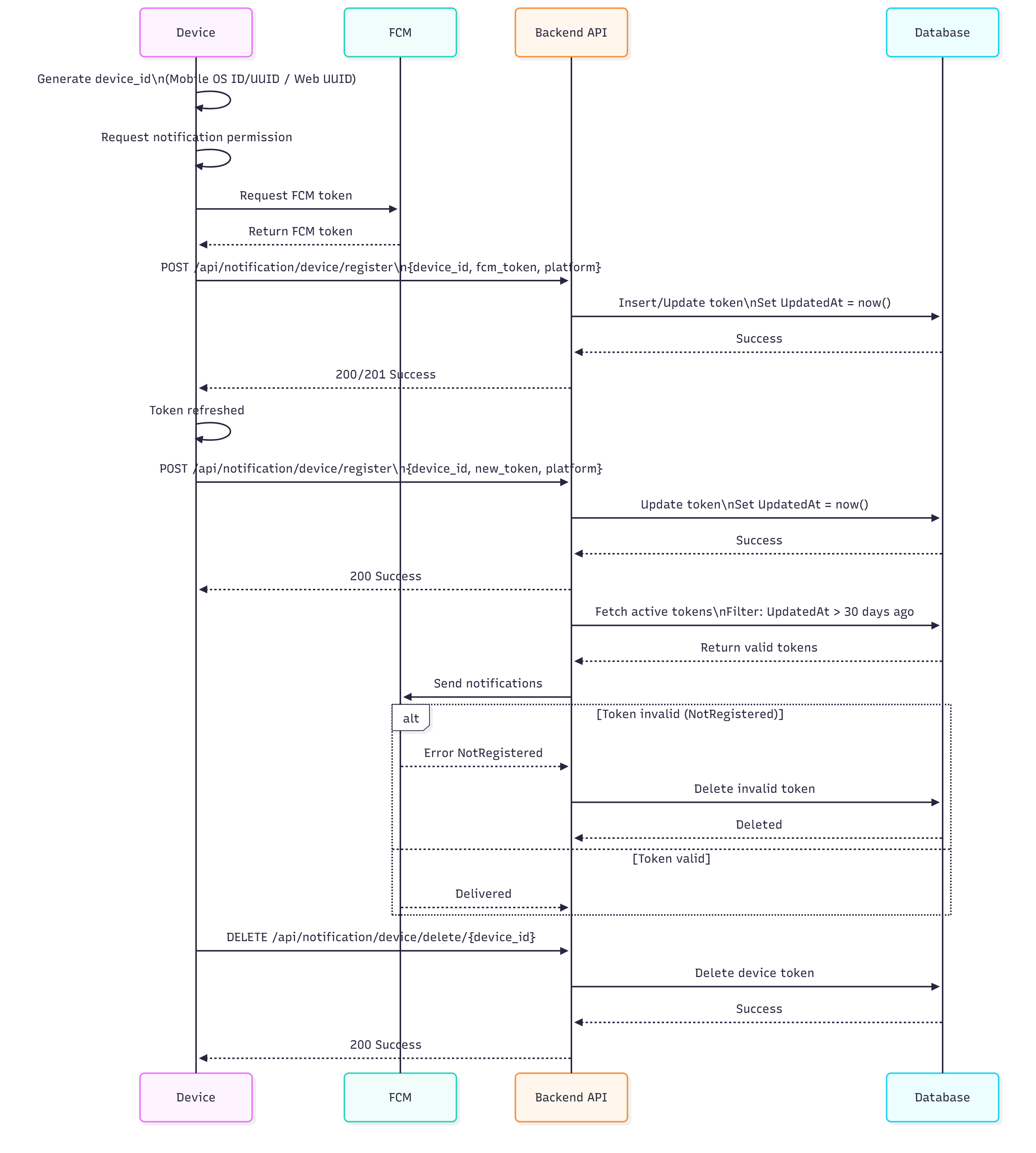
Notification Trigger Rules:
The system respects user notification preferences before sending push notifications for specific events:
-
New Auction Notification:
- Target Audience: Dealer users
- Condition: Push notification is sent only if the dealer has turned on their push notification setting (
push: true) - Trigger: When a new auction is created in the system
-
New/Lowest Bid Notification:
- Target Audience: Customer
- Condition: Push notification is sent only if the customer has turned on their push notification setting (
push: true) - Trigger: When a new bid is placed or when a bid becomes the lowest bid in an auction
-
Bid Accept Notification:
- Target Audience: Customer
- Condition: Push notification is sent only if the customer has turned on their push notification setting (
push: true) - Trigger: When a dealer accepts a customer's bid
Implementation Flow:
Before sending any push notification, the system must:
- Retrieve the target user's notification settings using the
GetNotificationSettingsRequest - Check the
Pushproperty inNotificationSettingsResponse - Only proceed with FCM notification delivery if
Push == true - Skip notification sending if
Push == falseor if settings are not found
Development Tasks & Estimates
| No | Task Name | Estimate (Hours) | Dependencies | Notes |
|---|---|---|---|---|
| 1 | 4 | Schema update |
| Total | | 46 Hours | | |
Review & Approval
Reviewer:
Approval Date:
Notes:
FCM Push Notification - Mobile
Overview
This POC demonstrates Firebase Cloud Messaging (FCM) implementation in the MBDN Market Flutter app using Clean Architecture principles with Riverpod 3.0 state management.
Architecture
Feature Structure
lib/features/message/
├── application/
│   └── messaging_state.dart          # Freezed state unions
├── providers/
│   ├── messaging_provider.dart       # Main FCM logic
│   └── notification_badge_provider.dart  # Badge count management
└── presentation/
    └── screen/
        └── message_screen.dart        # Notification history UI
Implementation Details
1. Dependencies
firebase_core: ^3.7.0
firebase_messaging: ^15.1.0
uuid: ^4.5.1  # For device ID generation
2. State Management
MessagingState (Freezed union):
initial- Before initializationloading- During setupready(deviceId, token, lastMessage)- Active with FCM tokenerror(message)- Permission denied or failure
3. Key Components
messaging_provider.dart
Responsibilities:
- Request notification permissions
- Generate/persist unique device ID
- Manage FCM token (get, save, refresh)
- Listen to foreground messages
- Handle token refresh events
Key Methods:
_init()- Initialize FCM, request permissions, set up listeners_ensureDeviceId()- Generate UUID v4 device ID (persisted via SharedPreferences)_ensureToken()- Fetch and save FCM token_saveToken()- Store token in SharedPreferences asfcm_token
Streams:
FirebaseMessaging.onMessage- Foreground notificationsFirebaseMessaging.instance.onTokenRefresh- Token rotation
notification_badge_provider.dart
Features:
- Badge count persistence (
notification_badge_countkey) - Increment on new message
- Reset badge count
- Notification history (in-memory list)
main.dart
Setup:
('vm:entry-point')
Future<void> _firebaseMessagingBackgroundHandler(RemoteMessage message) async {
await Firebase.initializeApp();
}
Future<void> main() async {
WidgetsBinding widgetsBinding = WidgetsFlutterBinding.ensureInitialized();
await Firebase.initializeApp();
FirebaseMessaging.onBackgroundMessage(_firebaseMessagingBackgroundHandler);
runApp(const ProviderScope(child: App()));
}
Listener in App Widget:
ref.listen(messagingProvider, (prev, next) {
  final last = next.whenOrNull(
    ready: (deviceId, token, lastMessage) => lastMessage,
  );
  if (last is RemoteMessage) {
    final title = last.notification?.title ?? 'New message';
    final body = last.notification?.body ?? last.data.toString();
    CustomSnackbar.show(context, '$title: $body');
  }
});
4. Notification Handling
Three Scenarios:
- Foreground -
FirebaseMessaging.onMessagestream- Shows CustomSnackbar
- Increments badge
- Adds to history
- Background -
_firebaseMessagingBackgroundHandler- Executes top-level function
- Must be annotated with
@pragma('vm:entry-point')
- Terminated - System handles, can check on app launch
5. Permission Flow
final settings = await FirebaseMessaging.instance.requestPermission(
  alert: true,
  badge: true,
  sound: true,
  announcement: false,
  carPlay: false,
  criticalAlert: false,
  provisional: false,
);

if (settings.authorizationStatus == AuthorizationStatus.denied) {
  state = const MessagingState.error('Notifications permission denied');
  return;
}
Testing
Get FCM Token
// Watch provider in UI
ref.watch(messagingProvider).whenOrNull(
  ready: (deviceId, token, _) => Text('Token: $token'),
);
Send Test Notification
Use Firebase Console or curl:
curl -X POST https://fcm.googleapis.com/fcm/send \
  -H "Authorization: key=YOUR_SERVER_KEY" \
  -H "Content-Type: application/json" \
  -d '{
    "to": "FCM_TOKEN_HERE",
    "notification": {
      "title": "Test Notification",
      "body": "This is a test message"
    },
    "data": {
      "click_action": "FLUTTER_NOTIFICATION_CLICK",
      "route": "/home"
    }
  }'
Debug Logs
debugPrint('FCM token: $token');  // On token acquisition
debugPrint('Device ID: $deviceId');  // On device ID creation
Storage Keys
| Key | Type | Purpose |
|---|---|---|
device_id | String | UUID v4 device identifier |
fcm_token | String | Current FCM registration token |
notification_badge_count | int | Unread notification count |
Platform Configuration
Android
AndroidManifest.xml - Add intent filters for notification click handling:
<intent-filter>
    <action android:name="FLUTTER_NOTIFICATION_CLICK" />
    <category android:name="android.intent.category.DEFAULT" />
</intent-filter>
iOS
Info.plist - Background modes:
<key>UIBackgroundModes</key>
<array>
    <string>remote-notification</string>
</array>
Limitations & Future Enhancements
Current Limitations
- No API integration (token not sent to backend)
- No notification channels (Android)
- No action buttons
- No deep linking
- History is in-memory only (cleared on app restart)
- No notification scheduling
Recommended Enhancements
-
Backend Integration
- POST token to
/api/v1/users/fcm-token - Delete token on logout
- Associate token with user account
- POST token to
-
Deep Linking
- Parse
data.routefrom notification - Navigate using GoRouter
- Parse
-
Notification Channels
const AndroidNotificationChannel channel = AndroidNotificationChannel(
  'high_importance_channel',
  'High Importance Notifications',
  importance: Importance.high,
); -
Local Notifications
- Use
flutter_local_notificationsfor foreground display - Scheduled notifications
- Use
-
Notification Actions
"data": {
  "actions": ["Accept", "Decline"],
  "type": "auction_bid"
}
Troubleshooting
Token not received
- Check Firebase project configuration
- Verify
google-services.json(Android) /GoogleService-Info.plist(iOS) - Ensure internet connectivity
- Check permission status
Background handler not working
- Verify
@pragma('vm:entry-point')annotation - Check Xcode build settings (iOS)
- Test on physical device (iOS)
Permission denied
- Settings > App > Notifications > Enable
- Re-request permission after settings change:
await FirebaseMessaging.instance.requestPermission();
Architecture Compliance
✅ Follows Clean Architecture:
- Domain:
MessagingState(Freezed models) - Application: State management logic in
MessagingNotifier - Presentation: UI in
MessageScreen
✅ Riverpod 3.0:
@riverpodannotations- Code generation with
build_runner - Proper disposal with
ref.onDispose
✅ Project Conventions:
- Notifier suffix:
MessagingNotifier - State suffix:
MessagingState - Provider suffix:
messagingProvider - Freezed for state unions
- SharedPreferences for persistence