Auto-Bid Feature
Author(s)
- Abhishak Kumar Roy
Last Updated Date
2025-10-24
SRS References
Version History
| Version | Date | Changes | Author |
|---|---|---|---|
| 1.0 | 2025-10-24 | Initial draft for Auto-Bid feature | Abhishak Kumar Roy |
Feature Overview
Objective: The Auto-Bid feature automates the bidding process for dealers in a reverse auction. It enables the system to place and adjust bids on behalf of dealers according to pre-configured rules such as reserve price, maximum discount percentage, and bid interval.
Scope: This feature ensures dealers remain competitive during live auctions without manual effort, while maintaining control through configurable limits and the ability to switch between Auto and Manual modes at any time. It also leverages a scheduler-based background service to track real-time auction changes and trigger automated actions accordingly.
The Auto-Bid system operates on two levels:
- Global Level: Dealer-wide settings that apply to all auctions by default
- Auction Level: Individual auction overrides that take precedence over global settings
Dependencies:
- Dealer Inventory module (for Reserve Price)
- Auction Master module (for Bid Mode control)
- Dealer Settings module
- Notification service (email/push)
- Scheduler/Background Job Processor
- WebSocket or SignalR for real-time updates
Requirements
- Auto-Bid must operate only if the vehicle is available in the dealer’s inventory.
- Add ReservePrice field in the existing Inventory class to define the minimum acceptable bid.
- Add BidMode field in the existing Auction Master class to support Auto/Manual modes.
- If ReservePrice exists → use it as the minimum limit for Auto-Bid.
- If no ReservePrice → system applies Max Discount (%) rule to determine the minimum possible bid.
- Scheduler must monitor real-time auction changes (new bids, new auctions, bid updates).
- Scheduler will process the data changes table and apply auto-bid logic as per configuration.
- Dealers can enable/disable Auto-Bid globally and per auction.
- Dealers can toggle between Auto and Manual modes during live auctions.
- Auto-Bid must stop automatically once the Reserve Price or Max Discount limit is reached.
- All system-generated Auto-Bids must be logged.
- Dealer receives notifications when Auto-Bid starts, stops, or switches mode.
- System must support two-level Auto-Bid control:
- Global Level: Default settings for all auctions (stored in
autobidsettingstable) - Auction Level: Individual auction overrides (stored in
auctionautobidsettingstable)
- Global Level: Default settings for all auctions (stored in
- Auction-level settings always take precedence over global settings.
- When disabling global Auto-Bid, system must prompt dealer to disable for all ongoing auctions.
- System must handle all ongoing auctions appropriately when global settings change.
Design Specifications
UI/UX Design:
- Add “Auto-Bid Settings” under Dealer Dashboard for configuring rules (discount %, interval, bid difference, etc.).
- Add Auto/Manual toggle button in each auction room (real-time control).
- Mark system-generated bids as “Auto-Bid” in the bid history.
- Notifications for Auto-Bid activation, deactivation, and stop condition alerts.
Data Models
Changes in Existing Models
1. Inventory Class Update
Add a new field ReservePrice to define the dealer's lowest acceptable bid.
public class Inventory
{
    public Guid VehicleId { get; set; }
    public Guid DealerId { get; set; }
    public string Make { get; set; }
    public string Model { get; set; }
    public int Year { get; set; }
    public decimal BasePrice { get; set; }
    public decimal? ReservePrice { get; set; } // Newly added
    public VehicleStatus Status { get; set; } // Available, Sold, etc.
}
2. Auction Master Update
Add BidMode to manage Auto/Manual bidding states.
public enum BidMode
{
    Auto,
    Manual
}
New Database Tables
1. Global Auto-Bid Settings (Table: autobidsettings)
This table stores dealer-wide default Auto-Bid configurations that apply to all auctions unless overridden at the auction level.
Database Schema:
CREATE TABLE IF NOT EXISTS public.autobidsettings (
    dealerid UUID PRIMARY KEY,
    enableautobid BOOLEAN NOT NULL DEFAULT false,
    enableinitialbid BOOLEAN NOT NULL DEFAULT false,
    maxdiscountpercent NUMERIC(5,2) NOT NULL DEFAULT 0,
    amountlessthanlowestbid NUMERIC(18,2) NOT NULL DEFAULT 0,
    loguser UUID NOT NULL,
    logdate TIMESTAMP WITH TIME ZONE NOT NULL DEFAULT CURRENT_TIMESTAMP
);
Field Descriptions:
dealerid: Unique identifier for the dealer (Primary Key)enableautobid: Global toggle for Auto-Bid functionalityenableinitialbid: Whether to place an initial bid automatically when auction startsmaxdiscountpercent: Maximum discount percentage allowed from base priceamountlessthanlowestbid: Amount to bid below the current lowest bidloguser: User who last modified the settingslogdate: Timestamp of last modification
2. Auction-Level Auto-Bid Settings (Table: auctionautobidsettings)
This table stores auction-specific Auto-Bid configurations that override global settings for individual auctions.
Database Schema:
CREATE TABLE IF NOT EXISTS public.auctionautobidsettings (
    auctionid UUID NOT NULL,
    dealerid UUID NOT NULL,
    enableautobid BOOLEAN NOT NULL DEFAULT false,
    maxdiscountpercent NUMERIC(5,2) NOT NULL DEFAULT 0,
    amountlessthanlowestbid NUMERIC(18,2) NOT NULL DEFAULT 0,
    updatedby UUID NOT NULL,
    updatedat TIMESTAMP WITH TIME ZONE NOT NULL DEFAULT CURRENT_TIMESTAMP,
    PRIMARY KEY (auctionid, dealerid)
);
Field Descriptions:
auctionid: Unique identifier for the auctiondealerid: Unique identifier for the dealerenableautobid: Auction-specific toggle for Auto-Bidmaxdiscountpercent: Auction-specific maximum discount percentageamountlessthanlowestbid: Auction-specific bid amount below lowest bidupdatedby: User who last modified the settingsupdatedat: Timestamp of last modification
Composite Primary Key: (auctionid, dealerid)
Settings Hierarchy & Priority
The system follows a hierarchical settings resolution pattern:
- Auction Level Settings (Highest Priority)
- If a record exists in
auctionautobidsettingsfor the specific auction and dealer, use these settings
- If a record exists in
- Global Level Settings (Default/Fallback)
- If no auction-specific settings exist, use settings from
autobidsettings
- If no auction-specific settings exist, use settings from
Example Scenario:
Global Settings (autobidsettings):
- EnableAutoBid: true
- MaxDiscountPercent: 5%
- AmountLessThanLowestBid: $100

Auction1 Override (auctionautobidsettings):
- EnableAutoBid: false  ← Takes precedence

Result:
- Auction1: Auto-Bid DISABLED (uses auction-level override)
- Auction2: Auto-Bid ENABLED (uses global settings)
- Auction3: Auto-Bid ENABLED (uses global settings)
C# Data Models
1. AutoBidSettings
Represents global Auto-Bid settings for a dealer.
public class AutoBidSettings
{
    public Guid DealerId { get; set; }
    public bool EnableAutoBid { get; set; } = false;
    public bool EnableInitialBid { get; set; } = false;
    public decimal MaxDiscountPercent { get; set; } = 0m;
    public decimal AmountLessThanLowestBid { get; set; } = 0m;
    public Guid LogUser { get; set; }
    public DateTime LogDate { get; set; }
}
2. AuctionAutoBidSettings
Represents auction-level Auto-Bid settings (request model).
public class AuctionAutoBidSettings
{
    public Guid AuctionId { get; set; }
    public bool EnableAutoBid { get; set; } = false;
    public decimal? MaxDiscountPercent { get; set; }
    public decimal? AmountLessThanLowestBid { get; set; }
}
3. AutoBidSettingsRequest
Request model for updating global Auto-Bid settings.
public record AutoBidSettingsRequest
{
    public bool EnableAutoBid { get; set; }
    public bool EnableInitialBid { get; set; }
    public decimal MaxDiscountPercent { get; set; }
    public decimal AmountLessThanLowestBid { get; set; }
    public bool? DisableForAllOngoingAuctions { get; set; } //only for if EnableAutoBid is set to false
}
4. AuctionAutoBidSettingsResponse
Response model for auction-level Auto-Bid settings retrieval.
public class AuctionAutoBidSettingsResponse
{
    public Guid AuctionId { get; set; }
    public Guid DealerId { get; set; }
    public bool EnableAutoBid { get; set; } = false;
    public decimal? MaxDiscountPercent { get; set; } = 0m;
    public decimal? AmountLessThanLowestBid { get; set; } = 0m;
    public Guid UpdatedBy { get; set; }
    public DateTime UpdatedAt { get; init; }
}
API Interfaces:
| Endpoint | Method | Parameters | Response | Response Status Codes |
|---|---|---|---|---|
/api/auto-bid-settings | GET | dealerId | AutoBidSettings | 200, 404, 500 |
/api/auto-bid-settings | PUT | AutoBidSettingsRequest | CommonResponse | 200, 400, 500 |
/api/auto-bid-settings/{auctionId} | GET | auctionId (path), dealerid | AuctionAutoBidSettingsResponse | 200, 404, 401, 500 |
/api/auto-bid/{auctionId}/toggle | POST | AuctionAutoBidSettings | CommonResponse | 200, 400, 500 |
/api/auto-bid/{auctionId}/execute | POST | auctionId, dealerId, currentLowestBid | Decimal (newBidAmount) | 200, 400, 500 |
API Request & Response Examples
Below are detailed JSON examples for each API endpoint to help frontend developers understand the exact structure of request and response bodies.
1. Get Auto-Bid Settings (Global Level)
Endpoint: /api/auto-bid-settings
Method: GET
Description: Retrieves the global Auto-Bid settings for a dealer.
Authentication: DealerId is extracted from JWT token.
Parameters: None (dealerId from JWT)
Response: AutoBidSettings
Example Response:
{
  "dealerId": "123e4567-e89b-12d3-a456-426614174000",
  "enableAutoBid": true,
  "enableInitialBid": true,
  "maxDiscountPercent": 5.0,
  "amountLessThanLowestBid": 100.0
}
2. Update Auto-Bid Settings (Global Level)
Endpoint: /api/auto-bid-settings
Method: PUT
Description: Updates the global Auto-Bid settings for a dealer. When disabling Auto-Bid, prompts to disable for all ongoing auctions.
Authentication: DealerId is extracted from JWT token.
Request Body: AutoBidSettingsRequest
{
  "enableAutoBid": true,
  "enableInitialBid": true,
  "maxDiscountPercent": 5.0,
  "amountLessThanLowestBid": 100.0,
  "disableForAllOngoingAuctions": false
}
Response: CommonResponse
{
  "status": 0,
  "message": "Auto-Bid settings updated successfully"
}
Business Logic:
When Enabling Global Auto-Bid (enableAutoBid = true):
- Check if record exists in
autobidsettingstable for the dealer - If exists → Update
enableautobid = trueand other settings - If not exists → Insert new record with provided settings
When Disabling Global Auto-Bid (enableAutoBid = false):
-
Update
autobidsettingstable: Setenableautobid = false -
Check
disableForAllOngoingAuctionsparameter:If
disableForAllOngoingAuctions = true:- Fetch all ongoing auctions where dealer is participating
- For each ongoing auction:
- Check if record exists in
auctionautobidsettingstable - If exists → Update
enableautobid = false - If not exists → Insert new record with
enableautobid = false
- Check if record exists in
- Return: "Global Auto-Bid disabled for all ongoing auctions"
If
disableForAllOngoingAuctions = false:- Fetch all ongoing auctions where dealer is participating
- For each ongoing auction:
- Check if record exists in
auctionautobidsettingstable - If exists → Update
enableautobid = true - If not exists → Insert new record with
enableautobid = truewith global amountLessThanLowestBid and maxDiscountPercent value.
- Check if record exists in
- Return: "Global Auto-Bid disabled. Ongoing auctions will continue with Auto-Bid"
Example Scenarios:
Scenario 1: Enable Global Auto-Bid
Request Body:
{
  "enableAutoBid": true,
  "enableInitialBid": true,
  "maxDiscountPercent": 5.0,
  "amountLessThanLowestBid": 100.0
}
Response:
{
  "status": 0,
  "message": "Auto-Bid settings updated successfully"
}
Scenario 2: Disable Global Auto-Bid (Disable All Ongoing)
Request Body:
{
  "enableAutoBid": false,
  "enableInitialBid": false,
  "maxDiscountPercent": 5.0,
  "amountLessThanLowestBid": 100.0,
  "disableForAllOngoingAuctions": true
}
Response:
{
  "status": 0,
  "message": "Global Auto-Bid disabled for all ongoing auctions"
}
Scenario 3: Disable Global Auto-Bid (Keep Ongoing Active)
Request Body:
{
  "enableAutoBid": false,
  "enableInitialBid": false,
  "maxDiscountPercent": 5.0,
  "amountLessThanLowestBid": 100.0,
  "disableForAllOngoingAuctions": false
}
Response:
{
  "status": 0,
  "message": "Global Auto-Bid disabled. Ongoing auctions will continue with Auto-Bid"
}
3. Get Auction-Level Auto-Bid Settings
Endpoint: /api/auto-bid-settings/{auctionId}
Method: GET
Description: Retrieves Auto-Bid settings for a specific auction.
Authentication: DealerId is extracted from JWT token.
Parameters:
auctionId(path parameter)dealerId(from JWT)
Response: AuctionAutoBidSettingsResponse
Example Response:
{
  "auctionId": "auction-uuid-123",
  "dealerId": "dealer-uuid-456",
  "enableAutoBid": true,
  "maxDiscountPercent": 7.5,
  "amountLessThanLowestBid": 150.0,
  "updatedBy": "user-uuid-789",
  "updatedAt": "2025-10-24T10:30:00Z"
}
4. Toggle Auction-Level Auto-Bid Mode
Endpoint: /api/auto-bid/{auctionId}/toggle
Method: POST
Description: Toggles Auto-Bid settings for a specific auction, overriding global settings.
Authentication: DealerId is extracted from JWT token.
Request Body: AuctionAutoBidSettings
{
  "enableAutoBid": true,
  "maxDiscountPercent": 7.5,
  "amountLessThanLowestBid": 150.0
}
Response: CommonResponse
{
  "status": 0,
  "message": "Auto-Bid settings updated for this auction"
}
Business Logic:
- Check if record exists in
auctionautobidsettingstable for(auctionId, dealerId) - If exists → Update settings
- If not exists → Insert new record with provided settings
- If
maxDiscountPercentoramountLessThanLowestBidare null, copy from global settings - Scheduler will respect these auction-level settings
Example Scenarios:
Scenario 1: Enable Auto-Bid with Custom Settings
Request Body:
{
  "enableAutoBid": true,
  "maxDiscountPercent": 8.0,
  "amountLessThanLowestBid": 200.0
}
Response:
{
  "status": 0,
  "message": "Auto-Bid settings updated for this auction"
}
Scenario 2: Disable Auto-Bid for Specific Auction
Request Body:
{
  "enableAutoBid": false,
  "maxDiscountPercent": null,
  "amountLessThanLowestBid": null
}
Response:
{
  "status": 0,
  "message": "Auto-Bid disabled for this auction"
}
5. Execute Auto-Bid Manually
Endpoint: /api/auto-bid/{auctionId}/execute
Method: POST
Description: Manually triggers Auto-Bid execution for a specific auction.
Authentication: DealerId is extracted from JWT token.
Parameters:
auctionId(path parameter)dealerId(from JWT)currentLowestBid(request body)
Request Body:
{
  "currentLowestBid": 5000.0
}
Response: Decimal (newBidAmount)
Example Response:
4900.0
Business Logic:
- Retrieve dealer's Auto-Bid settings (auction-level or global)
- Calculate new bid:
newBid = currentLowestBid - amountLessThanLowestBid - Validate against Reserve Price or Max Discount Percent
- If valid → place bid and return new bid amount
- If invalid → return error message
Third-Party Integrations:
- SignalR/WebSocket → Real-time bid synchronization.
- Notification Service → Dealer alerts (start, stop, limit reached).
- Scheduler/Background Processor (e.g., Hangfire/Quartz) → Track live auction updates and trigger auto-bid actions.
Workflow:
Global Auto-Bid Activation Workflow
- Dealer Enables Global Auto-Bid
- Dealer navigates to Auto-Bid Settings in dashboard
- Toggles Global Auto-Bid to ON
- Sets
enableautobid = trueandenableinitialbid = true - System inserts/updates record in
autobidsettingstable
- Automatic Auction Participation
- Three new auctions are created: Auction1, Auction2, Auction3
- Dealer participates in all three auctions
- System checks auction-level settings for each:
- No records exist in
auctionautobidsettingstable - Falls back to global settings (
enableautobid = true)
- No records exist in
- Auto-Bid Processing for All Auctions
- For each auction, system validates:
- Vehicle exists in dealer's inventory
- Reserve Price or Max Discount Percent is configured
- Scheduler monitors all three auctions
- Automatically places bids for Auction1, Auction2, and Auction3
- For each auction, system validates:
Auction-Level Override Workflow
- Dealer Disables Auto-Bid for Specific Auction (Auction1)
- Dealer wants to manually bid on Auction1
- Dealer toggles Auto-Bid OFF for Auction1
- System checks
auctionautobidsettingstable:- No record exists for (Auction1, DealerId)
- System inserts new record with
enableautobid = false
- Selective Auto-Bid Continuation
- Auction1: Auto-Bid DISABLED (auction-level override)
- Auction2: Auto-Bid ENABLED (uses global settings)
- Auction3: Auto-Bid ENABLED (uses global settings)
- Scheduler respects auction-level settings and continues placing bids only for Auction2 and Auction3
Global Auto-Bid Deactivation Workflow
- Dealer Disables Global Auto-Bid
- Dealer toggles Global Auto-Bid to OFF
- System prompts: "Do you want to disable Auto-Bid for all ongoing auctions?"
- Option A: Disable for All Ongoing Auctions (User Selects YES)
- System fetches all ongoing auctions where dealer is participating
- For Auction1:
- Record exists in
auctionautobidsettings(already disabled) - System updates
enableautobid = false(no change in effect)
- Record exists in
- For Auction2 and Auction3:
- No records exist in
auctionautobidsettings - System inserts new records with
enableautobid = false
- No records exist in
- Updates
autobidsettingstable:enableautobid = false - Result: Auto-Bid stops immediately for all auctions
- Option B: Keep Ongoing Auctions Active (User Selects NO)
- System only updates
autobidsettingstable:enableautobid = false - Existing auction-level settings remain unchanged
- For Auction1: Remains disabled (auction-level override)
- For Auction2 and Auction3: Continue Auto-Bidding (no auction-level override exists)
- New auctions will not have Auto-Bid enabled by default
- System only updates
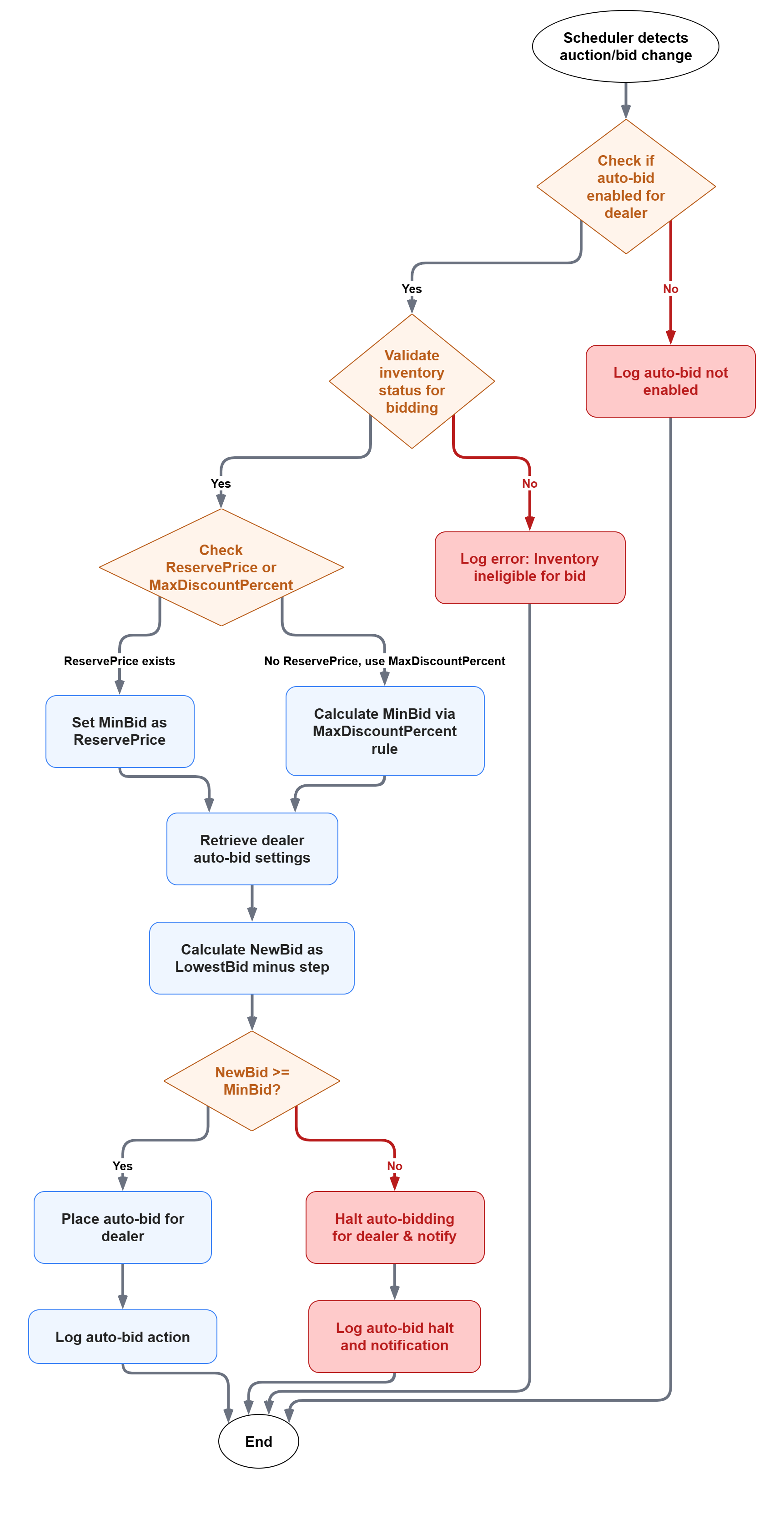
Real-Time Bid Processing Workflow
- Scheduler Monitors Auction Changes
- All auction/bid updates are written into a Change Tracker Table
- Scheduler Service continuously monitors this table
- Auto-Bid Decision Logic
- When a new bid or auction update is detected:
- Step 1: Check if auction-level settings exist in
auctionautobidsettings- If exists → Use auction-level
enableautobidflag - If not exists → Use global
enableautobidfromautobidsettings
- If exists → Use auction-level
- Step 2: If Auto-Bid is enabled, validate inventory and limits:
- Vehicle exists in dealer's inventory
- Determine minimum allowable bid:
- If
ReservePriceexists → use as minimum limit - Else → calculate using
MaxDiscountPercent
- If
- Step 3: Calculate next bid:
NewBid = LowestBid - AmountLessThanLowestBid- Ensure
NewBid ≥ MinBid
- Step 4: Execute bid:
- If valid → place bid automatically
- If not valid → stop Auto-Bid and notify dealer
- Step 1: Check if auction-level settings exist in
- When a new bid or auction update is detected:
- Toggle Flexibility
- Dealers can toggle between Auto and Manual at any time
- Scheduler respects mode changes in real-time
- System logs all automated actions for transparency
Complete Use Case Example
Initial Setup:
Global Settings (autobidsettings):
- enableautobid: true
- enableinitialbid: true
- maxdiscountpercent: 5%
- amountlessthanlowestbid: $100
Ongoing Auctions:
Auction1: Auto-Bid ENABLED (global)
Auction2: Auto-Bid ENABLED (global)
Auction3: Auto-Bid ENABLED (global)
User Action 1: Set Auction1 to Manual Mode
POST /api/v1/auto-bid/{auctionId}/toggle
{ "mode": "Manual" }

Result:
- Auction1: Manual Mode (auction-level override)
- Auction2: Auto Mode (global)
- Auction3: Auto Mode (global)
User Action 2: Disable Global (Option: Disable All)
POST /api/v1/auto-bid/global/toggle
{ "dealerId": "dealer1", "enableAutoBid": false, "disableForAllOngoingAuctions": true }

System Actions:
1. Update autobidsettings: enableautobid = false
2. Check Auction1 in auctionautobidsettings: EXISTS → Update to false
3. Check Auction2 in auctionautobidsettings: NOT EXISTS → Insert with false
4. Check Auction3 in auctionautobidsettings: NOT EXISTS → Insert with false

Result:
- Auction1: DISABLED (auction-level)
- Auction2: DISABLED (auction-level)
- Auction3: DISABLED (auction-level)
- Global: DISABLED
Development Tasks & Estimates
| No | Task Name | Estimate (Hours) | Dependencies | Notes |
|---|---|---|---|---|
| 1 | Add ReservePrice to Inventory | 4 | Inventory module | Schema update |
| 2 | Add BidMode to Auction Master | 4 | Auction module | Schema update |
| 3 | Create autobidsettings table | 4 | Database | Global dealer settings schema |
| 4 | Create auctionautobidsettings table | 4 | Database | Auction-level settings schema |
| 5 | Implement Global Auto-Bid Toggle API | 8 | autobidsettings table | With ongoing auction handling logic |
| 6 | Implement Auction-Level Auto-Bid Toggle API | 6 | auctionautobidsettings | Override logic implementation |
| 7 | Implement settings hierarchy resolution logic | 6 | Both settings tables | Auction-level overrides global |
| 8 | Develop Scheduler & Change Tracker logic | 12 | Auction DB | Monitor auction/bid changes with hierarchy |
| 9 | Update UI for Global Auto-Bid toggle | 6 | Dealer Dashboard | With confirmation dialog |
| 10 | Update UI for Auction-Level Auto-Bid toggle | 4 | Auction Room UI | Real-time mode switch |
| 11 | Integrate Notification Service | 4 | Notification API | Dealer alerts |
| 12 | QA & Testing (Unit + Integration) | 12 | Dev environment | End-to-end validation with edge cases |
| Total | 74 Hours |
Testing & Quality Assurance
Unit Tests:
- Validate bid calculations against ReservePrice and MaxDiscount.
- Test scheduler job for detecting auction updates.
- Ensure Auto-Bid stops when limit reached.
- Verify Global and Auction-level toggle functionality.
- Test settings hierarchy resolution (auction overrides global).
- Validate table insert/update logic for both settings tables.
- Test edge cases:
- Toggling global off with ongoing auctions
- Toggling auction-level while global is disabled
- Existing records vs new record insertion
Integration Tests:
- Simulate concurrent Auto-Bids for multiple dealers.
- Validate scheduler-based real-time trigger accuracy.
- Test complete workflow: Global enable → Auction disable → Global disable with options.
- Verify correct behavior when auction-level settings exist vs don't exist.
- Test notification triggers for all scenarios.
Acceptance Criteria:
- Auto-Bid functions within ReservePrice and MaxDiscount boundaries.
- Scheduler detects updates instantly and responds correctly.
- Global and auction-level toggle works without delay.
- Auction-level settings correctly override global settings.
- Disabling global Auto-Bid prompts for ongoing auction handling.
- System correctly inserts/updates records in both
autobidsettingsandauctionautobidsettingstables. - Notifications are sent for all major events.
Testing Tools:
- Postman (API validation)
- NUnit/xUnit (backend logic)
- Quartz test harness or Hangfire dashboard
- Cypress (UI flow testing)
Deployment Considerations
Configuration Changes:
- Add
ReservePricefield to existing Inventory table. - Add
BidModefield to Auction Master table. - Create new table:
autobidsettingsfor global dealer-level settings. - Create new table:
auctionautobidsettingsfor auction-level overrides. - Introduce new table:
AuctionChangeTrackerfor scheduler monitoring.
Rollout Plan:
- Schema updates (Inventory, Auction Master, autobidsettings, auctionautobidsettings, Change Tracker).
- Deploy Auto-Bid logic and Scheduler service.
- Integrate with UI and Notification system.
- Run monitored pilot with selected dealer accounts.
Risks & Mitigations
| Risk | Impact | Likelihood | Mitigation Strategy |
|---|---|---|---|
| Incorrect Reserve/Discount configuration | High | Medium | Validate rules before auction start |
| Scheduler delay due to heavy load | High | Medium | Optimize job interval and indexing |
| Manual override conflict | Medium | Low | Priority given to latest dealer mode change |
| Concurrent Auto-Bids per dealer | Medium | Low | Restrict one active Auto-Bid per auction |
| Settings hierarchy confusion (global vs auction) | Medium | Medium | Clear UI indicators showing which level is active |
| Race condition when disabling global during active bid | Medium | Low | Use database transactions and proper locking |
| Missing auction-level records causing incorrect behavior | High | Low | Implement proper fallback to global settings with logging |
Review & Approval
Reviewer: Abhishak Kumar Roy
Approval Date: 2025-10-24
Notes:
- Auto-Bid logic applies to reverse auctions, meaning bids move downward.
- Reserve Price is always prioritized over Max Discount.
- Scheduler ensures real-time bid automation by tracking auction updates.
- Dealers can take control anytime using Global or Auction-level toggle switches.
- Two-Level Settings Architecture:
- Global Level (
autobidsettings): Default behavior for all auctions - Auction Level (
auctionautobidsettings): Specific auction overrides - Auction-level settings always take precedence over global settings
- Global Level (
- When disabling global Auto-Bid, dealers are prompted to choose whether to stop ongoing auctions.
- System intelligently handles insert/update operations based on existing records in both tables.
- All toggle operations are logged with user information and timestamps for audit purposes.