Leave Management System
Author(s)
-
Sanket Mal
-
...
Last Updated Date
[2025-03-13]
Version History
| Version | Date | Changes | Author |
|---|---|---|---|
| 1.0 | 2025-03-13 | Initial draft | Sanket Mal, Ribhu Gautam |
| ... | ... | ... | ... |
Feature Overview
Objective:
The Leave Management System facilitates the process of requesting, approving, and tracking employee leaves, along with maintaining leave balances and reporting.
Scope:
- On behalf of Employees Manager can submit leave requests.
- HR can approve or reject requests.
- Work on rest days can be logged.
- A Daily Scheduled Job will run once a day to:
- Identify all employees who have active leave on that particular day.
- Deduct the leave from their available leave balance.
- Update the leave balance in the system accordingly.
Dependencies:
Requirements
- On behalf of Employee Manager should be able to request leave.
- HR should be able to approve/reject leave requests.
- Leave balance should be updated automatically.
- A monthly leave report should be generated.
- Work on rest days should be recorded and adjusted.
Workflow:
1. Employee Leave Request Workflow
Step 1: Employee Submits Leave Request
- Employee submits a leave request using the
EmployeeLeaveRequestpayload. - The system validates the data and inserts a record into the
tblLeaveRequesttable withStatusas Pending.
Step 2: HR Review
- HR can view all pending leave requests.
- HR either Approves or Rejects the leave request using the
LeaveRequestApprovalpayload. - The system updates the
StatusandRemarksintblLeaveRequest.
Approval Process
- Approved: Move to the leave consumption or LOP process.
- Rejected: No further action required. Employee is notified.
2. Leave Transaction Types and Management
A. Leave Consumed
- If the employee has sufficient leave balance (>0) and the leave is approved, then it is marked as Consumed.
- A record is inserted into
tblLeaveTransactionswithLeaveTypeas Consumed.
B. LOP (Loss of Pay)
- If the employee has no leave balance (=0) and the leave is approved, then it is marked as LOP.
- A record is inserted into
tblLeaveTransactionswithLeaveTypeas LOP.
C. Leave Earned
- If an employee works 8+ hours on a rest day, they earn a leave.
- At checkout, a record is inserted into
tblLeaveTransactionswithLeaveTypeas Earned.
D. Leave Expired
- At the end of the financial year (April 1st), any remaining leave balance is expired.
- A record is inserted into
tblLeaveTransactionswithLeaveTypeas Expired.
3. Schedular Workflow
Frequency
- Runs once daily.
Steps
- Fetch Approved Leaves
- Select all approved leaves from
tblLeaveRequestwhere theLeaveTodate matches yesterday.
- Select all approved leaves from
- Calculate Leave Balance
- Calculate leave balance for each employee using the formula:
Total Earned Leave - Total Consumed Leave - Total Expired Leave
- Calculate leave balance for each employee using the formula:
- Determine Leave Type
- Leave Balance = 0 → Mark all dates as LOP in
tblLeaveTransactions. - Leave Balance >= Total Leave Days → Mark all dates as Consumed.
- 0 < Leave Balance < Total Leave Days:
- Mark the initial days, up to the available leave balance, as Consumed.
- Any remaining days will be marked as LOP.
- Leave Balance = 0 → Mark all dates as LOP in
- Insert Records
- Insert appropriate records into
tblLeaveTransactions.
- Insert appropriate records into
Design Specifications
- UI/UX Design:
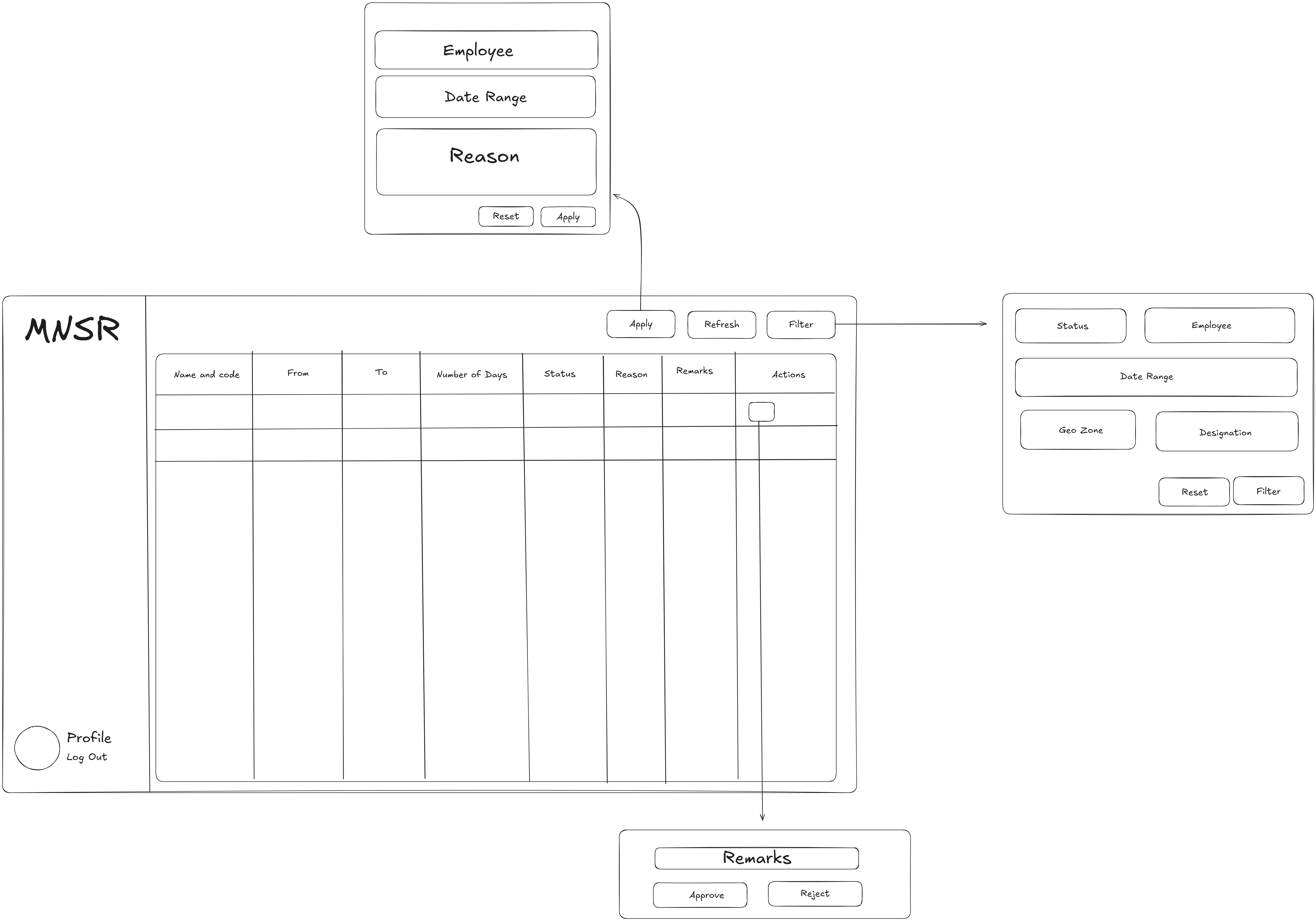
- Leave Request Page:
Wireframe:
Implementation:
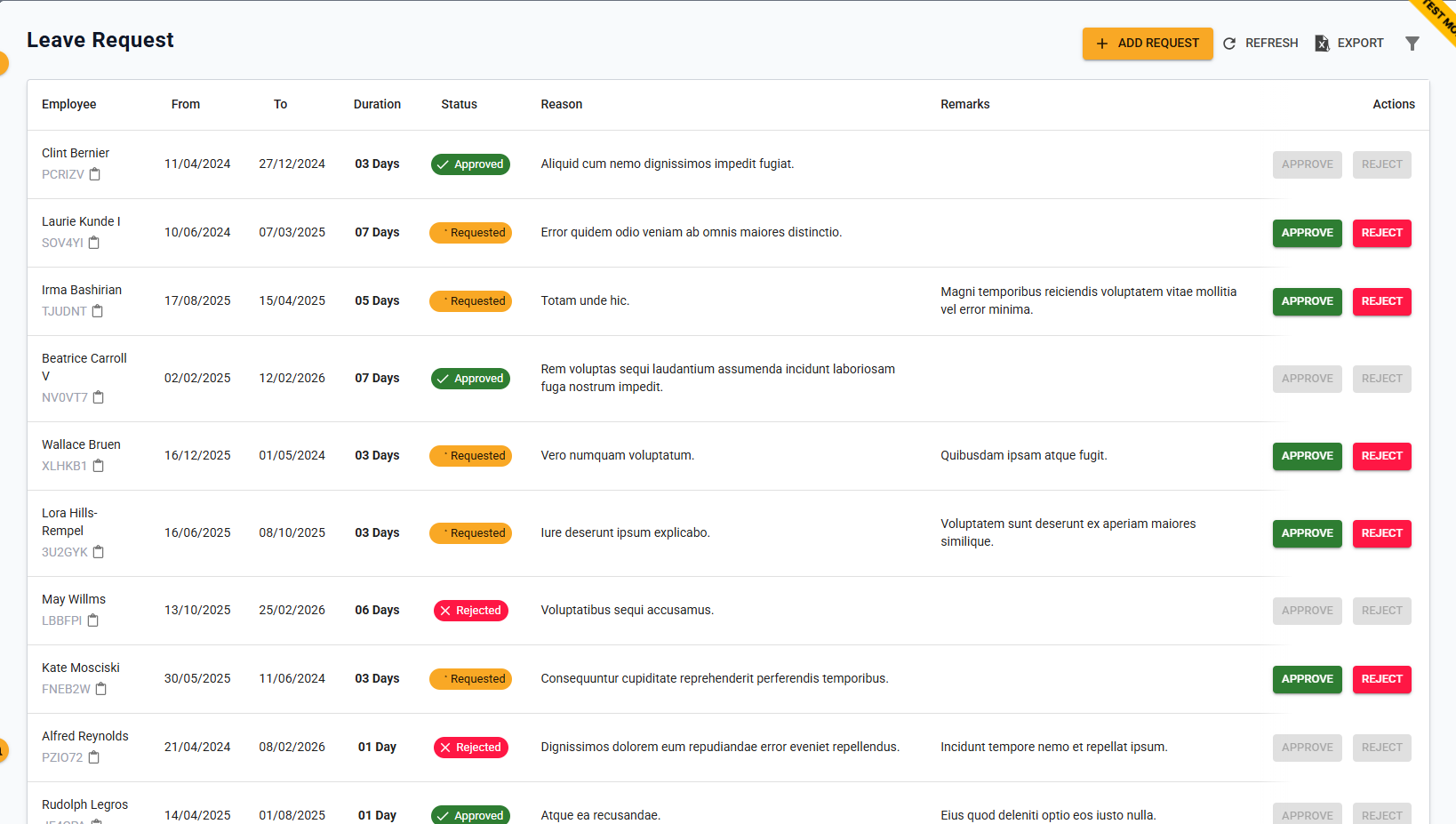 The interface includes:
- Leave dashboard to check requested leaves including filter.
- Add leave modal to raise leave request.
- Leave approval dialog to aproove or reject leave.
- Leave Analytics Page:
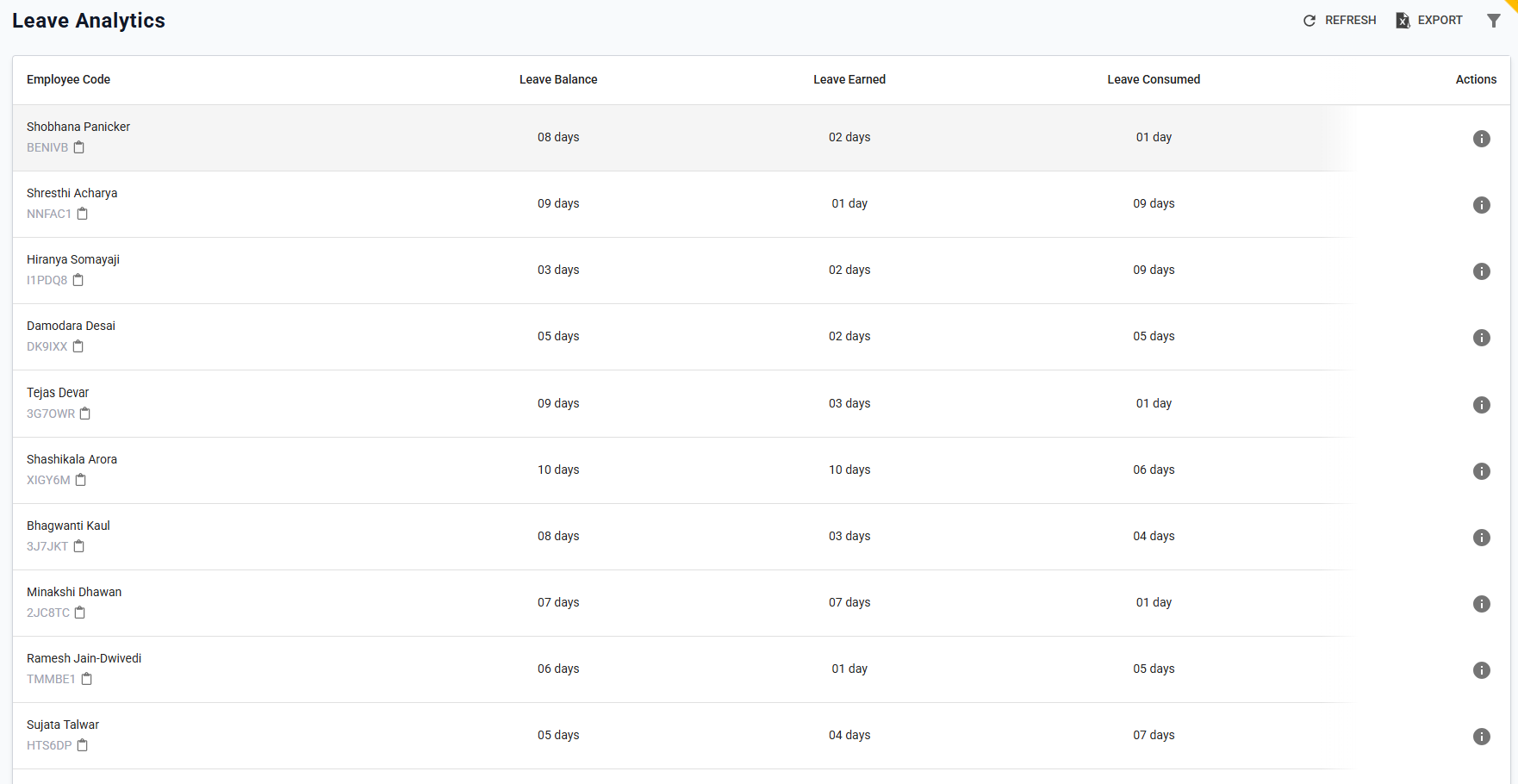 The interface includes:
- Leave Analytics page to check total, consumed and earned leave of an employee.
- Filter with Employee name/code and date range is present.
- Refresh and Export Functionality is also present.
- Leave Transactions Dialog:
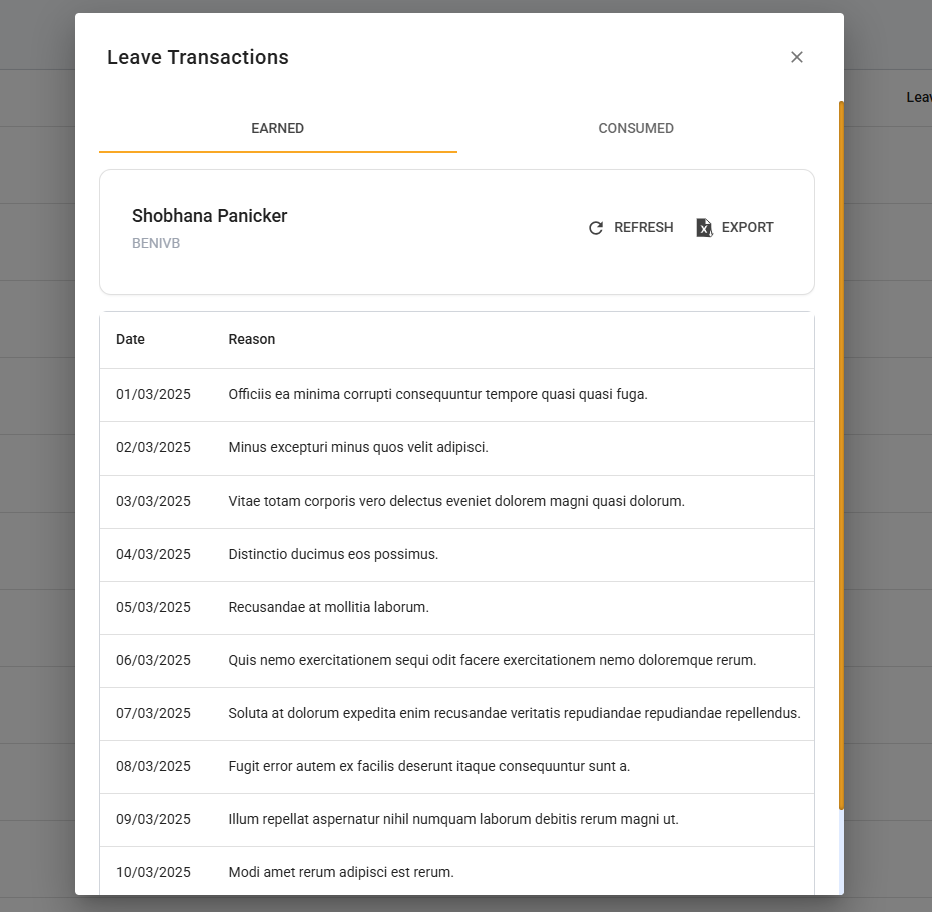 The interface includes:
-
Leave Transactions page to view details for Leaves earned and consumed by employee.
-
WorkFlow:
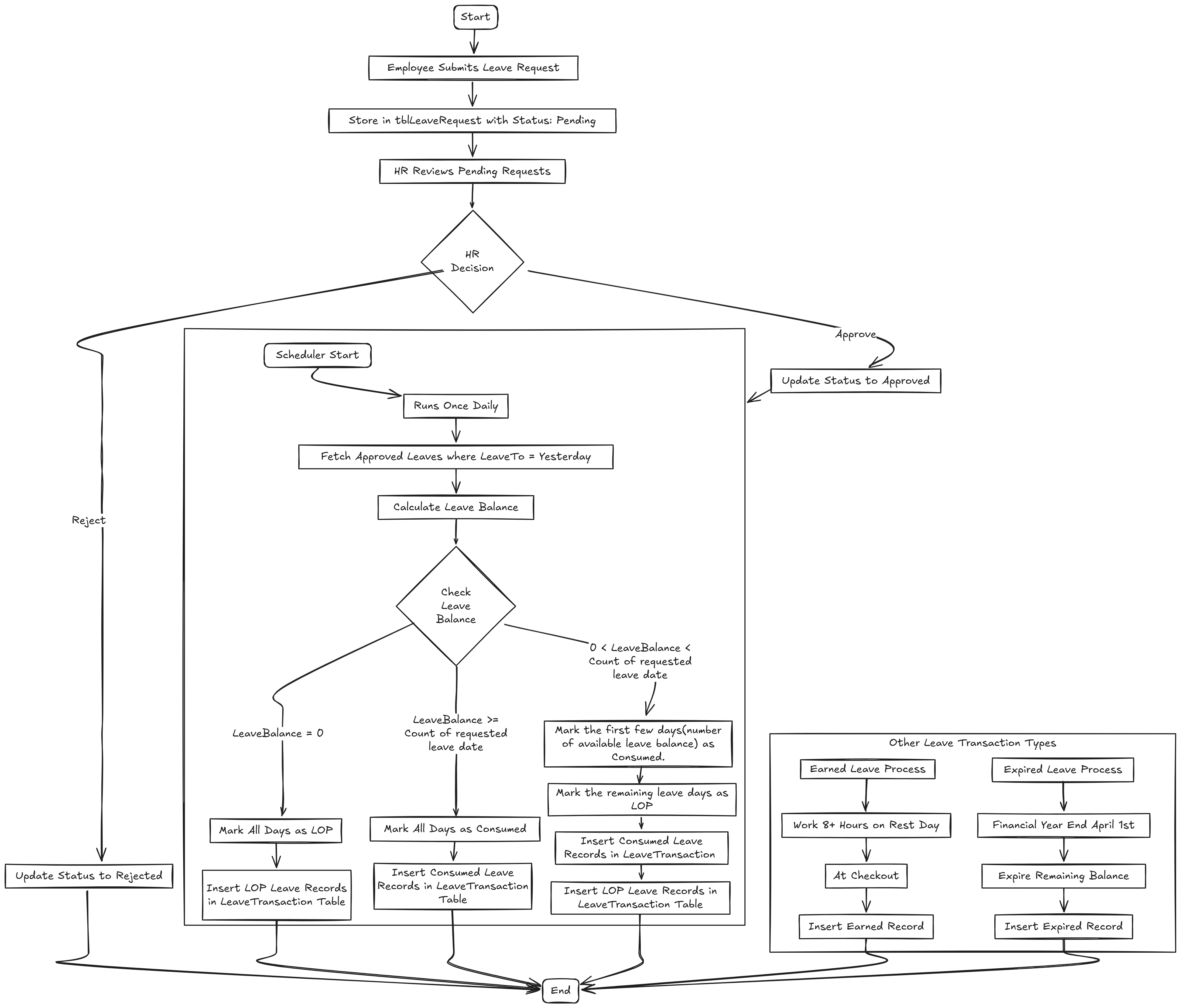
-
Data Models:
(Detail the data structures, including database schemas or objects.)Enums & Class Structures
  public enum LeaveRequestStatus
  {
      None,
      Requested,
      Approved,
      Rejected
  }
  public enum Day
  {
      Sunday = 0,
      Monday = 1,
      Tuesday = 2,
      Wednesday = 3,
      Thursday = 4,
      Friday = 5,
      Saturday = 6,
      All = 99
  }
  public enum LeaveType
  {
      Consumed,
      Earned,
      Expired,
      LOP
  }
  public record EmployeeLeaveRequest
  {
      public required string EmployeeCode { get; set; }
      public string? EmployeeName { get; set; }
      public required DateTime LeaveFrom { get; set; }
      public required DateTime LeaveTo { get; set; }
      public int Duration { get; set; } // Total count of leave date exclude rest day
      public string? Reason { get; set; }
      public LeaveRequestStatus Status { get; set; }
  }
  public record LeaveRequestDetails : EmployeeLeaveRequest
  {
      public Guid RequestId { get; init; }
      public string? Remarks { get; init; }
      public string? RequestedBy { get; init; }
      public DateTime RequestedOn { get; set; }
      public string ? ApprovedBy { get; init; }
      public DateTime ApprovedOn { get; set; }
  }
  public record LeaveDateList
  {
      public Guid RequestId { get; init; }
      public required string EmployeeCode { get; init; }
      public string? EmployeeName { get; init; }
      public List<DateTime> LeaveDates { get; init; } = [];
      public required LeaveType LeaveType { get; init; }
  }
  public record LeaveTransactionResponse
  {
      public Guid TransactionId { get; init; }
      public DateTime Date { get; init; }
      public string? Reason { get; init; }
  }
  public record LeaveTransactionFilter
  {
      public Guid? EmployeeCode { get; init; }
      public int RowsPerPage { get; set; } = 10;
      public int PageNumber { get; set; } = 1;
      public DateTime? StartDate { get; set; }
      public DateTime? EndDate { get; set; }
  }
  public class LeaveRequestApproval
  {
      public Guid RequestId { get; set; }
      public LeaveRequestStatus Status { get; set; }  // "Approved" or "Rejected"
      public string? Remarks { get; set; }
  }
  public class EmployeeLeaveBalance
  {
      public required string EmployeeCode { get; set; }
      public string EmployeeName {get; set;}
      public int LeaveBalance { get; set; }
      public int LeaveConsumed { get; set; }
      public int LeaveEarned { get; set; }
  }
  public class LeaveRequestFilter
  {
      public int RowsPerPage { get; set; }
      public int PageNumber { get; set; }
      public string? EmployeeCode { get; set; }
      public DateTime? LeaveFrom { get; set; }
      public DateTime? LeaveTo { get; set; }
      public LeaveRequestStatus? Status { get; set; }
      public Guid DesignationId {get; init;}
      public Guid GeoZoneId {get; init;}
      public Guid DepartmentId {get; init;}
      public bool IsExcel {get; init;} = false;
  }
Schemas
CREATE TABLE tblLeaveRequest (
      RequestId UUID PRIMARY KEY,
      EmployeeCode VARCHAR(50),
      EmployeeName VARCHAR(100),
      LeaveFrom DATE,
      LeaveTo DATE,
      Status TEXT,
      Reason TEXT,
      RequestedBy VARCHAR(50),
      RequestedOn TIMESTAMP WITH TIME ZONE DEFAULT CURRENT_TIMESTAMP,
      ApprovedBy VARCHAR(50),
      ApprovedOn TIMESTAMP WITH TIME ZONE DEFAULT CURRENT_TIMESTAMP,
      Remarks TEXT NULL,
      Duration INT,
      LogUser VARCHAR(50),
      LogDts TIMESTAMP WITH TIME ZONE DEFAULT CURRENT_TIMESTAMP
  );

  CREATE TABLE tblLeaveTransactions (
    TransactionId UUID PRIMARY KEY DEFAULT gen_random_uuid(),
    RequestId UUID,
    EmployeeCode VARCHAR(50),
    Date DATE,
    LeaveType TEXT,
    LOP BOOLEAN DEFAULT FALSE,
    LogUser VARCHAR(50),
    LogDts TIMESTAMP WITH TIME ZONE DEFAULT CURRENT_TIMESTAMP,
    CONSTRAINT FK_RequestId FOREIGN KEY (RequestId) REFERENCES tblLeaveRequest(RequestId)
 );

 CREATE TABLE tblLeaveBalance (
    EmployeeCode VARCHAR(50) PRIMARY KEY,
    LeaveBalance INT NOT NULL CHECK (LeaveBalance >= 0),
    LogUser VARCHAR(50),
    LogDts TIMESTAMP WITH TIME ZONE DEFAULT CURRENT_TIMESTAMP
);


ALTER TABLE tblLeaveTransactions
ADD COLUMN Reason TEXT;

ALTER TABLE tblLeaveTransactions
RENAME COLUMN RequestId TO MappingId;

ALTER TABLE tblLeaveTransactions
DROP COLUMN IF EXISTS LOP;

ALTER TABLE tblLeaveTransactions
ADD COLUMN Count INT;

DROP TABLE IF EXISTS tblLeaveBalance; -
API Interfaces:
(Define the APIs required for this feature, including endpoints, methods, request/response formats.)Endpoint Method Parameters Response Response Status Codes /api/attendance/leave/requestPOSTLeaveRequeststring message200,204,403,400,500/api/attendance/leave/approvePUTLeaveRequestApprovalstring message200,204,403,400,500/api/attendance/leave/requestGETLeaveRequestFilterServerPaginatedData<LeaveRequestDetails>200,204,400,403,500/api/attendance/leave/earned/{employeeCode}GETLeaveTransactionFilterServerPaginatedData<LeaveTransactionResponse>200,204,400,403,500/api/attendance/leave/consumed/{employeeCode}GETLeaveTransactionFilterServerPaginatedData<LeaveTransactionResponse>200,204,403,400,500/api/attendance/leave/reportGETLeaveTransactionFilterServerPaginatedData<EmployeeLeaveBalance>200,204,403,400,500 -
Third-Party Integrations:
(List any third-party services or tools that need to be integrated.) -
Workflow:
(Describe the end-to-end workflow of the feature, detailing how different components interact, including the sequence of events, data flow, and the user journey.)
Development Tasks & Estimates
(Break down the development process into smaller tasks and provide time estimates for each.)
| No | Task Name | Estimate (Hours) | Dependencies | Notes |
|---|---|---|---|---|
| 1 | API for making a leave request | 5 hours | ||
| 2 | Test leave request API | 1 hour | Dependency 1 | |
| 3 | API for getting paginated leave requests | 5 hours | ||
| 4 | Test get paginated leave requests API | 1 hour | Dependency 3 | |
| 5 | API for leave approval | 4 hours | Dependency 1 | |
| 6 | Test leave approval API | 1 hour | Dependency 5 | |
| 7 | Track work on rest day (if above 8 hours) and grant leave for future use | 6.5 hours | ||
| 8 | Test Task 7 | 1.5 hours | Dependency 7 | |
| 9 | API for getting leave report of employees | 6 hours | ||
| 10 | Test get employee leave report of employees API | 1 hour | Dependency 9 | |
| 11 | API for paginated leave consumed of a particular employee | 5 hours | ||
| 12 | Test the API for paginated leave consumed of a particular employee | 1 hour | Dependency 11 | |
| 13 | API for paginated leave earned of a particular employee | 5 hours | ||
| 14 | Test the API for paginated leave earned of a particular employee | 1 hour | Dependency 13 | |
| 15 | Daily Scheduled Job to Update Employee Leave Balance | 6.5 hours | ||
| 16 | Test Daily Scheduled Job to Update Employee Leave Balance | 1.5 hours | Dependency 15 | |
| 17 | Integration Testing for Employee Leave Management APIs | 8 hours | ||
| Total | 60 hours |
Testing & Quality Assurance
(Outline the testing strategy and quality assurance measures for the feature.)
-
Unit Tests:
(List the unit tests that will be written for this feature.) -
Integration Tests:
(Describe how integration testing will be conducted.) -
Acceptance Criteria:
(Define the criteria that must be met for the feature to be considered complete.) -
Testing Tools:
(List any tools that will be used for testing.)
Deployment Considerations
(Describe any deployment considerations, including environment configurations, feature toggles, or migration steps.)
-
Configuration Changes:
(Detail any configuration changes required for this feature.) -
Rollout Plan:
(Outline the plan for rolling out the feature, including any phased releases.)
Risks & Mitigations
(Identify potential risks and the strategies to mitigate them.)
| Risk | Impact | Likelihood | Mitigation Strategy |
|---|---|---|---|
| Risk 1 | High | Medium | Strategy for mitigating Risk 1 |
| Risk 2 | Medium | High | Strategy for mitigating Risk 2 |
| ... | ... | ... | ... |
Review & Approval
(Include a section for review and approval by stakeholders.)
-
Reviewer:
(Name and role of the person reviewing the document.) -
Approval Date:
(Date when the feature is approved for development.)
Notes
(Add any additional notes or considerations related to the feature development here.)