Calculate Daily WorkTime and Overtime of Employee
Author(s)
- SANKET MAL
Last Updated Date
2025-04-10
SRS References
Version History
| Version | Date | Changes | Author |
|---|---|---|---|
| 1.0 | 2025-04-10 | Initial draft | SANKET MAL |
| ... | ... | ... | ... |
Feature Overview
Objective:
To automatically calculate the total daily work time and overtime minutes of an employee at the moment of their check-out on a working day. This ensures accurate attendance and payroll processing.
Scope:
The feature covers:
-
Regular shift and/or overtime assignments for the day.
-
Single and multiple check-in/check-out scenarios.
-
Time calculation rules based on overlapping work periods, check in, check out time, shift start time and shift end time.
-
Exclusion of unauthorized or unassigned time.
This process is triggered at check-out time and updates the daily work log. Dependencies:
-
Employee Shift Management Module
-
Attendance Records System
-
Overtime Assignment Module
Requirements
-
Fetch shift and overtime assignments for the day during check-out.
-
Identify presence of regular shift or overtime assignment.
-
Handle both single and multiple check-in/check-out events.
-
Apply rules to calculate work time.
-
Differentiate and log regular work minutes vs. overtime minutes.
-
Store the final calculated data in the work log table.
Design Specifications
(Provide detailed design specifications, including UI/UX designs, API interfaces, and any other relevant architectural details.)
-
UI/UX Design:
(Include wireframes, mockups, or links to design files.) -
Data Models:
(Detail the data structures, including database schemas or objects.) -
API Interfaces:
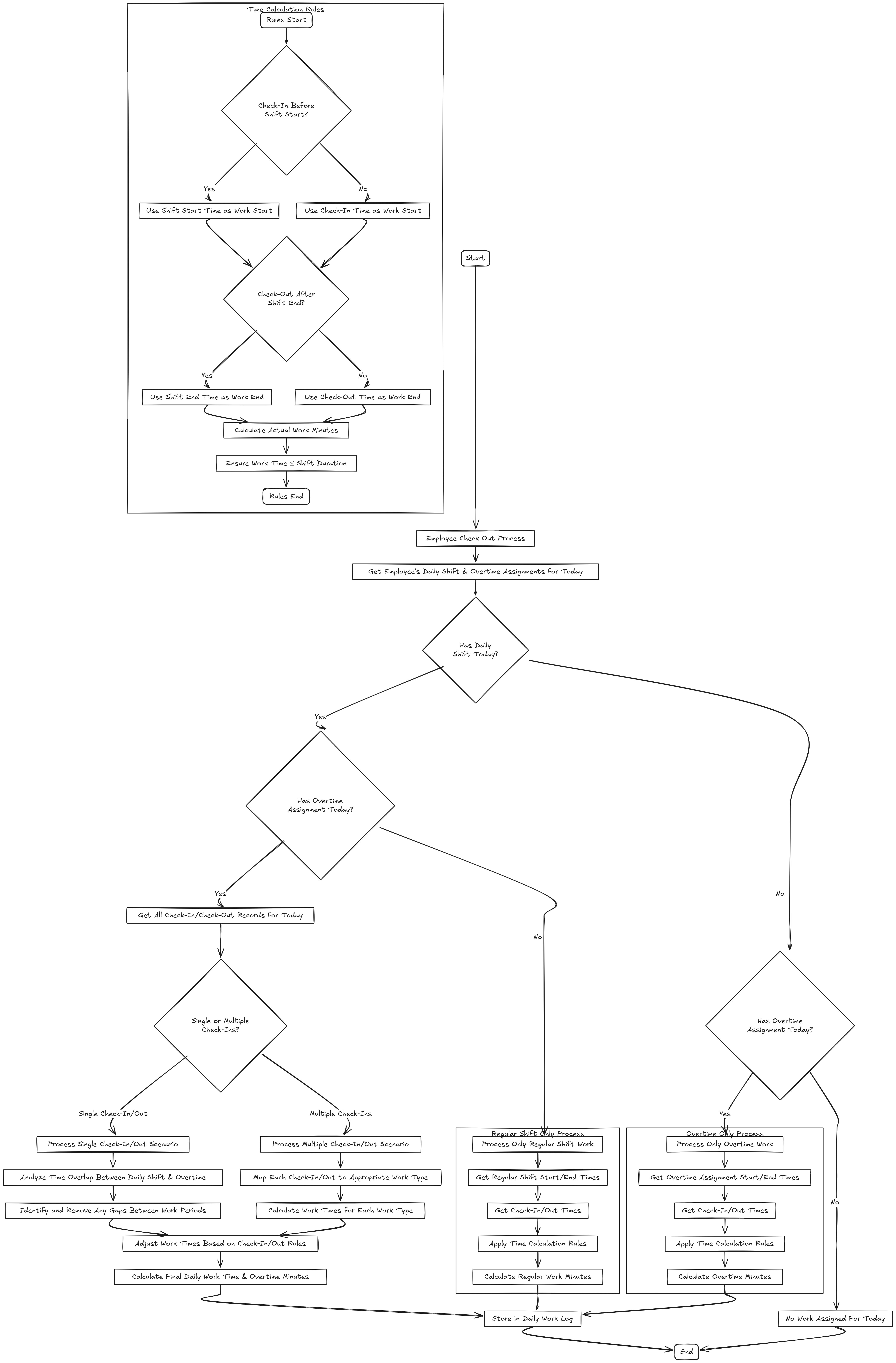
FlowChart:
Workflow:
The logic flows through these stages at check-out
Stage 1: Determine Assigned Work
-
Check if the employee has a regular shift assigned for the day.
-
Check if the employee has overtime assigned for the day.
-
If neither, exit the flow. (No work assigned.)
Stage 2: Check-Out
At the time of checkout, determine the CheckOut type:
-
Only Daily Regular Shift CheckOut
-
Only Overtime CheckOut
-
CheckOut after Doing Both Regular Shift and Overtime
Type 1: Only Regular Shift
-
Fetch shift start and end times.
-
Determine effective working interval:
-
Work Start Time: If Check-in < Shift Start, use Shift Start, else use Check-in.
-
Work End Time: If Check-out > Shift End, use Shift End, else use Check-out.
-
Ensure max work time = shift duration.
-
Calculate Work Time in Minutes.
-
Update daily work time for the employee on this date.
Type 2: Only Overtime
-
Fetch assigned overtime slot(s).
-
Match check-in/out to overtime slot(s).
-
Apply business rules:
-
Calculate Overtime in Minutes.
-
Update overtime for the employee on this date.
Type 3: Both Regular Shift and Overtime
-
Calculate working time for overtime and regular shift separately by removing gap between regular shift and overtime.
-
Update both daily work time and overtime for the employee.
Development Tasks & Estimates
(Break down the development process into smaller tasks and provide time estimates for each.)
| No | Task Name | Estimate (Hours) | Dependencies | Notes |
|---|---|---|---|---|
| 1 | Planing | 1.5 hours | ||
| 2 | Define Workflow | 1.5 hours | ||
| 3 | Calculate Daily Work Time and Overtime | 8 hours | ||
| 4 | Testing | 2 hours | Dependency 3 | |
| 4 | Total | 13 hours |
Testing & Quality Assurance
(Outline the testing strategy and quality assurance measures for the feature.)
-
Unit Tests:
(List the unit tests that will be written for this feature.) -
Integration Tests:
(Describe how integration testing will be conducted.) -
Acceptance Criteria:
(Define the criteria that must be met for the feature to be considered complete.) -
Testing Tools:
(List any tools that will be used for testing.)
Deployment Considerations
(Describe any deployment considerations, including environment configurations, feature toggles, or migration steps.)
-
Configuration Changes:
(Detail any configuration changes required for this feature.) -
Rollout Plan:
(Outline the plan for rolling out the feature, including any phased releases.)
Risks & Mitigations
(Identify potential risks and the strategies to mitigate them.)
Risk Assessment Table
| Risk | Description | Impact | Likelihood | Mitigation Strategy |
|---|---|---|---|---|
| Risk 1 | Employee checks in before the start of their regular shift on one day and continues working into the overtime of the next day, leading to incorrect time calculation. | High | Implement cross-day time segregation logic that splits check-in/out records across calendar days and evaluates each individually. | |
| Risk 2 | Employee checks in before an overtime shift and continues into the next day's regular shift without intermediate check-out, causing incorrect classification. | High | Introduce logic to detect overnight sessions and break them into distinct work blocks for accurate regular and overtime mapping. | |
| ... | ... | ... | ... | ... |
Review & Approval
(Include a section for review and approval by stakeholders.)
-
Reviewer:
(Name and role of the person reviewing the document.) -
Approval Date:
(Date when the feature is approved for development.)
Notes
(Add any additional notes or considerations related to the feature development here.)