User-Specific Access for Managing Received Orders
Authors
- SANKET MAL
- RESHMI KARAN
- SAYAN MUKHERJEE
Last Updated Date
2024-09-13
SRS References
Version History
| Version | Date | Changes | Author |
|---|---|---|---|
| 1.0 | 2024-09-13 | Initial draft | Sanket Mal , Sayan Mukherjee , Reshmi Karan |
Feature Overview
Objective:
To implement user-based access for viewing received orders by introducing three scopes: received.order.view, received.order.view.own, and received.order.view.all.
Scope:
This feature defines a flexible access control system for managing received order views based on assigned scopes. The key scopes involved are:
received.order.view.own
Grants users the ability to view only the received orders that are placed by the dealers or distributors under their direct management. This ensures that users with this scope can only access orders from the specific dealers or distributors they are responsible for.
received.order.view.all
Grants users the ability to view all received orders across the system, regardless of the dealer or distributor placing the order. This scope is typically assigned to higher-level managers or administrators who need broader visibility of orders.
By using these scopes, the feature ensures secure and customizable access to order data based on roles, supporting a hierarchical view of orders for managers and administrators while maintaining privacy and control over sensitive data.
Dependencies:
- DAL call for fetching list of dealer id under an user.
- Depends on mass transist call to
dealermanagement servicefor getting list of dealers under a manager.
Requirements
This section outlines the functional requirements of the feature, explaining how access to received orders is controlled based on user scopes. These requirements ensure the system behaves as intended when managing and filtering order views.
-
Implement Scopes for Controlling Access : The following three scopes must be implemented to handle different levels of access to the received orders:
-
received.order.view:This scope is required for users to be able to hit the API that fetches the received orders. It allows users to access the API but does not dictate what orders they can view. Every user must have this scope to initiate API requests. -
received.order.view.own:This scope grants users the ability to view only the received orders that were placed by the dealers or distributors they manage. This means users with this scope will only see orders from dealers under their direct supervision. This scope is typically assigned to managers who oversee specific dealers or distributors. -
received.order.view.all:This scope gives users permission to view all received orders regardless of which dealer or distributor placed the order.
-
-
Validate User Scopes in API : Inside the API, the system must check which scopes are assigned to the logged-in user to determine what orders they can view:
- If the user has
received.order.view.all, they can view all received orders without restriction. No filtering by dealer or distributor is needed in this case. - If the user does not have the
received.order.view.allscope, the API should fetch the email from the user's JWT (JSON Web Token) and use it to identify which dealers or distributors are managed by the user. The system will then filter the received orders based on the dealers or distributors the manager is responsible for, showing only their own received orders.
- If the user has
-
Ensure Compatibility with JWT Authentication : The system must work with JWT for user authentication, and the user’s email will be extracted from the token. This email is essential for determining which dealers or distributors are under the logged-in user's control, especially when applying the
received.order.view.ownscope. -
DAL Method to Fetch Dealers Under a Manager : A DAL method must be implemented to retrieve the list of dealers or distributors that a manager oversees, based on their email address. This method will be used to filter the received orders when a user has the
received.order.view.ownscope. The method will take themanager’s email as a parameterandreturn a list of dealer or distributorwhich is the list of dealers or distributors that is under the user's oversees. -
Filter by orderFrom Option : Users will have the option to filter orders by specifying a
list of dealerIdsin theorderFromfilter. Depending on the user's scope, the system will handle the filtering as follows:-
If the user has
received.order.view.all, the system will simply filter the received orders based on thelist of dealerIdspassed in theorderFromfilter. This allows the user to see orders from any dealers they specify. -
If the user has
received.order.view.own, the system must first fetch thelist of dealers or distributors that the user manages, based on their email using the helper method. Once the list is retrieved, the system will perform anintersection operation between the two lists:The list of dealerIds retrieved from the helper method, representing the dealers or distributors the manager oversees.The list of dealerIds provided in the orderFrom filter.
-
- After the intersection operation, the system will only pass the common dealer IDs from both lists to the data access layer. This ensures that users with received.order.view.own scope can only see orders from dealers they manage, even when using the orderFrom filter.
Design Specifications
(Provide detailed design specifications, including UI/UX designs, API interfaces, and any other relevant architectural details.)
-
UI/UX Design:
(Include wireframes, mockups, or links to design files.) -
Data Models:
For retrieving orders, at first the dealer ID list will be fetched using the user's email.public class ServerPaginatedData<OrderMinimalData>
{
public List<OrderMinimalData>? Data { get; set; }
public long Totalnumber { get; set; }
}
public record OrderDraftMinimalData
{
public required Guid OrderId { get; set; }
public string? OrderCode { get; set; }
public Guid DealerId { get; set; }
[Required(AllowEmptyStrings = false)]
public required string DealerCode { get; init; }
public Guid OrderTo { get; set; }
public DateTime? OrderDate { get; set; }
public decimal TotalAmount { get; set; }
public decimal CGSTAmount { get; set; }
public decimal SGSTAmount { get; set; }
public decimal IGSTAmount { get; set; }
public decimal TotalAmountWithTax { get; set; }
public decimal? RoundOff { get; set; }
public DeliveryTypeStatus DeliveryType { get; set; }
public DealershipLocation DeliveryAddress { get; set; } = new DealershipLocation();
[System.Text.Json.Serialization.JsonIgnore]
public string? DeliveryAddressAsString { get; set; }
[System.Text.Json.Serialization.JsonIgnore]
public long? TotalNumber { get; set; }
public string? SellerName { get; set; }
public string? BuyerName { get; set; }
}
public record OrderMinimalData : OrderDraftMinimalData
{
public PurchaseRequestStatus CurrentStatus { get; set; }
public PurchaseRequestStep CurrentStep { get; set; }
public string? Reviewer { get; set; }
public InvoicePaymentStatus? PaymentStatus { get; set; }
} -
API Interfaces:
(Define the APIs required for this feature, including endpoints, methods, request/response formats.)Endpoint Method Parameters Response Response Status Codes /api/order/get/order/managePOSTPageNumber,RowsPerPage,OrderCode,ListOfPurchaseRequestStep,ListOfInvoicePaymentStatus,ListOfBuyerId,ListOfSellerId,StartDate,EndDate,IsExcelList of Received Orders200,
404,403,500 -
Third-Party Integrations:
-
Workflow:
Flow Chart for get invoice-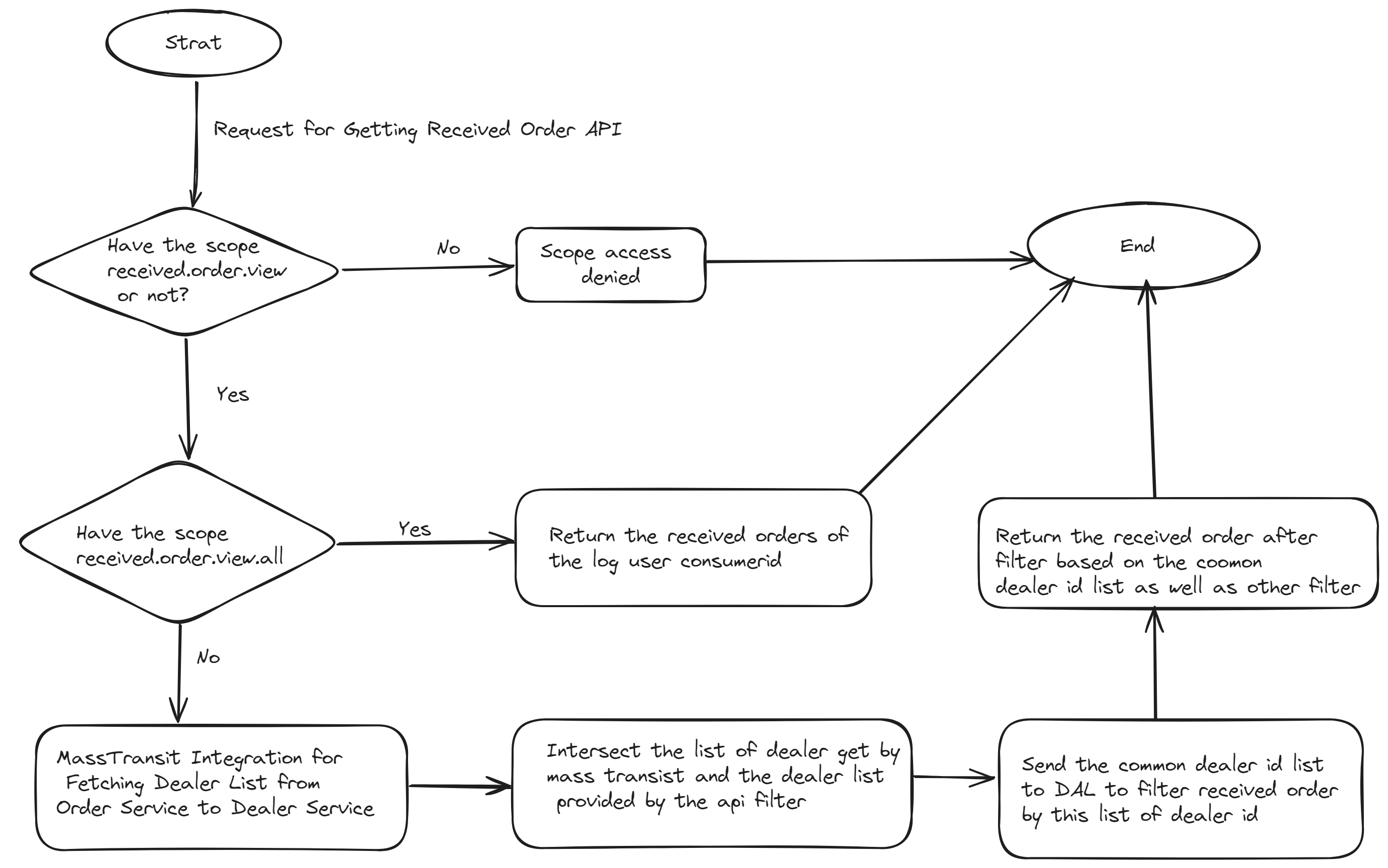
- User requests for received orders.
- JWT token is validated, extracting the user's email and assigned scopees.
- If the user has received.order.view.all, they are shown all orders.
- If the user has received.order.view.own, the manager's dealers are fetched using the helper method, and the orders are filtered by those dealer IDs.
- If the user lacks the required scope, access is denied.
Development Tasks & Estimates
| No | Task Name | Estimate (Hours) | Dependencies | Notes |
|---|---|---|---|---|
| 1 | DAL call to Retrieve Dealer List Managed by a User | 1 hours | ||
| 2 | MassTransit Integration for Fetching Dealer List from Order Service to Dealer Service | 2 hours | Task 1 | |
| 3 | Modify the API to Retrive Received Orders to Handle User Specific Access | 6 hours | Task 2 | |
| 4 | Backend Testing | 2 hours | ||
| 5 | Database Migration | 2 hours | Depend on Fleeto's given data which user should assign received.order.view.all scope | |
| 6 | Total | 13 hours |
Testing & Quality Assurance
-
Unit Tests:
Unit test for API to Retrive Received Orders. -
Integration Tests:
Test the full workflow, including validating JWT tokens, extracting email addresses, querying dealers, and filtering orders by dealer ID. -
Acceptance Criteria: API correctly handles user specific accessed based on their given scopes. An user who have scope "received.order.view.all" can see all orders. An user who have scope "received.order.view.own" can view only their under dealers' orders.
-
Testing Tools:
xUnit
Moq
Deployment Considerations
(Describe any deployment considerations, including environment configurations, feature toggles, or migration steps.)
-
Configuration Changes:
- Depend on Fleeto's given data which user should assign
received.order.view.allscope
- Depend on Fleeto's given data which user should assign
-
Rollout Plan:
(Outline the plan for rolling out the feature, including any phased releases.)
Risks & Mitigations
| Risk | Impact | Likelihood | Mitigation Strategy |
|---|
Review & Approval
-
Reviewer:
Abhishak Kumar Roy -
Approval Date:
2024-09-16
Notes
(Add any additional notes or considerations related to the feature development here.)