Cancel Order
Author(s)
- Reshmi Karan
- Sayan Mukherjee
- Sanket Mal
Last Updated Date
2024-09-02
SRS References
Version History
| Version | Date | Changes | Author |
|---|---|---|---|
| 1.0 | 2024-08-30 | Initial draft | Reshmi Karan, Sayan Mukherjee, Sanket Mal |
Feature Overview
Objective:
The objective of this feature is to allow users to cancel orders at various stages of the order process, with specific actions taken depending on the stage of cancellation.
Scope:
This feature will be limited to Fleeto and Distributors, who will have the capability to cancel orders at defined stages. The feature will include logic to handle cancellations at each stage, ensuring compliance with existing business rules and constraints.
Dependencies:
Payment service for invoice and credit note generation, IRN and e-way bill cancellations.
Inventory service for delete annexure.
Requirements
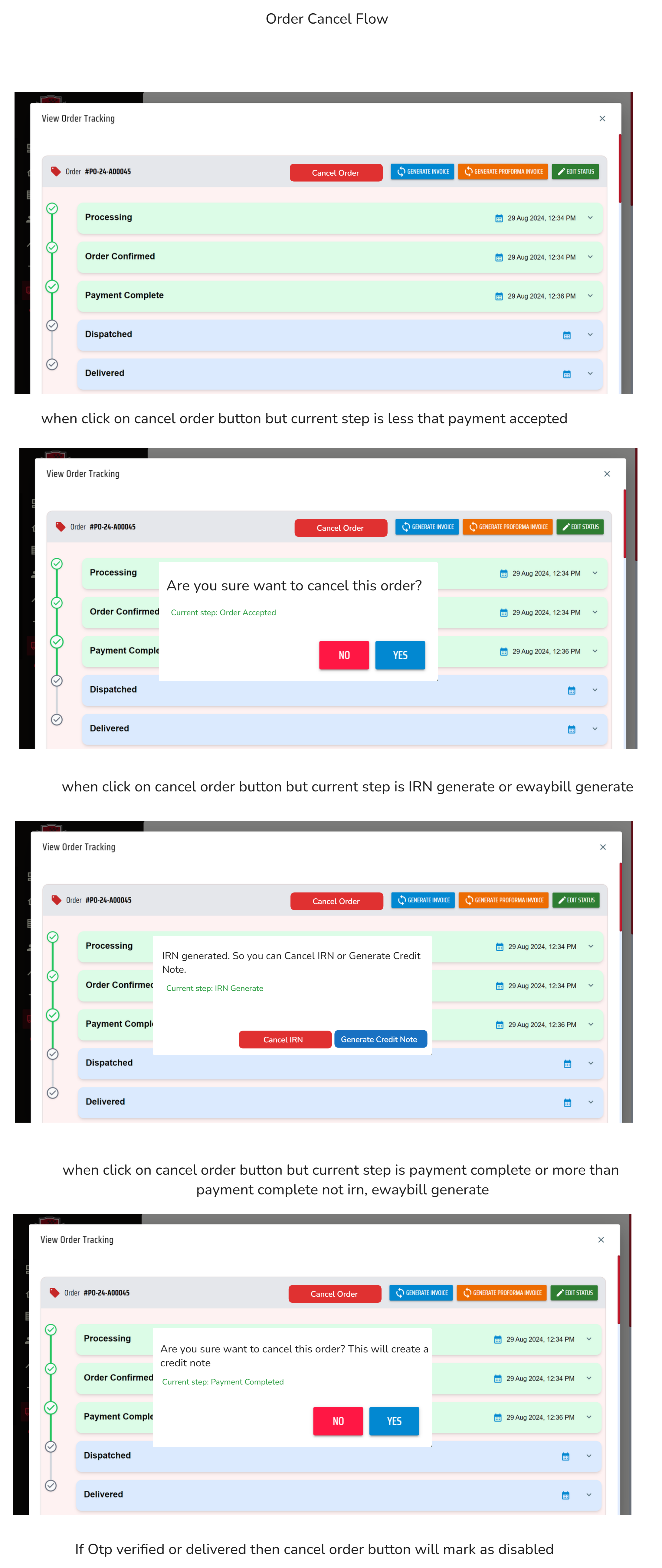
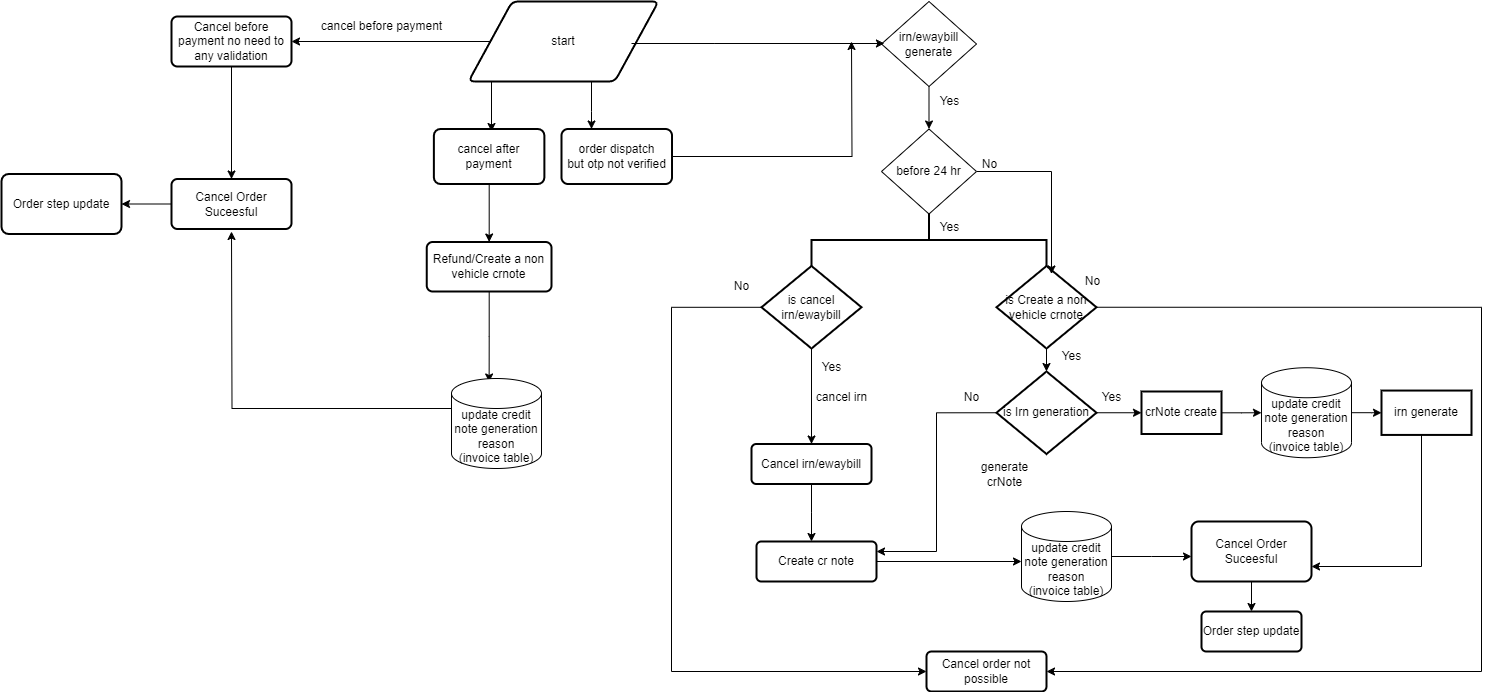
- If an order is canceled before payment, the order should be canceled successfully without additional actions.
- If an order is canceled during the payment step, a credit note must be created. If an invoice exists, it should be canceled, followed by the successful cancellation of the order.
- If an order is canceled during the IRN generation step and within 24 hours, the IRN should be canceled first(user preference), followed by credit note creation, and then the order cancellation.
- If an order is canceled during the IRN generation step and after 24 hours, a credit note should be created, followed by the successful cancellation of the order.
- If an order is canceled during the e-way bill step and within 24 hours, the e-way bill should be canceled first, then the IRN(user preference), followed by credit note creation, and finally the order cancellation.
- If an order is canceled during the e-way bill step and after 24 hours, a credit note should be created, followed by the successful cancellation of the order.
- If an order is canceled after annexure, delivery, dispatch, or OTP send steps(but otp not verified), a credit note should be created, followed by the successful cancellation of the order.
- If none of these scenarios match, order cancellation will not be possible.
- Then release annexure(delete for this consumer and update issale data for seller)
Design Specifications
-
UI/UX Design:
-
Data Models:
public record CancelOrderInfo
{
  public required Guid OrderId { get; set; }
  public CancelOrderStep CancelOrderStep { get; set; }
  public string? LogUserName { get; set; }
  public Guid? LogConsumerId { get; set; }
  public DateTime? LogDts { get; set; } = DateTime.UtcNow;
}

 public enum CancelOrderStep
 {
     PrePaymentCancellation, // send this enum when current step is before payment and cancel button click
     PartialPaymentCancellation,// send this enum when current step is partial payment and cancel button click
     CreditNoteGeneration, // send this if current step is greater than payment and less than otp verify and click on cancel button,
     CreditNoteGenerationWithIrn, // send this if current  step is greater than payment and less than otp verify and click on cancel button,
     IrnCancellation, // send this during current step is IRN generate and cancel button click
     EwayBillCancellation, //Send This during current step is Eway-bill generated and cancel button click
} -
API Interfaces:
Endpoint Method Parameters Response Response Status Codes /cancel/orderPOSTCancelOrderInfo(required, object)String (Message) 200,204,500,400,401 -
Third-Party Integrations:
-
Workflow:
Flow Chart -
-
Order Management Service interact with payment service to get invoice and update credit note generation reason(invoice table) and create invoice.
-
Order Management Service interact with payment service to cancel irn and cancel ewaybill.
-
Order Management Service interact with inventory service to cancel annexure
-
Development Tasks & Estimates
| No | Task Name | Estimate (Hours) | Dependencies | Notes |
|---|---|---|---|---|
| 1 | Back-end If cancel order before payment cancel order successfull | 2 hours | ||
| 2 | Back-end If an order is canceled at the payment step, a credit note will be created. Check if an invoice has been generated; if so, update credit note generation reason(invoice table). Once these steps are completed, the order cancellation will be successful. | 8 hours | ||
| 3 | Back-end If an order is canceled at the IRN generation step and within 24 hours, cancel the IRN first. Then, create a credit note, update credit note generation reason(invoice table). Once these steps are completed, the order cancellation will be successful. | 8 hours | ||
| 4 | Back-end If an order is canceled at the IRN generation step and after 24 hours, create a credit note. Once the credit note is created, update credit note generation reason(invoice table), the order cancellation will be successful. | 8 hours | ||
| 5 | Back-end If an order is canceled after IRN generation and the user chooses to create a credit note with IRN, then create the credit note, update the credit note generation reason in the invoice table, and generate the IRN for the credit note. Once these steps are completed, the order cancellation will be successful. | 4 hours | ||
| 6 | Back-end If an order is canceled at the e-way bill step and within 24 hours, first cancel the e-way bill, then cancel the IRN. After that, create a credit note, update credit note generation reason(invoice table). Once these steps are completed, the order cancellation will be successful. | 8 hours | ||
| 7 | Back-end If an order is canceled at the e-way bill step and after 24 hours, create a credit note, update credit note generation reason(invoice table). Once the credit note is created, the order cancellation will be successful. | 8 hours | ||
| 8 | Back-end If an order is canceled after the annexure, delivery, dispatch, or OTP send steps, create a credit note. Once the credit note is created,update credit note generation reason(invoice table), the order cancellation will be successful.(If Irn or eway bill have generated then go to step 3 or 4, 5 or 6) | 8 hours | ||
| 9 | Back-end Delete or cancel the annexure for the consumer and update the issale field for the seller. This applies to all components and each annexure. | 8 hours | 8 | |
| 10 | Back-end Update the order step at every stage if the order cancellation is successful. | 2 hours | 1-8 | |
| 11 | Back-end Testing | 6 hours | 1-9 | |
| 12 | Front-end - Cancel order button add on the top of edit tracker dialog screen besides generate invoice in manage order page | 0.5hours | NA | |
| 13 | Front-end - in case of current step is irn , eway-bill genetrated credit note creation button and message show after 24hrs accordinly. if user cancels within 24hr of irn generation then only show irn cancel option. and same as ewaybill. but credit note options shows without condition. | 2hours | NA | |
| 14 | Front-end - Changes needed in manage order alert modal structure | 2hours | NA | |
| 15 | Front-end - When button click open a dialog and create a sperate component | 1hours | Dependency 12 | |
| 16 | Front-end - Create a generic api call and send it payload enum as per button click and current step | 2hours | 13,14,15 | |
| 17 | Front-end - show success and error message and refetch all step details call and handle errors properly | 0.5hours | 15 | |
| 18 | Front-end - Testing | 2hours | 13-16 | |
| 19 | Total | 80 hours |
Testing & Quality Assurance
-
Unit Tests:
(List the unit tests that will be written for this feature.)- Test Cancel Order Before Payment:
Objective: Verify that the order can be successfully canceled if it is canceled before the payment step. Expected Outcome: Order status should be updated to "canceled," and no credit note or invoice cancellation actions should be triggered.
- Test Cancel Order During Payment Step:
Objective: Test canceling an order during the payment step to ensure a credit note is created, and if an invoice exists, it is canceled. Expected Outcome: A credit note should be generated, any existing invoice should be canceled, and the order status should be updated to "canceled."
- Test Cancel Order at IRN Generation Step (Before 24 Hours) :
Objective: Verify the order cancellation flow when IRN is generated and within 24 hours. Expected Outcome: The IRN should be canceled, a credit note should be created, and the order should be successfully canceled.
- Test Cancel Order at IRN Generation Step (After 24 Hours):
Objective: Test canceling an order when the IRN is generated but after 24 hours have passed. Expected Outcome: A credit note should be created without IRN cancellation, and the order status should be updated to "canceled."
- Test Cancel Order at Eway Bill Step (Before 24 Hours):
Objective: Verify that the eway bill and IRN are both canceled within 24 hours, and a credit note is created when canceling the order. Expected Outcome: Both the eway bill and IRN should be canceled, a credit note should be created, and the order should be successfully canceled.
- Test Cancel Order at Eway Bill Step (After 24 Hours):
Objective: Test canceling an order during the eway bill step but after 24 hours. Expected Outcome: A credit note should be created, and the order status should be updated to "canceled," without eway bill or IRN cancellation.
- Test Cancel Order After Annexure/Delivery/Dispatch/OTP Send Steps:
Objective: Verify that a credit note is created and the order is canceled when attempting to cancel after these steps. Expected Outcome: A credit note should be generated, and the order should be marked as "canceled."
- Test Cancel Order with Invalid Step or Scenario:
Objective: Ensure that the system correctly identifies invalid scenarios where cancellation is not possible. Expected Outcome: The order should not be canceled, and an appropriate error message should be returned.
-
Integration Tests:
(Describe how integration testing will be conducted.)- Integrating cancel-order api with ui:
Objective: Integrating api with button click and show proper message and check it will give perfect result or not and also check if null undefined params how it will be work. how errors will be tackled against api payload and response.
-
Acceptance Criteria:
-
Testing Tools:
Deployment Considerations
-
Configuration Changes:
-
Rollout Plan:
Risks & Mitigations
Review & Approval
-
Reviewer:
Abhishak Kumar Roy -
Approval Date:
2024-09-09
Notes
If the order is canceled during the partial payment step, it is currently not possible due to dependencies on different features.