Digital Retailing Web Integration Guide
Purpose
The Digital Retailing Web Integration allows you to capture and respond to events triggered by activities in the chat window related to the Digital Retailing tool. This integration helps you seamlessly track and handle data, such as form submissions or other specific actions, in real time.
How It Works
Integration Instructions
To enable this feature, insert the following JavaScript code within the <head> section of your website. Ensure that the chat window integration code is already added before including this script.
let digitalRetailingEventer = window[window.addEventListener ? "addEventListener" : "attachEvent"];
let externalEvents = {
    digitalRetailing: "DIGITAL_RETAILING",
    formsInChat: "FORMS_IN_CHAT"
};

// Listen to messages from the chat window for digital retailing activities
digitalRetailingEventer(!window.addEventListener ? "onmessage" : "message", function (e) {
    if (e.data.topic === externalEvents.digitalRetailing) {
        // Access the event data here
        console.log(e.data.data);
        // Your custom code here
    }
    if (e.data.topic === externalEvents.formsInChat) {
        // Access form submission data here
        console.log(e.data.data);
        // Your custom code here
    }
});
Event Handling
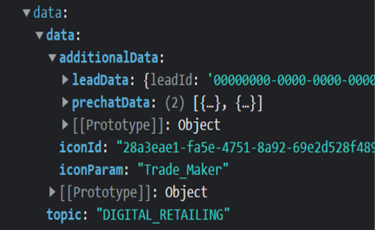
Once integrated, this script listens for messages from the chat window. Whenever an event is fired, you can access the data from e.data.data. The data includes the topic of the event (e.g., DIGITAL_RETAILING or FORMS_IN_CHAT) and the relevant details.
Event Details
1. Forms in Chat Event
This event is triggered when a visitor submits a form. The event data contains the following information:

Example Data Format:
{
    "SubscriberId": "00000000-0000-0000-0000-000000000000",
    "Id": "00000000-0000-0000-0000-000000000000",
    "Name": "My 1st form",
    "Description": "",
    "FormElementList": [
        {
            "InputElementId": "00000000-0000-0000-0000-000000000000",
            "ElementType": 1,
            "Label": "Phone",
            "Values": [
                "111111111"
            ]
        },
        {
            "InputElementId": "00000000-0000-0000-0000-000000000000",
            "ElementType": 1,
            "Label": "Name",
            "Values": [
                "John"
            ]
        }
    ]
}
Key Components:
- SubscriberId: Unique identifier for the subscriber.
- Id: Unique identifier for the form.
- Name: Name of the form.
- FormElementList: Contains the list of elements in the form, including:
- InputElementId: Unique identifier for the input element.
- ElementType: Enum value representing the type of the input field (e.g., text, number, checkbox).
- Label: Label associated with the input element.
- Values: Array of values entered by the visitor.
Input Element Types (Enum):
The ElementType determines the type of input field used in the form. Below are the possible values:
enum InputElementType {
    None = 0,
    Text = 1,
    TextArea = 2,
    Radio = 3,
    Select = 4,
    MultiSelect = 5,
    Slider = 6,
    Date = 7,
    Time = 8,
    Pill = 9,
    FileUpload = 10,
    Checkbox = 11
}
2. Digital Retailing Event
The DIGITAL_RETAILING event captures activities specifically related to the Digital Retailing tool. You can access and process the event data similarly by using e.data.data.
Usage Example
Here’s an example of how to handle the FORMS_IN_CHAT event and log the submitted data:
digitalRetailingEventer(!window.addEventListener ? "onmessage" : "message", function (e) {
    if (e.data.topic === externalEvents.formsInChat) {
        const formData = e.data.data;
        console.log("Form submitted:", formData);

        // Example: Extracting specific values
        formData.FormElementList.forEach(element => {
            console.log(`${element.Label}: ${element.Values.join(", ")}`);
        });
    }
});
Notes
- JSON Stringification: All event data is sent as JSON-stringified objects. Ensure proper parsing if required.
- Customization: Modify the event handling logic to fit your application’s specific needs, such as saving the data, triggering additional actions, or integrating with third-party tools.
- Pre-requisite: Ensure the chat window integration script is correctly implemented before adding this event listener.
For further assistance or advanced integration scenarios, please contact our support team.