[New Web Console]
Author(s)
- Alapan Das
Last Updated Date
[2025-07-07]
SRS References
Version History
| Version | Date | Changes | Author |
|---|---|---|---|
| 1.0 | 2025-07-07 | Initial draft | Alapan Das |
| ... | ... | ... | ... |
Feature Overview
Objective:
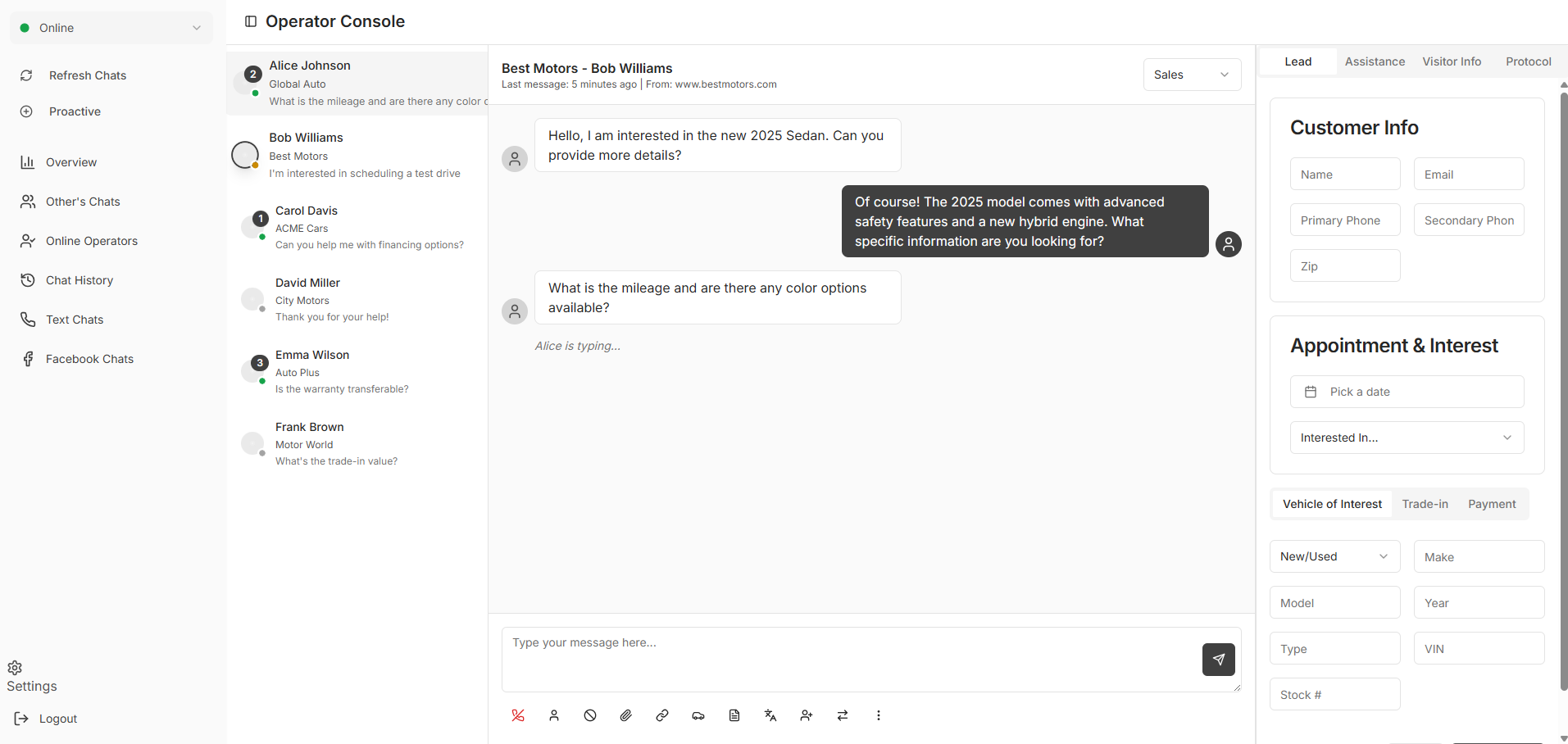
To create a new Web Console for all ChatLead products including fresh new UI and API Layer
Scope:
This Development includes rebranding of new web page and new API Layer which will serve the existing functionalities of the old console but with a modern approach and different aspect
Dependencies:
- Frontend includes
- ReactJS
- React-hook-form
- zod
- Zustand
- Shadcn
- Tanstack Query
- SignalR
- Backend :
- .NET 8
- WCF
Requirements
- Reproduce Exisiting Functionalities from old WebConsole
- Refresh UI for a new Webpage
- Integrate API with new UI
Design Specifications
(Provide detailed design specifications, including UI/UX designs, API interfaces, and any other relevant architectural details.)
-
UI/UX Design:
-
Data Models:
-
API Interfaces:
Endpoint Method Parameters Response Response Status Codes -
Third-Party Integrations:
-
Workflow:
- Project Setup for Backend
- WCF Connection Configuration
- Authentication Service Configuration
- Login Call
- Logout Call
- Refresh Call
- WebCall Configuration
- REST API Configuration
- Project Setup for Frontend
- Prepare Design in V0
- UI Component Integration
- Installing Dependencies
- react-hook-form
- zod
- zustand
- tanstack
- signalR connection configuration
- Message Parser configuration
- Service Worker configuration
- Notification Service using firebase messaging
Development Tasks & Estimates
| No | Task Name | Estimate (Hours) | Notes |
|---|---|---|---|
| 1 | Basic Project Setup with installing dependencies | 5 hours | Any notes here |
| 2 | Basic Project Setup (Frontend) with dependencies | 5 hours | Any notes here |
| 6 | Total | 10 hours | SubTasks are added separately |
Testing & Quality Assurance
(Outline the testing strategy and quality assurance measures for the feature.)
-
Unit Tests:
(List the unit tests that will be written for this feature.) -
Integration Tests:
(Describe how integration testing will be conducted.) -
Acceptance Criteria:
(Define the criteria that must be met for the feature to be considered complete.) -
Testing Tools:
(List any tools that will be used for testing.)
Deployment Considerations
(Describe any deployment considerations, including environment configurations, feature toggles, or migration steps.)
-
Configuration Changes:
(Detail any configuration changes required for this feature.) -
Rollout Plan:
(Outline the plan for rolling out the feature, including any phased releases.)
Risks & Mitigations
(Identify potential risks and the strategies to mitigate them.)
| Risk | Impact | Likelihood | Mitigation Strategy |
|---|---|---|---|
| Risk 1 | High | Medium | Strategy for mitigating Risk 1 |
| Risk 2 | Medium | High | Strategy for mitigating Risk 2 |
| ... | ... | ... | ... |
Review & Approval
(Include a section for review and approval by stakeholders.)
-
Reviewer:
(Name and role of the person reviewing the document.) -
Approval Date:
(Date when the feature is approved for development.)
Notes
(Add any additional notes or considerations related to the feature development here.)