Onboarding Request Update
Author(s)
- Saptarshi Mukherjee
- Arpita Dey
- ...
Last Updated Date
[2024-10-16]
SRS References
Version History
| Version | Date | Changes | Author |
|---|---|---|---|
| 1.0 | 2024-10-16 | Initial draft | Saptarshi Mukherjee, Arpita Dey |
Feature Overview
Objective:
The feature allows users to manage booking requests received from the portal by either changing the property code or modifying the agreement period.
For changing the property code, the system fetches a list of available properties, excluding any that are currently blocked or occupied within the specified building. The user can then select a new property code from the available options. Upon selection, the system updates the booking details by marking the previous property as available, blocking the newly selected property, and finalizing the changes in the booking record.
Alternatively, the user can change the agreement period. This involves selecting a new period, after which the system updates the booking details to reflect the revised agreement period. This ensures that the booking is aligned with the new time frame while maintaining accurate records.
Scope:
The feature scope involves managing booking requests by allowing users to either change the property code or update the agreement period. For property code changes, the system retrieves available properties within the specified building, excluding those that are blocked or currently occupied. Users can select a new property, after which the system marks the old property as available, blocks the newly selected property, and updates the booking details accordingly. For agreement period modifications, users can select a new period, and the system will update the booking details to reflect the revised duration.
Limitations and Boundaries:
- Property Availability: The feature only allows selection from properties that are unblocked and unoccupied. Any property that is currently in use or reserved for another purpose will not appear in the selection list.
- Booking Constraints: Changes can only be applied to ongoing bookings and cannot affect past or completed reservations.
- Property and Period Modification Rules: Both changes (property and period) must respect existing business rules, such as minimum stay durations or specific property blocking periods.
- Real-time Availability: The system assumes real-time property status but could be limited by data synchronization delays or temporary system errors.
- Onboarding Request Update Restriction: The onboarding request update can only be achieved on the very first step of the process. Once the request has passed Meeting Approval state, it can no longer be updated.
Dependencies:
None
Requirements
Functional Requirements
- Property Code Change: The system must allow users to change the property code associated with an existing booking.
- Fetch Available Properties: The system must retrieve and display a list of properties that are available for selection, excluding those that are blocked or occupied within the specified building.
- Select Property Code: The user must be able to select a new property code from the available options presented by the system.
- Update Booking Details: Upon selection of a new property code, the system must:
- Mark the old property as available.
- Mark the newly selected property as blocked.
- Update the booking details to reflect the changes.
- Change Agreement Period: The system must allow users to modify the agreement period of an existing booking.
- Select Period: Users must be able to select a new agreement period from available options.
- Update Period in Booking Details: The system must update the booking details with the newly selected agreement period.
- LastUpdatedOn: The system must capture and store the timestamp of when the booking details were last updated.
- LastUpdateBy: The system must record the user or system entity responsible for the last update to the booking details.
Non-Functional Requirements
- Data Modification Access: This feature has its separate permission/scope.Any user assigned with that permission can do this task of updating. By deafult superadmin, admin & Hod can modify booking request data.
Design Specifications
(Provide detailed design specifications, including UI/UX designs, API interfaces, and any other relevant architectural details.)
-
UI/UX Design:
Initially Edit button will be inside customer card. Button size will be small.
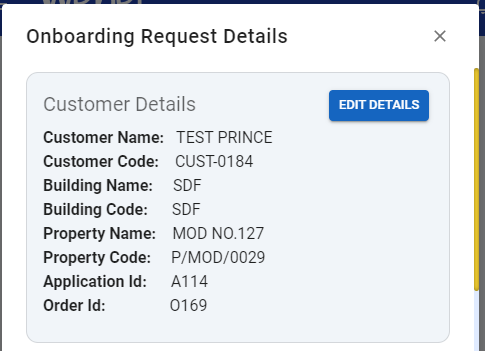 once user clicks on the edit button
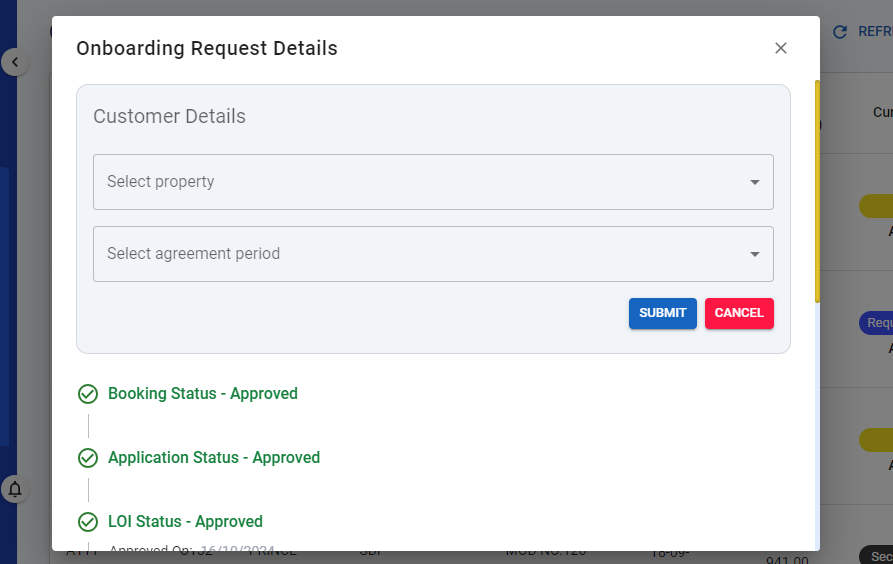
-
Data Models:
(Detail the data structures, including database schemas or objects.)public class CustomerBookingDetails
{
public string? ApplicationNo { get; set; }
public string? OrderNumber { get; set; }
public string? CustomerId { get; set; }
public string? CustomerName { get; set; }
public string? BuildingId { get; set; }
public string? BuildingName { get; set; }
public string? PropertyId { get; set; }
public string? PropertyName { get; set; }
public BillingPeriod? Period { get; set; }
public DateTime? Date { get; set; }
public string? Documents { get; set; }
}
public class Item
{
public string? Code { get; set; }
public string? Name { get; set; }
} -
API Interfaces:
Following apis will be in CustomerOnboardingController.cs.Endpoint Method Parameters Response Response Status Codes /update/booking/requestPOSTCustomerBookingDetailsString(Message)200,204,500/get/free/properties/{buildingcode}GETbuildingcode(required, string)List of Item200,204,500 -
Third-Party Integrations:
None -
Workflow:
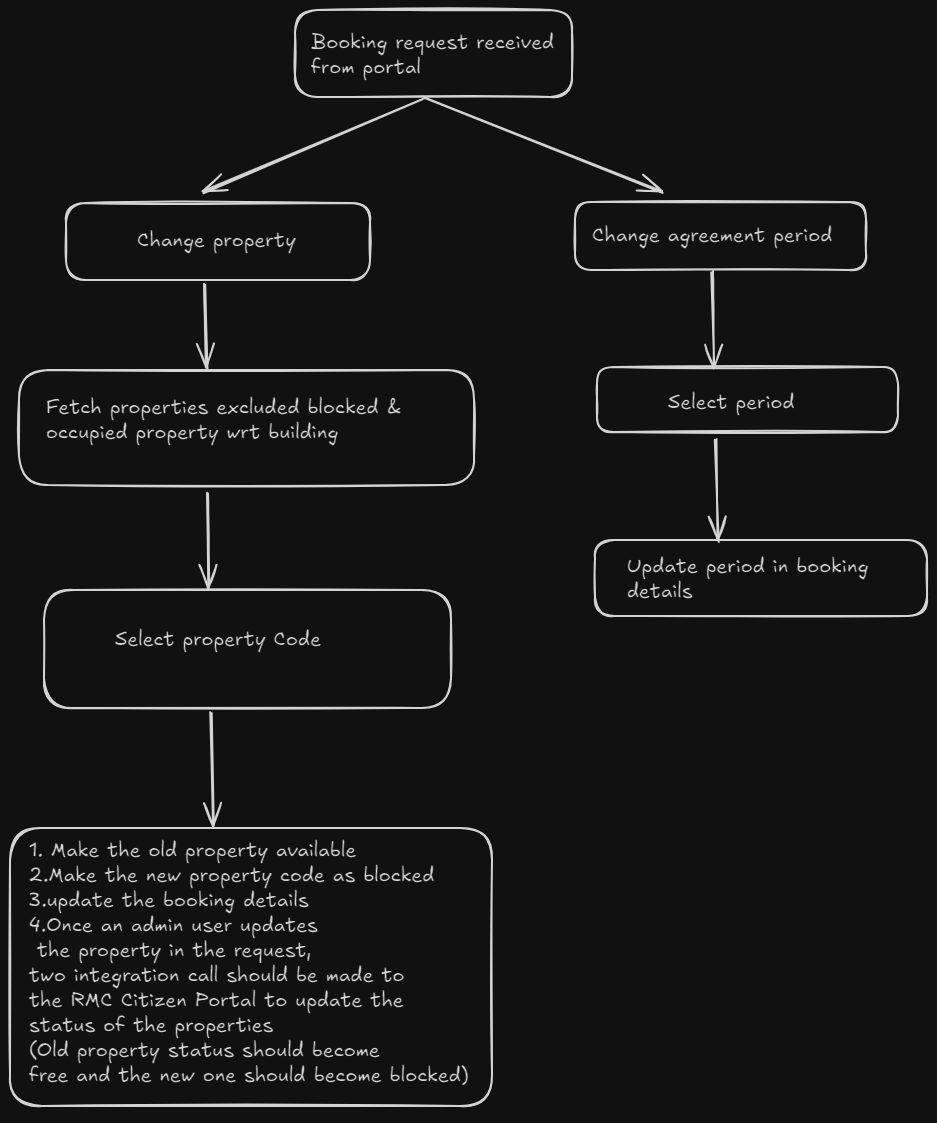
Development Tasks & Estimates
(Break down the development process into smaller tasks and provide time estimates for each.)
| No | Task Name | Estimate (Hours) | Dependencies | Notes |
|---|---|---|---|---|
| 1 | Update Booking Request | 4 hours | Scope Name : bookingrequest.update | |
| 2 | Frontend For Updating Booking Request | 6 hours | ||
| 2 | Integration Test | 1 hours | ||
| 4 | Total | 11 hours |
Testing & Quality Assurance
(Outline the testing strategy and quality assurance measures for the feature.)
-
Unit Tests:
- Test that available properties are correctly fetched excluding blocked and occupied ones.
- Test the property selection process, ensuring the selected property is marked as blocked and the old property is made available.
- Test that booking details are updated correctly when a new property code is selected.
- Test the change agreement period functionality to ensure the selected period is applied.
-
Integration Tests:
- Validate Property Code Change Update in RMC Citizen Portal
- Booking Request Sync with RMC Citizen Portal
- Verify Update Responses from RMC Citizen Portal
-
Acceptance Criteria:
None -
Testing Tools:
None
Deployment Considerations
None
Risks & Mitigations
None |
Review & Approval
(Include a section for review and approval by stakeholders.)
-
Reviewer:
Ayon Das -
Approval Date:
2024-10-18
Notes
None