Security Deposit Reversal
Author(s)
- Dipak Mourya
- Bishwanath Jana
Last Updated Date
2024-10-16
Version History
| Version | Date | Changes | Author |
|---|---|---|---|
| 1.0 | 2024-10-16 | Initial draft | Bishwanath Jana |
Feature Overview
Objective:
The goal of this feature is to handle the reversal of security deposit payments when a tenant vacates a property. When the tenant offboards and the property status is changed, the security deposit that was originally paid needs to be reversed. This feature will create a new entry in the system with the same details as the original transaction but with a negative amount to effectively refund the deposit.
This process ensures that the system accurately records and tracks security deposit reversals when tenants leave the property.
Scope:
The security deposit reversal feature is restricted to admin and super admin users, allowing them to reverse payments for specific customers.
Requirements
Before returning a tenant's security deposit, we need to make sure that the tenant has officially moved out and completed the offboarding process. Once we confirm that the tenant has successfully left, we will create a new record to show the amount being refunded, making it clear in our system that the security deposit is being returned.
Design Specifications
- UI/UX Design:
The below image is provided for reference. In the UI, the new sd-reverse option will be placed beside theeyeicon. This button will be available only when the offboarding process for a customer is fully completed. If the offboarding is incomplete, the reverse payment option will remain disabled, ensuring that security deposit payments can only be reversed for customers who have completed their offboarding process.
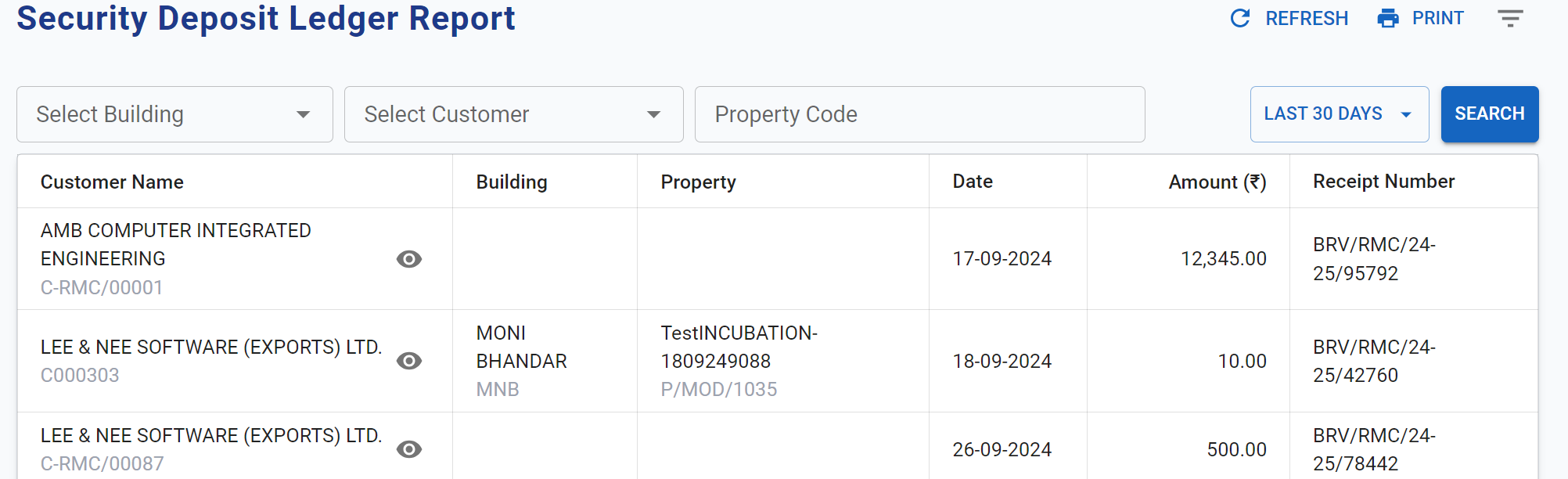
When a user clicks on the reverse sd-payment option, the system will gather the necessary information, including the customerId, buildingId, propertyId, and brvNumber. These details will be sent as a payload to a designated API endpoint. Upon successful submission of this data, the API will process the request, and the reverse of the security deposit (SD) will be completed.
-
Data Models: The
SecurityDepositTransactionstructure will be used to represent the security deposit transactions:public record SecurityDepositTransaction
{
public string BrvNumber { get; init; }
public string BuildingCode { get; init; }
public string CustomerCode { get; init; }
public string PropertyCode { get; init; }
}
public class SDLedgerStruct
{
public Guid TransactionId { get; set; }
public string? CustId { get; set; }
public string? CustName { get; set; }
public string? BuildingCode { get; set; }
public string? BuildingName { get; set; }
public string? PropertyCode { get; set; }
public string? PropertyName { get; set; }
public DateTime? Date { get; set; }
public decimal Amount { get; set; }
public string? ReceiptNumber { get; set; }
public bool IsOffboarded { get; set; } // New property added to indicate if the customer has offboarded
}The
IsOffboardedproperty has been added to theSDLedgerStructclass to indicate whether a customer has successfully offboarded.When processing a security deposit transaction, the system retrieves the
BuildingCode,CustIdandPropertyCodefrom thetblsecuritydepositetable using the providedbrvnumber. If the customer has completed the offboarding process, theIsOffboardedfield is set totrue, allowing for a security deposit reversal. If not, it remainsfalse, preventing any reversal actions until offboarding is finalized.
-
API Interfaces:
The following API endpoints are required for handling the reversal logic:Endpoint Method Parameters Response Response Status Codes security-deposit/reversePOSTSecurityDepositTransaction(required, body): Transaction details for reversalString(Message)201,400,500customer/sd/ledgerGETThe IsOffboardedproperty has been added to theSDLedgerStructclass{ "isOffboard": boolean }200,404,500
Workflow for the New API:
- The client sends a
GETrequest to thecustomer/sd/ledgerendpoint with thebrvnumberas a query parameter. - The system retrieves the
BuildingCodeandPropertyCodefrom thetblsecuritydepositetable based on the providedbrvnumber. - The system checks the
statusoflandin thetblcustomerpropertymappingtable for the providedbrvnumber. - If the status is "Vacant," the system sends a request to the CoreERP system to verify the offboarding status.
- If the CoreERP response indicates that the customer has been offboarded, the response will return
{"isOffboard": true}. - If the CoreERP response indicates that the customer has not been offboarded, the response will return
{"isOffboard": false}.
- If the CoreERP response indicates that the customer has been offboarded, the response will return
- If the status is "Occupied," the response will return
{"isOffboard": false}without checking the CoreERP response. - If the
brvnumberdoes not exist, a404response will be sent. - Any internal errors will result in a
500response.
Development Tasks & Estimates
| No | Task Name | Estimate (Hours) | Dependencies | Notes |
|---|---|---|---|---|
| 1 | API writing | 2 hours | None | Implement new API endpoints |
| 2 | Existing API changes | 2 hours | None | Modify existing API to include isOffboard field |
| 3 | DAL call implementation | 2 hours | Database | Create data access layer calls |
| 4 | Logic for isOffboard status | 1 hour | Database | Fetch data from the table |
| 5 | CoreERP DAL call implementation | 2 hours | CoreERP service | Create data access layer calls for CoreERP integration |
| 6 | Unit testing | 2 hours | Test framework | Ensure unit coverage |
| 7 | Full integration testing | 2 hours | End-to-end system | Validate full functionality |
| 8 | Security Deposit API integration | 3 hours | Security Deposit page | Integrate new API into the page with proper UI/UX and reverse action logo |
| 9 | Total | 16 hours |
Testing & Quality Assurance
-
Unit Tests:
- Test the validation of
statusofland. - Ensure that the reversal is only processed when the land status is "occupied" and the customer has been offboarded.
- Confirm the creation of a negative entry with the same
brvnumberin thetblsecuritydepositetable. - Validate the retrieval of the
isOffboardstatus. - Ensure that the correct status is returned based on the property status.
- Confirm that non-existent BRV numbers return a
404status.
- Test the validation of
-
Integration Tests:
- Validate end-to-end functionality by submitting reversal requests and checking the database for the correct changes.
- Simulate transaction ID conflicts and ensure the system handles them gracefully.
- Validate end-to-end functionality by querying existing BRV numbers and checking the returned statuses.
- Simulate requests for non-existent BRV numbers to ensure correct error handling.
-
Acceptance Criteria:
- Reversal is processed only when the land status is "occupied" and offboarding has occurred.
- A negative transaction entry is created with the correct
brvnumberand details. - The
isOffboardstatus accurately reflects the state of the property. - Responses return the correct status codes for valid and invalid requests.
- Logs are generated for each reversal transaction.
-
Testing Tools:
- NUnit/xUnit for unit testing.
- Postman for API testing.
- Database integration tools for verifying transaction entries.
Deployment Considerations
-
Configuration Changes:
Ensure that logging is enabled to capture the reversal transactions. -
Rollout Plan:
- Deploy to a staging environment for testing.
- Monitor reversal transactions in the staging database.
- Roll out to production once tests are passed.
Risks & Mitigations
| Risk | Impact | Likelihood | Mitigation Strategy |
|---|---|---|---|
| Transaction ID conflict during reversal | High | Medium | Implement a proper ID conflict resolution mechanism |
| Incorrect reversal amount | Medium | Low | Validate negative amount during transaction creation |
| Status validation failure | Medium | Medium | Ensure statusofland is accurately checked before reversal |
Review & Approval
-
Reviewer:
Ayon Das -
Approval Date:
2024-10-18
Notes
This update allows users to quickly check the offboarding status of a property, improving overall system functionality and user experience.