Customer Property Update
Author(s)
- Bishwanath Jana
- Dipak Mourya
Last Updated Date
[2024-10-16]
SRS References
Version History
| Version | Date | Changes | Author |
|---|---|---|---|
| 1.0 | 2024-10-16 | Initial draft | Bishwanath Jana & Dipak Mourya |
| ... | ... | ... | ... |
Feature Overview
Objective:
This feature allows users to update property details for customers easily. On the Customer Property page, each property has an Update/Edit button. When a user clicks this button, a form appears where they can adjust details like rent rates or service charges. After making changes and saving, the information is updated in the system, keeping the property records accurate and up-to-date
Scope:
Only Super Admin and Admin users can access the Update/Edit feature on the Customer Property page. This restriction ensures that only authorized users can make changes, keeping the property data secure and accurate, while regular customers are limited to viewing the information without making edits.
Dependencies:
- The feature relies on the
tblcustomerpropertymappingtable schema and any existing integrations with this table.
Requirements
- Update all relevant fields in
tblcustomerpropertymappingbased on the provided data. - API will be in
POSTformat to handle the update.
Design Specifications
(Provide detailed design specifications, including UI/UX designs, API interfaces, and any other relevant architectural details.)
-
UI/UX Design:
A modal will be integrated into the Customer Property page, triggered when users click the
Update/Editicon located at the end of each row in the customer-property table. This modal will allow users to view and edit specific fields related to the selected property, with the ability to modify their initial values before saving changes. The goal is to enable seamless editing of property details directly from the table interface.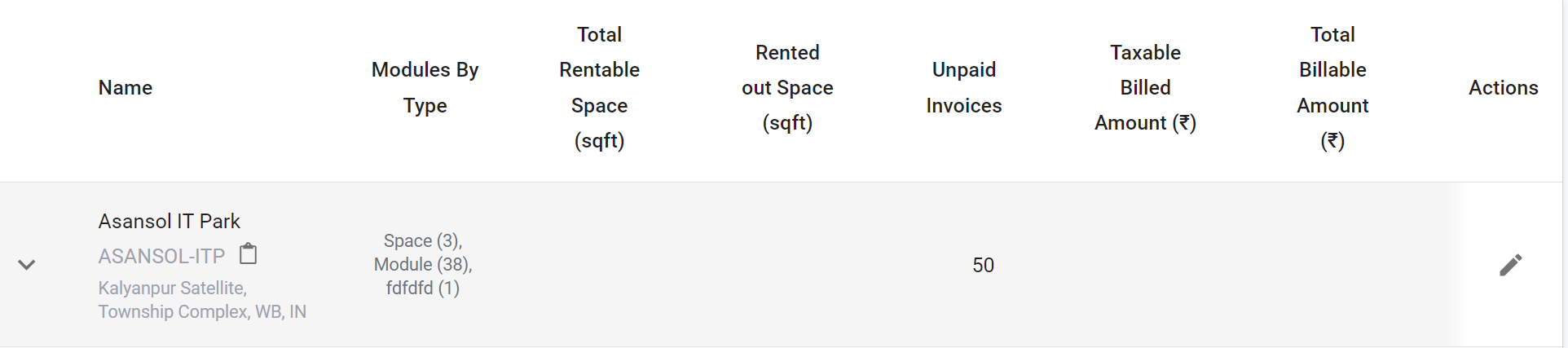
In this UI/UX flow, a modal is triggered when the user clicks the edit icon in the
Actionscolumn of a property row on the Customer Property page (as shown in the reference screenshot). The modal displays editable fields like Required Rent Rate, Service Charge Rate, Rate per Seat, Surrender Date, and Status of Land, pre-filled with current values. Users can make changes and Submit/Save, which updates the table and synchronizes the data with the backend for consistency. -
Data Models:
The core class structure for updating customer property mappings is:public class CustomerPropertyMappingStruct
{
public string? CustomerPropertyCode { get; init; }
public string? PropertyCode { get; init; }
public string? IdentificationNo { get; init; }
public string? PropertyType { get; init; }
public string? CustId { get; init; }
public string? CustName { get; init; }
public string? BuildingCode { get; init; }
public string? BuildingName { get; init; }
public string? AgreementCode { get; init; }
public DateTime? AgreementStartDate { get; init; }
public DateTime? AgreementEndDate { get; init; }
public string? BillingProcess { get; init; }
public DateTime? DateOfAllotmentOfPlot { get; init; }
public string? PositionOfPlot { get; init; }
public string? PurposeOfLandOrMode { get; init; }
public float AreaSqftSuperBuild { get; init; }
public float AreaSqftInBuild { get; init; }
public float AreaInAcars { get; init; }
public string? Registration { get; init; }
public float RegistrationAmount { get; init; }
public DateTime? RegistrationDate { get; init; }
public bool IsRegistrationOfPlot { get; init; }
public string? NoSeries { get; init; }
public string? ItemRequirement { get; init; }
public string? LastModifiedBy { get; init; }
public float PermissionFeeRate { get; init; }
public float PermissionFeeAmount { get; init; }
public bool IsStampDutyPaid { get; init; }
public float StampDutyAmount { get; init; }
public float SecurityAmount { get; init; }
public float PremiumAmount { get; init; }
public bool IsPropertyTaxPaid { get; init; }
public float PropertyTaxAmount { get; init; }
public float ServiceChargeRate { get; init; }
public float RentRate { get; init; }
public int NumberOfSeat { get; init; }
public float RatePerSeat { get; init; }
public float MazAreaInSqrFt { get; init; }
public float MazAreaInAcars { get; init; }
public float ServiceChargeRateMazFloor { get; init; }
public float RentRateMazFloor { get; init; }
public float RentalFactorForLand { get; init; }
public float ServiceChgFactForLand { get; init; }
public bool ThirdPartyExist { get; init; }
public bool Alloted { get; init; }
public StatusOfLand? StatusOfLand { get; init; }
public string? UnitOfMeasure { get; init; }
public string? Floor { get; init; }
public DateTime? BillingActivationDate { get; init; }
public string? IsSuperBuildOrInBuild { get; init; }
public string? SecurityDeposit { get; init; }
public DateTime? CreationDate { get; init; }
public DateTime? LastModificationDate { get; init; }
public float AreaForGenerator { get; init; }
public DateTime? SurrenderDate { get; init; }
} -
API Interfaces:
The following API endpoints will be utilized for updating customer property data:Endpoint Method Parameters Response Response Status Codes update/customerpropertiesPOSTCustomerPropertyMapping(required, JSON object)String(Update status)200,400,500 -
Third-Party Integrations:
(List any third-party services or tools that need to be integrated.) -
Workflow:
(Describe the end-to-end workflow of the feature, detailing how different components interact, including the sequence of events, data flow, and the user journey.)
Development Tasks & Estimates
| No | Task Name | Estimate (Hours) | Dependencies | Notes |
|---|---|---|---|---|
| 1 | Create API for editing customer property mapping | 2 hours | None | Implement POST API for handling updates |
| 2 | Add DAL call for database interaction | 1 hour | API Implementation | Implement data access logic to update the tblcustomerpropertymapping table |
| 3 | Unit test case implementation | 1 hour | DAL call | Write unit tests for API functionality |
| 4 | Full integration testing | 1.5 hours | API, DAL | Test end-to-end functionality of the feature |
| 5 | Create modal with fields and validation | 2.5 hours | None | Implement a modal for editing fields like required rent rate, service charge rate, rate per seat, surrender date, and status of land, with validation |
| 6 | API integration with modal | 1 hour | API, Modal | Integrate the modal with the API to submit changes |
| 7 | Full testing of UI and backend changes | 1.5 hours | API, Modal | Perform comprehensive testing of the UI and backend updates |
| 8 | Total | 10.5 hours |
Testing & Quality Assurance
-
Unit Tests:
Unit tests will verify that the data is correctly updated intblcustomerpropertymapping. -
Integration Tests:
Integration tests will ensure that the API interacts correctly with the database and updates the records based on the provided data. -
Acceptance Criteria:
- All fields in
tblcustomerpropertymappingare updated based on the provided data.
- All fields in
-
Testing Tools:
(List any tools that will be used for testing.)
Deployment Considerations
-
Configuration Changes:
Ensure any configuration for handling updates during the update process is set up in the deployment environment. -
Rollout Plan:
(Outline the plan for rolling out the feature, including any phased releases.)
Risks & Mitigations
| Risk | Impact | Likelihood | Mitigation Strategy |
|---|---|---|---|
| Data inconsistency during update | High | Medium | Ensure transactions are used to maintain data integrity during updates |
Review & Approval
-
Reviewer:
Ayon Das -
Approval Date:
2024-10-16
Notes
(Add any additional notes or considerations related to the feature development here.)