Multipayment Change Request
Author(s)
- Bishwanath Jana
- Dipak Mourya
Last Updated Date
[2025-01-08]
SRS References
- 2.1.2
- 2.1.3
Version History
| Version | Date | Changes | Author |
|---|---|---|---|
| 1.0 | 2025-01-08 | Initial draft | Bishwanath Jana |
Feature Overview
Objective:
Currently, the system allows multi-payment for multiple customers. In the current flow, the admin selects the customer code, building code, and amount multiple times to make payments. However, this process will change in the new implementation. In the updated flow, we are introducing a new field called Account Type, which will provide greater flexibility. This field will have multiple values such as EMD, Customer, and Payable to IT. Based on the selected account type, the admin can perform multi-payment not only for customers but also for other account types, enabling a more versatile and streamlined payment process.
Scope
- Account Type Integration: Introduce a new field called Account Type with predefined values such as EMD, Customer, and Payable to IT.
- Multi-payment Flexibility: Allow the admin to perform multi-payments based on the selected Account Type, enabling payments not only for customers but also for other account types.
- Streamlined Payment Process: Simplify the payment process by letting the admin select the Account Type once and make payments for multiple entries in a single flow.
Dependencies:
(List any external dependencies, libraries, or other features that this feature depends on.)
Requirements
- Admin must select the Account Type (Customer, EMD, or Payable to IT) before proceeding.
- If Account Type is Customer, the existing payment flow must remain unchanged.
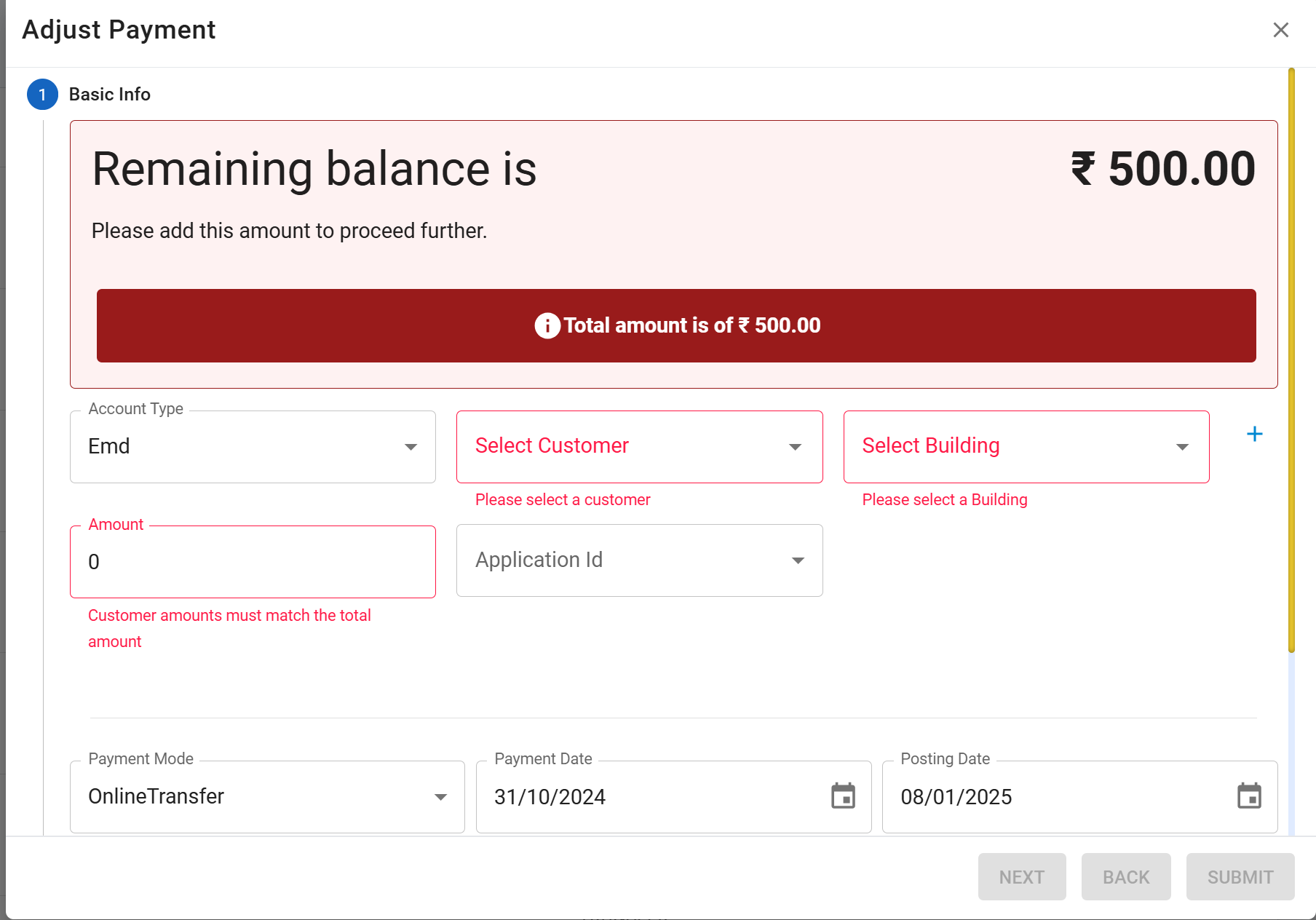
- If Account Type is EMD, the following must be mandatory:
- Customer Code
- Building Code
- Amount
- Application Number (to be fetched based on Customer Code).
- For EMD, Building Code and Amount must be auto-filled based on Application Number.
- If Account Type is Payable to IT:
- Customer Code is optional.
- Building Code and Amount are mandatory.
- Application Number is not applicable.
- Mandatory fields must be validated based on the selected Account Type.
Design Specifications
Below, you can see the provided UI design showcasing these changes.
- UI/UX Design:
First image showing the customer account type UI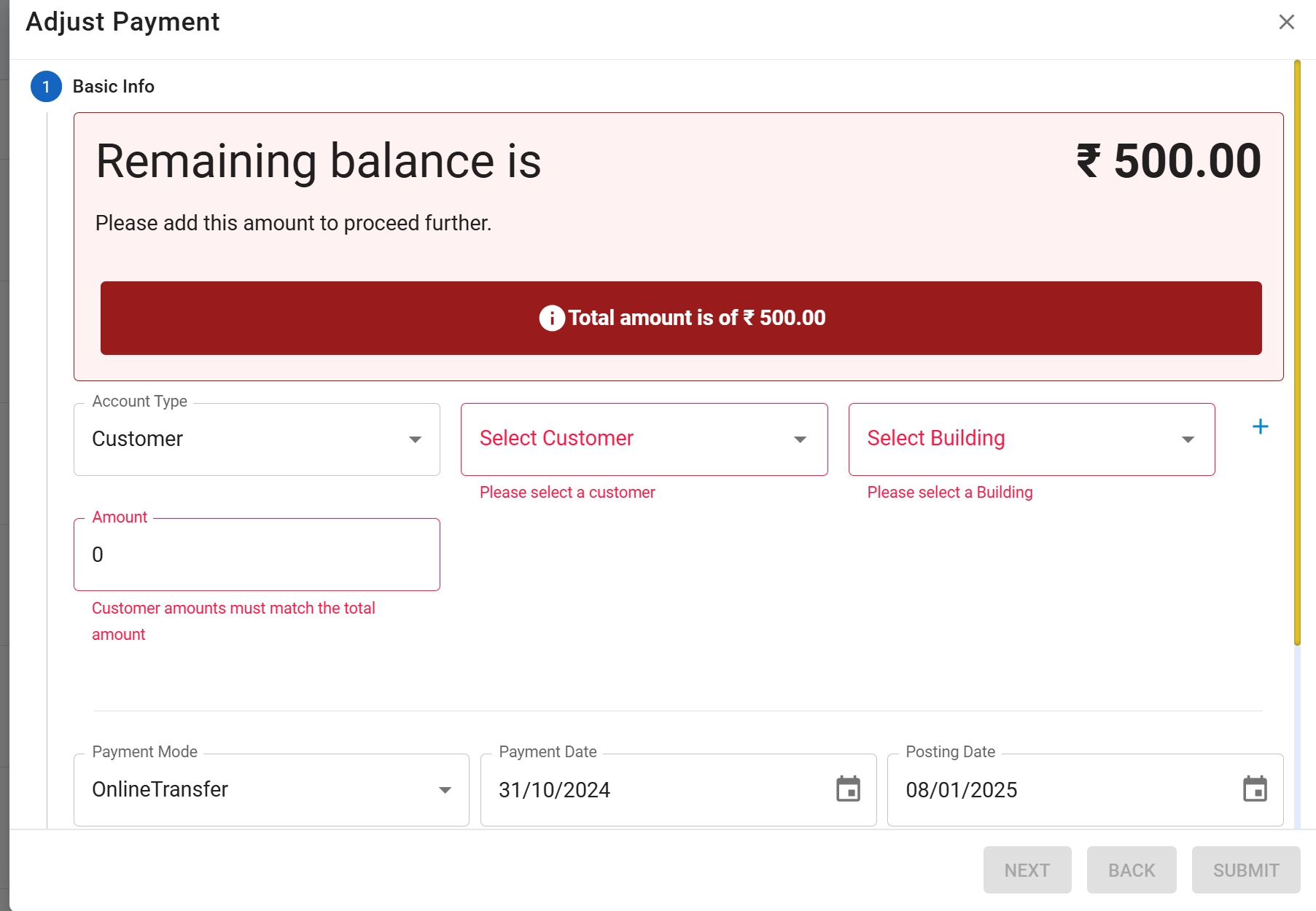 Second image showing the Emd account type UI
- Data Models
public enum AccountIdentifier
{
    Rent,
    ServiceCharge,
    RentFactor,
    ServiceChargeFactor,
    // ... other existing enum values
    PayableToIT = 25,
    Customer = 26,
    Emd = 27
}

public record InitiateTransactionDetails
{
    public PaymentTransaction? PaymentTransaction { get; init; }
    public List<PaymentInvoiceMapping>? PaymentAccountMappings { get; init; }
    public AccountIdentifier AccountType { get; init; }
    public string? ApplicationNo { get; init; }
}
- API Interfaces:
| Endpoint | Method | Parameters | Response | Response Status Codes |
|---|---|---|---|---|
/api/v1/process/initiate/multipay | POST | InitiateTransactionDetails (required, object): Contains PaymentTransaction, PaymentAccountMappings, AccountType (enum: Customer, EMD, PayableToIT), and ApplicationNo (string) | String (Message) | 201, 400, 500 |
-
Third-Party Integrations:
(List any third-party services or tools that need to be integrated.) -
Workflow:
-
Admin Action:
- Admin selects an Account Type:
Customer,EMD, orPayableToIT.
- Admin selects an Account Type:
-
Data Input:
- Customer: Follows the existing flow (
Customer Code,Building Code,Amount). - EMD:
- Admin enters
Customer Code. - System fetches
ApplicationNo, autofillsBuilding CodeandAmount.
- Admin enters
- PayableToIT:
Building CodeandAmountare mandatory;Customer Codeis optional.
- Customer: Follows the existing flow (
-
Request Submission:
- Admin submits the form, sending
InitiateTransactionDetailsto/api/v1/process/initiate/multipay.
- Admin submits the form, sending
-
Backend Processing:
- Validates input fields based on Account Type.
- Fetches
GLCodeand updatestblpaymentdetailswith:AccountType(based on selection).GLCode(based onBuildingCodeandAccountTypevia stored procedure).
-
Response:
- Returns success or error message to the admin.
-
Database:
- Adds two new columns to
tblpaymentdetails:AccountType: Populated based on selection.GLCode: Retrieved from the database using a stored procedure.
- Adds two new columns to
Development Tasks & Estimates
(Break down the development process into smaller tasks and provide time estimates for each.)
| No | Task Name | Estimate (Hours) | Dependencies | Notes |
|---|---|---|---|---|
| 1 | Modify /api/v1/process/initiate/multipay endpoint to handle new logic based on AccountType | 4 hours | Updated InitiateTransactionDetails | Validate input based on AccountType. |
| 2 | Add DAL (Data Access Layer) call to fetch GLCode based on BuildingCode and AccountType | 1 hour | Database access | Ensure proper handling of fetched data. |
| 3 | Implement backend logic to populate GLCode and AccountType in tblpaymentdetails | 3 hours | Modified database schema | Ensure proper integration with the new flow. |
| 4 | Test API changes (unit testing and integration testing) | 3 hours | All development tasks completed | Validate input/output and error handling. |
| 5 | UI development under different condition based on account type like emd,payble ToIt. | 4 hours | No | Validate input/output and error handling. |
| 6 | API Update for multipayment | 2 hours | Integration depends on the backend API being developed by the backend team. | Validate input/output and error handling. |
| 7 | Test for multipayment full integration | 2 hours | No | Validate input/output and error handling. |
| 8 | Total | 19 hours |
Testing & Quality Assurance
(Outline the testing strategy and quality assurance measures for the feature.)
-
Unit Tests:
(List the unit tests that will be written for this feature.) -
Integration Tests:
(Describe how integration testing will be conducted.) -
Acceptance Criteria:
(Define the criteria that must be met for the feature to be considered complete.) -
Testing Tools:
(List any tools that will be used for testing.)
Deployment Considerations
(Describe any deployment considerations, including environment configurations, feature toggles, or migration steps.)
-
Configuration Changes:
(Detail any configuration changes required for this feature.) -
Rollout Plan:
(Outline the plan for rolling out the feature, including any phased releases.)
Risks & Mitigations
(Identify potential risks and the strategies to mitigate them.)
| Risk | Impact | Likelihood | Mitigation Strategy |
|---|---|---|---|
| Risk 1 | High | Medium | Strategy for mitigating Risk 1 |
| Risk 2 | Medium | High | Strategy for mitigating Risk 2 |
| ... | ... | ... | ... |
Review & Approval
(Include a section for review and approval by stakeholders.)
-
Reviewer:
(Name and role of the person reviewing the document.) -
Approval Date:
(Date when the feature is approved for development.)
Notes
(Add any additional notes or considerations related to the feature development here.)