AUDIT LOG
Author(s)
- Dipak Mourya
Last Updated Date
[2025-06-27]
SRS References
- 2.1.2
- 2.1.3
Version History
| Version | Date | Changes | Author |
|---|---|---|---|
| 1.0 | YYYY-MM-DD | Initial draft | Developer Name |
| ... | ... | ... | ... |
Feature Overview
Objective:
The purpose of this feature is to implement an Audit Logging system that captures and displays both API activity logs and Database operation logs. This will help in tracking requests, responses, user activities, and system-level operations for better transparency, debugging, and auditing.
Scope:
-
Provide logging for both API calls and database-level operations.
-
Display key metadata such as timestamps, request/response details, status codes, user info, and machine/environment context.
-
Support parsing and rendering of the log data in a simple, user-friendly, and visually clear format, showing differences (where applicable) using side-by-side old and new values with color highlights (e.g., green for new, red for old).
-
Include basic filtering (e.g., by date, user, type) and sorting functionality.
Dependencies:
- Backend API that returns structured log data
- JSON parser to format and display nested log content
Note: Optional: A UI library for syntax highlighting or side-by-side diff display (e.g., react-diff-viewer, highlight.js, prismjs).
Requirements
Functional Requirements:
-
The system must log every API request and response with metadata such as method, status code, timestamp, and IP address.
-
The system must log all database operations, including user actions and affected entities.
-
The logs must be displayed in a structured and readable format for end-users.
-
The UI must show old and new values side by side with appropriate color indicators.
-
Users should be able to filter logs by date, user, event type, or status.
Design Specifications
- UI/UX Design:
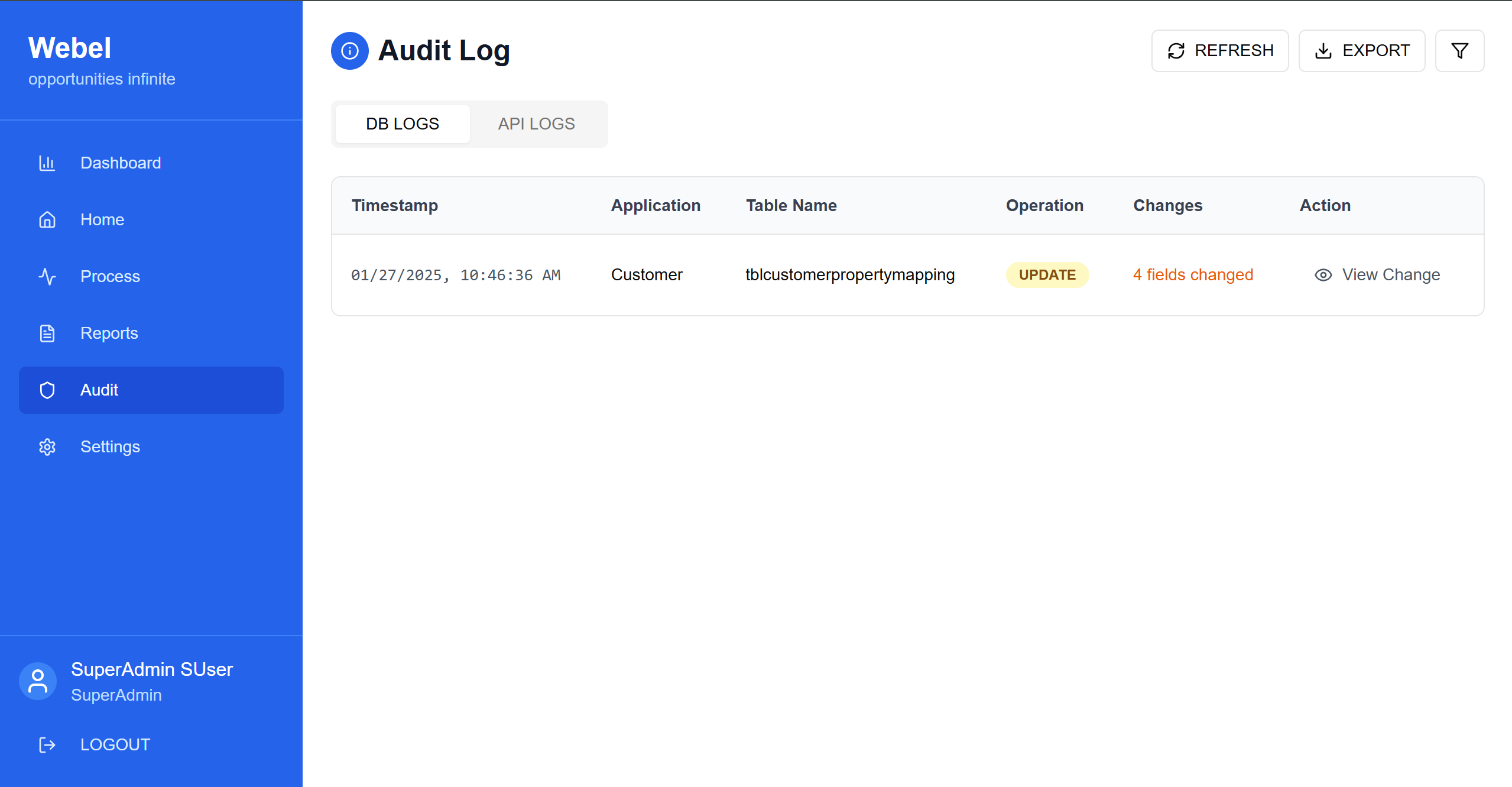
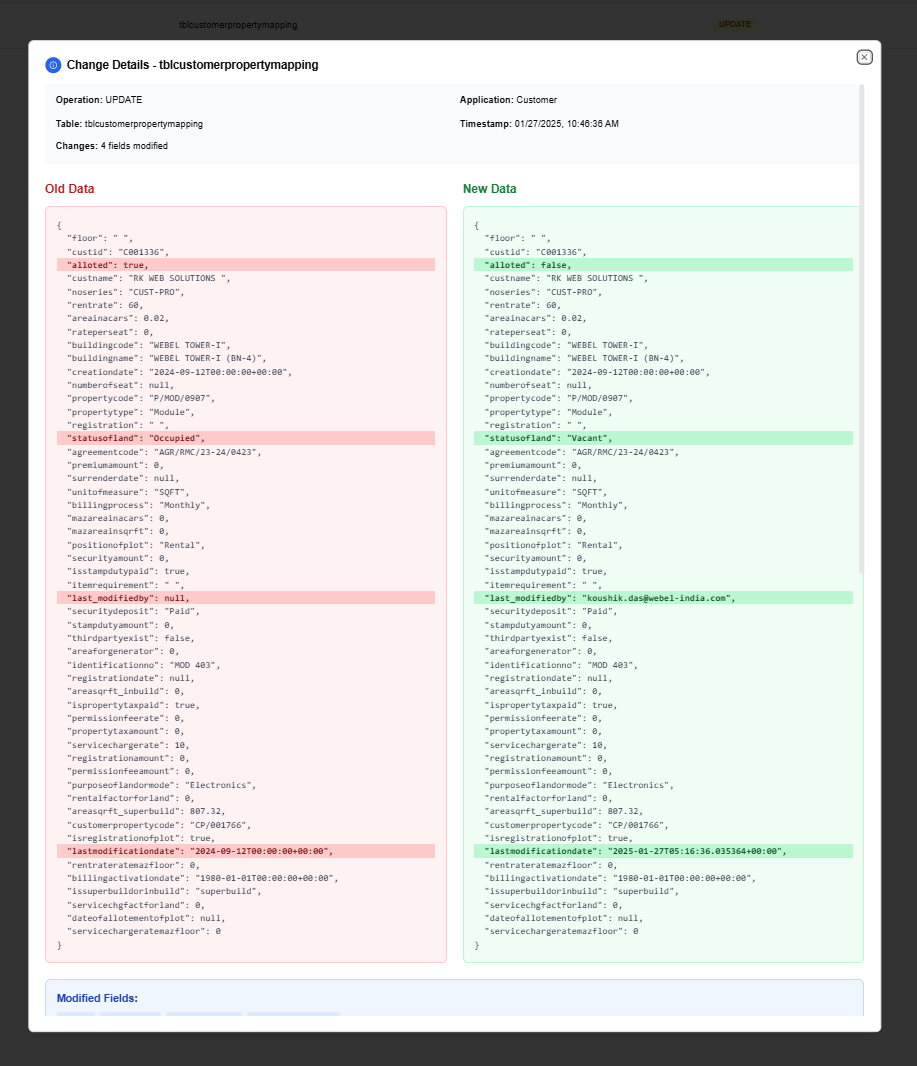
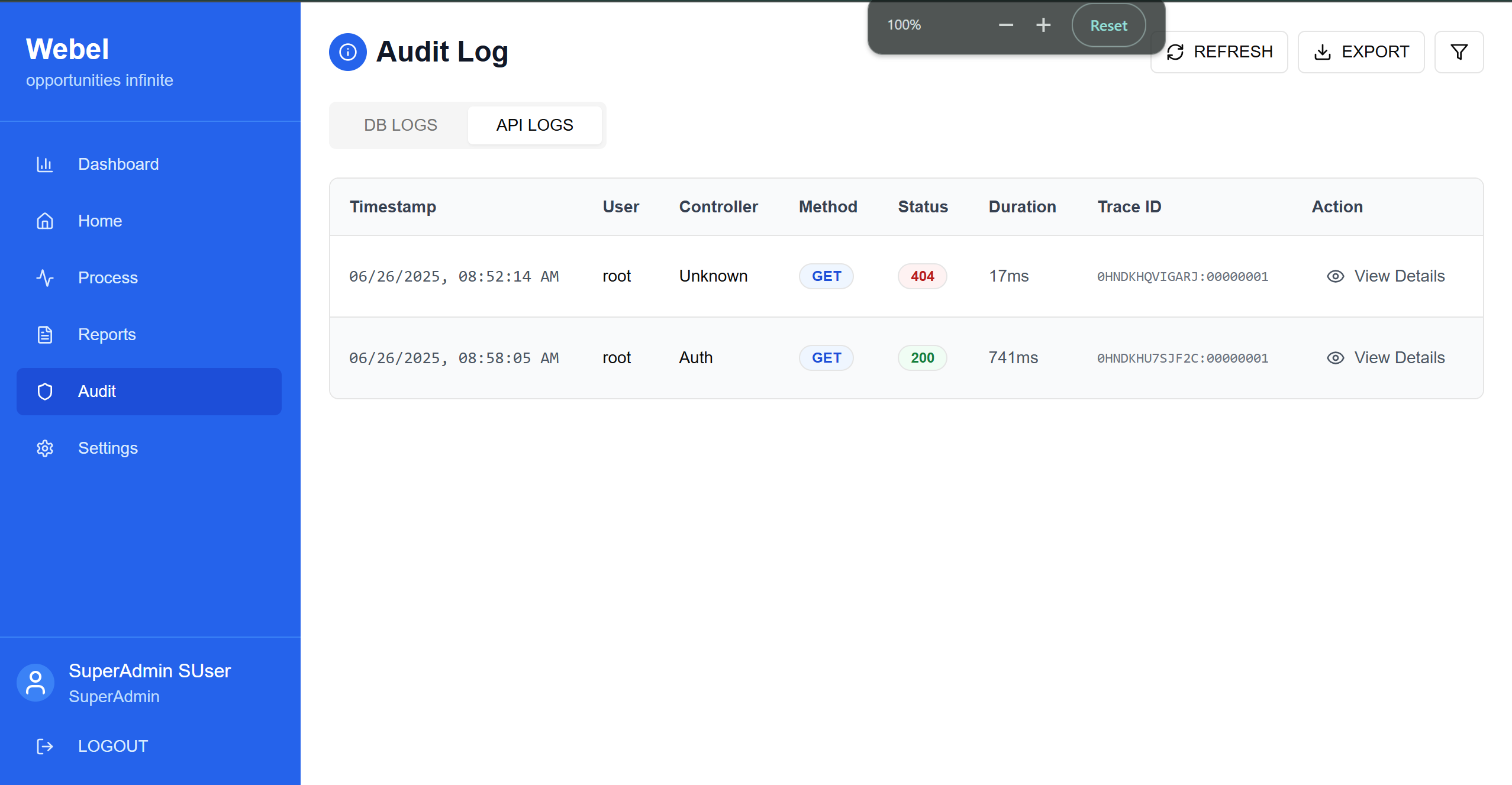
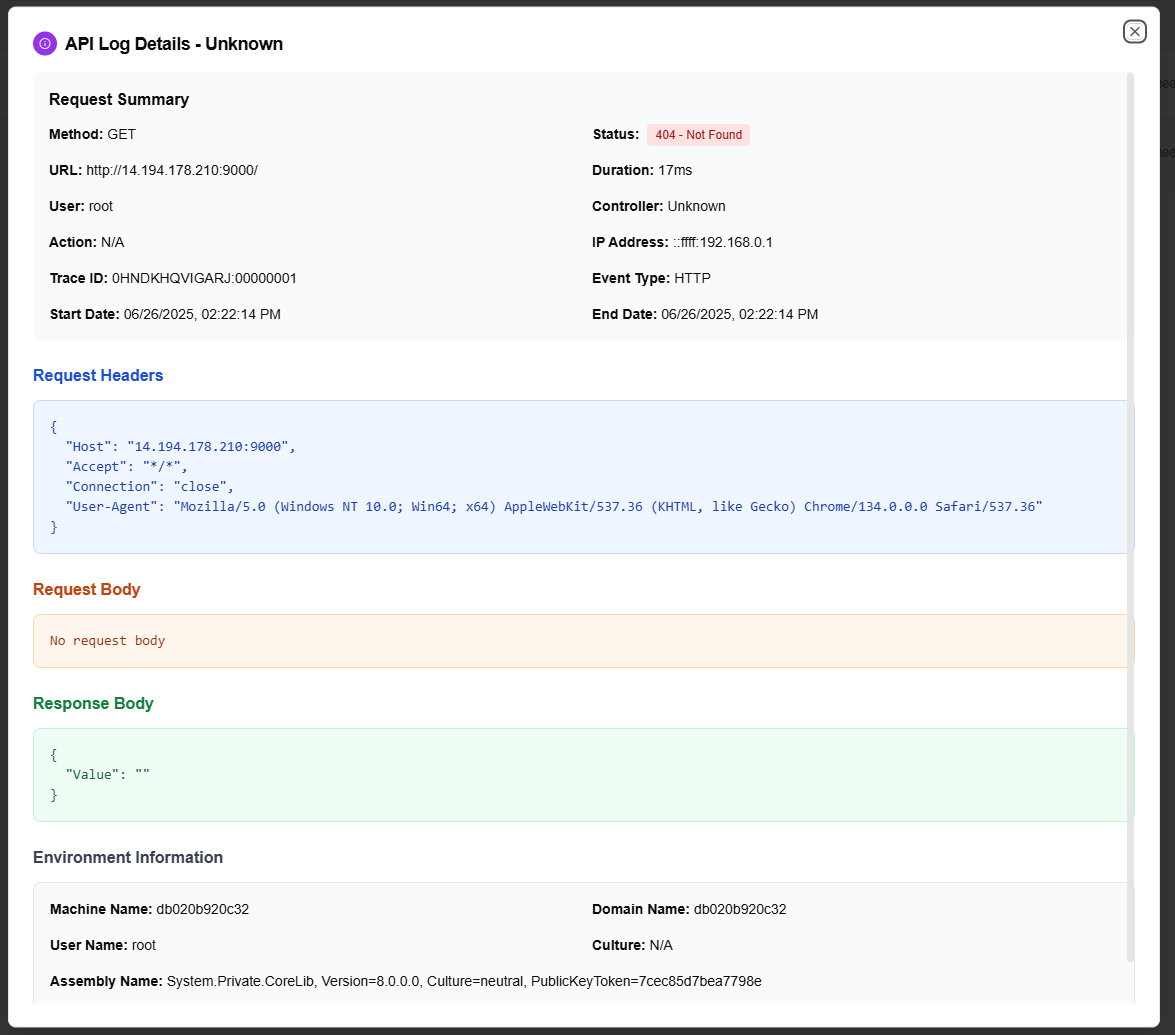
For an interactive demo of the Audit Log feature, please visit: https://rmc-audit.vercel.app
-
Data Models:
public record AuditApiLogItem
{
  public DateTime EventDate { get; init; }
  public string Data { get; init; } // This is a stringified JSON — parse separately
  public string UserName { get; init; }
  public string ControllerName { get; init; }
  public int TotalNumber { get; init; }
}
  public record AuditDbLogItem
  {
    public DateTime EventDate { get; init; }
    public string ApplicationName { get; init; }
    public string Operation { get; init; }
    public string TableName { get; init; }
    public string ClientQuery { get; init; }
    public string OldData { get; init; } // JSON string
    public string NewData { get; init; } // JSON string
    public int TotalNumber { get; init; }
  }
-
API Interfaces:
(Define the APIs required for this feature, including endpoints, methods, request/response formats.)Endpoint Method Request Body Parameters Response Response Status Codes /api/analytics/event/logs/apiPOSTsortBy, sortingOrder, startDate,endDate, userName, controllerName, pageNumber, rowsPerPage, isExcelAPI log200,204,500,400/api/analytics/event/logs/dbPOSTsortBy, sortingOrder, startDate, endDate, userName, controllerName, pageNumber, rowsPerPage, isExcelDB log200,204,500,400 -
Third-Party Integrations:
(List any third-party services or tools that need to be integrated.) -
Workflow:
(Describe the end-to-end workflow of the feature, detailing how different components interact, including the sequence of events, data flow, and the user journey.)
Development Tasks & Estimates
(Break down the development process into smaller tasks and provide time estimates for each.)
| No | Task Name | Estimate (Hours) | Dependencies | Notes |
|---|---|---|---|---|
| 1 | Set up page routing for the audit log and add scope handling | 0.5hrs | ||
| 2 | Create a filter component for the Audit Log API and the DB Log API. | 2 hours | ||
| 3 | Implement the UI for DB audit log screen and the table display. | 1.5 hours | ||
| 4 | Implement the UI for API audit log screen and the table display | 1 hours | ||
| 5 | Implement the View section for DB old data and new data updates with a clear UI so that users can easily understand. Also, display all other important fields such as the SQL query. | 4 hours | ||
| 6 | Implement the View section for API data logs by parsing and displaying all the data, including request headers, summary, body, environmental information, query, etc | 6 hours | ||
| 7 | Integrate the API for audit DB logs and parse the data. | 1.5 hours | ||
| 8 | Integrate the API for audit API logs and parse the data. | 1 hours | ||
| 9 | Test the audit log feature end-to-end to ensure all data (API logs and DB logs) is fetched, parsed, and displayed correctly in the UI. Verify that filtering, sorting, pagination, and view details work properly, and data exports function as expected. Report any discrepancies or issues | 2 hours | ||
| 10 | Total | 19.5 hours |
Deployment Considerations
(Describe any deployment considerations, including environment configurations, feature toggles, or migration steps.)
-
Configuration Changes:
(Detail any configuration changes required for this feature.) -
Rollout Plan:
(Outline the plan for rolling out the feature, including any phased releases.)
Risks & Mitigations
(Identify potential risks and the strategies to mitigate them.)
| Risk | Impact | Likelihood | Mitigation Strategy |
|---|---|---|---|
| Risk 1 | High | Medium | Strategy for mitigating Risk 1 |
| Risk 2 | Medium | High | Strategy for mitigating Risk 2 |
| ... | ... | ... | ... |
Review & Approval
(Include a section for review and approval by stakeholders.)
-
Reviewer:
(Name and role of the person reviewing the document.) -
Approval Date:
(Date when the feature is approved for development.)
Notes
(Add any additional notes or considerations related to the feature development here.)