Authentication Service
Author(s)
- Arpita Dey
Last Updated Date
[2024-11-14]
SRS References
- 2.1.2
Version History
| Version | Date | Changes | Author |
|---|---|---|---|
| 1.0 | 2024-11-14 | Initial draft | Arpita Dey |
| ... | ... | ... | ... |
Feature Overview
Objective:
The authentication service provides a secure and efficient mechanism for user authentication and session management. This service enables users to log in and log out of the portal with different authentication methods tailored for mobile and web platforms. Mobile devices leverage stateless authentication using JWT (JSON Web Tokens), ensuring quick, token-based access without maintaining server-side sessions. Web users benefit from a refresh token mechanism that facilitates secure and seamless session persistence. Additionally, the service extends functionality to enable administrative capabilities, such as viewing the list of all users, creating or updating user profiles, and managing role scopes through add and edit functions.
Scope:
- User authentication for web and mobile platforms
- Role-based access control management
- User session management
- User profile management
- Scope and permission management
Dependencies:
- JWT Token Library
- Password Hashing Library
- Database Access Layer
- Caching Service
- Email Service (for password reset)
Requirements
(List all the functional and non-functional requirements that the feature must meet.)
- Web devices must use refresh token-based authentication
- Mobile devices must use JWT token-based authentication
- Scope Management:
- Support multiple scope types (Payroll, Attendance, Authentication)
- Each type can have multiple scopes (e.g., Payroll.view, Payroll.get, Payroll.set)
- Role Management:
- Support multiple role types (Admin, Manager, Worker)
- One role can have multiple scopes (many-to-one relationship)
- Predefined role configurations:
- Admin: Access to Payroll, Attendance, Authentication
- Manager: Access to Payroll, Attendance
- User Management:
- One-to-one relationship between user and role
- Example: user@example.com has Admin role
- Core Authentication Features:
- User login/logout functionality
- View/create/update user profiles
- Role Management Features:
- GetRoles, GetMinimalRoles, GetScopes
- AddRole, UpdateRole, DeleteRole
Design Specifications
(Provide detailed design specifications, including UI/UX designs, API interfaces, and any other relevant architectural details.)
-
UI/UX Design:
The UI should provide intuitive login and registration screens with clear options for both web and mobile platforms. Additionally, user role management should be easily accessible for admin users, with simple forms for adding and editing user roles and scopes. -
Data Models:
(Detail the data structures, including database schemas or objects.)
public record ScopeMaster
{
  public required string Name { get; set; }
  public required bool Value { get; set; }
}
public record ScopeDetails : ScopeMaster
{
  public required ScopeType Type { get; set; }
  public required string Description { get; set; }
}
public class MinimalRoleDetails
{
  public Guid? RoleId { get; set; }
  public required string Role { get; set; }
  [System.Text.Json.Serialization.JsonConverter(typeof(JsonStringEnumConverter))]
  public required RoleType Type { get; set; }
}
public class RoleMaster : MinimalRoleDetails
{
  [JsonIgnore]
  public int TotalNumber { get; set; }
  public DateTime? Created { get; set; }
  public DateTime? Updated { get; set; }
}
public class RoleDetails : MinimalRoleDetails
{
  public required List<ScopeMaster> Scopes { get; set; }
}
public record LogInUser
{
  [Required(ErrorMessage = "Username is required")]
  public required string Username { get; init; }

  [Required(ErrorMessage = "Password is required")]
  [DataType(DataType.Password)]
  public required string Password { get; init; }
}
public class User
{
  public string? FirstName { get; set; }

  public string? LastName { get; set; }

  [Required(ErrorMessage = "Password is required")]
  [DataType(DataType.Password)]
  public required string Password { get; set; }

  [Required(ErrorMessage = "Email is required")]
  [EmailAddress]
  public required string Email { get; set; }

  [Phone]
  public string? Phone { get; set; }

  [Required(ErrorMessage = "User role is required")]
  public required string Role { get; set; }
  [System.Text.Json.Serialization.JsonConverter(typeof(JsonStringEnumConverter))]
  public RoleType Type { get; set; } = RoleType.User;

  public UserStatus Status { get; set; } = UserStatus.Uninitialized;

  [DataType(DataType.DateTime)]
  public DateTime? Created { get; set; }

  [DataType(DataType.DateTime)]
  public DateTime? Updated { get; set; }
}
public enum OperationType
{
  Insert,
  Update
}
public record UserRecord(string Email, string Role, string? FirstName, string? LastName, string? Phone, UserStatus Status = UserStatus.Uninitialized)
{
  [DataType(DataType.Password)]
  public string? Password { get; set; }

  [DataType(DataType.DateTime)]
  [JsonIgnore]
  public DateTime? Created { get; set; } = DateTime.UtcNow;

  [DataType(DataType.DateTime)]
  [JsonIgnore]
  public DateTime? Updated { get; set; } = DateTime.UtcNow;
}
- API Interfaces:
| Endpoint | Method | Parameters | Response | Response Status Codes |
|---|---|---|---|---|
| /api/auth/login | POST | LogInUser | 200 OK, 400 Bad Request, 401 Unauthorized, 403 Forbidden, 404 Not Found, 500 Internal Server Error | |
| /api/auth/token/refresh | GET | None | 200 OK, 401 Unauthorized, 404 Not Found, 500 Internal Server Error | |
| /api/auth/logout | GET | None | 200 OK, 401 Unauthorized, 500 Internal Server Error | |
| /api/auth/users | GET | None | List Of User | 200 OK, 401 Unauthorized, 403 Forbidden, 500 Internal Server Error |
| /api/auth/user/createorupdate | POST | [Required] OperationType, UserRecord | 204 No Content, 400 Bad Request, 401 Unauthorized, 403 Forbidden, 404 Not Found, 409 Conflict, 500 Internal Server Error | |
| /api/auth/get/roles | GET | int pageNumber, int rowsPerPage | List Of RoleMaster | 200 OK, 401 Unauthorized, 403 Forbidden, 500 Internal Server Error |
| /api/auth/get/scopes | GET | Guid? roleId, string? role | List Of RoleMaster | 200 OK, 400 Bad Request, 401 Unauthorized, 403 Forbidden, 500 Internal Server Error |
| /api/auth/add/role | POST | RoleDetails | 200 OK, 400 Bad Request, 401 Unauthorized, 403 Forbidden, 500 Internal Server Error | |
| /api/auth/update/role | PUT | RoleDetails | 204 No Content, 400 Bad Request, 401 Unauthorized, 403 Forbidden, 500 Internal Server Error | |
| /api/auth/delete/role | DELETE | Guid roleId | 204 No Content, 400 Bad Request, 401 Unauthorized, 403 Forbidden, 500 Internal Server Error |
-
Third-Party Integrations:
None -
Workflow:
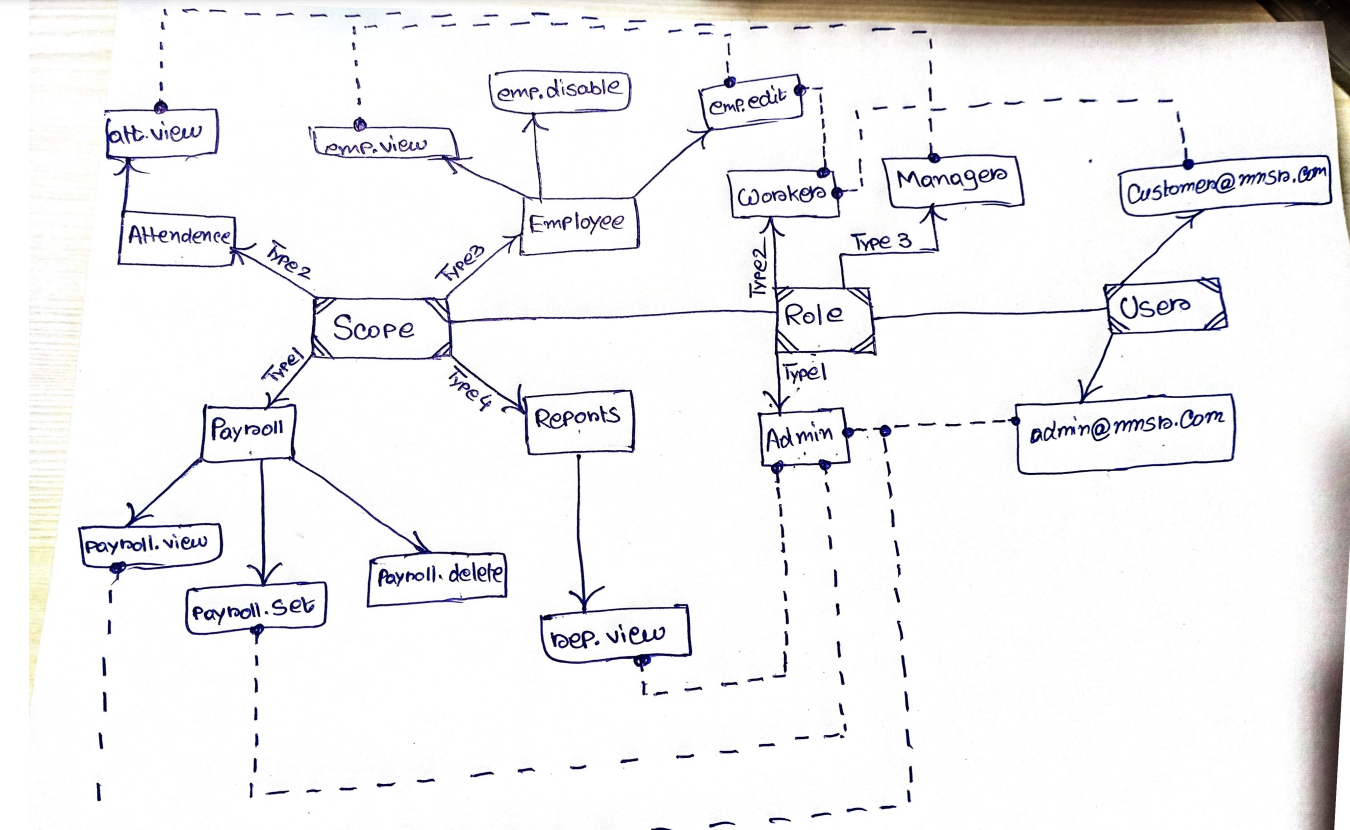
Development Tasks & Estimates
(Break down the development process into smaller tasks and provide time estimates for each.)
| No | Task Name | Estimate (Hours) | Dependencies | Notes |
|---|---|---|---|---|
| 1 | Introduce Scope Management System | 3.5 hours | None | Implementing scope types and values. |
| 2 | Introduce Role Management System | 2 hours | Task 1 | Defining roles and their permissions. |
| 3 | Introduce User Management System | 3 hours | Task 2 | Adding user profile management functionality. |
| 4 | Introduce Login & Logout | 4.5 hours | Task 1, 2, 3 | Implementing JWT and refresh token authentication. |
| 5 | Total | 13 hours |
Testing & Quality Assurance
(List all the relevant test cases for this feature.)
| Test Case ID | Description | Expected Result | Status |
|---|---|---|---|
| TC01 | Test login with valid credentials | Returns 200 OK and a valid JWT or refresh token | Pending |
| TC02 | Test login with invalid credentials | Returns 401 Unauthorized | Pending |
| TC03 | Test role assignment functionality | Returns the correct role with associated scopes | Pending |
| TC04 | Test user profile creation | User is successfully created with assigned role | Pending |
| TC05 | Test logout functionality | Returns 200 OK, session terminated | Pending |
Deployment Considerations
- None
Risks & Mitigations
(Identify potential risks and the strategies to mitigate them.)
| Risk | Impact | Likelihood | Mitigation Strategy |
|---|---|---|---|
| Risk 1 | High | Medium | Strategy for mitigating Risk 1 |
| Risk 2 | Medium | High | Strategy for mitigating Risk 2 |
| ... | ... | ... | ... |
Review & Approval
(Include a section for review and approval by stakeholders.)
-
Reviewer:
(Name and role of the person reviewing the document.) -
Approval Date:
(Date when the feature is approved for development.)
Notes
(Add any additional notes or considerations related to the feature development here.)