Email Overview in a Complete Order Cycle
In our order management system, various emails are sent throughout the lifecycle of an order to ensure effective communication between the seller and the buyer. This document provides a detailed overview of the emails triggered at different stages of an order, including their subjects, key content, and any attachments included. These emails help keep the customer informed about the status of their order and any necessary actions they need to take.
There are two main scenarios here:
- Seller places an order on behalf of the buyer – Seller creates the order when requested by the buyer.
- Buyer places the order directly – Buyer creates the order on their own.
In both cases (whether the seller creates the order on behalf of the buyer or the buyer places the order themselves), the same email sequence is followed. There is no difference in the content or sequence of emails sent after the order is placed. Once an order is placed, the future steps and email notifications are handled by the seller, and both parties receive the same notifications.
In both cases, the steps following the order placement remain the same, as further steps can only be taken by the seller.
- Workflow:
To help visualize the flow of these communications, the workflow diagram below outlines the sequence of actions and corresponding emails sent during the order process. From the moment an order is placed, the system triggers relevant notifications, maintaining seamless communication throughout the process.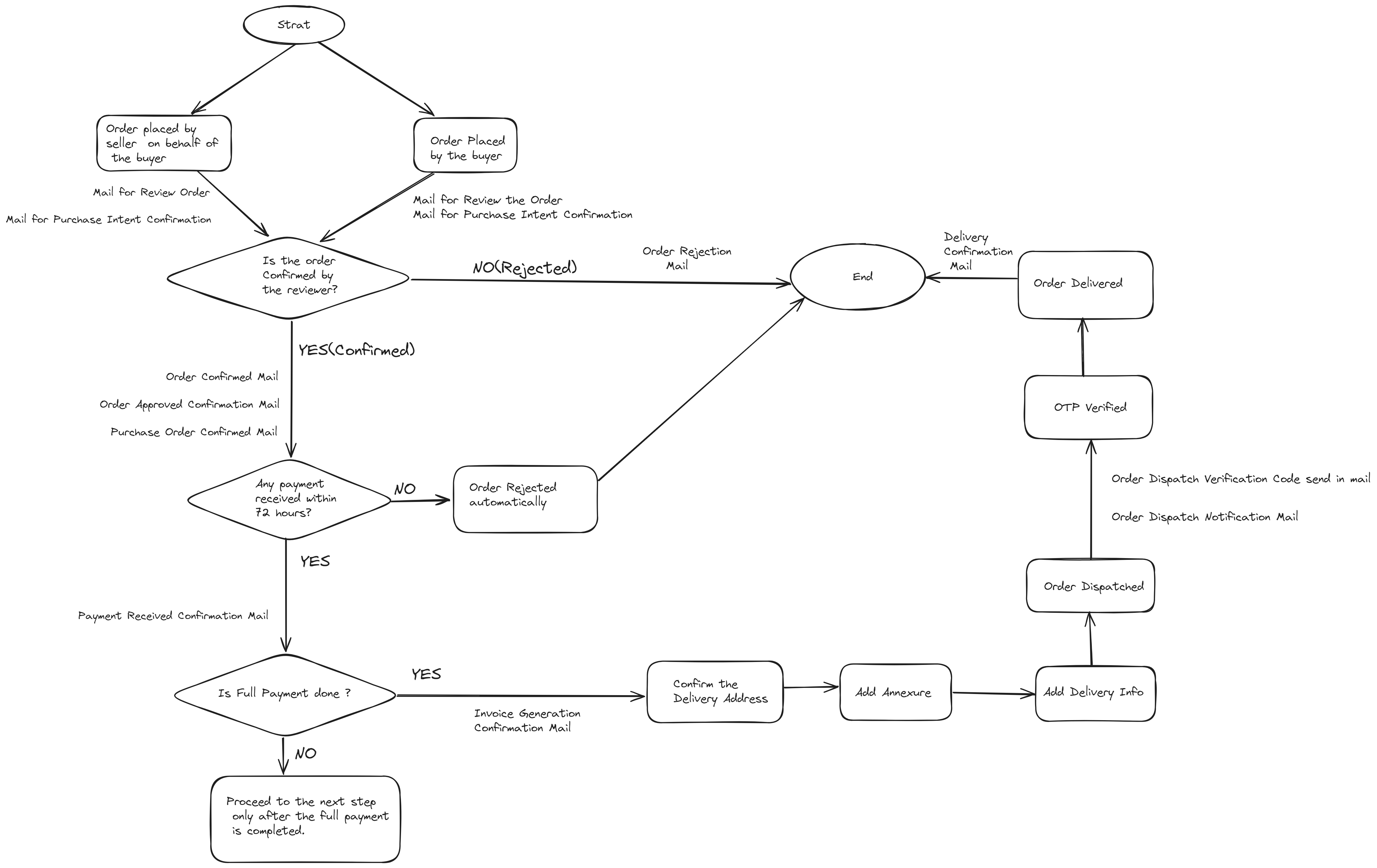
Here are the key emails that are sent throughout the order lifecycle, outlining each stage from order placement to post-delivery communication:
1. Review Order
-
Subject: Please Review Your Order
#Order Number -
Trigger: This email is sent to the reviewer immediately after an order is placed.
-
Purpose: To confirm that the order has been successfully placed and prompt the buyer to review the order details.
Gist:
This email asks the buyer to review the order. It includes a breakdown of the items, total charges, delivery address, and any relevant instructions, along with a button to view the order details online.
- Attachments: None
2. Purchase Intent Confirmation
- Subject: Your Purchase Intent Has Been Confirmed – Order
#Order Number - Trigger: This email is sent to both the buyer and seller immediately after an order is placed.
- Purpose: To confirm that the order has been successfully placed and notify both parties about the order details.
Gist:
This email provides the key details to both the buyer and seller. It includes information about the items purchased, the total order amount, delivery address, and instructions, ensuring that both parties are aware of purchase intent confirmation of the order.
- Attachments: None
3. Order Confirmed
- Subject: Order
#Order NumberConfirmed - Trigger: This email is sent to both the buyer and seller once the order has been confirmed.
- Purpose: To notify both parties that the order has been successfully confirmed and to provide them with the order details.
Gist:
This email confirms that the order has been finalized. It includes detailed information about the order, such as the items purchased, total amount, delivery address, and any relevant instructions. Additionally, it includes a PDF attachment of the proforma invoice for reference.
- Attachments: Proforma Invoice PDF
4.Order Rejection Notification
- Subject: Your Purchase Intent Has Been Cancelled – Order #Order Number
- Trigger: This email is sent to both the buyer and seller if the seller rejects the order after it has been placed.
- Purpose: To inform both parties that the order has been cancelled and provide a reason for the rejection.
Gist:
This email notifies both the buyer and seller that the order has been rejected by the seller. It includes details such as the order number, and a message explaining the rejection. The email content typically contains the following message:
We regret to inform you that your recent order has been rejected by the reviewer.
- Attachments: None
5. Order Approved Confirmation
- Subject: Order
#Order NumberApproved Confirmation - Trigger: This email is sent to both the buyer and seller once the seller approves the order.
- Purpose: To confirm that the order has been approved by the seller and notify the buyer and seller about the order details.
Gist:
This email informs both the buyer and the seller that the order has been approved. It provides the order details, total order amount, and delivery instructions.
- Attachments: None
6. Purchase Order Confirmed
- Subject: Your Purchase Order Has Been Confirmed – Order
#Order Number - Trigger: This email is sent to both the buyer and seller immediately after the purchase order has been confirmed.
- Purpose: To inform both parties that the purchase order has been officially confirmed.
Gist:
This email serves to confirm that the purchase order is officially acknowledged. It contains essential details regarding the order, including the items purchased, the total amount, delivery address, and any relevant instructions, ensuring both parties are aligned on the order confirmation.
- Attachments: None.
7. Payment Received Confirmation
- Subject: Payment from
Buyer Namehas been received – Receipt#Receipt Number - Trigger: This email is sent to both the buyer and seller each time a payment is made, whether partial or full.
- Purpose: To confirm that the payment has been received and provide transaction details to both parties.
Gist:
This email notifies both the buyer and seller that a payment has been successfully processed. It includes important information such as the payment amount, payment method, and any relevant invoice or order numbers. The email also contains a receipt document for reference.
- Attachments: Receipt PDF (Except when the
payment methodisWalletorCredit Note)
8. Invoice Generation Confirmation
- Subject: Invoice
#Invoice NumberGenerated ForBuyer Namefor order#Order Number - Trigger: This email is automatically sent to both the buyer and seller when an invoice is generated after the full payment is completed.
- Purpose: To notify both parties that an invoice has been created for the order and provide the necessary details.
Gist:
This email confirms the generation of an invoice following the successful payment for an order. It includes essential information such as the invoice number, order number, total amount, and the addresses of both the buyer and seller. An invoice document is attached for reference.
- Attachments: Invoice PDF
9. Order Dispatch Notification
- Subject: Your Order Has Been Dispatched: Order
#Order Number - Trigger: This email is sent to both the buyer and seller when the order is dispatched by the seller.
- Purpose: To inform both parties that the order has been dispatched and provide details about the order.
Gist:
This email notifies both the buyer and seller that the order has been dispatched, including relevant details such as seller information, order information, and delivery instructions.
- Attachments: None
10. Order Dispatch Verification Code
- Subject: Your Order
#Order NumberVerification Code - Trigger: This email is sent to the buyer once the seller dispatches the order.
- Purpose: To provide the buyer with a verification code (OTP) necessary for confirming the delivery of the order.
Gist:
This email notifies the buyer that their order has been dispatched and provides a secret OTP for verification during delivery. The email includes key details such as seller information, order information, and delivery instructions.
- Attachments: None
11. Delivery Confirmation Notification
- Subject: Your Order
#Order NumberHas Been Delivered - Trigger: This email is sent to both the buyer and seller after the OTP verification confirming that the goods have been handed over to the buyer.
- Purpose: To inform both parties that the order has been successfully delivered.
Gist:
This email notifies both the buyer and seller that the order has been delivered, including relevant details such as seller information, order information, and delivery instructions.
- Attachments: None
Conclusion
This document outlines the emails sent in the order cycle, from order placement to final delivery, step by step. These communications help ensure clear interaction and timely notifications throughout the process, ultimately enhancing the customer experience for both buyers and sellers.