Dealer Ledger and Excel Export
Author(s)
- Reshmi Karan
- Sayan Mukherjee
Last Updated Date
2024-10-07
SRS References
Version History
| Version | Date | Changes | Author |
|---|---|---|---|
| 1.0 | 2024-09-28 | Initial draft | Reshmi Karan, Sayan Mukherjee |
| 2.0 | 2024-10-07 | Structure change | Reshmi Karan, Sayan Mukherjee |
Feature Overview
Objective:
This feature includes tracking financial transactions related to consumers, such as invoices, payments, and credit notes and due notes. The system must allow filtering of ledger entries by date range and consumer to provide detailed reports and summaries.
Scope:
The feature is specifically for Fleeto.
Dependencies:
Requirements
- The system should track all ledger transactions (due notes, payments, credit notes, and invoices) for each consumer.
- The system should allow filtering and retrieval of ledger data by a specific date range.
- The system should allow filtering ledger entries by consumer, using unique identifiers like ConsumerId.
- The system should provide export functionality for ledger entries in CSV or PDF format.
Design Specifications
(Provide detailed design specifications, including UI/UX designs, API interfaces, and any other relevant architectural details.)
-
UI/UX Design:
(Include wireframes, mockups, or links to design files.) Ui Design -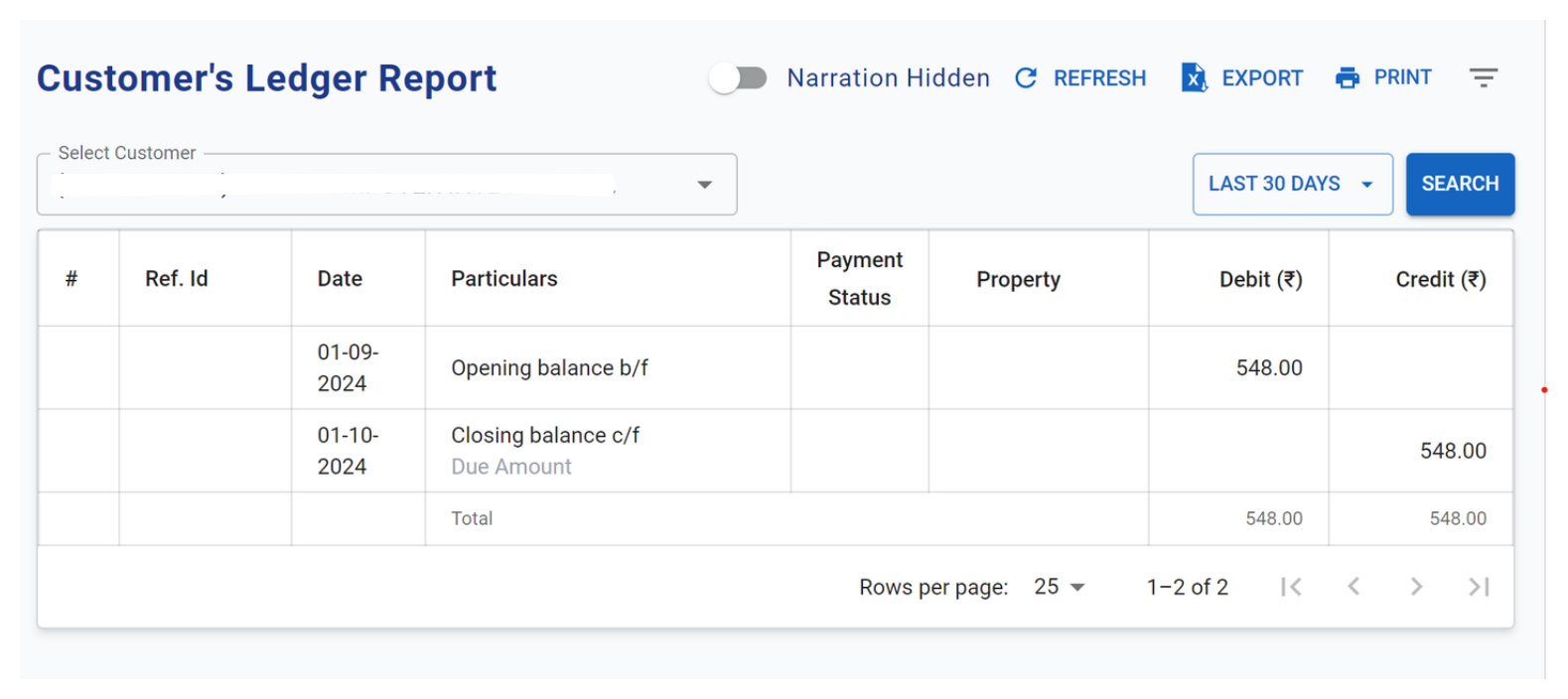
-
Data Models:
public class LedgerStruct
{
  public Guid ConsumerId { get; set; }
  public string ConsumerName { get; set; } = string.Empty;
  public string ConsumerCode { get; set; } = string.Empty;
  public DateTime? StartDate { get; set; }
  public DateTime? EndDate { get; set; }
  public decimal DrOpeningBal { get; set; }
  public decimal CrOpeningBal { get; set; }
  public List<LedgerEntryStruct?> LedgerEntryStruct { get; set; }
  public decimal DrClosingBalance { get; set; }
  public decimal CrClosingBalance { get; set; }
}

public class LedgerEntryStruct
{
  [XLColumn(Ignore = true)]
  public Guid Id { get; set; }
  [XLColumn(Order = 1, Header = "ReferenceId")]
  public string? ReferenceId { get; set; }
  [XLColumn(Order = 2, Header = "Item Type")]
  public LedgerItemType ItemType { get; set; }
  [XLColumn(Order = 3, Header = "Payment Status")]
  public InvoicePaymentStatus PaymentStatus { get; set; }
  [XLColumn(Order = 4, Header = "Entry Date")]
  public DateTime EntryDate { get; set; }
  [XLColumn(Order = 5, Header = "Description")]
  public required string Description { get; set; }
  [XLColumn(Order = 6, Header = "Narration")]
  public string? Narration { get; set; }
  [XLColumn(Order = 7, Header = "")]
  public List<LedgerProduct>? ProductList { get; set; }
  [XLColumn(Order =8 , Header = "Debit Amount")]
  public required decimal DebitAmount { get; set; }
  [XLColumn(Order = 9, Header = "Credit Amount")]
  public required decimal CreditAmount { get; set; }
}
public class LedgerFilterStruct
{
  public required Guid ConsumerId { get; set; }
  public DateTime StartDate { get; set; }
  public DateTime EndDate { get; set; }
  public bool? IsExcel { get; set; }

}
public class LedgerProduct
{
  public string? ProductCode { get; set; }
  public string? ProductName { get; set; }
}
public enum LedgerItemType
{
  Invoice,
  CreditNote,
  Payment,
  DueNote
} -
API Interfaces:
Endpoint Method Parameters Response Response Status Codes /info/ledgerPOSTLedgerFilterStruct(required)LedgerStruct200,204,500 -
Third-Party Integrations:
-
Workflow:
- The user selects a date range and a consumer to view ledger entries.
- The system fetches all ledger entries (due notes, payments, credit notes, invoices) for the selected date range and consumer.
- Find out the sum of the total amount of all invoices raised to this customer id and save it to total debit value.
- Find out the sum of the total amount of payment made by this customer id and save it to total credit value.
- If sum_debit > sum_credit then opening_debit = (sum_debit - sum_credit) and opening_credit = 0
- If sum_debit < sum_credit than opening_debit = 0 and opening_credit = (sum_credit - sum_debit)
- If sum_debit == sum_credit then opening_debit = opening_credit = 0
- Call database to return a dataset with all the invoices and payments made by the customer_id, within the provided range (ledgerStruct.StartDate and ledgerStruct.EndDate) order by transaction dates. This Dataset table should contain columns like sl_num, date, particulars, narration, product_num, debit amt, credit amt
- Now add all the debit amounts from the table and add it with opening_db to total_db.
- Add all the credit amounts from the table and add it with opening_cr to total_cr.
- Calculate in a similar but reverse way to calculate closing debit and credit values finally fill-up the ledgerStruct.
- Add Due Note transactions to the ledger but exclude wallet transactions.
- Export Ledger.
Development Tasks & Estimates
| No | Task Name | Estimate (Hours) | Dependencies | Notes |
|---|---|---|---|---|
| 1 | Backend Create ledger data models | 1 hours | ||
| 2 | Backend The user selects a date range and a consumer to view ledger entries. | 8 hours | 1 | |
| 3 | Backend Due Note entries add in ledger payment and adjustment | 3 hours | ||
| 4 | Backend Excel Export | 4 hours | 1-3 | |
| 5 | Backend Testing | 5 hours | 1-4 | |
| 6 | Frontend ledger component create and ui creation | 3 hours | ||
| 7 | Frontend ledger structure create | 1 hours | ||
| 8 | Frontend ledger api call | 1 hours | ||
| 9 | Frontend ledger export call | 1 hours | ||
| 10 | Frontend ledger filter add | 1.5 hours | ||
| 11 | Frontend ledger testing | 3 hours | ||
| 12 | Integration testing | 3.5 hours | ||
| 13 | Total | 35 hours | 1-5 |
Testing & Quality Assurance
- Unit Tests:
(List the unit tests that will be written for this feature.) Test the functionality that retrieves ledger entries based on the selected date range and consumer ID.
- Verify that the correct ledger entries are returned for a valid date range and consumer.
- Verify that no entries are returned for an invalid date range.
- Verify that no entries are returned for a consumer ID with no transactions.
Test calculations for total debit and credit values.
- Ensure total debit is accurately calculated from invoice amounts.
- Ensure total credit is accurately calculated from payment amounts.
Test the logic for determining opening debit and credit balances.
- Verify opening balances when total debit is greater than total credit.
- Verify opening balances when total credit is greater than total debit.
- Verify opening balances when total debit equals total credit.
Test the structure and contents of the returned dataset.
- Verify the dataset includes the correct columns (sl_num, date, particulars, etc.).
- Ensure that the dataset is ordered by transaction date.
- Integration Tests:
Integration testing will be conducted to ensure all components work together as expected, especially in data retrieval and processing.
-
Acceptance Criteria:
-
Testing Tools:
Deployment Considerations
- Configuration Changes:
 CREATE TYPE public.ledgerentrystruct AS
 (
	consumerid uuid,
	CustomerName text,
	CustomerCode text,
	startdate timestamp with time zone,
	enddate timestamp with time zone,
	dropeningbal numeric,
	cropeningbal numeric,
	entries jsonb[],
	drclosingbalance numeric,
	crclosingbalance numeric
 );
- Rollout Plan:
Risks & Mitigations
Review & Approval
(Include a section for review and approval by stakeholders.)
-
Reviewer:
Abhishak Kumar Roy -
Approval Date:
2024-10-01
Notes