Product Management
Author(s)
- Reshmi Karan
- Sayan Mukherjee
- Sanket Mal
- Ayan Ghosh
Last Updated Date
2024-11-15
SRS References
Version History
| Version | Date | Changes | Author |
|---|---|---|---|
| 1.0 | 2024-10-18 | Initial draft | Reshmi Karan, Sayan Mukherjee |
| 2.0 | 2024-10-30 | Structure change | Sanket Mal |
| 3.0 | 2024-11-04 | Added new APIs: Get all base products, Get all versions, Get all catalogs, Get all configurations | Sanket Mal |
| 4.0 | 2024-11-15 | A few changes in structure and Revised screen layout to improve user experience. Add api for status update of base product , catalog & config . Add API for image upload for any catalog and image delete for any catalog. | Sanket Mal, Ayan Ghosh |
Feature Overview
Objective:
To design a product management system that tracks various products like scooters, bikes, parts, or accessories. The system will manage product versions, configurations, and pricing.
This feature will allow creating of both saleable and non-saleable parts and product configurations.
Scope:
The feature is specifically for Fleeto, allowing them to handle stock.
Dependencies:
Requirements
- A user should be able to create a base product (e.g., Fleeto Magnum).
The base product represents the primary version of the product without any specifications like color or power configurations. Action: Create a base product entity in the system (e.g., BaseProduct table with fields like Name, Description, etc.).
- Add Multiple Versions of Base Product.
For each base product, users should be able to add multiple versions. Action: Create a ProductVersion table that is linked to the BaseProduct table. Fields in ProductVersion: VersionName etc. Each version will be mapped to its respective base product.
- Add Multiple Product Catalogs for Each Version
Each version of the product will have multiple catalogs with different specifications (for instance, red Fleeto Magnum, blue Fleeto Magnum with specific configurations like different battery capacities, colors, etc.). Action: Create a CatalogProduct table, linked to ProductVersion. The catalog will define the various product configurations (e.g., color, capacity, etc.).
First add product Catalog then user can add configaration(unique) Only
If the product type is either Parts or Accessories, adding a configuration explicitly for the catalog is not required. In such cases, a default configuration is automatically created when the catalog is added, using the same catalog details.
- Product Price Management
Each catalog product will have a price defined with a valid date range, and only one active price can exist at a time for a catalog. Details: A catalog product can have multiple prices over time, but at any given moment, only one price range can be active. Action: Create a ProductCatalogPrice table with fields like Price, ValidFrom, ValidTo, and PriceState.
- Background Scheduler for Setting End Price Date
A background scheduler should be implemented to set the end date for old prices when a new price starts. Action: Implement a background service that will periodically check for new prices and update the end dates for old prices accordingly.
Design Specifications
-
UI/UX Design:
(Include wireframes, mockups, or links to design files.) Base product -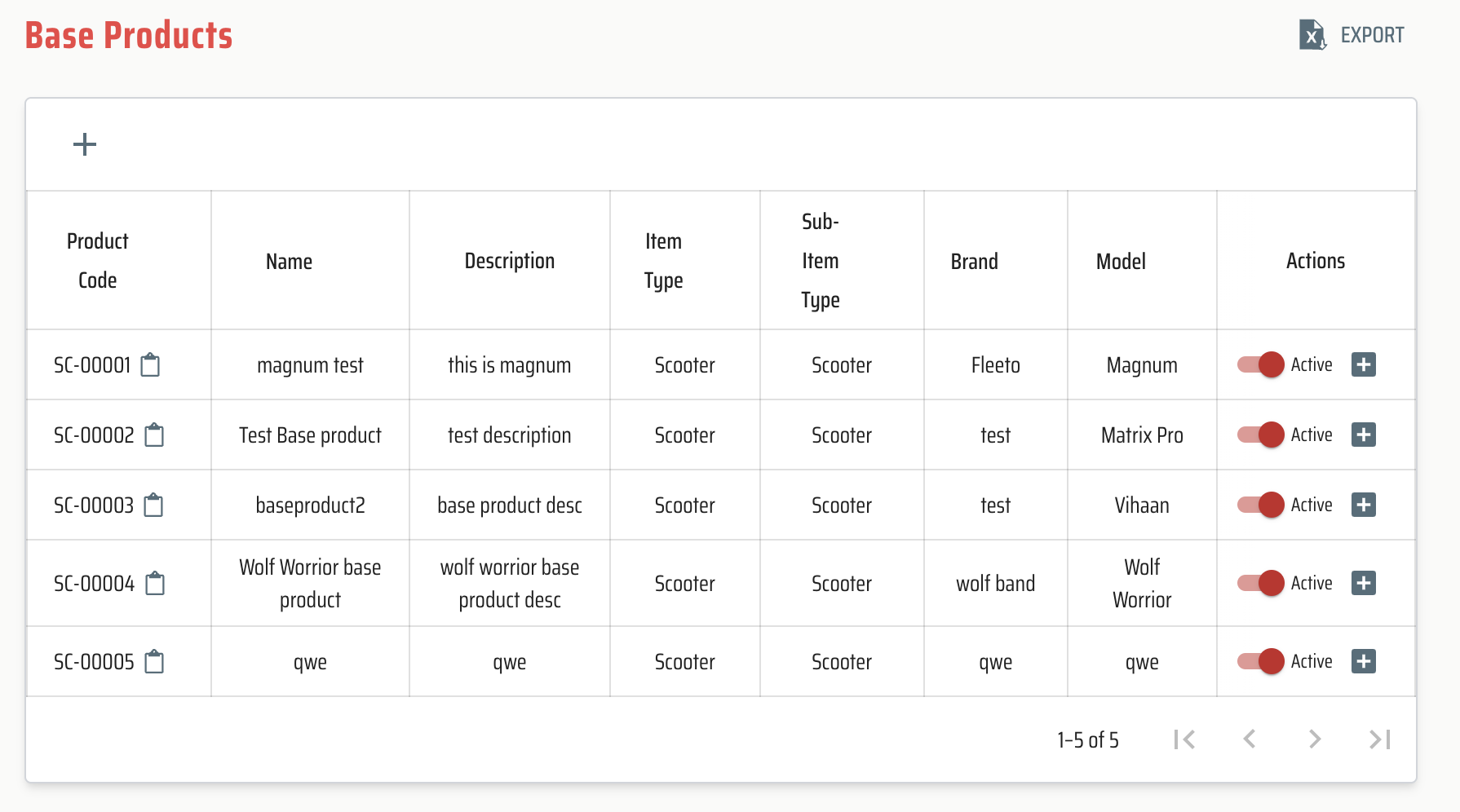
Catalog -
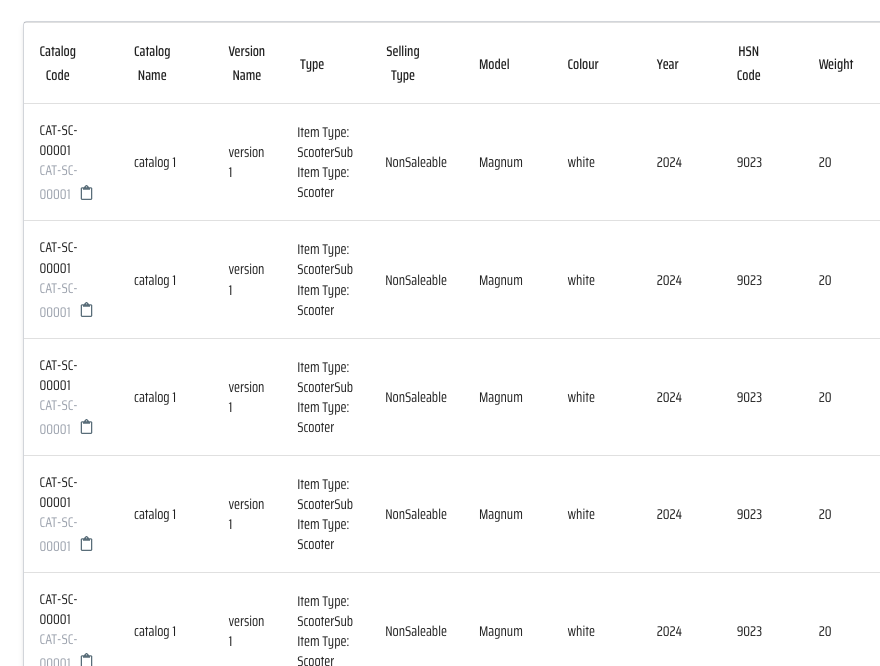
Config -
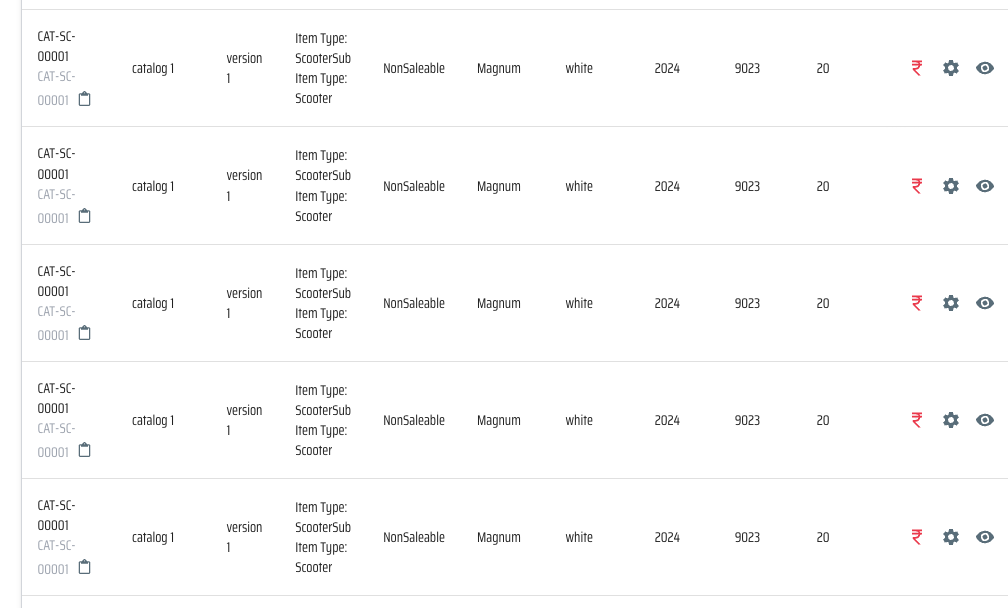
Add Price -
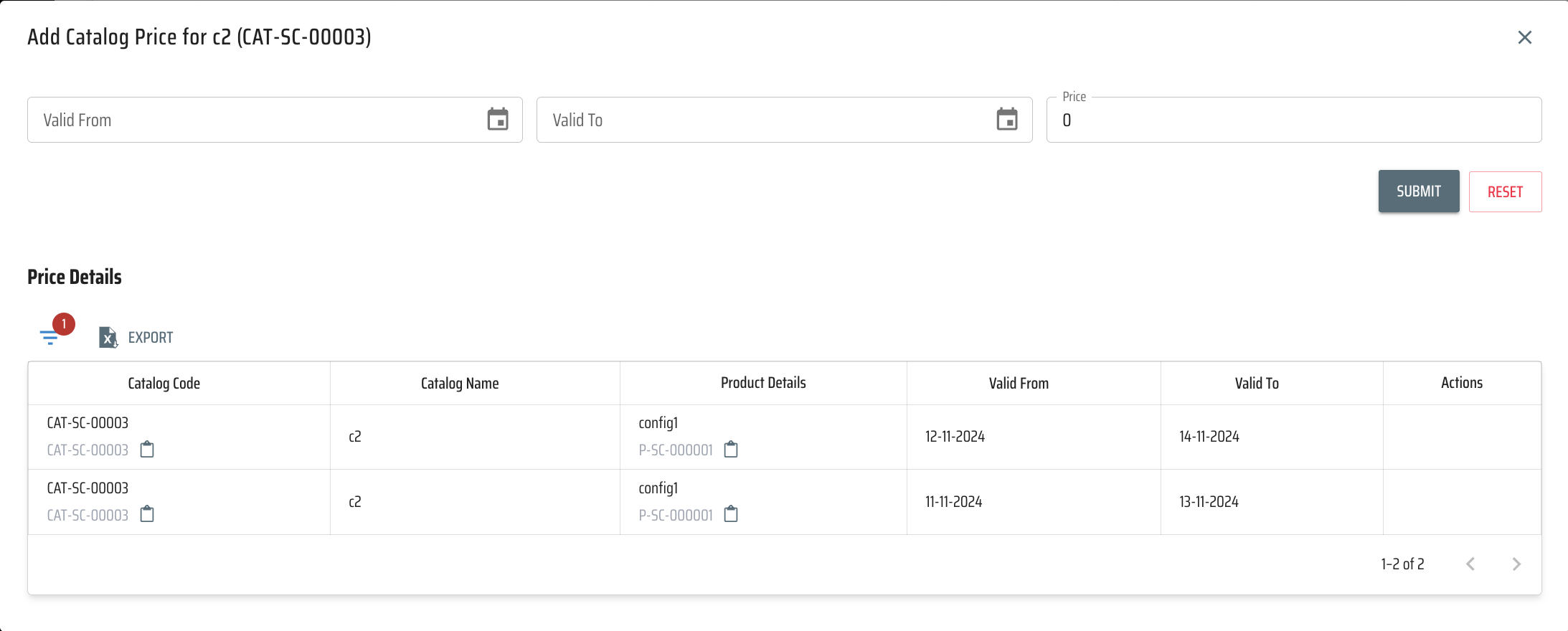
-
Data Models:
public record BaseProduct
{
    [XLColumn(Ignore = true)]
    public Guid BaseProductId { get; set; }
    [XLColumn(Header = "Base Product Code")]
    public string? ProductCode { get; set; }
    public required string Name { get; init; }
    [XLColumn(Header = "Item Type")]
    public required ProductType ItemType { get; init; }
    [XLColumn(Header = "Sub Type")]
    public required SubItemType SubItemType { get; init; }
    public string? Brand { get; init; }
    public string? Model { get; init; }
    public ProductStatus Status { get; init; }
    public string? Description { get; init; }
    [XLColumn(Ignore = true)]
    public string? LogUserName { get; set; }
    [XLColumn(Ignore = true)]
    public System.DateTime? LogDts { get; set; }
    [System.Text.Json.Serialization.JsonIgnore]
    [Newtonsoft.Json.JsonIgnore]
    [XLColumn(Ignore = true)]
    public int TotalNumber { get; init; }
}
public record ProductVersion
{
    public Guid VersionId { get; set; }
    public Guid BaseProductId { get; init; }
    public required string VersionName { get; init; }
    public string? Description { get; init; }
    public ProductStatus VersionStatus { get; init; }
    public string? LogUserName { get; set; }
    public System.DateTime? LogDts { get; set; } = DateTime.Now;
    [System.Text.Json.Serialization.JsonIgnore]
    [Newtonsoft.Json.JsonIgnore]
    public int TotalNumber { get; init; }
}
public record BaseProductFilter
{
    public string? BaseProductCode { get; init; }
    public string? Name { get; init; }
    public ProductType? ItemType { get; init; }
    public SubItemType? SubItemType { get; init; }
    public string? Brand { get; init; }
    public string? Model { get; init; }
    public ProductStatus? Status { get; init; }
    public int PageNumber { get; set; }
    public int RowsPerPage { get; set; }
    public bool IsExcel { get; init; } = false;
}
public record ProductCatalog
{
    [XLColumn(Ignore = true)]
    public Guid CatalogProductId { get; set; }
    [XLColumn(Ignore = true)]
    public Guid VersionId { get; init; }
    [XLColumn(Ignore = true)]
    public Guid BaseProductId { get; init; }
    [XLColumn(Header = "Catalog Code")]
    public string? CatalogCode { get; set; }
    [XLColumn(Header = "Catalog Name")]
    public required string CatalogName { get; init; }
    public string? Year { get; set; }
    [XLColumn(Header = "HSN Code")]
    public required string HsnCode { get; init; }
    public decimal Weight { get; init; }
    public required string Colour { get; init; }
    [XLColumn(Header = "Item Type")]
    public ProductType ItemType { get; init; }
    public ProductStatus Status { get; init; }
    public string? Description { get; init; }
    [XLColumn(Header = "Selling Type")]
    public SellingType SellingType { get; init; }
    [XLColumn(Ignore = true)]
    public string? LogUserName { get; set; }
    [XLColumn(Ignore = true)]
    public System.DateTime? LogDts { get; set; } = DateTime.Now;
    [XLColumn(Header = "GST Rate")]
    [AllowedValues("GST-0", "GST-5", "GST-12", "GST-18", "GST-28")]
    public string? GstRate { get; set; }
    [XLColumn(Ignore = true)]
    [JsonProperty("imageJson")]
    public List<ImageInfo> Images { get; set; } = [];
    [XLColumn(Ignore = true)]
    public List<CatalogConfig> ConfigarationInfo { get; set; } = [];
    [XLColumn(Ignore = true)]
    [System.Text.Json.Serialization.JsonIgnore]
    public int TotalNumber { get; set; }
}
public record CatalogWithVersion : ProductCatalog
{
    public string? VersionName { get; init; }
    public ProductStatus VersionStatus { get; init; }
}
public record CatalogInformation
{
    [XLColumn(Ignore = true)]
    public Guid BaseProductId { get; init; }
    [XLColumn(Ignore = true)]
    public Guid VersionId { get; init; }
    [XLColumn(Ignore = true)]
    public Guid CatalogProductId { get; init; }
    [XLColumn(Header = "Catalog Name")]
    public string? CatalogName { get; init; }
    [XLColumn(Header = "Catalog Code")]
    public string? CatalogCode { get; init; }
    [XLColumn(Header = "Base Product Name")]
    public string? BaseProductName { get; init; }
    public string? Model { get; init; }
    public string? Colour { get; init; }
    [XLColumn(Header = "Item Type")]
    public ProductType ItemType { get; init; }
    [XLColumn(Header = "Sub Type")]
    public SubItemType SubItemType { get; init; }
    [XLColumn(Header = "Version Name")]
    public string? VersionName { get; init; }
    public string? Description { get; init; }
    public string? Year { get; init; }
    [XLColumn(Header = "HSN Code")]
    public string? HsnCode { get; init; }
    public decimal Weight { get; init; }
    [AllowedValues("GST-0", "GST-5", "GST-12", "GST-18", "GST-28")]
    [XLColumn(Header = "GST Rate")]
    public string? GstRate { get; init; }
    [XLColumn(Header = "Catalog Status")]
    public ProductStatus CatalogStatus { get; init; }
    [XLColumn(Header = "Selling Type")]
    public SellingType SellingType { get; init; }
    [XLColumn(Ignore = true)]
    [System.Text.Json.Serialization.JsonIgnore]
    public string? ImagesAsString { get; set; }
    [XLColumn(Ignore = true)]
    [JsonProperty("imageJson")]
    public List<ImageInfo> Images { get; set; } = [];
    [XLColumn(Ignore = true)]
    [System.Text.Json.Serialization.JsonIgnore]
    public int TotalNumber { get; init; }
}
public record ConfigInformation : CatalogInformation
{
    [XLColumn(Ignore = true)]
    public Guid ConfigId { get; init; }

    [XLColumn(Header = "Config Name")]
    public string? ConfigName { get; init; }
    [XLColumn(Header = "Config Code")]
    public string? ConfigCode { get; init; }
    [XLColumn(Header = "Config Status")]
    public ProductStatus ConfigStatus { get; init; }
    [XLColumn(Ignore = true)]
    public List<AdditionalInfo> AdditionalInfos { get; set; } = [];
    [XLColumn(Header = "Additional Info")]
    [System.Text.Json.Serialization.JsonIgnore]
    public string? AdditionalInfosString { get; set; }
    [XLColumn(Header = "Active Price")]
    public decimal ActivePrice { get; init; }

}
public record CatalogConfig
{
    public Guid ConfigId { get; set; }
    public Guid CatalogProductId { get; init; }
    public string? Description { get; init; }
    public string? ConfigCode { get; set; }
    public required string ConfigName { get; init; }
    public List<AdditionalInfo> AdditionalInfos { get; set; } = [];
    public List<ProductCatalogPrice> Price { get; set; } = [];
    public ProductStatus Status { get; init; }
    [XLColumn(Header = "Item Type")]
    public ProductType ItemType { get; init; }
    public string? LogUserName { get; set; }
    public System.DateTime? LogDts { get; set; } = DateTime.Now;
}

public record ProductCatalogPrice
{
    [XLColumn(Ignore = true)]
    public Guid PriceId { get; set; }
    [XLColumn(Ignore = true)]
    public Guid CatalogProductId { get; init; }
    [XLColumn(Ignore = true)]
    public required Guid ConfigId { get; init; }
    public decimal Price { get; init; }
    [XLColumn(Header = "Valid From")]
    public DateTime ValidFrom { get; set; }
    [XLColumn(Header = "valid To")]
    public DateTime? ValidTo { get; set; }
    [XLColumn(Header = "Current Price Status")]
    public PriceState Status { get; set; }
    [XLColumn(Ignore = true)]
    public string? LogUserName { get; set; }
    [XLColumn(Ignore = true)]
    public System.DateTime? LogDts { get; set; } = DateTime.Now;
}
public record ProductCatalogPriceDetail : ProductCatalogPrice
{
    [XLColumn(Header = "Config Code")]
    public string? ConfigCode { get; init; }
    [XLColumn(Header = "Config Name")]
    public string? ConfigName { get; init; }
    [XLColumn(Header = "Catalog Name")]
    public string? CatalogName { get; init; }
    [XLColumn(Header = "Catalog Code")]
    public string? CatalogCode { get; set; }
    [XLColumn(Ignore = true)]
    [System.Text.Json.Serialization.JsonIgnore]
    public int TotalNumber { get; set; }
}

public record CatalogFilter
{
    public Guid? CatalogId { get; init; }
    public Guid? BaseProductId { get; init; }
    public string? CatalogName { get; init; }
    public string? BaseProductName { get; init; }
    public string? VersionName { get; init; }
    public string? CatalogCode { get; init; }
    public string? Model { get; init; }
    public string? Color { get; init; }
    public SellingType? SellingType { get; init; }
    public ProductType? ItemType { get; init; }
    public ProductStatus? CatalogStatus { get; init; }
    public SubItemType? SubItemType { get; init; }
    public int PageNumber { get; set; }
    public int RowsPerPage { get; set; }
    public bool IsExcel { get; init; } = false;
}
public record ConfigFilter : CatalogFilter
{
    public Guid? ConfigId { get; init; }
    public ProductStatus? ConfigStatus { get; init; }
    public string? CatalogConfigCode { get; init; }
    public string? CatalogConfigName { get; init; }
    public List<AdditionalInfo> AdditionalInfos { get; init; } = [];
}
public record PriceFilter
{
    public Guid? ConfigId { get; init; }
    public string? ConfigCode { get; init; }
    public string? ConfigName { get; init; }
    public DateTime? ValidFrom { get; set; }
    public DateTime? ValidTo { get; set; }
    public PriceState? Status { get; set; }
    public int PageNumber { get; set; }
    public int RowsPerPage { get; set;}
    public bool IsExcel { get; init; } = false;
}
public class ImageInfo
{
    public string? ImageId { get; set; }
}
public enum PriceState
{
  [Description("None")]
  None = 0,
  [Description("Active")]
  Active = 1,
  [Description("Inactive")]
  InActive = 2,
  [Description("Disabled")]
  Disable = 3,
  [Description("Scheduled")]
  Scheduled = 4
}
public enum SellingType
{
  Unknown,
  Saleable,
  NonSaleable
} -
API Interfaces:
(Define the APIs required for this feature, including endpoints, methods, request/response formats.)Endpoint Method Parameters Response Response Status Codes /product/add/baseproductPOSTBaseProduct(required)BaseProduct200,400,403,500/product/get/baseproductsPOSTBaseProductFilterServerPaginatedData<BaseProduct>200,400,403,404,500/product/get/allbaseproductsGETList<BaseProduct>200,400,403,404,500/product/add/versionPOSTProductVersion(required)ProductVersion200,400,403,500/product/get/allversionGETList<ProductVersion>200,400,403,404,500/product/add/catalogPOSTProductCatalog(required)ProductCatalog200,400,403,500/product/get/catalogPOSTCatalogFilterServerPaginatedData<CatalogInformation>200,400,403,404,500/product/get/configPOSTConfigFilterServerPaginatedData<ConfigInformation>200,400,403,404,500/product/get/allcatalogGETList<ProductCatalog>200,400,403,404,500/product/add/configurationPOSTCatalogConfig(required)CatalogConfig200,400,403,500/product/get/allconfigurationGETList<CatalogConfig>200,400,403,404,500/product/set/catalog/pricePOSTProductCatalogPrice(required)ProductCatalogPrice200,400,403,500/product/get/catalog/pricePOSTCatalogConfigidServerPaginatedData<ProductCatalogPriceDetail>200,400,403,404,500/product/update/baseproductstatusPATCHStatusUpdateRequestMessage200,400,403,500/product/update/catalogstatusPATCHStatusUpdateRequestMessage200,400,403,500/product/update/configstatusPATCHStatusUpdateRequestMessage200,400,403,500/product/{catalogid}/uploadfilesPOSTGuid catalogid,IFormFileCollection filesList<ImageInfo>200,400,403,500/product/{catalogid}/deletefilesDELETEGuid catalogid,string imageIdMessage200,400,403,500 -
Third-Party Integrations:
(List any third-party services or tools that need to be integrated.) -
Workflow:
Flow Chart - 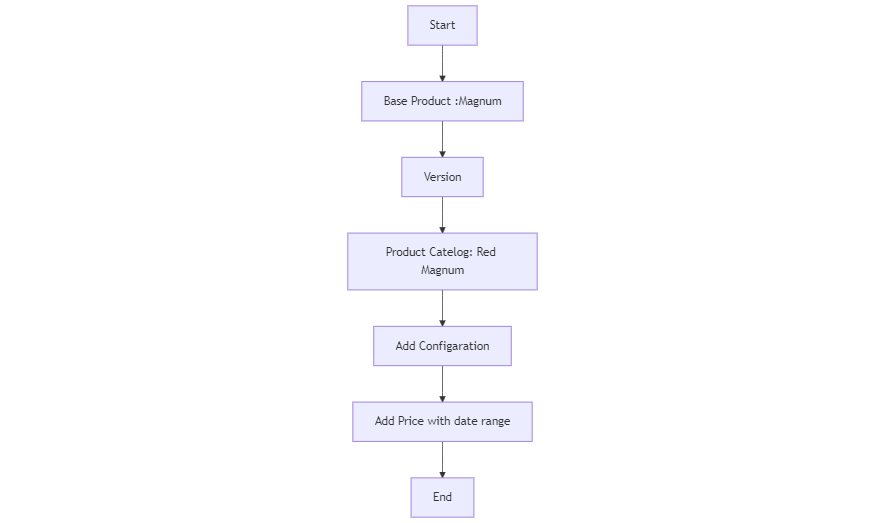
Development Tasks & Estimates
| No | Task Name | Estimate (Hours) | Dependencies | Notes |
|---|---|---|---|---|
| 1 | Backend Create product cycle models | 2 hours | ||
| 2 | Backend Create Database schema | 2 hours | ||
| 3 | Backend Api for Add Base Product | 3 hours | 1,2 | |
| 4 | Backend Api for get paginated Base Product | 4 hours | ||
| 5 | Backend Api for Add Product version | 3 hours | ||
| 6 | Backend Api for add product Catalog | 3 hours | ||
| 7 | Backend Api for get paginated config | 6 hours | ||
| 8 | Backend Api for Update Catalog configuration only | 3 hours | ||
| 9 | Backend Api for add price | 3 hours | ||
| 10 | Backend Api for get price | 3 hours | ||
| 11 | Backend Background scheduler set end price date | 4.5 hours | ||
| 12 | Backend Testing | 7 hours | ||
| 13 | Backend Integration Testing | 4 hours | ||
| 14 | Frontend product screen change | 2 hours | ||
| 15 | Frontend product api and structure change | 2 hours | ||
| 16 | Frontend product version add screen | 2 hours | ||
| 17 | Frontend product version api and structure | 2 hours | ||
| 18 | Frontend base product screen add | 3 hours | ||
| 19 | Frontend base product api and structure change | 2 hours | ||
| 20 | Frontend product table view change api and screen | 3 hours | ||
| 21 | Frontend product base product show inside table collapsible | 3 hours | ||
| 22 | Frontend product all get call change and show as per need in dropdown | 3 hours | ||
| 23 | Frontend product catalog create with component and product dropdown show | 3.5 hours | ||
| 24 | Frontend product catalog create with component api add and structure add | 1.5 hours | ||
| 25 | Frontend product Price create/update with startdate and enddate multiple at a time | 3.5 hours | ||
| 26 | Frontend product Price create with startdate and enddate api create & structure add | 1.5 hours | ||
| 27 | Frontend product filter add | 3 hours | ||
| 27 | Frontend Product Prices show in a dialog | 2.5 hours | ||
| 28 | Frontend whole testing | 6 hours | ||
| 29 | Backend Api for get all baseproducts | 3 hours | ||
| 30 | Backend Api for get all version | 3 hours | ||
| 31 | Backend Api for get all catalog | 3 hours | ||
| 32 | Backend Api for get all catalog config | 3 hours | ||
| 33 | Backend When Item Type is Parts or Accessories then at the time of adding cataog make a default config with same details | 3 hours | ||
| 34 | Frontend Base product screen | 5 hours | ||
| 35 | Frontend Add version ui | 2 hours | ||
| 36 | Frontend Catalog Screen | 4 hours | ||
| 37 | Frontend Add config ui | 2 hours | ||
| 38 | Frontend Config screen | 5 hours | ||
| 39 | Backend Api for base product status update | 5 hours | ||
| 40 | Backend Api for catalog status update | 3 hours | ||
| 41 | Backend Api for config status update | 3 hours | ||
| 42 | Backend Api for catalog image upload | 4 hours | ||
| 43 | Backend Api for catalog image delete | 3 hours | ||
| 44 | Backend Api for get paginated catalog | 4 hours | ||
| 45 | Frontend Integrate update base product status API | 2 hours | ||
| 46 | Frontend Integrate update catalog status API | 2 hours | ||
| 47 | Frontend Integrate update config status API | 2 hours | ||
| 48 | Frontend Integrate update catalog image upload | 5 hours | ||
| Total | 152 hours |
Testing & Quality Assurance
- Unit Tests:
- Base Product Creation
Objective: Ensure that base products (e.g., Fleeto Magnum) are correctly added, validating necessary fields like name and description. Key Tests: Create a valid base product. Handle invalid product creation (e.g., missing name).
- Product Version Creation
Objective: Verify that multiple versions of a base product can be added with differing attributes (e.g., colors, battery specifications). Key Tests: Successfully add multiple versions for a base product. Ensure product versions are linked correctly to the base product.
- Catalog Product Creation
Objective: Ensure catalog products are added for each version, including saleable and non-saleable items. Key Tests: Validate catalog product creation for multiple versions. Handle unrecognized items by adding them to the component list.
- Catalog Price Management by date range
Objective: Ensure that catalog prices are correctly managed and activated within their specified date ranges, with no overlap between active prices. Key Tests: Set a valid price range for a catalog product. Ensure that only one active price exists at any time. Handle price deactivation when the date expires
- Background Scheduler for Setting End Price Date
Objective: Implement a background scheduler to automatically set the end date for old prices when a new price starts, ensuring proper price management. Key Tests: Scheduled Execution of Price Updates. Set End Date for Old Prices When a New Price Starts.
-
Integration Tests:
- Base product
- Version
- Catalog
- Configuration
- Price
-
Acceptance Criteria:
-
Testing Tools:
Deployment Considerations
(Describe any deployment considerations, including environment configurations, feature toggles, or migration steps.)
-
Configuration Changes:
  CREATE TABLE tblBaseProduct (
  BaseProductId UUID PRIMARY KEY,
  Name TEXT,
  ItemType VARCHAR(50),
  SubType VARCHAR(50),
  Brand VARCHAR(100),
  Model VARCHAR(100),
  Description VARCHAR(255),
  ProductCode TEXT,
  Status VARCHAR(50),
  LogUserName VARCHAR(50),
  LogDTS TIMESTAMP WITH TIME ZONE
);


 CREATE TABLE tblProductVersion (
VersionID UUID PRIMARY KEY, -- Version ID (PK)
BaseProductId UUID,
VersionName VARCHAR(100),
Description VARCHAR(255),
VersionStatus TEXT,
LogUserName VARCHAR(50),
  LogDTS TIMESTAMP WITH TIME ZONE ,
CONSTRAINT FK_ProductVersion FOREIGN KEY (BaseProductId) REFERENCES tblBaseProduct(BaseProductId)
);

CREATE TABLE tblProductCatalog (
  CatalogProductId UUID PRIMARY KEY,
  VersionId UUID NOT NULL,
  BaseProductId UUID NOT NULL,
  CatalogCode VARCHAR(100),
  CatalogName VARCHAR(255),
  Description TEXT,
  Colour text,
  images jsonb,
  GstRate text,
  HsnCode text,
  Year int,
  Weight decimal,
  Status text,
ItemType VARCHAR(50),
SellingType VARCHAR(50),
  LogDTS TIMESTAMP WITH TIME ZONE,
  LogUserName VARCHAR(50),
  CONSTRAINT FK_ProductVersion FOREIGN KEY (VersionId) REFERENCES tblProductVersion(VersionID),
  CONSTRAINT FK_ProductBase FOREIGN KEY (BaseProductId) REFERENCES tblBaseProduct(BaseProductId)
);

CREATE TABLE tblCatalogConfig (
  ConfigId UUID PRIMARY KEY,
  CatalogProductId UUID not null,
  CatalogProductCode VARCHAR(100),
  CatalogProductName VARCHAR(255),
  Description TEXT,
  LogDTS TIMESTAMP WITH TIME ZONE,
  LogUserName VARCHAR(50),
  Status text,
AdditionalInfos Jsonb,
ItemType VARCHAR(50),
  FOREIGN KEY (CatalogProductId) REFERENCES tblProductCatalog(CatalogProductId)
);

 CREATE TABLE tblCatalogPrice (
  PriceId UUID PRIMARY KEY,
  ConfigId UUID not null,
  CatalogProductId UUID not null,
  Price DECIMAL(10, 2),
  StartDate TIMESTAMP WITH TIME ZONE,
  EndDate TIMESTAMP WITH TIME ZONE,
  LogDTS TIMESTAMP WITH TIME ZONE,
  LogUserName VARCHAR(50),
  Status text,
  FOREIGN KEY (CatalogProductId) REFERENCES tblProductCatalog(CatalogProductId),
  FOREIGN KEY (ConfigId) REFERENCES tblCatalogConfig(ConfigId)
); -
Rollout Plan:
(Outline the plan for rolling out the feature, including any phased releases.)
Risks & Mitigations
(Identify potential risks and the strategies to mitigate them.)
| Risk | Impact | Likelihood | Mitigation Strategy |
|---|---|---|---|
| Product for distributor | High | Medium | Maintain a ConsumerId. Determine the appropriate stage in the workflow for adding it, considering the involvement of the distributor. |
Review & Approval
(Include a section for review and approval by stakeholders.)
-
Reviewer:
Abhishak Kumar Roy -
Approval Date:
2024-11-01
Notes
(Add any additional notes or considerations related to the feature development here.)