Bulk Upload System
Author(s)
- SANKET MAL
- AYAN GHOSH
- RESHMI KARAN
Last Updated Date
2025-02-05
SRS References
Version History
| Version | Date | Changes | Author |
|---|---|---|---|
| 1.0 | 2025-02-05 | Initial draft | Sanket Mal, Ayan Ghosh, Reshmi Karan |
Feature Overview
Objective:
The goal of this feature is to implement a generic bulk upload solution for multiple data categories within the inventory management system. Users will be able to download predefined Excel templates, populate them with data, and then upload them for processing. The system will handle data validation, insertion, and updates, while ensuring proper error handling, conflict resolution, and process synchronization.
Scope:
-
Supported Data Categories:The feature will be available across multiple inventory-related data categories (e.g., Catalog, Config, SKU, etc). -
Excel Format:Each category will have a unique Excel template that users must follow. -
File Upload & Storage:- Uploaded files are stored in a Docker container with a unique filename (
uniqueId.csv). - Metadata is stored in a database, including filename, upload date, status, uploader, and category name.
- Uploaded files are stored in a Docker container with a unique filename (
-
File History:- Users can view previously uploaded files in a paginated history section.
- History is filtered based on the data category (e.g., Catalog, Config, SKU).
-
File Preview & Processing:- Files have one of the following statuses:
- ReadyToProcess: File is uploaded but not yet processed.
- Processing: Data validation and database operations are in progress.
- Processed: Data has been successfully inserted/updated.
- Failed: An error occurred, and no changes were committed.
- Users can preview files before processing to see:
- New records (to be inserted).
- Existing records (to be updated).
- Conflicts (If conflicts exist, the user cannot proceed).
- When confirmed, the file status updates:
ReadyToProcess → Processingduring execution.Processing → Processedafter successful completion.Processing → Failedif any issues occur (with rollback).
- Files have one of the following statuses:
-
Processing Restriction:- If any file is in Processing state, no other file from the same data category can be processed simultaneously.
- No manual insert or update operations will be allowed for that particular section while a file is being processed.
-
Background Scheduler for Process Timeout:- A background scheduler will run every 1 hour to check for stuck processes.
- If a file is in Processing state for more than 1 hour, it will be automatically marked as Failed.
Dependencies:
Requirements
-
File Upload API
- Must allow users to upload Excel files following the predefined template.
- Save files in a Docker container and record metadata in the database.
- Assign a unique identifier to each uploaded file.
-
File History API
- Fetch uploaded file records based on the selected data category.
- Implement pagination for efficient retrieval.
-
File Preview API
- Read uploaded file content and categorize records into
1. New inserts,2. Updatesand3.Conflicts. - If conflicts exist, prevent the user from proceeding.
- Read uploaded file content and categorize records into
-
File Processing API
- Change the file status to Processing when confirmation is received.
- Perform insert/update operations in a single transaction.
- If an error occurs, rollback changes and update the status to Failed.
- If successful, update the status to Processed.
-
Processing Restriction
- If any file is in Processing state, no other file from the same category can be processed.
- No manual insert or update operations are allowed in the database for that category while a file is being processed.
-
Background Scheduler for Process Timeout
- A background scheduler will run every 1 hour to check if any process is stuck in
Processingstate. - If a file has been in
Processingstate for more than 1 hour, it will be automatically marked asFailed.
- A background scheduler will run every 1 hour to check if any process is stuck in
Design Specifications
(Provide detailed design specifications, including UI/UX designs, API interfaces, and any other relevant architectural details.)
-
UI/UX Design:
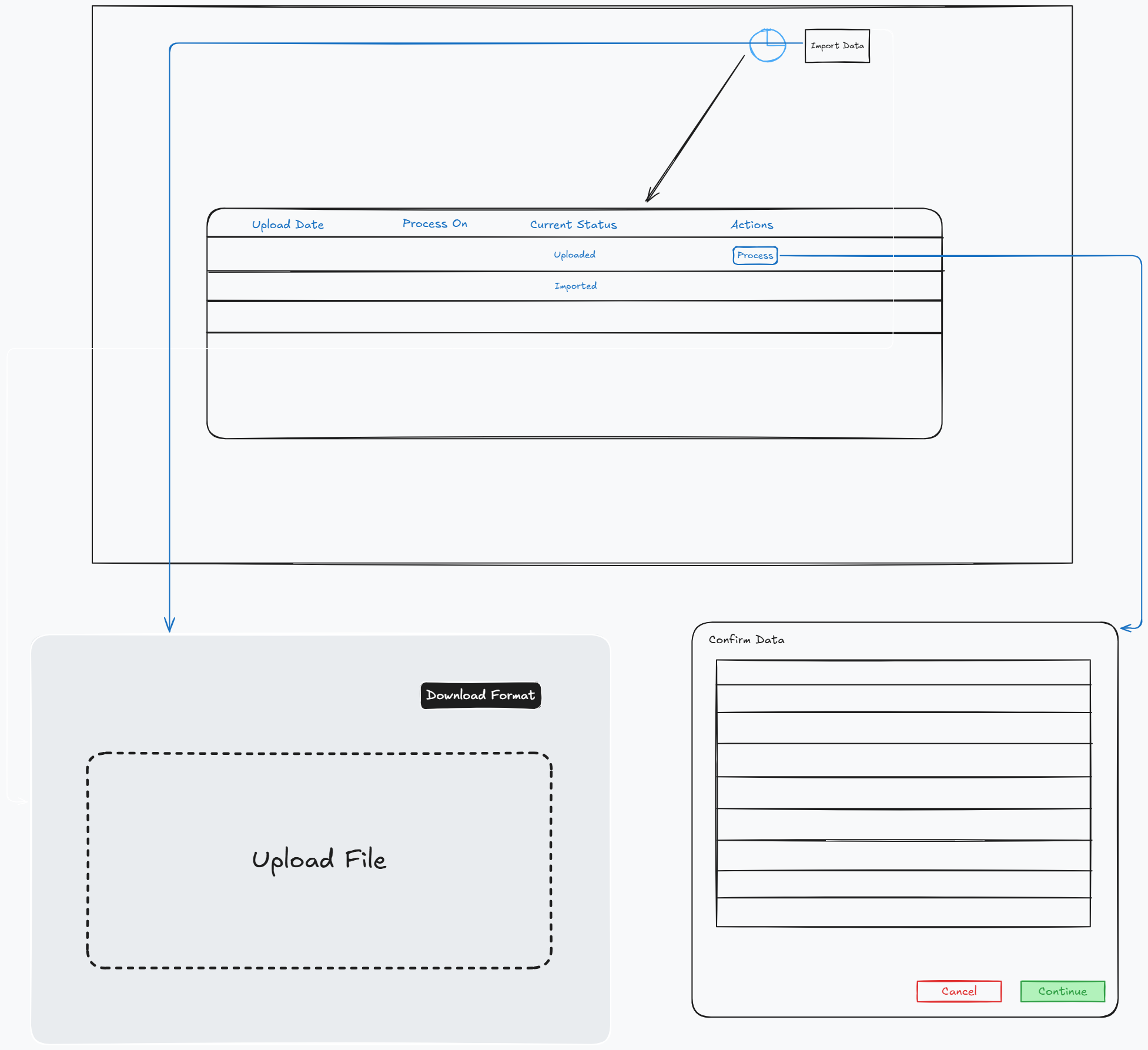
-
Workflow:
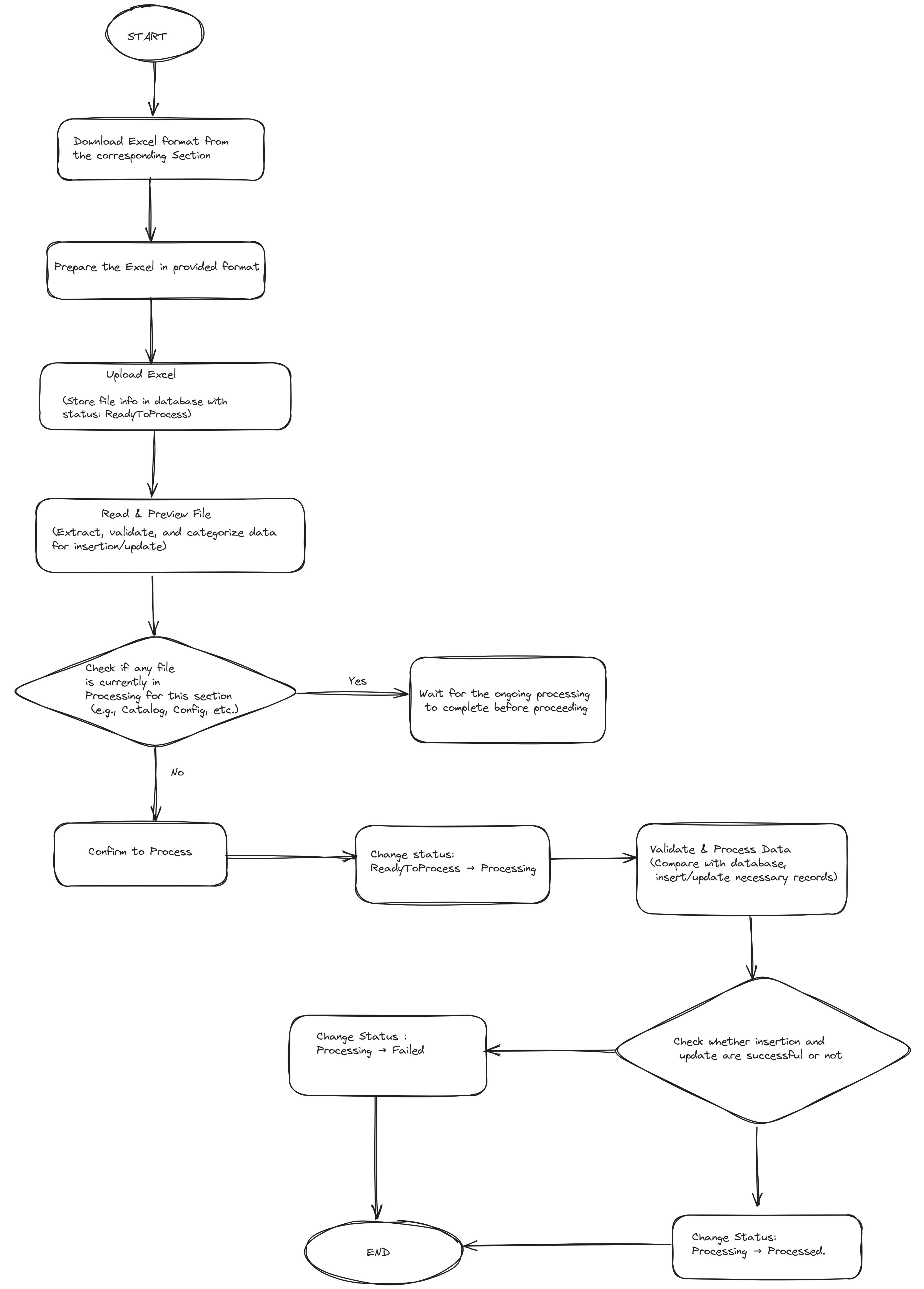
-
Data Models:
public enum BulkUploadCategory
{
    Catalog = 1,
    Config = 2,
    SKU = 3,
    All = 99
}
public enum FileStatus
{
    ReadyToProcess = 1,
    Processing = 2,
    Processed = 3,
    Failed = 4,
    All = 99
}
public record BulkUploadFileResult(
    string ActualFileName,
    bool IsSuccess,
    string? UniqueFileName,
    string? FailReason,
    BulkUploadCategory? Category
);
 public record PreviewResponse<T>
{
    public List<T>? Insert { get; init; }
    public List<T>? Update { get; init; }
    public List<T>? Conflict { get; init; }
}
public record FileHistoryFilter
{
    [Required]
    public BulkUploadCategory Category { get; init; }
    public FileStatus FileStatus { get; init; }
    public DateTime? UploadFrom { get; set; }
    public DateTime? UploadTo { get; set; }
    public DateTime? ProcessFrom { get; set; }
    public DateTime? ProcessTo { get; set; }
    public int PageNumber { get; set; }
    public int RowsPerPage { get; set; }
}
public record FileMetaData
{
    public Guid FileId { get; set; }
    public string? ActualFileName { get; init; }
    public string? UniqueFileName { get; set; }
    public BulkUploadCategory Category { get; init; }
    public FileStatus FileStatus { get; init; }
    public DateTime? UploadedAt { get; set; }
    public string? UploadedBy { get; init; }
    public DateTime? ProcessStartAt { get; set; }
    public DateTime? ProcessEndAt { get; set; }
    public string? ProcessedBy { get; init; }
    [System.Text.Json.Serialization.JsonIgnore]
    [Newtonsoft.Json.JsonIgnore]
    public int TotalNumber { get; set; }
}
public record FormatInfo
{
      public Guid FormatId { get; set; }
      public string ActualFileName { get; init; }
      public string UniqueFileName { get; set; }
      public BulkUploadCategory Category { get; set; }  // Example: "Catalog", "Config", "SKU"
      public DateTime UploadedAt { get; set; } = DateTime.UtcNow;
      public string? UploadedBy { get; set; }
}

public record UploadConfirmRequest
{
    public required string UniqueFileName { get; init; }
    public required BulkUploadCategory Category { get; init; }
}
public record MessageResponse
{
    public string Message { get; init; }
} -
API Interfaces:
(Define the APIs required for this feature, including endpoints, methods, request/response formats.)Endpoint Method Parameters Response Response Status Codes /api/inventory/product/upload/{category}POSTBulkUploadCategory(category),IFormFile(file)BulkUploadFileResult200,400,403,404,500/api/inventory/product/files/{category}POSTFileHistoryFilterServerPaginatedData<FileInfo>200,204,500/api/inventory/product/upload/preview/{category}GETBulkUploadCategory(category),string(uniqueFileName)PreviewResponse<T>200,400,403,404,500/api/inventory/product/upload/confirmPOSTUploadConfirmRequestMessageResponse200,400,403,404,500/api/inventory/product/upload/format/{category}POSTBulkUploadCategory(category),IFormFile(file)MessageResponse200,400,403,404,500/api/inventory/product/download/format/{category}GetBulkUploadCategory(category)FileContentResult200,400,403,404,500 -
Third-Party Integrations:
(List any third-party services or tools that need to be integrated.) -
Workflow:
(Describe the end-to-end workflow of the feature, detailing how different components interact, including the sequence of events, data flow, and the user journey.)
Development Tasks & Estimates
| No | Task Name | Estimate (Hours) | Dependencies | Notes |
|---|---|---|---|---|
| 1 | Save(Insert And Update) File History | 5 hours | ||
| 2 | Testing File History API | 2 hours | Task 1 | |
| 3 | File Upload API | 5 hours | Upload Excel files into Docker container, store file metadata in database. | |
| 4 | Testing File Upload API | 2 hours | Task 3 | |
| 5 | Get File History API (Paginated View) | 6 hours | Paginated file history API to fetch file records based on category. | |
| 6 | Testing Get File History API | 2 hours | Task 5 | |
| 7 | Upload Preview API | 8 hours | Create logic to preview the file before processing, categorize data into Insert, Update, and Conflict. | |
| 8 | Testing Preview API | 2 hours | Task 7 | |
| 9 | Upload Confirm API (Processing & Rollback) | 8 hours | Implement API to confirm the upload and perform insert/update operations. Handle errors and rollback if necessary. | |
| 10 | Testing Upload Confirm API | 2 hours | Task 9 | |
| 11 | Format Upload API | 4 hours | Implement the upload API for format files. | |
| 12 | Testing Format Upload API | 2 hours | Task 12 | |
| 13 | Save (Insert & Update) Format API | 6 hours | ||
| 14 | Testing Save Format API | 2 hours | Task 13 | |
| 15 | Download Format API | 4 hours | ||
| 16 | Testing Download Format API | 1 hours | Task 15 | |
| 17 | Add Validation for Excel Files | 6 hours | Add validation logic to ensure uploaded Excel files follow the correct format and also other validation. | |
| 18 | Restrict manual insertion at the time of Processing in Add Catalog API | 3 hours | Prevent manual additions or updates to Catalog data while any Catalog related file bulk upload in processing state. | |
| 19 | Test: Add Catalog API | 3 hours | ||
| 20 | Restrict manual insertion at the time of Processing in Add Config API | 3 hours | Prevent manual additions or updates to Config data while any Config related file bulk upload in processing state. active. | |
| 21 | Test: Add Config API | 1 hours | ||
| 22 | Implement a Background Scheduler for Process Timeout | 6 hours | Background job to detect stuck processes and mark them as failed. | |
| 23 | Test: Background Scheduler for Process Timeout | 2 hours | Task 22 | Validate that processes exceeding the time limit are marked as failed. |
| 24 | Update Config Price API | 4 hours | ||
| 25 | Test: Update Config Price API | 1 hours | Task 24 | |
| 26 | Update Catalog API | 4 hours | ||
| 27 | Test: Update Catalog API | 1 hours | Task 26 | |
| 28 | Update Config API | 4 hours | ||
| 29 | Test: Update Config API | 1 hours | Task 28 | |
| 30 | Integration Tests for Bulk Upload Feature | 8 hours | Task 29 | |
| Frontend | ||||
| 31 | Create File Import Dialog | 4hr | Task 30 | |
| 32 | Create File Import History Dialog | 3hr | Task 31 | |
| 33 | File Import History List | 4hr | Task 32 | |
| 34 | Filter History | 3hr | Task 33 | |
| 35 | Insert Data Preview | 4hr | Task 34 | |
| 36 | Update Data Preview | 4hr | Task 35 | |
| 37 | Conflict Data Preview | 4hr | Task 36 | |
| 38 | Download Excel Format | 2hr | Task 37 | |
| Total | 136 hours |
Testing & Quality Assurance
(Outline the testing strategy and quality assurance measures for the feature.)
-
Unit Tests:
(List the unit tests that will be written for this feature.) -
Integration Tests:
(Describe how integration testing will be conducted.) -
Acceptance Criteria:
(Define the criteria that must be met for the feature to be considered complete.) -
Testing Tools:
(List any tools that will be used for testing.)
Deployment Considerations
(Describe any deployment considerations, including environment configurations, feature toggles, or migration steps.)
-
Configuration Changes:
  CREATE TABLE tblFileHistory (
      FileId UUID NOT NULL,
      ActualFileName TEXT NOT NULL,
      UniqueFileName TEXT NOT NULL UNIQUE,
      Category TEXT NOT NULL,  -- (Example values: 'Catalog', 'Config', 'SKU')
      FileStatus TEXT NOT NULL,  -- (ReadyToProcess, Processing, Processed, Failed)
      UploadedAt TIMESTAMP WITH TIME ZONE DEFAULT NOW(),
      UploadedBy TEXT NOT NULL,
      ProcessStartAt TIMESTAMP WITH TIME ZONE NULL,
      ProcessEndAt TIMESTAMP WITH TIME ZONE NULL,
      ProcessedBy TEXT NULL
  );

  CREATE TABLE tblFormat (
      FormatId UUID NOT NULL,
      ActualFileName TEXT NOT NULL,
      UniqueFileName TEXT NOT NULL UNIQUE,
      Category TEXT NOT NULL,  -- (Example values: 'Catalog', 'Config', 'SKU')
      UploadedAt TIMESTAMP WITH TIME ZONE DEFAULT NOW(),
      UploadedBy TEXT NOT NULL
); -
Rollout Plan:
(Outline the plan for rolling out the feature, including any phased releases.)
Risks & Mitigations
(Identify potential risks and the strategies to mitigate them.)
| Risk | Impact | Likelihood | Mitigation Strategy |
|---|
Review & Approval
-
Reviewer:
Abhishak Kumar Roy -
Approval Date:
2025-02-07
Notes
(Add any additional notes or considerations related to the feature development here.)