Chat Window Design Reconfiguration
Author(s)
- Alapan Das
Last Updated Date
2025-02-11
SRS References
Version History
| Version | Date | Changes | Author |
|---|---|---|---|
| 1 | 2025-02-11 | Initial draft | Alapan Das |
| ... | ... | ... | ... |
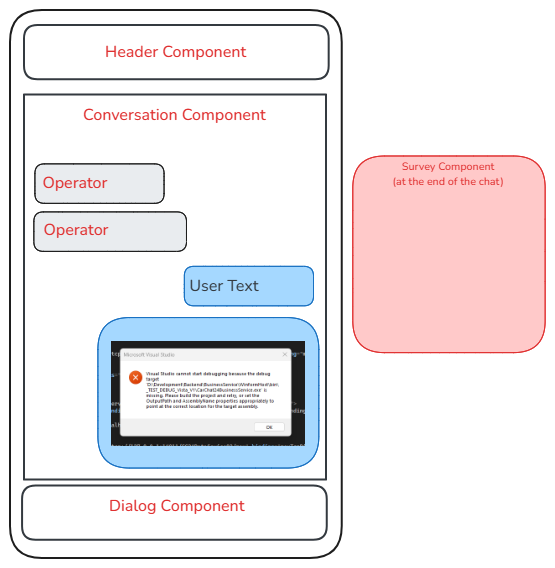
This documentation provides an overview of the chat window component, its structure, usage, and program workflow. The chat window is designed to facilitate real-time communication between users and operators.
Folder Structure
/ root folder
│
├── baseComponent.ts
├── bottomSection
│   ├── action-area.component.css
│   ├── action-area.component.html
│   ├── action-area.component.ts
│
├── chat-widget.component.css
├── chat-window5.component.ts
├── chat-window5.module.ts
├── customization
│   └── customization.ts
│
├── dailogs
│   ├── chatConfirmation.component.css
│   ├── chatConfirmation.component.html
│   ├── chatConfirmation.component.ts
│   ├── chatSwich.component.css
│   ├── chatSwich.component.html
│   ├── chatSwitch.component.ts
│   └── confirmationDialog.component.html
│   └── confirmationDialog.component.ts
│
├── middleSection
│   ├── choose-websms.component.css
│   ├── choose-websms.component.html
│   ├── choose-websms.component.ts
│   ├── conversation.component.css
│   ├── conversation.component.html
│   ├── conversation.component.ts
│   ├── form-in-chat
│   │   ├── form-in-chat.component.css
│   │   ├── form-in-chat.component.html
│   │   └── form-in-chat.component.ts
│   ├── survey.component.css
│   ├── survey.component.html
│   └── survey.component.ts
│
├── surveyFields
│   ├── checkBox.component.ts
│   ├── input.component.ts
│   ├── radio.component.ts
│   ├── rating.component.html
│   ├── rating.component.scss
│   ├── rating.component.ts
│   ├── select.component.ts
│   └── textArea.component.ts
│
└── topSection
├── header.component.css
├── header.component.html
├── header.component.ts
├── listOperatorInfo.component.css
├── listOperatorInfo.component.html
└── listOperatorInfo.component.ts
Components Overview
1. Base Component
- File:
baseComponent.ts - Usage: This is the base class for all components in the chat window. It manages subscriptions and UI updates.
- Key Methods:
updateUI(): Updates the UI and handles change detection.addSubscriptions(): Adds subscriptions to the component.unSubscribeSubscriptions(): Unsubscribes from all subscriptions.
2. Action Area Component
- File:
action-area.component.ts - Usage: This component handles the user input area, including sending messages and managing chat controls.
- Key Features:
- Text area for user input.
- Buttons for sending messages and managing chat options (e.g., video chat).
- Displays error messages and typing indicators.
3. Chat Window Component
- File:
chat-window5.component.ts - Usage: The main component that encapsulates the chat window structure, including header, conversation, and action area.
- Key Features:
- Manages the layout of the chat window.
- Controls visibility of different sections based on chat state.
4. Choose Web SMS Component
- File:
choose-websms.component.ts - Usage: Allows users to select a department for SMS communication.
- Key Features:
- Displays department options.
- Handles user selection and proceeds to the next step.
5. Conversation Component
- File:
conversation.component.ts - Usage: Displays the chat messages and handles the display of operator and visitor messages.
- Key Features:
- Renders messages based on sender type.
- Displays typing indicators and system messages.
6. Survey Component
- File:
survey.component.ts - Usage: Manages survey forms presented to users during or after the chat.
- Key Features:
- Displays various survey fields (text, radio, checkbox).
- Handles submission and validation of survey responses.
7. Dialog Components
- Files:
chatConfirmation.component.tschatSwitch.component.tsconfirmationDialog.component.ts
- Usage: These components manage modal dialogs for chat confirmations and switches.
- Key Features:
- Displays confirmation messages and handles user responses.
8. Survey Fields Components
- Files:
checkBox.component.tsinput.component.tsradio.component.tsrating.component.tsselect.component.tstextArea.component.ts
- Usage: These components represent individual survey fields.
- Key Features:
- Each component handles its own validation and state management.
9. Header Component
- File:
header.component.ts - Usage: Displays the header of the chat window, including operator information and controls.
- Key Features:
- Shows operator name and image.
- Provides close and minimize buttons.
Program Workflow
-
Initialization:
- The
ChatWindow5Componentinitializes the chat window and sets up the necessary subscriptions.
- The
-
User Interaction:
- Users can type messages in the
ActionAreaComponent. - Users can select departments in the
ChooseWebsmsComponent.
- Users can type messages in the
-
Message Handling:
- Messages are displayed in the
ConversationComponent. - The component differentiates between operator and visitor messages.
- Messages are displayed in the
-
Survey Handling:
- Surveys are presented using the
SurveyComponentafter certain chat states. - Users can fill out surveys using various field components.
- Surveys are presented using the
-
Dialog Management:
- Confirmation dialogs are managed by the dialog components, allowing users to confirm actions like ending a chat.
-
UI Updates:
- The
BaseComponenthandles UI updates and change detection across all components.
- The
-
Cleanup:
- On component destruction, subscriptions are cleaned up to prevent memory leaks.
Overview
Estimation
| Component Name | Modification Type | Estimated Time (Hours) | Buffer | Total Time (Hours) |
|---|---|---|---|---|
bottomSection (Action-area Component) | Apply HTML | 2 | 1 | 3 |
bottomSection (Action-area Component) | Apply CSS and Integration with .ts File | 3 | 1 | 3 |
dailogs (Chat Confirmation Component) | Apply CSS | 3 | 1 | 4 |
dailogs (Chat Confirmation Component) | Apply HTML and Integration | 1 | 1 | 2 |
dailogs (Chat Switch Component) | Apply CSS and HTML | 2.5 | 1 | 3.5 |
dailogs (Chat Switch Component) | Apply Integration | 2.5 | 1 | 3.5 |
dailogs (Confirmation Dialog Component) | Apply HTML and CSS | 2 | 1 | 3 |
form-in-chat (Form in Chat Component) | Apply HTML and CSS | 2 | 1 | 3 |
form-in-chat (Form in Chat Component) | Changes in the .ts File | 2 | 1 | 3 |
middleSection (choose-websms Component) | Changes in the CSS File | 2 | 1 | 3 |
middleSection (choose-websms Component) | Changes in the HTML and .TS File | 2 | 1 | 3 |
middleSection (conversation Component) | Changes in the CSS File | 2 | 1 | 3 |
middleSection (conversation Component) | Changes in the HTML and .TS File | 2 | 1 | 3 |
surveyField (Survey Component) | Changes in the CSS File | 2 | 1 | 3 |
surveyField (Survey Component) | Changes in the HTML and .ts File | 1 | 1 | 2 |
topSection (Header Component) | Changes in the CSS File | 3 | 0.5 | 3.5 |
topSection (list-operator Component) | Changes in the CSS File | 2 | 0.5 | 2.5 |
topSection (operator-info Component) | Changes in the CSS File and HTML File | 2.5 | 0.5 | 3 |
chat-widget Component | Changes in the CSS File and HTML File | 1 | 0.5 | 1.5 |
Overall Component Integration and Testing | Testing for overall component and demo chat | 3 | 0.5 | 3.5 |
| Total | -- | -- | 1 | 61 |
Review & Approval
(Include a section for review and approval by stakeholders.)
-
Reviewer:
Rupanjan Hari -
Approval Date:
2025-02-18
Conclusion
This documentation provides a comprehensive overview of the chat window component structure, usage, and workflow. Each component plays a crucial role in ensuring a smooth and interactive chat experience for users and operators.