Refresh Token Based Authentication


In this blog post, we'll walk through the implementation of refresh token-based authentication using .NET Core for the backend and React for the frontend. This approach allows us to maintain user sessions securely, even after the access token expires.
Introduction
Authentication is a critical part of web applications. Using JSON Web Tokens (JWT) for stateless authentication is common, but JWTs have a limited lifespan for security reasons. To maintain a user session, we can implement a refresh token mechanism that issues a new access token without requiring the user to log in again.
What We'll Cover:
- Overall workflows
- Backend: Refresh token logic & configuration in a .NET Core API.
- Frontend: Integrating the refresh token authentication flow in a React application.
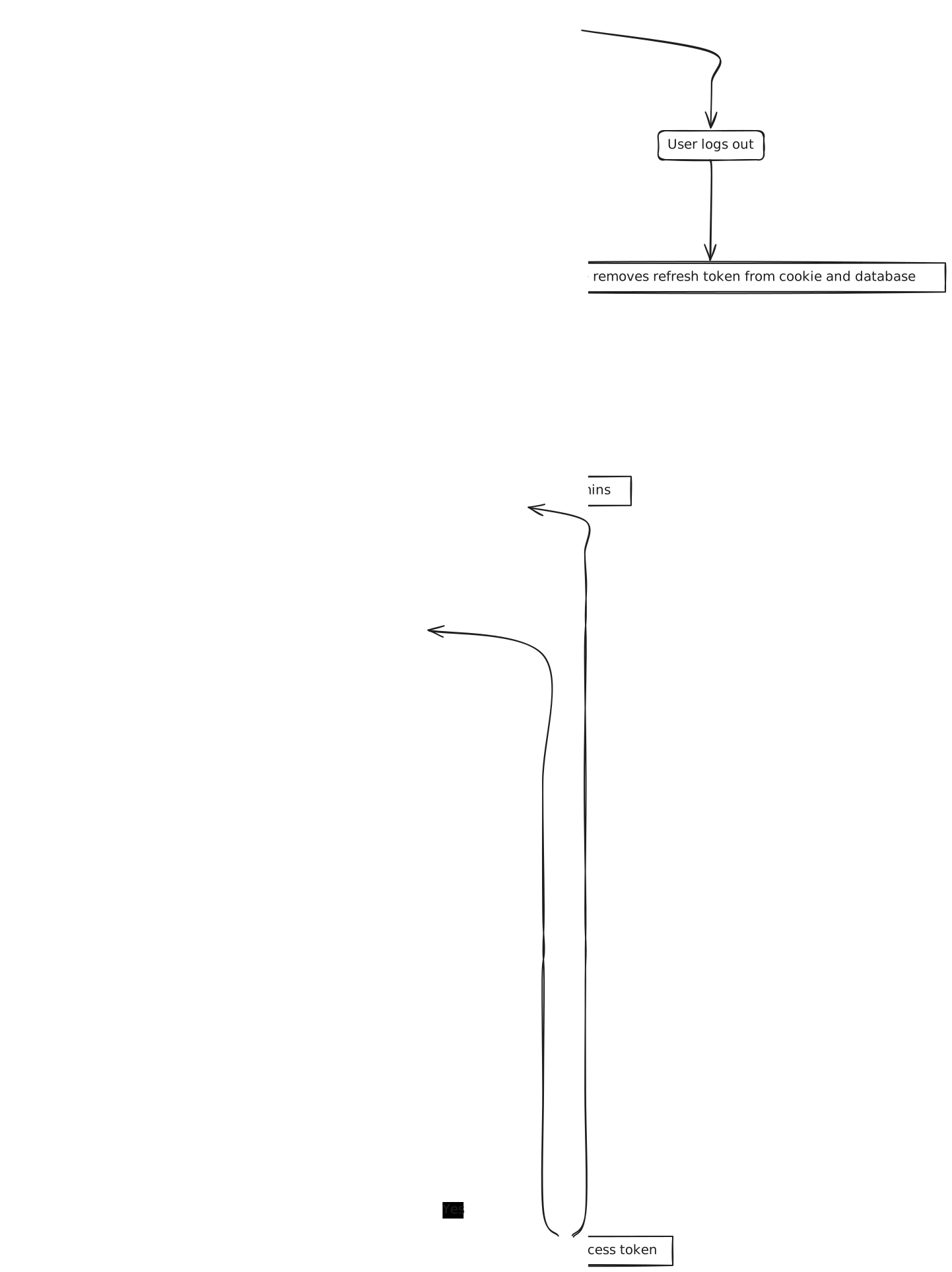
Overall Workflow
Backend: .NET Core Implementation
1. Generate Tokens
When the Login API is called with valid credentials, the authentication service generates two tokens: an access token with a short expiration time and a refresh token with a longer expiration time. The access token is a JWT (JSON Web Token), and the refresh token is a Base64-encoded string of a unique UUID/GUID.
The access token is returned to the caller with its expiration details, while the refresh token is set as an HTTP-only, same-site cookie in the browser for security. Additionally, the refresh token is stored in a database table (tblsession) along with relevant details such as the user agent and IP address.
Below is the Login endpoint method from the AuthController:
public class AuthController : ControllerBase
{
    ...
    private readonly int _maxLoginAge = 15;
    ...

    [HttpPost]
    [Route("login")]
    public async Task<IActionResult> Login([FromBody] LogInUser credential)
    {
        try
        {
            if (credential.Username.IsNullOrEmpty() || credential.Password.IsNullOrEmpty())
                return BadRequest("Username and Password can not be empty");

            (int status, User? user) = await _authDAL.CheckValidUser(credential.Username);
            if (user == null) return NotFound("User not found");
            bool isPasswordCorrect = PasswordHasher.Verify(credential.Password, userPassword);
            if (!isPasswordCorrect) return Unauthorized("Password is not correct");

            ...

            var tokenDescriptor = await CreateJwtClaims(user);
            var tokenHandler = new JwtSecurityTokenHandler();
            var token = tokenHandler.CreateToken(tokenDescriptor);
            var jwtToken = tokenHandler.WriteToken(token);
            // Create logged in session in DB
            var ipAddress = HttpContext.Connection.RemoteIpAddress?.ToString();
            var session = new LoggedInSession
            {
                RefreshToken = Convert.ToBase64String(Guid.NewGuid().ToByteArray()),
                Expires = DateTime.UtcNow.AddDays(7),
                Username = credential.Username,
                IpAddress = ipAddress,
                UserAgent = HttpContext.Request.Headers.UserAgent
            };
            await _authDAL.CreateSession(session);
            SetRefreshTokenInCookie(session.RefreshToken, session.Expires);
            return Ok(new LoginAccess(jwtToken, TimeSpan.FromMinutes(_maxLoginAge).TotalSeconds));
        }
        catch (Exception ex)
        {
            _logger.LogError(ex, "Login failed! Error: {Error}, Username: {Username}", exMessage, credential.Username);
            return StatusCode(StatusCodes.Status500InternalServerError);
        }
    }
}
2. Handle Token Refresh
When the access token expires, the caller can request a new access token by calling the refresh token endpoint. If the refresh token is stored in the browser cookie, it will be automatically included in the API request.
If the refresh token is valid, the authentication service will generate a new access token and return it to the caller. Otherwise, it will return an Unauthorized response.
Additionally, the refresh token will be rotated (replaced with a new one) after successful access token regeneration, and the new token will be saved in both the cookie and the database.
[HttpGet]
[Route("token/refresh")]
public async Task<IActionResult> RefreshToken()
{
    try
    {
        Request.Cookies.TryGetValue(_refreshTokenCookieKey, out string? refreshToken)
        if (string.IsNullOrEmpty(refreshToken)) return Unauthorized();

        (int status, LoggedInSession? session) = await _authDAL.GetSessionByToken(refreshToken);
        if (status != RMCStatusCode.OK || session == null || session.IsExpired) return Unauthorized();

        (_, User? user) = await _authDAL.CheckValidUser(session.Username);
        if (user == null) return NotFound("User not found");

        var tokenDescriptor = await CreateJwtClaims(user);
        var tokenHandler = new JwtSecurityTokenHandler();
        var token = tokenHandler.CreateToken(tokenDescriptor);
        var jwtToken = tokenHandler.WriteToken(token);

        session.RefreshToken = Convert.ToBase64String(Guid.NewGuid().ToByteArray());
        session.LastUpdated = DateTime.UtcNow;

        await _authDAL.UpdateSession(session);
        SetRefreshTokenInCookie(session.RefreshToken, session.Expires);

        return Ok(new LoginAccess(jwtToken, TimeSpan.FromHours(_maxLoginAge).TotalSeconds));
    }
    catch (Exception ex)
    {
        _logger.LogError(ex, "Token validation failed! Error: {Error}", ex.Message);
        return StatusCode(StatusCodes.Status500InternalServerError);
    }
}
3. Logout and Removing Refresh Token
When the caller initiates a logout, the authentication service will attempt to retrieve the refresh token from the request's cookies. If successful, it will expire the refresh token in the database and remove the cookie from the browser.
[HttpGet]
[Route("logout")]
public async Task<IActionResult> Logout()
{
    try
    {
        Request.Cookies.TryGetValue(_refreshTokenCookieKey, out string? refreshToken);
        if (string.IsNullOrEmpty(refreshToken)) return Unauthorized();

        await _authDAL.ExpireSession(refreshToken);
        Response.Cookies.Delete(_refreshTokenCookieKey);

        return Ok();
    }
    catch (Exception ex)
    {
        _logger.LogError(ex, "Logout failed! Error: {Error}", ex.Message);
        return StatusCode(StatusCodes.Status500InternalServerError);
    }
}
Frontend: React Implementation
1. Frontend basic flow
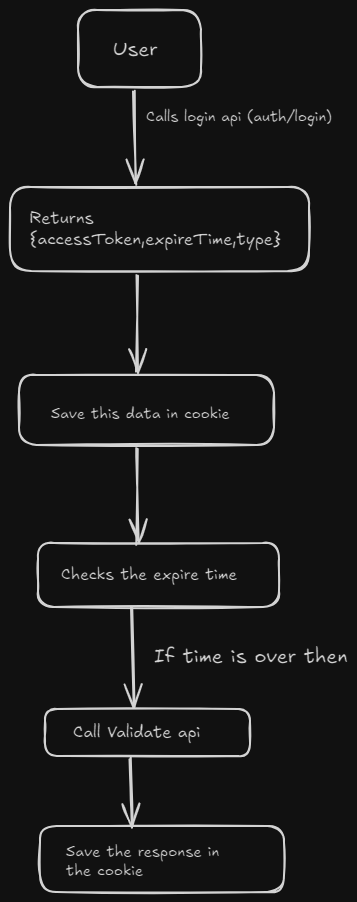
2. Update main.tsx with the Interceptor Logic
Create a context to manage authentication state:
// main.tsx (or similar entry point for your application)
import httpService from './httpService'; // Assuming you have an httpService configured
import { getCookieV2, setCookieWithTime } from './cookieUtils'; // Your cookie utility functions
import { cookieConstants } from './constants'; // Constants for cookie keys
import { forceLogout } from './authActions'; // Action to handle logout

const isCookieExpired = () => {
    const cookieData = getCookieV2(cookieConstants?.auth_key);
    console.log(cookieData);
    return cookieData === undefined;
};

let isRefreshing = false;

httpService.interceptors.request.use(
    async (config) => {
        if (isCookieExpired() && config.url !== 'auth/login' && !isRefreshing) {
            console.log("Inside interceptor");
            isRefreshing = true;
            // Token expired, call the /auth/validate API
            try {
                const response = await httpService.get("/auth/token/refresh", {
                    withCredentials: true,
                });

                console.log(response);

                // Save the new token in the cookie
                setCookieWithTime(
                    cookieConstants.auth_key,
                    JSON.stringify(response.data),
                    response.data.expiresIn
                );

                // Update the request headers with the new token
                config.headers.Authorization = `Bearer ${response.data.accessToken}`;
            } catch (error) {
                console.error("Token refresh failed", error);
                forceLogout(dispatch)(error);
            } finally {
                isRefreshing = false;
            }
        } else {
            // Token is valid, add it to the request headers
            const cookie = getCookieV2(cookieConstants.auth_key) as any;
            if (cookie) {
                const token = JSON.parse(cookie)?.accessToken;
                config.headers.Authorization = `Bearer ${token}`;
            }
        }
        return config;
    },
    (error) => Promise.reject(error)
);
2. Implementing Login and Logout
Create components for login and logout functionality:
export const logout = () => async (dispatch: Dispatch) => {
    const type = actions.changeAuth.type;
    try {
        // Dispatch GET request to 'auth/logout' endpoint
        const response = await dispatchGet(dispatch, type, "auth/logout", false);

        // Clear auth state and perform client-side logout
        dispatch(actions.changeAuth(null));
        authService.logout();

        console.log("Logout successful", response);

    } catch (error: any) {
        console.error("Logout failed on the server", error);

        // Ensure client-side logout happens even if server-side logout fails
        authService.logout();
    }
};
Conclusion
By implementing refresh token-based authentication, you ensure that your application maintains a secure user session without requiring frequent logins. The combination of .NET Core on the backend and React on the frontend provides a robust solution for modern web applications.
This implementation also enables new features. Since login sessions are no longer stateless, you can dynamically expire any session from the backend if needed. Another useful feature is the ability to track and display all active sessions for a particular logged-in user, allowing the user to view and manage their sessions. Users can even terminate any of their own active sessions for increased control and security.