Real-Time Van Location Tracking
Author(s)
- Sanket Mal
- Ribhu Gautam
- Ashik Ikbal
- ...
Last Updated Date
[2026-02-06]
SRS References
Version History
| Version | Date | Changes | Author |
|---|---|---|---|
| 1.0 | 2026-01-15 | Initial draft | Sanket Mal , Ribhu Gautam |
| 2.0 | 2026-02-04 | SignalR optimization and model refactoring | Ashik Ikbal |
Feature Overview
Objective:
Enable real-time tracking of technician vans for customers and admins, including live location, route, and ETA, using efficient and scalable backend and frontend architecture.
Scope:
- Real-time GPS location updates from technician devices
- Live map and ETA for customers
- Admin dashboard to monitor all active technicians
- Route calculation and deviation handling
- Multi-device support for technicians
Dependencies:
- SignalR (WebSocket communication)
- MapBox API (route and ETA)
- Valkey (caching)
- PostgreSQL (persistent storage)
- JWT authentication
Requirements
Functional:
- Technician sends GPS updates every 3-5 seconds during tracking.
- Customer receives live van location and ETA.
- Admin can monitor all active technicians on a map.
- Route recalculates if technician deviates.
- Tracking stops on completion or cancellation.
- Multi-device support for technician.
- Breadcrumb trail is stored for audit.
Non-Functional:
- Low latency (<2s) for updates.
- Efficient MapBox API usage (rate-limited, cached).
- High reliability and scalability.
- Secure access (JWT, role-based).
Design Specifications
Architecture Diagram
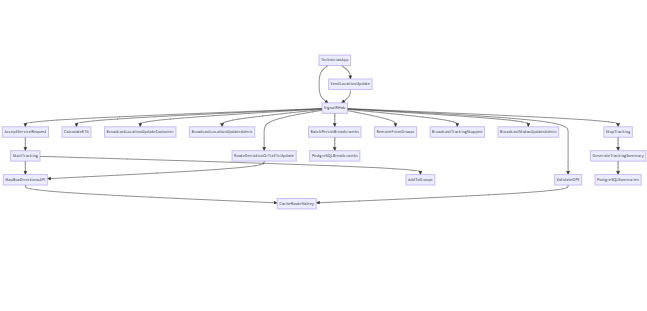
The following diagram illustrates the complete system architecture for real-time van location tracking, showing the interactions between technician devices, SignalR hub, backend services, databases, and client applications:
MapBox API Optimization Flow Diagram
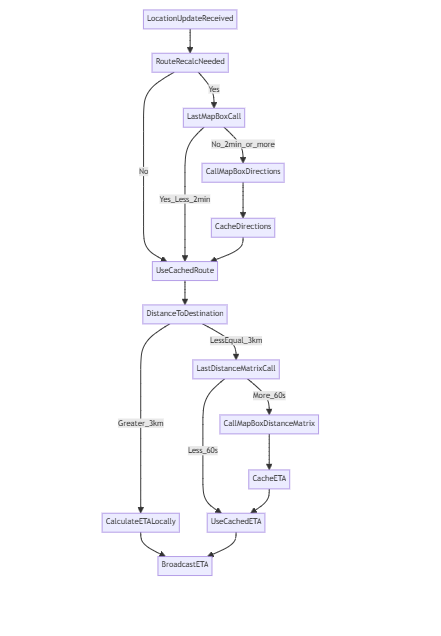
The following diagram illustrates the complete flow for optimizing MapBox API calls and calculating ETA and polylines internally. This approach helps minimize external API usage, improves performance, and ensures accurate route and ETA calculations for technician van tracking.
Key Components:
- Technician Device: Sends GPS updates every 3-5 seconds via SignalR (primary) or REST (fallback)
- SignalR Hub: Manages WebSocket connections and broadcasts location updates to subscribed groups
- Location Service: Processes GPS data, calculates routes/ETA, validates location accuracy
- MapBox API: Provides route calculation and distance matrix for ETA
- Valkey/Redis: Caches live tracking state and buffers breadcrumbs for performance
- PostgreSQL: Stores persistent tracking history (breadcrumbs and summaries)
- Customer/Admin Apps: Subscribe to real-time updates via SignalR groups
-
UI/UX Design:
- Customer View: Live map with technician location, van registration, technician code, current heading, speed, and ETA
- Admin Dashboard: Map showing all technicians (available + in-service), filter by status, click for tracking history
- Technician App: Location auto-tracks during service, shows customer data, manual stop option with completion reason
-
Data Models:
Below are the main models used in backend (C#).
For frontend, refer to the sample JSON in API/HUB sections.// Location data component (used in broadcasts)
public record CustomerLocation
{
public decimal Latitude { get; set; }
public decimal Longitude { get; set; }
}
public record TechnicianLocation : CustomerLocation
{
public double Heading { get; set; }
public double Speed { get; set; }
public double Accuracy { get; set; }
public DateTime Time { get; set; }
}
// Technician sends location update (always, whether serving request or available)
public class LocationDataWithRequestId:TechnicianLocation
{
public Guid? RequestId { get; set; } // Nullable - null when available/no active request
}
public record TechnicianBasicInfo
{
public Guid TechnicianId { get; init; }
public string TechnicianCode { get; init; } = string.Empty;
public TechnicianAvailabilityStatus? AvailabilityStatus { get; init; }
public string FirstName { get; init; } = string.Empty;
public string LastName { get; init; } = string.Empty;
public string? Email { get; init; }
public string? PhoneNumber { get; init; }
}
public record CustomerBasicInfo
{
public Guid UserId { get; init; }
// Customer identification
public Guid CustomerId { get; init; }
public string CustomerCode { get; init; } = string.Empty;
// User information
public string Email { get; init; } = string.Empty;
public string FirstName { get; init; } = string.Empty;
public string LastName { get; init; } = string.Empty;
public string PhoneNumber { get; init; } = string.Empty;
public Gender? Gender { get; init; }
}
public record VanBasicInfo
{
public Guid VanId { get; init; }
public string VanNumber { get; init; } = string.Empty;
public string RegistrationNumber { get; init; } = string.Empty;
public string VIN { get; init; } = string.Empty;
}
public record ServiceRequestBasicInfo
{
public Guid RequestId { get; init; }
public required string RequestNumber { get; set;}
public Guid CustomerId { get; init; }
public Guid? TechnicianId { get; init; }
public ServiceStatus ServiceStatus { get; init; }
public decimal Latitude { get; init;}
public decimal Longitude {get; init;}
public DateTime RequestedAt {get; init;}
}
public class RequestAssignedResponse
{
public ServiceRequestBasicInfo? ServiceRequestInfo { get; set; }
public TechnicianBasicInfo? TechnicianInfo { get; set; }
public CustomerBasicInfo? CustomerInfo {get; set; }
}
// Data broadcasted to customer/admin on every location update
public class LocationBroadcastModel
{
public ServiceRequestBasicInfo? ServiceRequestInfo { get; set; }
public TechnicianBasicInfo? TechnicianInfo { get; set; }
public CustomerBasicInfo? CustomerInfo {get; set; }
public VanBasicInfo? VanInfo { get; set; }
public CustomerLocation? CustomerLocation { get; set; }
public TechnicianLocation? TechnicianLocation { get; set; }
public int? DistanceInMeter { get; set; }
public int? EtaInSec { get; set; }
public string? EncodedPolyline {get; set;}
public int? PolylineVersion { get; set; }
public DateTime Timestamp { get; set; }
}
public record ServiceStartBroadcastModel
{
public ServiceRequestBasicInfo? ServiceRequestInfo { get; set; }
public TechnicianBasicInfo? TechnicianInfo { get; set; }
public CustomerBasicInfo? CustomerInfo {get; set; }
public DateTime ServiceStartAt { get; set; } = DateTime.UtcNow;
}
public record RequestCancelBroadcastModel
{
public Guid RequestId {get; set;}
public bool IsCanceledByTechnicain {get; set;} = false;
public bool IsCanceledByCustomer {get; set;} = false;
public decimal DistanceTravelInMeter {get; set;}
public DateTime JourneyStartAt {get; set;}
public DateTime JourneyEndAt {get; set;} = DateTime.UtcNow;
}
public record ServiceCompletedBroadcastModel
{
public ServiceRequestBasicInfo? ServiceRequestInfo { get; set; }
public TechnicianBasicInfo? TechnicianInfo { get; set; }
public CustomerBasicInfo? CustomerInfo {get; set; }
public DateTime ServiceCompletedAt { get; set; } = DateTime.UtcNow;
}
public record TechnicianArrivedBroadcastModel
{
public Guid RequestId { get; set; }
public string TechnicianName { get; set; }
public string TechnicianCode { get; set; }
public string Message { get; set; }
public DateTime Timestamp { get; set; } = DateTime.UtcNow;
}
public record TechnicianPresenceResponseModel
{
public Guid TechnicianId { get; set; },
public string? OnlineOfflineStatus { get; set; }, // Online/Offline
public DateTime UpdateAt { get; set; } = DateTime.UtcNow;
}
// GPS trail - stored for audit and history
public class Breadcrumb
{
public Guid Id { get; set; }
public Guid RequestId { get; set; }
public Guid TechnicianId { get; set; }
public decimal Latitude { get; set; }
public decimal Longitude { get; set; }
public double? Heading { get; set; }
public double? Speed { get; set; }
public double? Accuracy { get; set; }
public DateTime RecordedAt { get; set; }
}
// Journey summary - stored when tracking completes
public class TrackingSummary
{
public Guid SummaryId { get; set; }
public Guid RequestId { get; set; }
public Guid TechnicianId { get; set; }
public int TotalDistanceMeters { get; set; }
public int TotalDurationMinutes { get; set; }
public decimal AverageSpeedKmh { get; set; }
public string EncodedPath { get; set; } // Full journey polyline
public DateTime TrackingStartedAt { get; set; }
public DateTime TrackingCompletedAt { get; set; }
public string CompletionReason { get; set; } // "completed" or "canceled"
}
// Generic API response wrapper (already exists in codebase)
public record CommonResponse
{
public int Status { get; init; } // 200, 400, 401, 403, 404, 500
public string? Message { get; init; } // Success or error message
}
// Response wrapper with data (already exists in codebase)
public record ResponseWithData<T> : CommonResponse
{
public T? Data { get; init; } // Response data (can be null on error)
}
// Pagination wrapper for list responses (already exists in codebase)
public class ServerPaginatedData<T>
{
public List<T> Data { get; set; } = []; // Array of items
public int TotalNumber { get; set; } // Total count of all records
public bool HasPreviousPage { get; set; }
public bool HasNextPage { get; set; }
public int TotalPages { get; set; }
public int PageNumber { get; set; }
public int RowsPerPage { get; set; }
}
// Response model for tracking history endpoint
public record TrackingHistoryResponse
{
public TrackingSummary Summary { get; set; }
public List<Breadcrumb> Breadcrumbs { get; set; }
}
// Response model for current tracking state endpoint
public class CurrentTrackingResponse
{
public LocationBroadcast Location { get; set; }
}
// Response model for all active trackings endpoint
public class ActiveTrackingsResponse
{
public List<LocationBroadcast> ActiveTrackings { get; set; }
public int TotalCount { get; set; }
}
// Response model for all technician locations endpoint
// Used by: GET /van-location/active-technicians and all_technicians_snapshot SignalR event
public class TechnicianLocationsResponse
{
public List<TechnicianLocationSnapshot> Technicians { get; set; }
public int TotalCount { get; set; }
public DateTime Timestamp { get; set; }
}
SignalR Events Reference
All SignalR events used in the Van Location Tracking system:
Connection Events
| Event Name | Direction | Description | Payload / Data Model |
|---|---|---|---|
handshake_ack | Server → Client | Acknowledgment sent when client successfully connects | { ConnectionId, UserId, UserType, UserName, ConnectedAt, Message } |
force_disconnect | Server → Client | Forces client to disconnect (e.g., another device took over) | { Reason, Message } |
initial_data | Server → Client | Send initial data only to the customer and technician after connection is established; do not send the initial data to any admin group | LocationBroadcastModel |
Location Tracking Events
| Event Name | Direction | Description | Payload / Data Model |
|---|---|---|---|
update_location | Client (Technician) → Server | Technician sends location update | LocationDataWithRequestId |
location_updated | Server → Client (Customer/Admin) | Broadcast location update to subscribers | LocationBroadcastModel |
Service Request Events
| Event Name | Direction | Description | Payload / Data Model |
|---|---|---|---|
request_accepted | Server → Client | Notification when request is accepted by technician | LocationBroadcastModel |
request_assigned | Server → Client (Technician) | New request assigned to technician | { RequestId, CustomerName, ServiceType, ScheduledTime, Location } |
request_canceled | Server → Client | Request was canceled by either customer or technician | RequestCancelBroadcastModel |
service_started | Server → Client | Service has started | ServiceStartBroadcastModel |
service_completed | Server → Client | Service has been completed | ServiceCompletedBroadcastModel |
technician_arrived | Server → Client (Admin/Technician/Customer) | Technician has arrived (distance < 30 meters) | TechnicianArrivedBroadcastModel |
Admin Events
| Event Name | Direction | Description | Payload / Data Model |
|---|---|---|---|
technician_presence_changed | Server → Client (Admin and Customer) | Broadcast technician online/offline status to all groups where the technician is currently engaged | TechnicianPresenceResponseModel |
-
Database Tables:
Breadcrumbs Table
Stores GPS trail (location history) for each tracked journey.
CREATE TABLE breadcrumbs (
    breadcrumbid UUID PRIMARY KEY,
    requestid UUID NOT NULL,
    technicianid UUID NOT NULL,
    latitude DECIMAL(9,6) NOT NULL,
    longitude DECIMAL(9,6) NOT NULL,
    heading DOUBLE PRECISION,
    speed DOUBLE PRECISION,
    accuracy DOUBLE PRECISION,
    recordedat TIMESTAMP NOT NULL,
    createdat TIMESTAMP NOT NULL DEFAULT CURRENT_TIMESTAMP
);

-- Indexes for performance
CREATE INDEX idx_breadcrumbs_request_id ON breadcrumbs(request_id);
CREATE INDEX idx_breadcrumbs_technician_id ON breadcrumbs(technician_id);
CREATE INDEX idx_breadcrumbs_recorded_at ON breadcrumbs(recorded_at);
Tracking Summaries Table
Stores journey summary for each completed/canceled tracking session.
CREATE TABLE tracking_summaries (
    trackingsummaryid UUID PRIMARY KEY,
    requestid UUID NOT NULL,
    technicianid UUID NOT NULL,
    totaldistancemeters INT NOT NULL,
    totaldurationminutes INT NOT NULL,
    averagespeedkmh DECIMAL(5,2) NOT NULL,
    encodedpath TEXT NOT NULL,
    trackingstartedat TIMESTAMP NOT NULL,
    trackingcompletedat TIMESTAMP NOT NULL,
    journeystatus VARCHAR(20) NOT NULL, -- Status of the journey (e.g., ongoing, completed, cancelled)
    cancelbytechnician BOOLEAN NOT NULL DEFAULT FALSE,
    cancelbycustomer BOOLEAN NOT NULL DEFAULT FALSE,
    cancellationreason TEXT,
    createdat TIMESTAMP NOT NULL DEFAULT CURRENT_TIMESTAMP
);

-- Indexes for performance
CREATE INDEX idx_tracking_summaries_request_id ON tracking_summaries(request_id);
CREATE INDEX idx_tracking_summaries_technician_id ON tracking_summaries(technician_id);
CREATE INDEX idx_tracking_summaries_completed_at ON tracking_summaries(tracking_completed_at); -
API Interfaces:
HTTP REST Endpoints
Endpoint Method Purpose Parameters Request Model Response Model Status Codes /van-location/updatePOST FALLBACK ONLY: Use SignalR SubmitLocationfirst; use REST only if SignalR failsJWT in header LocationDataWithRequestId CommonResponse200, 400, 401, 500 SignalR Hub:
/hubs/vanlocationAuthentication: JWT token via query string
?access_token={JWT_TOKEN}Hub Method Direction Purpose Request Model Server-to-Client Events (Connection Established) Server → Client AUTOMATIC: Sent when Technician/Customer/Admin connects to SignalR - handshake_ack,initial_dataSubmitLocationClient → Server PRIMARY METHOD: Technician sends location update every 3-5s (use SignalR, not REST) LocationDataWithRequestId location_updated,technician_arrived(Background Events) Server → Client AUTOMATIC: Sent when various events occur - request_accepted,request_assigned,service_started,service_completed,force_disconnect,request_canceled
API Examples
IMPORTANT: Recommended Flow for Developers
Location Updates (Technician):
- Primary Method: Use SignalR
SubmitLocationmethod (WebSocket) for real-time location updates.- Called every 3-5 seconds
- Faster and more efficient than HTTP
- Automatically broadcasts to customers and admins
- Fallback Method: Use REST POST
/api/location/updateonly if:- SignalR connection is temporarily disconnected
- Network only supports HTTP (rare)
- SignalR keeps failing after retry attempts
- When SignalR is restored, switch back to
SubmitLocationimmediately.
1. Submit Location via SignalR (Technician) - PRIMARY METHOD
Technician sends location update every 3-5 seconds via SignalR (whether serving request or available):
SignalR Hub Method:
connection.invoke("SubmitLocation", LocationDataWithRequestId)Request (sent via SignalR):
{
  "requestId": "550e8400-e29b-41d4-a716-446655440000",
  "latitude": 28.6139,
  "longitude": 77.209,
  "heading": 125.5,
  "speed": 45.3,
  "accuracy": 8.5,
  "timestamp": 1737379200
}
Broadcast Events (automatic - no explicit response):
Event:
location_updated(torequest:{requestId}group if serving request)Data Model:
LocationBroadcastModel{
"serviceRequestInfo": {
"requestId": "550e8400-e29b-41d4-a716-446655440000",
"requestNo": "RQ-2026-001234"
},
"technicianInfo": {
"technicianId": "770e8400-e29b-41d4-a716-446655440002",
"technicianCode": "TECH-001",
"availabilityStatus": "EnRoute",
"firstName": "John",
"lastName": "Doe",
"email": "john.doe@example.com",
"phoneNumber": "+91-9876543210"
},
"vanInfo": {
"vanId": "660e8400-e29b-41d4-a716-446655440001",
"vanNumber": "VAN-001",
"registrationNumber": "DL-01-AB-1234"
},
"customerInfo": {
"userId": "abc12345-def6-7890-ghij-klmnop123456",
"customerId": "cust-uuid-here",
"customerCode": "CUST-5678",
"email": "rajesh.kumar@example.com",
"firstName": "Rajesh",
"lastName": "Kumar",
"phoneNumber": "+91-9988776655",
"gender": "Male"
},
"customerLocation": {
"latitude": 28.65,
"longitude": 77.22
},
"technicianLocation": {
"latitude": 28.6139,
"longitude": 77.209,
"heading": 45.5,
"speed": 12.5,
"accuracy": 10.0
},
"distanceInMeter": 4235,
"etaInSec": 480,
"encodedPolyline": "_p~iF~ps|U_ulLnnqC_mqNvxq`@",
"polylineVersion": 2,
"timestamp": "2026-01-21T14:30:00Z"
}Event:
location_updated(toAllAdminsgroup - always broadcast)Data Model:
LocationBroadcastModel{
"serviceRequestInfo": {
"requestId": "550e8400-e29b-41d4-a716-446655440000",
"requestNo": "RQ-2026-001234"
},
"technicianInfo": {
"technicianId": "770e8400-e29b-41d4-a716-446655440002",
"technicianCode": "TECH-001",
"availabilityStatus": "EnRoute",
"firstName": "John",
"lastName": "Doe",
"email": "john.doe@example.com",
"phoneNumber": "+91-9876543210"
},
"vanInfo": {
"vanId": "660e8400-e29b-41d4-a716-446655440001",
"vanNumber": "VAN-001",
"registrationNumber": "DL-01-AB-1234"
},
"customerInfo": {
"userId": "abc12345-def6-7890-ghij-klmnop123456",
"customerId": "cust-uuid-here",
"customerCode": "CUST-5678",
"email": "rajesh.kumar@example.com",
"firstName": "Rajesh",
"lastName": "Kumar",
"phoneNumber": "+91-9988776655",
"gender": "Male"
},
"customerLocation": {
"latitude": 28.65,
"longitude": 77.22
},
"technicianLocation": {
"latitude": 28.6139,
"longitude": 77.209,
"heading": 45.5,
"speed": 12.5,
"accuracy": 10.0
},
"distanceInMeter": 3500,
"etaInSec": 1200,
"encodedPolyline": "encoded_polyline_string_here",
"polylineVersion": 2,
"timestamp": "2026-01-21T14:30:00Z"
}
1b. Submit Location via REST (Technician) - FALLBACK ONLY
Use this endpoint ONLY if SignalR connection fails. Same behavior as SignalR but slower.
POST
/van-location/updateRequest:
{
  "requestId": "550e8400-e29b-41d4-a716-446655440000",
  "latitude": 28.6139,
  "longitude": 77.209,
  "heading": 125.5,
  "speed": 45.3,
  "accuracy": 8.5,
  "timestamp": 1737379200
}
Response (200 OK):
{
  "status": 200,
  "message": "Location updated"
}
Note: Backend still broadcasts to customers/admins the same way, but there's network latency delay.
SignalR immediately sends to caller:
Event:
location_updated(current state if tracking active)Data Model:
LocationBroadcastModel{
"serviceRequestInfo": {
"requestId": "550e8400-e29b-41d4-a716-446655440000",
"requestNo": "RQ-2026-001234"
},
"technicianInfo": {
"technicianId": "770e8400-e29b-41d4-a716-446655440002",
"technicianCode": "TECH-001",
"availabilityStatus": "EnRoute",
"firstName": "John",
"lastName": "Doe",
"email": "john.doe@example.com",
"phoneNumber": "+91-9876543210"
},
"vanInfo": {
"vanId": "660e8400-e29b-41d4-a716-446655440001",
"vanNumber": "VAN-001",
"registrationNumber": "DL-01-AB-1234"
},
"customerInfo": {
"userId": "abc12345-def6-7890-ghij-klmnop123456",
"customerId": "cust-uuid-here",
"customerCode": "CUST-5678",
"email": "rajesh.kumar@example.com",
"firstName": "Rajesh",
"lastName": "Kumar",
"phoneNumber": "+91-9988776655",
"gender": "Male"
},
"customerLocation": {
"latitude": 28.65,
"longitude": 77.22
},
"technicianLocation": {
"latitude": 28.6139,
"longitude": 77.209,
"heading": 45.5,
"speed": 12.5,
"accuracy": 10.0
},
"distanceInMeter": 4235,
"etaInSec": 480,
"encodedPolyline": "_p~iF~ps|U_ulLnnqC_mqNvxq`@",
"polylineVersion": 2,
"timestamp": "2026-01-21T14:30:00Z"
}
2. Get Tracking History (Admin/Customer)
Get breadcrumb trail for a completed service:
GET
/van-location/request/{requestId}/historyAuthorization: Bearer {JWT_TOKEN}Response:
{
  "summary": {
    "summaryId": "abc12345-def6-7890-ghij-klmnop123456",
    "requestId": "550e8400-e29b-41d4-a716-446655440000",
    "totalDistanceMeters": 8456,
    "totalDurationMinutes": 23,
    "averageSpeedKmh": 22.0,
    "encodedPath": "_p~iF~ps|U_ulLnnqC_mqNvxq`@...",
    "trackingStartedAt": "2026-01-21T14:00:00Z",
    "trackingCompletedAt": "2026-01-21T14:23:00Z",
    "completionReason": "completed"
  },
  "breadcrumbs": [
    {
      "id": "crumb1",
      "latitude": 28.6139,
      "longitude": 77.209,
      "heading": 125.5,
      "speed": 45.3,
      "accuracy": 8.5,
      "recordedAt": "2026-01-21T14:00:00Z"
    },
    {
      "id": "crumb2",
      "latitude": 28.6145,
      "longitude": 77.2095,
      "heading": 126.0,
      "speed": 46.0,
      "accuracy": 8.2,
      "recordedAt": "2026-01-21T14:00:30Z"
    }
  ]
}
3. Get All Technician Locations (Admin)
Get snapshot of all technician locations (active + available):
GET
/api/location/technicians/locationsAuthorization: Bearer {JWT_TOKEN}Response:
[
  {
    "technicianId": "770e8400-e29b-41d4-a716-446655440002",
    "technicianCode": "TECH-001",
    "firstName": "John",
    "lastName": "Doe",
    "vanId": "660e8400-e29b-41d4-a716-446655440001",
    "vanNumber": "VAN-001",
    "registrationNumber": "DL-01-AB-1234",
    "requestId": "550e8400-e29b-41d4-a716-446655440000",
    "location": {
      "latitude": 28.6139,
      "longitude": 77.209,
      "heading": 125.5,
      "speed": 45.3,
      "accuracy": 8.5
    },
    "status": "EnRoute",
    "lastUpdate": "2026-01-21T14:30:00Z"
  }
]
SignalR Event Examples
Connection Events
Event:
handshake_ack(Server → Client)Sent immediately after successful connection to confirm handshake.
{
  "connectionId": "abc123xyz789",
  "userId": "770e8400-e29b-41d4-a716-446655440002",
  "userType": "technician",
  "userName": "John Doe",
  "connectedAt": "2026-01-21T14:30:00Z",
  "message": "Connected successfully"
}
Event:
force_disconnect(Server → Client)Forces client to disconnect (e.g., when another device takes over the same user session).
{
  "reason": "another_device_connected",
  "message": "Your account has been accessed from another device. You have been disconnected."
}
Service Request Events
Event:
request_accepted(Server → Client)Data Model:
LocationBroadcastModelSent when a technician accepts a service request.
{
  "serviceRequestInfo": {
    "requestId": "550e8400-e29b-41d4-a716-446655440000",
    "requestNo": "RQ-2026-001234"
  },
  "technicianInfo": {
    "technicianId": "770e8400-e29b-41d4-a716-446655440002",
    "technicianCode": "TECH-001",
    "availabilityStatus": "EnRoute",
    "firstName": "John",
    "lastName": "Doe",
    "email": "john.doe@example.com",
    "phoneNumber": "+91-9876543210"
  },
  "vanInfo": {
    "vanId": "660e8400-e29b-41d4-a716-446655440001",
    "vanNumber": "VAN-001",
    "registrationNumber": "DL-01-AB-1234"
  },
  "customerInfo": {
    "userId": "abc12345-def6-7890-ghij-klmnop123456",
    "customerId": "cust-uuid-here",
    "customerCode": "CUST-5678",
    "email": "rajesh.kumar@example.com",
    "firstName": "Rajesh",
    "lastName": "Kumar",
    "phoneNumber": "+91-9988776655",
    "gender": "Male"
  },
  "customerLocation": {
    "latitude": 28.65,
    "longitude": 77.22
  },
  "technicianLocation": {
    "latitude": 28.6139,
    "longitude": 77.209,
    "heading": 45.5,
    "speed": 12.5,
    "accuracy": 10.0
  },
  "distanceInMeter": 15000,
  "etaInSec": 1200,
  "encodedPolyline": "_p~iF~ps|U_ulLnnqC_mqNvxq`@",
  "polylineVersion": 2,
  "timestamp": "2026-01-21T14:30:00Z"
}
Event:
request_assigned(Server → Technician)Sent when a new request is assigned to a technician.
{
  "requestId": "550e8400-e29b-41d4-a716-446655440000",
  "requestNo": "RQ-2026-001234",
  "firstName": "Rajesh",
  "lastName": "Kumar",
  "customerCode": "CUST-5678",
  "serviceType": "Oil Change",
  "scheduledTime": "2026-01-21T15:00:00Z",
  "location": {
    "latitude": 28.65,
    "longitude": 77.22,
    "address": "123 MG Road, Connaught Place, New Delhi, 110001"
  }
}
Event:
request_canceled(Server → Client)Data Model:
RequestCancelBroadcastModelSent when a request is canceled by either technician or customer.
{
  "requestId": "550e8400-e29b-41d4-a716-446655440000",
  "isCanceledByTechnician": false,
  "isCanceledByCustomer": true,
  "distanceTravelInMeter": 5000,
  "journeyStartAt": "2026-01-21T14:00:00Z",
  "journeyEndAt": "2026-01-21T14:15:00Z"
}
Event:
service_started(Server → Client)Data Model:
ServiceStartBroadcastModelSent when service has started.
{
  "serviceRequestInfo": {
    "requestId": "550e8400-e29b-41d4-a716-446655440000",
    "requestNo": "RQ-2026-001234"
  },
  "technicianInfo": {
    "technicianId": "770e8400-e29b-41d4-a716-446655440002",
    "technicianCode": "TECH-001",
    "availabilityStatus": "EnRoute",
    "firstName": "John",
    "lastName": "Doe",
    "email": "john.doe@example.com",
    "phoneNumber": "+91-9876543210"
  },
  "customerInfo": {
    "userId": "abc12345-def6-7890-ghij-klmnop123456",
    "customerId": "cust-uuid-here",
    "customerCode": "CUST-5678",
    "email": "rajesh.kumar@example.com",
    "firstName": "Rajesh",
    "lastName": "Kumar",
    "phoneNumber": "+91-9988776655",
    "gender": "Male"
  },
  "serviceStartAt": "2026-01-21T14:30:00Z"
}
Event:
service_completed(Server → Client)Data Model:
ServiceCompletedBroadcastModelSent when service has been completed.
{
  "serviceRequestInfo": {
    "requestId": "550e8400-e29b-41d4-a716-446655440000",
    "requestNo": "RQ-2026-001234"
  },
  "technicianInfo": {
    "technicianId": "770e8400-e29b-41d4-a716-446655440002",
    "technicianCode": "TECH-001",
    "availabilityStatus": "EnRoute",
    "firstName": "John",
    "lastName": "Doe",
    "email": "john.doe@example.com",
    "phoneNumber": "+91-9876543210"
  },
  "customerInfo": {
    "userId": "abc12345-def6-7890-ghij-klmnop123456",
    "customerId": "cust-uuid-here",
    "customerCode": "CUST-5678",
    "email": "rajesh.kumar@example.com",
    "firstName": "Rajesh",
    "lastName": "Kumar",
    "phoneNumber": "+91-9988776655",
    "gender": "Male"
  },
  "serviceCompletedAt": "2026-01-21T15:30:00Z"
}
Event:
technician_arrived(Server → Admin/Technician/Customer)Data Model:
TechnicianArrivedBroadcastModelSent when technician arrives at customer location (distance < 30 meters).
{
  "requestId": "550e8400-e29b-41d4-a716-446655440000",
  "firstName": "John",
  "lastName": "Doe",
  "technicianCode": "TECH-001",
  "message": "Technician has arrived at your location",
  "timestamp": "2026-01-21T14:30:00Z"
}
Admin Dashboard Events
Event:
technician_presence_changed(Server → Admin)Data Model:
TechnicianPresenceResponseModelSent when technician goes online or offline.
{
  "technicianId": "770e8400-e29b-41d4-a716-446655440002",
  "onlineOfflineStatus": "Online",
  "updateAt": "2026-01-21T14:30:00Z"
}
Endpoint Reference Summary
⚠️ CRITICAL FOR DEVELOPERS: Location Update Flow
Every technician app MUST follow this flow:
EVERY 3-5 SECONDS:

IF (signalRHub.isConnected) {
  ✅ USE: connection.invoke("SubmitLocation", LocationDataWithRequestId)
  ← Fastest, real-time, recommended
}
ELSE IF (signalRHub.isDisconnected && retryCount < MAX_RETRIES) {
  🔄 TRY TO RECONNECT SignalR
  ← Attempt auto-reconnect with exponential backoff
}
ELSE IF (signalRHub.stillFailed && locationUpdate.isUrgent) {
  ⚠️ FALLBACK: POST /van-location/update
  ← Only use if SignalR keeps failing
  ← Slower (HTTP latency), but guarantees delivery
}

ONCE SignalR RECONNECTS {
  🔁 SWITCH BACK to SubmitLocation immediately
  ← Stop using REST endpoint
}
Analogy: Think of SignalR as a fast phone call (real-time) and REST as a text message (slower). Use the phone when available, send a text only if the line is down.
1. POST
/van-location/update(FALLBACK ONLY)Purpose: Fallback endpoint for location updates when SignalR is unavailable. Same backend processing as SignalR but with HTTP latency.
Request:
{
  "requestId": "550e8400-e29b-41d4-a716-446655440000",
  "latitude": 28.6139,
  "longitude": 77.209,
  "heading": 125.5,
  "speed": 45.3,
  "accuracy": 8.5,
  "timestamp": 1737379200
}
Response (200 OK):
{
  "status": 200,
  "message": "Location updated",
  "data": null
}
Response (400 Bad Request):
{
  "status": 400,
  "message": "GPS accuracy exceeds maximum allowed (30m)",
  "data": null
}
- Primary Method: Use SignalR
-
Third-Party Integrations:
- MapBox Directions API: Called when tracking starts, when technician deviates from route (>50m), or every 5 minutes for traffic updates. Returns encoded polyline and duration.
- MapBox Distance Matrix API: Called when technician is within 3km of destination (cached for 60 seconds) for accurate ETA.
- Valkey/Redis: Stores live tracking state, breadcrumb buffer, connection metadata, and rate limiting data. Auto-expires after TTL.
- PostgreSQL: Stores completed journeys (breadcrumbs, summaries) for audit, billing, and analytics.
- JWT via AWS Cognito: Authenticates all WebSocket and HTTP requests.
-
Workflow:
Scenario 1: Technician Available (No Active Request)
- Technician logs in to app
- App connects to SignalR hub with JWT
- Technician sends location updates every 3-5 seconds with RequestId = null
- Backend broadcasts to
AllAdminsgroup only - Admin dashboard sees technician on map with status "Available"
- Customer apps do NOT receive location updates
Scenario 2: Tracking Service Request
- Technician accepts service request → calls
StartTracking(requestId, vanId) - Backend calls MapBox Directions API to get initial route
- Backend adds technician to
request:{requestId}group andtech:{technicianId}group - Customer sees technician location and ETA on map
- Admin sees technician on map with status "EnRoute"
- Technician sends location updates every 3-5 seconds with RequestId = populated
- Backend:
- Validates GPS data (accuracy ≤ 30m, timestamp recent)
- Updates Valkey tracking state
- Buffers breadcrumb for batch DB insert
- Checks if route recalculation needed:
- If off route > 50m AND 2+ minutes since last call → Call MapBox Directions
- If 5+ minutes since last call → Call MapBox for traffic update
- Calculates ETA:
- If > 3km from destination → Use local calculation (FREE)
- If < 3km from destination → Call MapBox Distance Matrix (cached 60s)
- Broadcasts
location_updatedtorequest:{requestId}group (customer + admin) - Broadcasts to
AllAdminsgroup (all admins)
Scenario 3: Service Completed
- Technician calls
StopTracking(requestId, "completed") - Backend:
- Flushes all buffered breadcrumbs to database
- Generates TrackingSummary (distance, duration, polyline)
- Deletes tracking state from Valkey
- Removes technician from
request:{requestId}group
- Customer sees "Service completed" and journey summary
- Admin sees technician status back to "Available"
- Admin can later view full journey history via
/api/location/history/{requestId}
Scenario 4: Technician Cancels Request
- Technician calls
CancelRequest(requestId, reason) - Backend follows same cleanup as Scenario 3
- Broadcasts
request_canceled_by_technicianevent - Customer receives notification
Scenario 5: Multi-Device Support
- Technician logs in on phone AND tablet simultaneously
- Both connect to SignalR hub (2 connections in
tech:{technicianId}group) - When technician sends location from phone, both devices receive update
- If one device disconnects, the other maintains tracking
- When duty period ends, both connections are terminated
-
Best Practices for Developers:
Frontend (Flutter/Web):
- Always start with SignalR
SubmitLocation- This is 10-100x faster than REST - Implement SignalR reconnection logic with exponential backoff (1s, 2s, 4s, 8s, max 30s)
- Only use REST
/api/location/updateas fallback - Don't mix both simultaneously - Queue location updates during reconnection - Don't lose data while SignalR is reconnecting
- Switch back to SignalR immediately once connection is restored
- Handle both
location_updatedevents (customers receive both) - Always include JWT token - in query string for SignalR, in Authorization header for REST
- Send updates every 3-5 seconds - balance between accuracy and server load
Backend (C#):
- Process location updates identically whether from SignalR or REST (same validation, broadcasting)
- Validate GPS accuracy (reject if > 30m, log outliers)
- Rate-limit per technician - max 1 update per 2 seconds (defense against bad clients)
- Batch breadcrumb inserts - flush every 30 seconds or 100 updates, not every single update
- Use Valkey transactions for atomic updates (update state + buffer breadcrumb together)
- Broadcast to multiple groups -
request:{requestId}(customer) +AllAdmins(admin dashboard) - Cache MapBox API responses - Distance Matrix for 60s, Directions for 5 minutes
- Log all location update errors but don't fail the request - broadcast what you can
Purpose:
- Provides initial context to users when they connect/reconnect to SignalR
- Technicians receive their active request details and customer information (for immediate context)
- Customers receive their active request details and technician's current location (to display on map)
- Admins receive all active requests with technician locations (for monitoring dashboard)
- Helps clients quickly restore state without making additional REST API calls
- Always start with SignalR
Development Tasks & Estimates
(Break down the development process into smaller tasks and provide time estimates for each.)
| No | Task Name | Estimate (Hours) | Dependencies | Notes |
|---|---|---|---|---|
| 1 | SignalR Hub Setup & Groups | 6 | None | VanLocationHub with group logic |
| 2 | REST API Endpoints | 8 | 1 | All 6 endpoints with validation |
| 3 | LocationUpdate Processing Service | 8 | 2 | GPS validation, ETA, route logic |
| 4 | MapBox API Integration | 6 | 3 | Directions + Distance Matrix |
| 5 | Valkey State Management | 6 | 3 | TrackingState, buffering, TTL |
| 6 | Database Layer (DAL) | 6 | 5 | Breadcrumb persistence, summaries |
| 7 | Background Services | 4 | 6 | BreadcrumbPersistence, Cleanup |
| 8 | Error Handling & Logging | 4 | All | Comprehensive logging |
| 9 | Unit Tests | 6 | 1-8 | Service, DAL, API tests |
| 10 | Integration Tests | 6 | 1-8 | Hub, API, E2E flow tests |
| 11 | Load Testing | 4 | 1-10 | 100+ concurrent connections |
| 12 | Documentation & Examples | 3 | All | API docs, integration guides |
| Total | Development Time | 68 hours | ~2 weeks with 1 developer |
Testing & Quality Assurance
-
Unit Tests:
- LocationTrackingService: Process location, calculate ETA, detect route deviation
- MapBoxService: API calls, error handling, retry logic
- Valkey operations: State management, TTL, expiry
- GPS validation: Accuracy filter, timestamp validation
- Rate limiting: Per-technician, per-request checks
-
Integration Tests:
- SignalR Hub: Connection, group management, broadcast events
- HTTP REST API: All 6 endpoints with various scenarios
- End-to-end flow: Start tracking → multiple updates → stop tracking
- Multi-device support: Multiple connections from same user
- Error handling: Connection loss, API failures, invalid data
-
Acceptance Criteria:
- Technician location updates appear on customer app in < 2 seconds
- Admin dashboard shows all active technicians in real-time
- ETA is accurate within ±3 minutes
- Route recalculates when technician deviates > 50m
- Breadcrumb trail is complete and retrievable after service ends
- MapBox API calls do not exceed 10 per 30-minute service
- System handles 100+ concurrent active trackings
- Multi-device connections stay synchronized
- Tracking automatically stops on completion/cancellation
-
Testing Tools:
- xUnit: Unit testing framework
- Moq: Mocking dependencies
- Testcontainers: Docker containers (PostgreSQL, Valkey)
- k6: Load testing (100 concurrent users)
- SignalR Client Library: Hub method testing
- Postman: REST API testing
Deployment Considerations
-
Configuration Changes:
- Add MapBox credentials to
appsettings.json(API key, base URL) - Configure SignalR: MaxConnectionsPerUser, ClientTimeoutSeconds
- Configure location tracking: MinUpdateInterval, MaxGpsAccuracy, RouteRecalcInterval
- Add Valkey connection string (IP, port, password if needed)
- Create database migration for 3 new tables (breadcrumbs, summaries, events)
- Add MapBox credentials to
-
Rollout Plan:
- Phase 1 (Week 1): Deploy to staging, test with 5 internal technicians
- Phase 2 (Week 2): Pilot with 20 technicians in one city
- Phase 3 (Week 3): Gradual rollout to 50% of technicians
- Phase 4 (Week 4): Full rollout to all technicians
- Monitoring: Track MapBox API usage, WebSocket connections, database performance
-
Feature Toggles:
- Enable/disable real-time tracking per environment
- Enable/disable MapBox API integration (fallback to local ETA)
- Enable/disable breadcrumb persistence (for testing)
Related Documentation and Resources
- Authentication Guide - JWT/Cognito integration
- MapBox API Documentation - Directions & Distance Matrix
- Redis/Valkey Documentation - Session & cache management
- ASP.NET Core SignalR Guide - WebSocket fundamentals
- Dapper ORM Documentation - Data access patterns
- Flutter Geolocator Package - Mobile location tracking
- MapBox Flutter SDK - Map rendering
Risks & Mitigations
| Risk | Impact | Likelihood | Mitigation Strategy |
|---|---|---|---|
| GPS accuracy degradation in urban areas | Medium | High | Use Valkey to cache last-known location, implement fallback to cellular triangulation |
| MapBox API rate limiting | High | Medium | Implement request queuing, caching (60s for Distance Matrix), and conditional calls (2+ min interval) |
| WebSocket connection drops | Medium | High | Auto-reconnect with exponential backoff, message queue during disconnection, ACK-based retransmission |
| High database write load | Medium | Medium | Batch insert breadcrumbs every 30s, use async writes, implement partitioning on timestamp |
| Technician data privacy concerns | High | Low | Encrypt coordinates at rest, enforce role-based access, audit all location queries |
| Valkey cache inconsistency | Medium | Low | Use transactions for critical updates, implement cache invalidation patterns, monitor TTL expiry |
Review & Approval
-
Reviewer(s):
- Sanket Mal (Backend Architecture)
- Ribhu Gautam (System Design)
- Frontend Tech Lead (To be assigned)
-
Approval Status:
- ✅ Architecture Review: Complete
- ✅ API Specification: Complete
- ⏳ Security Review: Pending
- ⏳ Performance Review: Pending
- ⏳ Frontend Review: Pending
-
Approval Date: [To be completed after reviews]
Notes
- Frontend Developers: Start with the "API Examples" and "Data Models" sections. JSON samples show exact request/response structure.
- Backend Developers: Use the "Design Specifications", "API Interfaces", and "Development Tasks" sections for implementation guide.
- DevOps: Follow the "Deployment Considerations" section for configuration and phased rollout.
- QA: Use the "Testing & QA" section for test cases and acceptance criteria.
- Budget Estimate: ~68 hours (11 days at 6 hours/day) for complete implementation
- MapBox Cost Estimate: ~$20/month for full rollout (vs. $1000/month without optimization)