[Handle Pending Payment & Refund Processing]
Author(s)
- Reshmi Karan
- Ramit Kumar Ray
Last Updated Date
[2025-07-08]
SRS References
Version History
| Version | Date | Changes | Author |
|---|---|---|---|
| 1.0 | 2025-07-08 | Initial draft | Reshmi Karan |
| ... | ... | ... | ... |
Feature Overview
Objective:
To implement a robust refund and payment processing system that manages pending refund and payment, tracks refund and payment status, updates relevant reports (refund, payment, and invoice), and notifies stakeholders via a webhook for payment and refund events. The system ensures accurate status tracking and appropriate updates across all related components.
A manual button in the UI will allow on-demand status updates for pending payments or refunds. or an optional timer can be implemented to periodically check and update the status automatically, both are check status and decide the same as webhook logic.
Scope:
- Track refund/payment lifecycle (Pending, Completed, Failed)
- Backend updates for refund/payment/invoice reports
- Webhook notifications on payment and refund status changes
- Disable/enable payments or invoice statuses based on payment and refund outcomes.
- Create a button or poller to get current status of pending refund/payment
Limitations: Assumes integration with an existing payment gateway that supports refund operations. Dependencies:
Payment Gateway API (PayPal) for initiating and tracking refunds. Webhook infrastructure (webhook service) for event notifications. Existing payment and invoice management system.
Requirements
Functional Requirements:
-
Refund Initiation: When a refund is initiated and PayPal returns a Pending status, set the transaction status to Pending and notify the backend system.
-
Refund Status Tracking(Imidiate action): If the refund is pending, show it as Pending in the refund report. Disable the associated payment in the payment report until the refund is completed or failed. Continue to show the invoice as Paid during the refund pending state.
-
Webhook Notifications: Implement a webhook to notify external systems of refund events (pending, completed, failed, denied).
-
Webhook notify Refund Completion: Update the refund report to Completed. Remove the associated payment from the payment report. Update the invoice report to show Unpaid.
-
Webhook notify Refund Failure: Do not display the failed refund in the refund report. Re-enable the payment in the payment report. Keep the invoice report status as Paid.
-
Payment Initiation using cc: When a payment is initiated and paypal return pending status, set the transaction status to Pending and notify the backend.
-
Payment Status Tracking(Imidiate action): If the payment is pending, show it as Pending in the payment report. Disable the associated invoice in the invoice section until the payment status changes.
-
Webhook Notifications: Implement a webhook to notify external systems of payment events (pending, completed, failed, denied).
-
Webhook notify payment Completion: When the payment is completed, update the payment report to show Completed. Update the invoice report to show paid.
-
Webhook notify payment Failure: If the payment fails, do not show it in the payment report. Re-enable the invoice in the invoice report show unpaid.
-
Status Check via Manual Button or Poller Provide a manual button in the UI to allow users to fetch the latest status of pending payments or refunds. or Implement an optional automatic poller to periodically check the status of pending transactions.
Both the button and poller will apply the same logic as the webhook handlers to update reports and statuses accordingly.
Design Specifications
(Provide detailed design specifications, including UI/UX designs, API interfaces, and any other relevant architectural details.)
-
UI/UX Design:
(Include wireframes, mockups, or links to design files.) -
Data Models:
public class PaypalRefundWebhook
{
    [JsonProperty("id")]
    public string Id { get; set; }

    [JsonProperty("create_time")]
    public string CreateTime { get; set; }

    [JsonProperty("resource_type")]
    public string ResourceType { get; set; }

    [JsonProperty("event_type")]
    public string EventType { get; set; }

    [JsonProperty("summary")]
    public string Summary { get; set; }

    [JsonProperty("resource")]
    public PaypalRefundResource Resource { get; set; }

}
public class PaypalPaymentWebhook
{
    [JsonProperty("id")]
    public string Id { get; set; }

    [JsonProperty("create_time")]
    public string CreateTime { get; set; }

    [JsonProperty("resource_type")]
    public string ResourceType { get; set; }

    [JsonProperty("event_type")]
    public string EventType { get; set; }

    [JsonProperty("summary")]
    public string Summary { get; set; }

    [JsonProperty("resource")]
    public PaypalSaleResource Resource { get; set; }

}

public class PaypalRefundResource
{
    [JsonProperty("sale_id")]
    public string SaleId { get; set; }

    [JsonProperty("refund_reason_code")]
    public string RefundReasonCode { get; set; }

    [JsonProperty("amount")]
    public PaypalAmount Amount { get; set; }

    [JsonProperty("refund_from_received_amount")]
    public PaypalAmount RefundFromReceivedAmount { get; set; }

    [JsonProperty("refund_from_transaction_fee")]
    public PaypalAmount RefundFromTransactionFee { get; set; }

    [JsonProperty("parent_payment")]
    public string ParentPayment { get; set; }

    [JsonProperty("update_time")]
    public string UpdateTime { get; set; }

    [JsonProperty("create_time")]
    public string CreateTime { get; set; }

    [JsonProperty("total_refunded_amount")]
    public PaypalAmount TotalRefundedAmount { get; set; }

    [JsonProperty("refund_to_payer")]
    public PaypalAmount RefundToPayer { get; set; }

    [JsonProperty("invoice_number")]
    public string InvoiceNumber { get; set; }

    [JsonProperty("id")]
    public string Id { get; set; }

    [JsonProperty("state")]
    public string State { get; set; }
}


public class PaypalAmount
{
    [JsonProperty("value")]
    public string Value { get; set; }

    [JsonProperty("currency")]
    public string Currency { get; set; }
}
public class PaypalSaleResource
{
    [JsonProperty("reason_code")]
    public string ReasonCode { get; set; }

    [JsonProperty("parent_payment")]
    public string ParentPayment { get; set; }

    [JsonProperty("update_time")]
    public string UpdateTime { get; set; }

    [JsonProperty("amount")]
    public PaypalAmount Amount { get; set; }

    [JsonProperty("payment_mode")]
    public string PaymentMode { get; set; }

    [JsonProperty("create_time")]
    public string CreateTime { get; set; }

    [JsonProperty("protection_eligibility")]
    public string ProtectionEligibility { get; set; }

    [JsonProperty("links")]
    public List<PaypalLink> Links { get; set; }

    [JsonProperty("id")]
    public string Id { get; set; }

    [JsonProperty("state")]
    public string State { get; set; }
} -
API Interfaces:
Endpoint Method Parameters Response Response Status Codes /json/NotifyPOSTStream(PaypalRefundWebhook/PaypalPaymentWebhook)200,204,500 -
Third-Party Integrations:
-
PayPal
-
Workflow:
Flow Chart -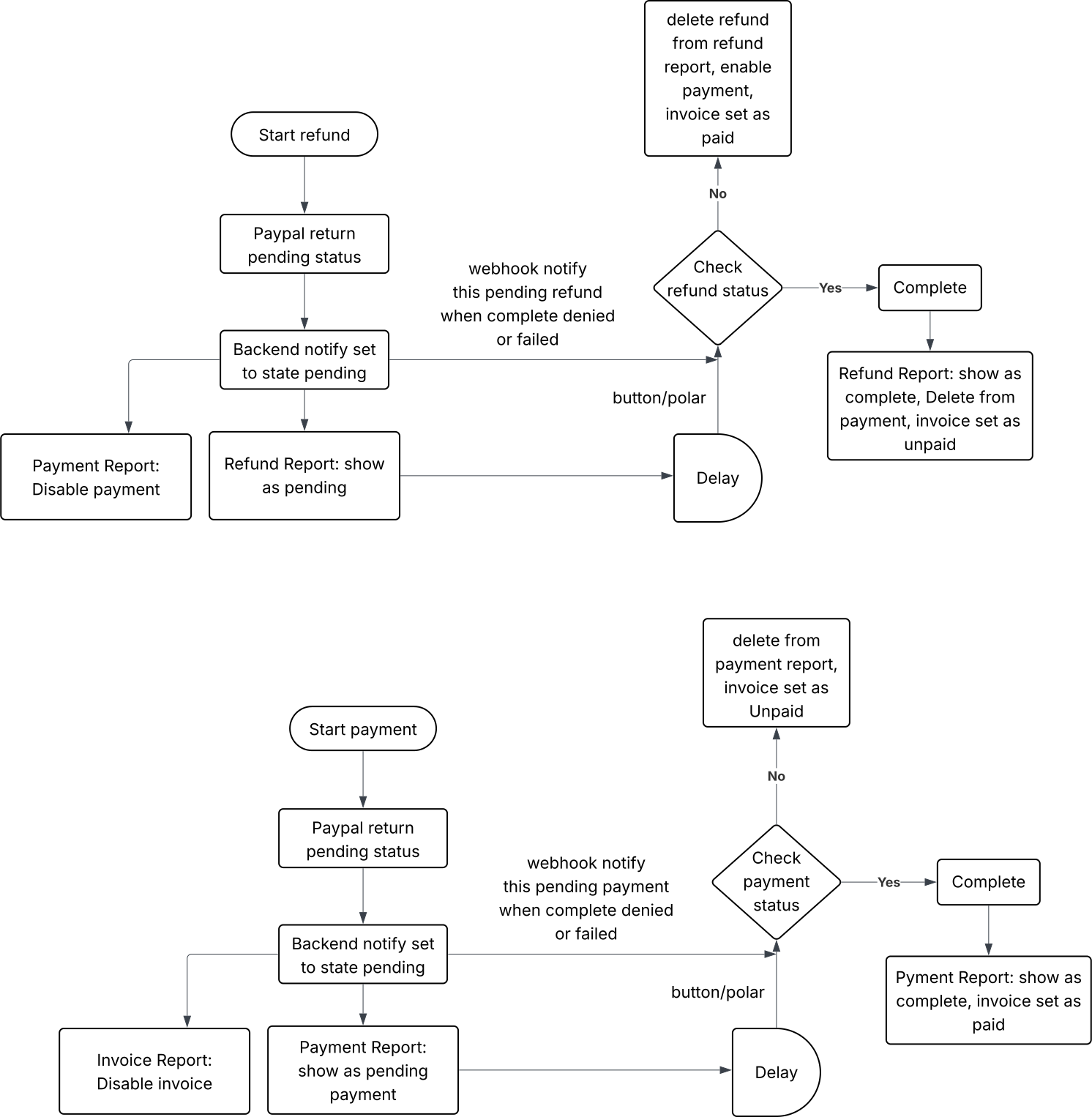
1. Refund Workflow a. Refund Initiation User initiates a refund (via UI or system logic). If PayPal returns a PENDING state:
- Transaction status is stored as Pending.
- Refund report is updated to reflect Pending.
- Associated payment is disabled in the payment section.
- Invoice is still shown as Paid.
b. Refund Status Resolution One of the following triggers updates the refund:
- Webhook event from PayPal
- Manual "Check Status" button
- Background poller (optional)
i. If Refund is Completed
- Refund report is updated to Completed.
- Associated payment is removed from the payment report.
- Invoice status is updated to Unpaid.
ii. If Refund Fails
- Refund is excluded from the refund report.
- Associated payment is re-enabled in the payment report.
- Invoice status remains Paid.
2. Payment Workflow a. Payment Initiation User initiates a payment (e.g., via credit card). A request is sent to PayPal’s payment API. If PayPal returns a PENDING state:
- Transaction status is stored as Pending.
- Payment report is updated to reflect Pending.
- Related invoice is disabled in the invoice section.
b. Payment Status Resolution Status is updated via one of:
- Webhook from PayPal
- Manual "Check Status"
- Optional poller
i. If Payment is Completed Payment report is updated to Completed. Invoice status is set to Paid.
ii. If Payment Fails Payment is excluded from the payment report. Invoice is re-enabled and marked as Unpaid.
3. Status Check (Manual or Poller) A "Check Status" button on the UI allows users to fetch the current status of pending payments or refunds. An optional poller runs in the background at configured intervals to update statuses automatically. Both use PayPal APIs to retrieve the latest state. The same logic used by webhook handlers is applied:
- Update reports
- Enable/disable payments/invoices
- Maintain data consistency
4. Webhook Notifications PayPal sends asynchronous webhook events to /json/Notify. Events include:
PAYMENT.SALE.COMPLETED, PAYMENT.SALE.DENIED, etc. PAYMENT.REFUND.COMPLETED, PAYMENT.REFUND.DENIED, etc.
Based on the event type and payload:
- Statuses are updated.
- Reports and invoice sections are adjusted accordingly.
Development Tasks & Estimates
| No | Task Name | Estimate (Hours) | Dependencies | Notes |
|---|---|---|---|---|
| 1 | Implement Webhook Receiver API /json/Notify and setup in payapal | 4 hours | ||
| 2 | Build Manual "Check Status" API for Refunds(Get current refund status from paypal) | 3 hours | ||
| 3 | Build Manual "Check Status" API for Payments(Get current payment status from paypal) | 3 hours | ||
| 4 | Add Background Poller to Track Pending Payments/Refund | 4 hours | ||
| 5 | Implement Webhook-Based Status Logic | 16 hours | ||
| 6 | Build Shared Status Resolution Logic | 32 hours | ||
| 7 | Update Refund, Payment & Invoice Reports | 24 hours | ||
| 8 | Integration Testing | 16 hours | ||
| 9 | QA Testing | 16 hours | ||
| 10 | Total | 118 hours |
Testing & Quality Assurance
(Outline the testing strategy and quality assurance measures for the feature.)
-
Unit Tests:
(List the unit tests that will be written for this feature.) -
Integration Tests:
Integration tests will validate interactions between services and components: End-to-end flow from refund/payment initiation to webhook or polling resolution Webhook delivery from PayPal triggers expected system behavior PayPal sandbox refund and payment events are correctly handled "Check Status" button updates the UI and data consistently Background poller syncs status without manual intervention Reports (payment, refund, invoice) reflect correct real-time data -
Acceptance Criteria:
(Define the criteria that must be met for the feature to be considered complete.) -
Testing Tools:
(List any tools that will be used for testing.)
Deployment Considerations
(Describe any deployment considerations, including environment configurations, feature toggles, or migration steps.)
-
Configuration Changes:
(Detail any configuration changes required for this feature.) -
Rollout Plan:
(Outline the plan for rolling out the feature, including any phased releases.)
Risks & Mitigations
Review & Approval
(Include a section for review and approval by stakeholders.)
-
Reviewer:
Ayon Das -
Approval Date:
2025-07-10
Notes
(Add any additional notes or considerations related to the feature development here.)